Buy anything from 5,000+ international stores. One checkout price. No surprise fees. Join 2M+ shoppers on Desertcart.
Desertcart purchases this item on your behalf and handles shipping, customs, and support to South Africa.
🔥 Dominate your build with ASUS ROG Strix Z690-E — where power meets precision!
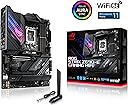
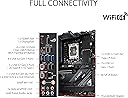
The ASUS ROG Strix Z690-E Gaming WiFi 6E motherboard is engineered for Intel 12th Gen processors with an LGA 1700 socket, featuring 18+1 90A power stages, DDR5 memory support up to 128GB at 6400 MHz, PCIe 5.0 slots, and cutting-edge WiFi 6E connectivity. It offers advanced thermal solutions, multiple M.2 slots including PCIe 5.0, and comprehensive USB 3.2 Gen 2x2 Type-C ports, all wrapped in a sleek design with Aura Sync RGB lighting. Ideal for professionals and gamers seeking future-proof performance and premium build quality.
| ASIN | B09JS5DHSX |
| Best Sellers Rank | #446 in Computer Motherboards |
| Brand | ASUS |
| CPU Model | Core i5 |
| CPU Socket | LGA 1700 |
| Chipset Type | Intel Z690 |
| Compatible Devices | Personal Computer |
| Compatible Processors | intel celeron |
| Customer Reviews | 4.4 out of 5 stars 1,064 Reviews |
| Global Trade Identification Number | 00195553494632 |
| Graphics Card Interface | PCI Express |
| Item Dimensions L x W x H | 12.2"L x 4.5"W x 14.4"H |
| Item Type Name | motherboard |
| Item Weight | 6 Pounds |
| Main Power Connector Type | 24-Pin |
| Manufacturer | ASUS |
| Memory Clock Speed | 6400 MHz |
| Memory Slots Available | 4 |
| Memory Storage Capacity | 128 GB |
| Mfr Part Number | ASUS ROG STRIX Z690-E GAMING WIFI |
| Model Name | ROG STRIX Z690-E GAMING WIFI |
| Model Number | ROG STRIX Z690-E GAMING WIFI |
| Number of Ethernet Ports | 1 |
| Number of Ports | 12 |
| Platform | Windows 11 |
| Processor Socket | LGA 1700 |
| RAM Memory Technology | DDR5 |
| Ram Memory Maximum Size | 128 GB |
| S/PDIF Connector Type | Optical |
| System Bus Standard Supported | Serial ATA/600 |
| Total Number of HDMI Ports | 1 |
| Total PCIe Ports | 4 |
| Total SATA Ports | 6 |
| Total Usb Ports | 12 |
| UPC | 195553494632 |
| USB 2.0 | 11 |
| Warranty Description | 3 years |
A**N
Amazing board with no issues
An amazing motherboard, while plenty of newer models are now released, for the LGA 1700 socket it's easily one of the best designed visually and technically. Has everything you might need for ports, although a few more USBC would've been nice. The additional memory card is also pretty nice and has good cooling. The WIFI-6E capability is super nice to have for WIFI speeds. I ended up changing out my CPU and messed up my pins and bought it again and it was 100% worth it.
M**R
Another good motherboard - a few notes
This is probably my fifth or sixth Asus motherboard in many years of building my own systems. It seems to have retained the good build quality I expect from this manufacturer, and I encountered no serious problems in using it to build my new Windows 11 system. It is worth noting that, in addition to all the features listed, it has six 'native' SATA headers, four of which are RAID-compatible. Less experienced builders may want to note a couple of minor warnings: 1) The system comes with a PCI daughterboard, which accounts for two of its M2 sockets and is intended for use with high power M2 SSD Drives. The daughterboard includes very substantial heatsinks which are in close thermal contact with the installed drives and are designed to (and should) enhance the SSDs' reliability by greatly reducing their risk of overheating. There are also three other more conventional M2 sockets under shields on the motherboard itself. The screws/clips which are used to secure the M2 cards in their sockets are packed separately in small inner bags in a 'hardware' bag. The ones to be used in the daughterboard are small flat silver screws with washers; the ones to be used on the main motherboard are somewhat longer screws with black plastic clips. The screws have identical threads, so it is possible to use them in the wrong places, but this does not work well! The documentation could be clearer on this. 2) If you update the BIOS to the current version downloaded from the manufacturer's website (recommended - mine came with a very old version of the BIOS), be aware that the process takes a surprisingly long time (a few minutes). If you use the BIOS's built-in EZ-Flash program, you will be reassured by the screen displaying progress reports. If you use the 'plug in a USB drive and press the button' option, all you get is a flashing LED, and a LOT of patience is required.
C**S
Love Asus Mobos
I got this to go with a i7 13700k chip. After doing some research, this offered about the same performance (some differences that I do not use), for a significantly reduced price from the Strix z790e. A quick flash of the bios (since the default bios was meant to support the 12700k chips), downloaded from Asus' website, and I was good to go. The differences between the z690e and z790e were : the amount of pcie gen 5 lanes, which almost nothing supports yet, so no biggie to me (nothing I added was gen 5), and higher ddr5 memory clock speeds (but this supported the DDR5 sticks I used). The only negative is their "Armorer" software. I went heavy on the RGB with this build (ram, fans, even rgb cable extensions for the PSU), and the Armorer software caused MAJOR issues. I thought I had defective parts, until I stumbled on a website where someone posted about their issues. Once I uninstalled Armorer, it worked fantastically (if that is, in fact a word). That is my only complaint. It still gets a 5 star review from me, just for how well it works and the price paid (I got on sale, probably trying to clear out older supplies for the next gen stuff).
T**.
Perfect Mid-to-High tier board, bang for your buck!
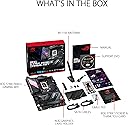
An excellent motherboard! If you are shopping for this, you probably dont need to know every single detail. What stands out to me the most about this board is the attention to detail. ROG is known for being overpriced but I feel like you really get your money's worth with this board. 2 integrated M.2 slots, plenty of rear IO, an easy to use BIOS with an easy BIOS updater, an AI overclocker for your CPU (if you want that kinda thing) and some cool RGB on it as well (if you want that kinda thing). You get a detached wifi antenna, a GPU sag bracket, and a PCIE M.2 SSD expansion card (it also comes with little stuff like a keychain and stickers lol). This is a great mid-to-high tier board perfect for anyonese rig or anyone looking to get great value for their money.
A**W
Pricey but powerful, upgradable
This motherboard has it all. It's wifi performance has actually been so solid I never needed to connect my Ethernet from my router on the other side of the room. It's able to be BiOS flashed for 13th gen processors when those become more affordable and Armoury Crate (while a little clunky for some) hasn't done me wrong yet. Only issues I've had so far is the Bluetooth stuttered a bit with my wireless speaker I had before buying a dedicated sound system for my setup. This could be because that speaker is a few years old but I have to test further for a definitive answer. However if you use the wired audio ports to hook anything up, it'll sound wonderful as this motherboard has a better audio codec than the Z790 series (which is honestly a let down but at least this motherboard nailed it). Overall, pricey, but mine came with add-ons for extra high speed storage and a large heatsink. ASUS knows what they're doing and you're paying for not only the quality, but the easy to use tuning options afterwards too :)
M**.
Great performance over the past 2 years!
Bought this for my new build a couple of years ago. The board is still going string which speaks to its overall quality. The functionality of the board, the USB ports, the memory space, etc. are all appreciated. The connectivity to my 4k monitor is great with no issues. I don’t really use the sound components as I have other methods of playing sound through the machine. The manual does provide some information for set up, and then the user can enter it’s control panel right around boot-up time. Took me a couple of hours to set everything up, but I’m glad to have this motherboard along for the ride!
S**L
Avoid Asus at any cost
I had it for less than a year, and it already has a lot of problems. It has already been mentioned in the comments about qcode 55. So I had the same problem. At first, I thought it was RAM, and initiated RMA with Corsair, they replaced RAM for a new one and after a month I had qcode 55 again, my computer frozen after I turned it on, behavior was exactly the same as with the old RAM. And again, I thought it was RAM failed on me again. Another RMA with Corsair and another set of RAM sticks, but this time they give me 32Gb 6000Mhz. Mobo had worked for several hours on default 4800Mhz RAM speed, and qcode 55 showed up again. Both sticks did not work. I initiated RMA with Asus and sent Mobo to them. While I was waiting for a response, I bought MSI z690 Carbon and installed it on my PC with faulty (as I thought) RAM sticks, and it worked without any problem. After about 2 weeks, I received a response from asus, and they stated that my Mobo has bented pins in CPU socket. Some people already mentioned the same problem with Asus in the comments, so I took pictures of my Mobo upon sending it to Asus. I attached a picture below where they circled bented pins and the picture on the bottom I made prior to packaging and sending it to Asus. Since this issue isn't covered by Asus warranty, they sent me a bill for $135 to fix it. That is a scam. They want me to pay for their fault. Never again, I will buy Asus products. Although I have been Asus costumer for almost 20 years and all my builds had only Asus components. Update- if you start RMA with ASUS, it always a good idea to have the proof of undamaged equipment before you send it out. I took a picture of the mobo socket before sending it to ASUS and disputed charges they made by providing an evidence of undamaged socket, and they waived off any charges and agreed to fix it according to their warranty
C**K
Leave it to Asus to always delivery quality and performance with slick designs.
Awesome MB for the price. Runs smooth, zero issues on install or any bios or driver updates.
ع**ز
سعر حلو وبائع موثوق
،ماقدر اكتب مراجعه كامله عن هذا المنتج ولاكن انصح اللي شاف لها مراجعه وكان مستعد يشتري انه يشتري من هذا البائع السعر ممتاز 1550 ريال تقريبا (وصلتني في اقل من ٣ ايام)
F**D
Great motherboard!
The motherboard is well made, looks great, you can have 5 NVME on it, 3 slots on board plus 2 on a card. Setup is easy, BIOS updates are easy to do. ASUS boards are always my go to.
S**O
Buena
La compré por el descuento que tuvo, y llegó en muy buen estado, no me ha presentado ninguna falla y fue muy fácil actualizar la bios. Tiene 5 meses de uso
E**.
IT ACTUALLY WORKS!
i just recently bought the motherboard to replace the current one i had when i was about to by the motherboard i saw a review in the uk saying not to buy because there were bent pins bu when i bought it there was nothing wrong with it defintley would recommend buying
B**D
Best mid-high range Z690 motherboard
This is literally the best motherboard you can get in this price range, whether you are going to pair it with Intel 14 13 or 12; it will work perfectly, and thankfully mine arrived labeled “ready intel core 14,” so I can directly use it with Intel Core 14 without any issues. It arrived in BIOS 3101, which supports all the three CPU generations out of the box, which is something I like, and I liked the M.2 card that they provide. I wasn’t expecting that, so it was a surprise for me. 😅 so there is total 5 M.2 slots and it’s actually more than enough for me and the motherboard in general has literally all the features i need and more and the most important thing is that it's budget-friendly. really recommend it instead of paying double the price for Z790 motherboard. This is more than enough for any normal use or gamer.
Trustpilot
1 month ago
2 months ago