Desertcart purchases this item on your behalf and handles shipping, customs, and support to South Africa.
🚗 Navigate smarter, arrive cooler — your ultimate road trip co-pilot!
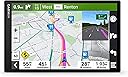
The Garmin DriveSmart 86 is an 8-inch high-resolution GPS navigator featuring dual-orientation touchscreen, built-in Wi-Fi for easy map updates, and Bluetooth connectivity for hands-free calling and smart notifications. It offers real-time traffic, weather, and driver alerts, plus exclusive access to Tripadvisor ratings, U.S. National Parks, and HISTORY databases, making it the perfect companion for safe, informed, and enjoyable drives across North America.


| ASIN | B09D5MQQKD |
| Additional Features | Driver Alerts, Find Places by Name, Hands-Free Calling, Large Display, Live Traffic and Weather, National Parks Directory, Smart Notifications, Traffic Cams and Parking, Tripadvisor, Voice Assist |
| Audio Output Mode | Stereo |
| Best Sellers Rank | #1,197 in Electronics ( See Top 100 in Electronics ) #1 in Car In-Dash Navigation GPS Units |
| Brand | Garmin |
| Built-In Media | Garmin DriveSmart 86, vehicle suction cup mount, traffic receiver/vehicle power cable, USB cable and documentation |
| Compatible Devices | Smartphone |
| Compatible with Vehicle Type | Car |
| Connectivity Protocol | Bluetooth, Wi-Fi |
| Connectivity Technology | USB |
| Control Method | Voice |
| Customer Reviews | 4.3 out of 5 stars 3,027 Reviews |
| Display Type | Multi-touch, Glass, WXGA Color TFT with Backlight |
| Human-Interface Input | Touchscreen |
| Item Dimensions L x W x H | 7.6"L x 0.77"W x 4.7"H |
| Item Type Name | Car GPS |
| Item Weight | 10.41 ounces |
| Manufacturer | Garmin |
| Map Types | North America |
| Mfr Part Number | 010-02471-00 |
| Model Name | DriveSmart 86 |
| Model Number | 010-02471-00 |
| Model Year | 2021 |
| Mounting Type | Dashboard Mount, Windshield Mount, found in image |
| Number of Items | 1 |
| Resolution | 1280 x 800 |
| Screen Size | 8 inches |
| Special Feature | Driver Alerts, Find Places by Name, Hands-Free Calling, Large Display, Live Traffic and Weather, National Parks Directory, Smart Notifications, Traffic Cams and Parking, Tripadvisor, Voice Assist Special Feature Driver Alerts, Find Places by Name, Hands-Free Calling, Large Display, Live Traffic and Weather, National Parks Directory, Smart Notifications, Traffic Cams and Parking, Tripadvisor, Voice Assist See more |
| Supported Satellite Navigation System | GPS |
| Touch Screen Type | Capacitive |
| UPC | 753759276591 |
| Unit Count | 1 Count |
| Vehicle Service Type | Car |
| Warranty Description | 1 year limited warranty |
R**N
Garmin has long demonstrated good QC and good product design, and this one's no exception.
Am very pleased with this the latest model. It has been improved from my previous model, which was a Nuvi, but some of the changes have not been improvements in my opinion. The most positive and notable improvements are those to the audible commands. The Garmin responds to them with greater accuracy, performance, and efficiency in that results are sorted by proximity and can ben easily saved and displayed in alphabetical order for future ease in finding. Also, the operator can call request that Garmin search by business name if desired (as I understand it but have not tried that yet). This Garmin version is huge (8") and is easily taken out of view by being placed between the console and dash for easy hiding if dash-mount is a bean-bag base, which makes its being covered out of sight to thwart those who would break glass and grab and run. I recommend spending the extra bucks for this one.
A**S
I Was Hesitant, and Now I'm a Believer
When I read the reviews for the Garmin DriveSmart 86, I was hesitant to purchase this 8-inch GPS to replace my older NUVI that began to falter occasionally. There was a minor learning curve during the transition, but I printed the directions and actually read them. I just returned from a 1500+ mile round-trip where this GPS functioned beautifully. The screen resolution and customizability of the features made it enjoyable to use. I received a good, functional product and recommend this one.
D**D
Very nice. Worth the price.
Easy set-up. Crisp, clear screen. My second Garmin. This is faster to input address and easier to use. We often go where there is zero cell reception. This works in those locations. We also do not have unlimited Data for our cell phones. This works without cell phone data use.
D**E
Good once it is set up
My last Garmin died after two years. I had it connected to an android phone which made it so much easier to search for addresses to set as a destination. But that one failed recently, so I got this one due to it being the closest thing to the one I had. I was not able to connect the new one to the drive app on my android phone. I could connect via bluetooth, but for some reason, the drive app would not find it. I consider myself above average technically. Fortunately I have two phones, and I was able to quickly connect an iPhone to it and now it works as expected. I like the display of the gamins better than any of the phone apps that I have used. Although this Garmin has traffic, I'm not sure it is as accurate as some of the phone apps. I find it very easy to save a place once you get to it.. but it isn't intuitive on how to do it at first, but once you learn how, it is a snap. I just wish I could have transferred all of my saved places from my prior device. oh well. The wifi upgrade is a huge improvement. I just plugged the GPS into a USB brick and did the upgrade which took about an hour or less. Hopefully this one will last more than a couple years of light use that the last one got. I still have the old one, but it overheated last week and would not turn on. After a couple of hours to cool down, it would come back on, but I can't use that. I need something to rely on. And I live in New England and it overheated in February.. and I do not keep my vehicle very warm .. oh well.. Bottom line, after setup and connected to phone it is great.
N**N
Horrible Bluetooth and phone support
Updated score to one star from two stars. This device is Bluetooth is one of the worst I've ever seen. It takes ages to connect to Apple and Android devices. Every time you leave your car and come back it will have a problem connecting it doesn't seem to be a fix either. You have to restart your device, restart your phone, clear the app data, turn the Bluetooth, on turn it, off forget the device, and re-pair the device. I've had cheap $20 Bluetooth devices that have better connectivity than this. You need to be able to pair Bluetooth so that you can enter addresses from your phone, trying to enter an address into the devices self is slow and clunky. If you're only buying this to enter addresses directly into the device I would avoid because it just takes too long and does not work well ********** I do a lot of driving to different addresses and wanted something other than Google Maps which would constantly give me bad voice directions. I don't have an in screen Dash navigation system so I wanted something I could just have up to look at the directions instead of listening to them from my phone, or having Google Maps displayed on my phone if I am playing music. As navigation it does pretty much what I want it to do. The only issue is the absolutely terrible support with phones. Trying to search for an address on the unit itself is cumbersome and annoying, and much quicker to do it from the app and send that to your phone. Unfortunately it always loses Bluetooth connection and will not connect. You have to turn off Bluetooth turn it back on. Unpair and repair. Turn the GPS off turn it back on. This happens twice a day at least for me. I tried a different cell phone I had and had the same issues. If that app worked and the Bluetooth worked I would probably keep it but as it stands now it's far too annoying everyday to mess with the connection so I'll probably be returning this
P**N
Best of both worlds (dedicated vs. smartphone)! Google traffic/POIs, Garmin nav
I've been using this for over a year, and it's been fantastic. In case this review is appearing in the wrong place (because for some reason, Amazon is grouping reviews for different Garmin devices together), I'm reviewing the Garmin DriveSmart 86. If you think this is your dad's Garmin, you couldn't be more wrong. It merges the best aspects of smartphone navigation (traffic updates, points of interests (POIs)) with the excellent Garmin features. If you don't drive a lot or don't use a GPS a lot, you don't notice the problems with smartphone navigation. But use it enough and you'll notice how much better Garmin is. Do I always think Garmin navigation is always better? No. But on average, I feel 60-70% of the time it's better. Now, if I'm in a heavy traffic situation or if I'm in a very unfamiliar location, I will run both at the same time and then decide based on my prior knowledge of the area and my instincts to determine which one to trust at any given moment. Here's some pros for the Garmin. You don't need any cellular reception in order for the navigation to work. This came in quite handy when I was in areas of poor reception like rural areas. Sure, with smartphones you can download maps but that requires some preplanning. The Garmin is still the best for letting you know ahead of time what lane you should be in which comes in handy when you need to switch multiple lanes multiple times in short succession. You can also have both the map and some text turns at the same time so you can see ahead of time what your turns will be. The 86 has a fast CPU so it doesn't get laggy like older Garmins. It looks great in both vertical and horizontal orientations and for the first time, I feel like the 86 works better in the vertical orientation because of the better viewpoint. The screen is beautiful. The response and touch is great. If you connect the 86 to your smartphone via the Garmin Drive app, you now get all the benefits of the smartphone with realtime traffic (provided by Google I think) and the much bigger database of points of interests. So if you ever thought the Garmin POIs were too small or out of date or if you thought the search engine in the Garmin device was too weak, you can search in the Garmin Drive app and push that location to the Garmin GPS. Same for traffic. Garmin real-time traffic was often too slow to update but now with Garmin Drive, you never miss out on traffic alerts. If it's in Google, you'll find it in Garmin Drive. Of course, if you use Garmin Drive, you will need cellular reception but only while you're searching initially for the location. Once the Garmin is navigating, no cellular needed. The Garmin has so many options on how to pipe the audio. You can separate what type of audio goes through the Garmin and what goes through your car. So if you want phone to go through the car but nav instructions to go to the Garmin, you can. If you want everything to go to the car, you can. If you want phone and music to go to the Garmin but nav instructions to the car, you can. I send nav audio to the Garmin and everything else to the car because I've always hated the up and down volume when smartphone nav sends out nav instructions. You don't have to worry about draining your phone battery. It's easy to use the phone while navigating on the Garmin. The Garmin now uses USB C and the car charging cable also has a USB passthrough if you wanted to charge something else. The only negative (and I don't know if the situation has changed) is that at the time, there was no dashboard mount for the 86. Only the included window mount. The window mount is good but if you don't regularly clean the windshield and the mount, the Garmin will fall off.
S**E
I recommend
Pros: Excellent GPS screen with easy adjustment for brightness and content. The addition of Vaubortti mount holder made it exceptionally versatile. GPS satellite signal mapping is much more accurate especially in areas with few cell towers. The maps are up to date and very detailed. The addition of phone connection is a nice asset to have available. Cons: I haven't found 1!!
R**N
OK but falls way short of expectations. Pick up your game GARMIN!!!
This arrived with a paper saying "ready to go". However, I could not power it up. I charged it with a wall adapter and nothing. I charged it by plugging into a computer and nothing. I actually had to plug it into a vehicle, and had to have it in a specific one of the two USB adapters supplied and then it powered up. WOW - I was about ready to return it as defective! The only reason I tried all of this instead of returning it was because of a review written by someone else with similar issues and I did not have time to get a replacement. This has a lot of nice updates from the Garmin NUVI that I have been using, but I expected a lot more from Garmin with the general advancements in all software interfaces over the years. It is not as intuitive as one would expect. Some of the nice features are it has a larger screen, multiple stops can be put in on a route and rearranged in the order you prefer, you can add alerts for things like upcoming gas stations, lodging, restaurants , rest areas, suggested breaks, etc.. (It does not show by exit, but will show you what an upcoming town or city offers which is good for long cross country trips, but does not help you find what exit to get off of in a large city to find said items). Frustrations include: * detail instructions are somewhat lacking even though there is an on screen manual, there is a learning curve as it is not very intuitive * my old Garmin Nuvi had a popup screen that would show what lane to be in for upcoming turns and this one does occasionally but not very often. I have played with the settings and can't get it to come up reliably. On a 4000 mile trip I had numerous times when I had no idea what lane I had to be in when relying on the Garmin and had to make fast decisions based on road signs. * multiple times the voice command did not match the map screen - example - "take the second exit on the roundabout to hwy 50 connector" whereas the screen clearly showed taking the third exit and getting onto a completely different highway!!! * sometimes when starting the route it does not tell you to turn right or left, but just highlights the road in front of you from both directions, causing you to make a u-turn if you chose the incorrect way! * speed limit postings were OFTEN incorrect by as much as 10 MPH. This varied from being above the posted limit and below the posted limit. My old unit was pretty much spot on, but the DriveSmart 76 is NOT RELIABLE * Although multiple stops can be programmed in on the App button and the order rearranged, you CAN NOT delete a stop. You have to delete the whole trip and start over!!! * The search screen is improved over the NUVI, but it still has a lot to be desired. I have lived at the same address for over 30 years and it took me about 15 tries to get it to accept my address, which Garmin shows as a different spelling. If you don't have it exactly as they want it, you are out of luck. I even tried the suggestions they give on screen. * route preferences are programmed in on the settings screen, but the unit does not always follow them. I had programmed in to avoid tolls using the fastest route, and on one trip twice it tried to divert me to two lane highways which decreased the trip 5 miles but added 20 minutes compared to going on the interstate. Apple maps on my phone and navigation on one of my vehicles will give you route option on the screen before you select GO. Overall, the unit is helpful and much better than the old NUVI, but I am very disappointed with it overall even though other reviews said it was the best. It will get you where you want to go if you can spell it exactly as they want and you don't have any route preferences.
A**O
Excelente herramienta
Muy bueno, no tan intuitivo en su manejo como los viejos Nuvi y es algo difícil de registrar el dispositivo y actualizarlo via Wifi, yo lo hice todo con el cable USB conectado a la computadora y con la aplicación de garmin (garmin express). SI TRAE MAPAS DE MEXICO. 100% recomendado.
R**A
o adaptador não foi o anunciado - VEIO OUTRO MODELO sem aviso prévio
No anuncio do produto está descrito que o adaptador 12V teria DUAS SAÍDAS USB e recebí um adaptador com UMA saída... O resto do GPS está OK.
T**Y
Garmin Drive
The Garmin DriveSmart 76 indicates that it has Australian maps however it does not have WA maps and has now been returned, Thank you
D**D
Fantastic but sometimes a little annoying
I admit, I was a little skeptical when it came to this GPS. However, I was pleasantly surprised. My first reaction was how smooth it was, however when I went to update it via Wifi, it immediately started having issues. The update had failed, and I had to connect it to my PC, which allowed the update process to work nicely. Unfortunately, ever since that incident, the GPS tends to restart the configuration process from scratch often times. That aside however, I do wish there were more voices to use and vehicles, as some sound too robotic. Still, besides all of that, it was incredibly accurate, wonderful display, and the mount makes it all worth it, since it's easy to take off and put back on. Some locations aren't found easily, and I have to use other landmarks, but still, it's better than nothing. Overall, besides the issues I've had which I feel may not be common, it's a very nice GPS and I have no regrets with it.
D**N
gps
as described
Trustpilot
2 weeks ago
2 months ago