Desertcart purchases this item on your behalf and handles shipping, customs, and support to South Africa.
🖨️ Print smarter, save longer, connect easier — the EcoTank ET-3850 is your office’s new MVP!
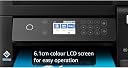
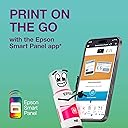
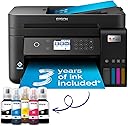
The Epson EcoTank ET-3850 is a compact A4 multifunction inkjet printer featuring ultra-high capacity refillable ink tanks that deliver up to 3 years of ink included, automatic duplex printing, a 30-page document feeder, and Wi-Fi connectivity. Designed for professionals seeking cost-efficient, eco-friendly printing, it offers fast print speeds up to 15.5 ppm, a 6.1cm color LCD, and seamless mobile device integration via the Epson Smart Panel app, making it ideal for home offices and small businesses aiming to reduce ink expenses and boost productivity.


| ASIN | B09GL13VHV |
| Additional Printer Functions | All In One |
| B&W Pages per Minute | 33 |
| Best Sellers Rank | 1,403 in Computers & Accessories ( See Top 100 in Computers & Accessories ) 4 in Ink Tank Printers |
| Box Contents | Printer |
| Brand | Epson |
| Brand Name | Epson |
| Color Depth | 24 bpp |
| Color Pages per Minute | 20 ppm |
| Colour | Black |
| Compatible Cartridge | Epson ink cartridges for model ET-3850 |
| Compatible Devices | Smartphones |
| Connectivity technology | Wi-Fi |
| Control Method | App |
| Controller Type | Android |
| Country of Origin | China |
| Customer Reviews | 4.0 out of 5 stars 348 Reviews |
| Display Type | LCD |
| Dual-sided printing | Yes |
| Duplex | Automatic |
| EU Spare Part Availability Duration | 3 Years |
| Global Trade Identification Number | 08715946683775 |
| Hardware Interface | Ethernet |
| Ink Colour | Black |
| Item Dimensions D x W x H | 34.7D x 37.5W x 23.1H centimetres |
| Item Type Name | Inkjet Printer |
| Item Weight | 6.7 Kilograms |
| Manufacturer | Epson |
| Maximum Copies Per Run | [Estimate] Varias centenas |
| Maximum Copy Resolution Black and White | 2000 dpi |
| Maximum Copy Resolution Color | 4800 x 1200 dpi |
| Maximum Copy Speed Black and White | 33 ppm |
| Maximum Print Resolution Black and White | 600 dpi |
| Maximum Sheet Capacity | 250 |
| Maximum Supported Paper Size | A4 |
| Maximum print Resolution Color | 4800 x 1200 dópi |
| Model Name | EcoTank ET-3850 |
| Model Number | C11CJ61401 |
| Model Series | ET(EcoTank) |
| Model name | EcoTank ET-3850 |
| Network Connectivity Technology | Wi-Fi |
| Number of Drivers | 2 |
| Number of Ethernet Ports | 1 |
| Number of Trays | 1 |
| Other Special Features of the Product | Auto-Duplex, High Yield, Mobile Printing Capability, Compatible with Mobile Phone & PC, |
| Output sheet capacity | 250 |
| Paper Size | A4 centimeters |
| Power Consumption Size | 12 Watts |
| Print media | Glossy photo paper |
| Printer Output Type | Colour |
| Printer Type | Inkjet |
| Printing technology | Inkjet |
| Processor Count | 1 |
| Product Warranty | 1 Year |
| Resolution | 4800 x 1200 |
| Scanner Type | Flatbed |
| Series Number | 38 |
| Special feature | Auto-Duplex , High Yield, Mobile Printing Capability , Compatible with Mobile Phone & PC |
| Specific Uses For Product | Home, Office |
| Unit Count | 1.0 count |
| Warranty Type | CoverPlus |
J**N
I would change to an EcoTank if I were you.
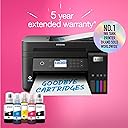
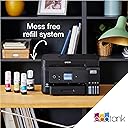
First time I have ventured into printing with refillable ink and I must say I am very impressed. I have had many Epson printers all with cartridges. I have always bought compatible ones and have constantly dodged warnings, naggings and refusing to print because of it, and they never lasted that long anyway. This is a game changer. The reservoir is huge compared to the cartridges offering up to 72 cartridges worth (they say) of ink. And you get this included with your order. Even when pricing original Epson ink it will work out cheaper and no nagging. Plus, you are doing your bit for the environment and giving the manufacturer all the money to invest. True the printer is a lot dearer but will work out just as cheap or cheaper if you are keeping it for the duration. The actual filling with ink is a doddle. The bottles have been ingeniously designed from the ground up to fit each tank individually. They don’t spill and the ink stops flowing when enough ink is in the tank. I was a bit apprehensive about doing this initially but it’s easy and not messy in the slightest. Epson have put a lot of effort into setting up their EcoTank models. You can install it perfectly and easily from new by downloading the setup APP to your smartphone. This communicates with the printer from the outset and expertly guides you through the whole initial set up process with pictures and confirmations at each stage. Leaving you with an initialised product ready for connection to your computer. This to is easy as it links itself to a specific setup page just for the model and does all the work for you just by responding to the questions. Mine was a Windows 11 installation. Very clever and very simple. It all takes a bit of time but patience is a virtue. The new software is good too. One example is organising scans from the scanner. The software is intuitive. Organising pages is easy and it can even intelligently rotate pages. This more or less does away with spending a lot more on double sided scanning as there is so little effort in just popping the pages back on the ADF knowing there is minimal effort needed for sorting. It takes up a small footprint for the amount it does. It is relatively light as well. It does feel a little plasticky but I don’t think so much so that it will fall apart. It just appears functional and is. The screen is small and is not touch meaning you have to keep pressing buttons and then okaying. Shame I would have loved the touch screen so much better. Also, when you lift the scanner unit it only holds in place when you force it upward so that it locks. I found this nerve racking as I thought it might break, I am sure this could be better manufactured. I will not be printing photos on it. For me it is meant for office type documents and they have all printed really well so far. It prints double sided also. I am more than happy to give anything I print to anyone who I believe should find it much more than acceptable. I do use decent paper. Perhaps the only down side is it seems to be a little slow in everything it does. Don’t get me wrong in no way a deal breaker for me but if you were in the office and want everything at speed then perhaps another model may better suit. I note some people are reporting a WiFi issue mine worked straight away although I cannot know yet whether this will come to haunt me. But there is the 5 year warranty which Epson are currently offering on their EcoTank models. Overall, I am extremely pleased so far. Far better than my Epson’s of old in terms of hardware, ink printing and software. A great upgrade. At this stage I am glad I bought it. My major gripe was Amazon reducing the price 2 days after I bought it.
J**G
Great so far…
My old HP Multi-function printer was ruined during a house move so I was looking for a quality replacement. I have alway bought HP as I like the software and quality of the kit but was fed up with the cost of the ink and print head cleaning. After much research, I saw the Epson ink tank printers scoring highly in a number of independent reviews. It seemed to me that the initial cost of the machine was off-set by the low cost of ink over the long-term. The features of the ET3850 were exactly what I was looking for; quality printing (including auto-duplex), scanning and wifi printing from mobile devices. It was easy to set up and the ink filling process was easy and spill-free using the foolproof fittings which differed for each colour to avoid mistakes. Connecting it to my wifi network was also easy although it did take a little time to update its firmware early in the process. I have 2 minor niggles when comparing it with the various HP models I’ve owned: 1) the software is not as user friendly or as comprehensive, but it works, 2) pressing the off button does not switch the machine off, you have to then use the menu buttons to change an option and then confirm with the ok button before it switches off. Although some might find this a benefit, I find it annoying that I have to press 3 different buttons to switch it off. On the plus side, as well as good quality printing, the machine seems to be able to print decent quality when started up even when it hasn’t been used for a while. I found that the HPs often required head cleaning and test printing which wasted paper, time and expensive ink! So far, I haven’t had to do this at all. Overall, I think this model is good value when looked at over a two or three year period and hope it last much longer than that. Having owned and used it for a few months now, I would buy it again.
M**0
Good but software install process flawed
Generally OK, but has dropped 1 star because of the software installation process. Other aspects of the Epson ET-3850 printer set-up were all OK and generally straightforward, including loading the ink tanks. The build of the printer is OK, although in some places (inc. the auto-paper feed) the stiffness of the plastics is quite low making it feel flimsy. With care, this aspect should not be an issue. The main problem with the printer was the software installation process on multiple computers. I utilise the ethernet connection on the printer (one of the main features I look for in a printer) rather than wi-fi, and this is where the software setup fails. If you follow the guidelines to download from the UK Epson website the installation kit will unzip and start to install. However, on two out of three PCs I tried to install this software, the installation process kept failing at the point where the PC could not detect the printer on the network. I tried several times installing using the wizard and separately, but this did not finish the process and left some software features missing. I then took the chance to download the install kit for this printer from the Epson US website. Upon running the install kit, the software components and install process was slightly different, but this change made the difference so I was able to complete the install on all three PCs, two of which used the Epson US software installer. I have not had any issues printing, copying or scanning with these PCs since installing this software.
R**J
Good print quality but the printer badly built, worst document scanner on the market
We are on our second one as the first had document feeder issues. The second one has been with us 9 months and the same has happened again, Its a cheaply built and designed printer no patch on the the HP we had. Only good thing about it is the ink last for ever. Wont be buying any Epson printers again.
K**N
No hassle printer, well worth the extra cost
Very reliable and excellent print results for text and images. Just keeps working and of course the big bonus of not having to constantly deal with ordering more ink. Has effortlessly printed 3,000+ pages in 9 months and so far has worked faultlessly. Colour inks still 80% full and black 50% (haven't even used the second black in refill that was supplied with the unit). A comparatively expensive printer, but well worth the money. Very pleased.
O**Y
I recommended item
delivered on time well packed, I have set this on LAN line (not Wi Fi) I am in my eighties, the instructions are not in my opinion very good, but you find yourself around them, had a problem with it printing could not get it right for a couple of days, paper and colour, got in touch by e-mail to Epson, they responded within 24hrs with suggestions, in the mean time I found out it was me, I had put one type of paper in settings and a different one in favourite paper setting, colour was still very pale including black print, went into printer settings on computer and made a alteration there to do with printing, all came good, printer very good, replaces a Epson Premium XL 6105 the reason being cost of replacement inks. My one criticism is Amazon do not price match, it was cheaper on E-bay with a voucher but box could be damaged or in another box ( I wanted one that had not been put under any stress )also Amazon next day after ordering reduced price and when contacting them would not reimburse the difference, other than that I am well pleased with printer
T**S
Good printer, shame about the functionality & connection etc.
Very little printing so far, but the quality looks excellent. The packaging was great, the ink-filling was flawless and with no mess at all, and the set up of the printer was simple with the app. HOWEVER... The app crashed every single time it came to installing the computer. I gave up after six attempts (and five deletions & reinstalls) and went to the Epson website to install from there. App now deleted, never to be used again. After four attempts with the process appearing to run smoothly but no printer driver actually being installed, I resorted to their technical support. After 45 minutes and more installations, they discovered that the printer cannot cope with multiple wifi signals. Oh, and it doesn't like MacBooks very much. Still, we got there, I said 'Thank you' and got down to printing. Or not. No double-sided option was available, and it would not print via USB cable. I then spent another hour with a different technician on yet more installations (!!!) until we were able to obtain a 2-sided print option. They also managed to resolve the USB cable option BUT at the expense of wifi connection. So, I paid £350 for a wifi printer that will not print via wifi! Essentially, it's a good printer, but DON'T buy this if: 1. You have more than one wifi signal in your home. 2. You have an old home with thick walls that require a wifi booster. Nope. No can do. Epson cannot cope with that! 3. You use a MacBook. 4. You like the option of wifi AND USB connection. It's one or the other. It's been a complete ballache, I've lost most of my day with the set-up and subsequent problems, and I shall never, ever buy Epson again, but at least the pages of text I printed look good.
D**S
Fantastic printer overall
Build Quality The EcoTank ET-3850 feels pretty well-built. The automatic document feeder on top is probably the only part that isn't sturdy and feels a bit thin and flimsy, and it squeaks when moved. The design is fairly user-friendly, as it allows easy access to the ink tanks and paper jams. Be warned though that the scanner’s lid doesn’t have a dampener, so it'll slam shut if you don’t raise it slowly and make sure it’s in the locked position. Ink The Epson ET-3850 has four refillable ink tanks that yield a large number of prints, meaning it is a perfect choice for high printing volumes. It's easy to see the ink levels from the front of the printer. However, it is important to keep an eye on the ink levels as letting the ink levels run too low or emptying the tank can introduce air bubbles into the print tubes and damage the printer. Print Quality Print quality is pin sharp for black and white documents. Coloured is still good, although not as impressive as the black and white due to some graininess. It is still head and shoulders above a previous all-in-one printer I had. App Features The Epson Smart Panel app is very useful to have. It allows you to print, copy, scan (You can scan with both the scanner on the printer itself and scan something from your phone's camera). You can also carry out most maintenance tasks from the app, including nozzle checking and print head cleaning. Overall I considered several printers, including a Canon Pixma model, but decided with the ET-3850 in the end - while both offered outstanding page yields and low costs per print, the Epson was both faster at printing and produced higher-quality scans.
G**F
Great except for the Epson software
The setup is really clunky, Epson really should able to do better. They recommend downloading an App which I wouldn't bother doing again. My Mac found the printer straight away, the Epson software couldn't detect the printer, then couldn't, then could. Besides this annoyance the printer is excellent, performs really well. Ink refill is seamless and no mess.
R**L
Kann man kaufen
... gerne wieder und habe das Gerrät immer noch und läuft ohne Klagen. Benutze es ca. 1 x im Monat
E**C
Économique à l'utilisation avec ses réservoirs
Très bonne qualité d'impression tant sur du papier ordinaire ou du papier glacé photo. Il faut juste s'assurer de bien régler les paramètres. Le recto verso fonctionne bien avec un temps de séchage entre les couches. Le scanner n'est pas très rapide mais très correct. Le logiciel de scan ne permet pas de réglages avancés mais il fait le travail. Fonction copie autonome bien pratique et plus vite disponible qu'une imprimante laser.
S**N
Qualité photo pas terrible
Attention produit venant d'angleterre et est livré avec cordon d'alimentation anglais Prevoir un autre cable ou un adaptateur
C**N
pas la bonne prise !!
bon produit mais livré avec une prise électrique au format anglais me contraignant à en acheter une au format français. Les obligations des vendeurs sur Amazon ne semblent pas être respectées. Dommage.
Trustpilot
4 days ago
3 weeks ago