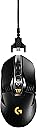
🎮 Dominate every game with the G900 Chaos Spectrum — where pro precision meets wireless freedom!
The Logitech G900 Chaos Spectrum is a professional-grade gaming mouse offering dual wired and wireless connectivity, a high-precision optical sensor, and an impressive 32-hour battery life. Weighing 107 grams, it delivers a premium, solid feel favored by serious gamers and professionals alike. Compatible across major operating systems, it’s designed to elevate your gaming or productivity setup with seamless performance and ergonomic design.


| ASIN | B01CZTGBOW |
| Additional Features | Wireless |
| Antenna Location | Gaming |
| Are Batteries Included | Yes |
| Are Batteries Required | Yes |
| Battery Average Life | 32 Hours |
| Best Sellers Rank | #56,701 in Computers ( See Top 100 in Computers ) #1,613 in Computer Mice |
| Brand | Logitech G |
| Built-In Media | [INCOMPLETE] USB receiver |
| Button Quantity | 11 |
| Color | Black |
| Colour | Black |
| Compatible Devices | Laptop, Personal Computer |
| Connectivity Technology | USB |
| Connectivity technology | USB |
| Customer Reviews | 4.5 out of 5 stars 867 Reviews |
| Embellishment Feature | Button |
| Enclosure Material | Wire, Pe |
| Global Trade Identification Number | 05099206062511 |
| Hand Orientation | Ambidextrous |
| Hardware Platform | Laptop, Personal Computer |
| Item Weight | 0.11 Kilograms |
| Manufacturer | Logitech |
| Mfr Part Number | 910-004608 |
| Model Name | G900 Chaos Spectrum |
| Model Number | 910-004608 |
| Mouse Maximum Sensitivity | 12000 Dots per Inch |
| Movement Detection | Optical |
| Movement detection technology | Optical |
| Number of Batteries | 1 Lithium Polymer batteries required. (included) |
| Number of buttons | 11 |
| Operating System | Windows, macOS, Linux |
| Power Source | plug_in_electric |
| Range | 33 |
| Special features | Wireless |
| Style Name | Modern |
| Theme | Video Game |
| UPC | 097855118424 |
| Unit Count | 1.0 Count |
E**A
Great mouse, stiff middle mouse button
Insanely good mouse for the price. Logitech is always dependable. The keys are super satisfying to use and the scroll wheel toggle into infinite scrolling is quite useful. It’s hefty too and if you’re into that then you’ll like that this mouse doesn’t feel like a toy. The battery life is also decent and it charges moderately fast. The biggest letdown for me is the middle click on the wheel. It’s unnecessarily stiff and it takes such a stupid amount of force to press down. As someone who uses the middle mouse button very frequently this is a major pain point for me. Other than that, it’s a great mouse!
M**D
Broken
its brand new and the scroll wheel doesnt work i dont really know why i tried everything but its unresponsive
J**O
Ratón excelente
Después de 2 años con él utilizándolo a diario, creo que puedo opinar con bastante sentido crítico, en este caso positivo, ya que no me ha dado ni un solo problema y estoy muy contento. Tengo que reconocer que cuando lo compré no estaba decidido por este modelo, ya que barato no es y los ratones son muy personales y no sabía si me iba a adaptar correctamente. El ratón es muy preciso y tiene el peso perfecto, la posibilidad de poder utilizarlo sin cable es una gozada, ya que hay determinados momentos en los que el cable puede molestar, se te apetece utilizarlo sin cable o simplemente quieres limpiarlo y no tienes que depender del dichoso cablecito. La batería dura bastante, así que no tengo quejas al respecto y es igual de preciso tanto con el cable conectado como sin él. Os parecerá una tontería pero aún no me he cansado de la lucecita RGB, la cual es personalizable y le da un toque gaming genial. No me extraña que después de 2 años cueste 10 € más caro de lo que lo compré y sea incluso más caro que su hermano mayor el G903, ya que es un buen ratón. Es caro sí, pero la calidad hay que pagarla y en este caso puedo decir que merece la pena.
C**N
Portátil o fijo
Me siento bastante satisfecho con la compra de éste artículo, como lo escribí en el título de la reseña, puede ser utilizado de manera fija con el cable o de manera portátil en su modo inalámbrico, es muy cómodo y bastante práctico, por los tipos de configuración y programación de botones de las que dispone, no puedo describir nada negativo sobre éste mouse. En cuanto al periodo de entrega también puedo hablar cosas positivas porque llego a mi domicilio en un tiempo menor al que ya se había calculado, en definitiva volveré a comprar más artículos en AMAZON. Es mi primera compra y la verdad ha sido una buena experiencia.
S**Y
Il mouse wireless n°1 al mondo
Parto subito col precisare che il Logitech G900 viene definito il miglior mouse wireless al mondo per un motivo ben preciso: il tempo di risposta di solo 1ms via wireless. Logitech finora è stata l'unica casa produttrice a raggiungere questo risultato, infatti il G900 non sfigura tra i competitors cablati proprio grazie a questa sua caratteristica unica. Ma in caso siate dei gamers davvero esigenti e non vogliate fare a meno della sicurezza che può dare un mouse cablato nel campo degli eSports, niente paura: nella confezione è incluso un bellissimo cavo rivestito che vi permetterà sia di ricaricare la batteria del mouse (che ha una durata effettiva di 32 ore a led spenti, e di circa 24 ore a led accesi) sia di utilizzare il mouse via cavo. Gli switch del tasto destro e sinistro sono meccanici, e forniscono un feedback tattile unico e gradevole, ed i tasti laterali sono anch'essi piacevoli al tatto e ben raggiungibili. Il mouse può essere utilizzato sia dai destrorsi che dai mancini, in quanto è possibile rimuovere i tasti laterali (che hanno dei pratici e veloci agganci magnetici) e sostituirli con delle cover (anch'esse ad aggancio magnetico), ma volendo è anche possibile mantenere i tasti in entrambi i lati. La rotellina è davvero unica, e devo ammettere di non aver mai provato una scroll wheel con degli step così precisi (e con un feedback così marcato e piacevole), inoltre la si può "sbloccare" tramite il tasto sotto di essa, attivando la funzione di hyperscroll che disattiva gli step e permette di effettuare uno scroll senza alcuna resistenza (utile per scorrere quelle pagine che a volte sembrano infinite XD). Quindi come dicevo, una scroll wheel davvero ben fatta, ma purtroppo non esente da "difetti" (solo uno a dire il vero): questo mouse permette di spostare la rotellina a sinistra o a destra (in pratica è come avere due tasti aggiuntivi), ma usando questa funzione vi accorgerete che tra lo spostamento fra sinistra e destra (e viceversa) vi è un leggero "gioco" (in inglese "rattle"): nulla di eclatante o di troppo fastidio, ma su un mouse di questa fascia di prezzo viene naturale pensare che la perfezione dovrebbe essere d'obbligo. Il sensore sotto al cofano (preciso all'inverosimile) permette di raggiungere ben 12.000 dpi, e vi assicuro che non lo imposterete mai a livelli così alti, a meno che non abbiate una configurazione multi-schermo (o una mano bionica XD). È possibile impostare fino a 5 livelli di dpi (selezionabili tramite i due tasti presenti al centro del mouse), e ad ogni livello è possibile impostare un valore di dpi preferito; ad ogni livello di dpi corrisponde una sequenza di accensione dei led che indicano il livello scelto, ed è inoltre possibile scegliere di tenere sempre accesi sia i led dei dpi sia quello del logo; tutti i led possono essere personalizzati con un colore statico o con degli effetti di transizione davvero spettacolari. In caso abbiate necessità di usare il mouse con altri dispositivi non muniti di software Logitech, tutte le impostazioni (dpi, personalizzazione dei tasti, colori ed effetti dei led, macro) possono essere salvate nella memoria interna del G900; è possibile salvare nella memoria interna fino a 5 profili personalizzati (ed è possibile passare da un profilo all'altro tramite un comodo tasto posto sotto al mouse). In quanto ad ergonomia e tipi di impugnatura, il G900 è molto comodo e si adatta a qualsiasi grandezza della mano (è un mouse abbastanza grande, quindi se avete una mano grande andrà benissimo) ed a qualsiasi tipo di impugnatura (io personalmente preferisco un'impugnatura perlopiù "palm" quando non gioco, mentre in game preferisco l'impugnatura "claw"). Una nota di plauso al Logitech Gaming Software, che oltre ad una personalizzazione estrema di ogni singola funzione, permette inoltre di scaricare dai server Logitech dei profili preimpostati (con macro già integrate) per una grande quantità di giochi (e se un gioco non è presente, è sempre possibile creare profili da zero), e la cosa che più mi ha colpito è che essi entrano in funzione in automatico all'apertura dei giochi. Detto questo, vi starete chiedendo se questo pezzo d'arte moderna valga i soldi che costa; la risposta è assolutamente sì, perchè a questo mouse non manca proprio nulla, e la differenza che si prova passando da un mouse di fascia inferiore a questo è netta e ben distinguibile: una volta provato non potrete più farne a meno.
A**A
Parfait
Je passe d'une G500 (qui a rendu l'âme) à celle la. Ce qui me gênait le plus au moment de changer de souris était ce style gamer. Certes, je vais jouer avec, mais je n'ai pas vraiment envie que mon bureau se transforme en cockpit de fusée. D'autant plus que je trouve globalement les produit gamers de mauvaise qualité (les casques en particulier... je vais préférer des casques hifi plutôt que gamer). Tout cela pour dire qu'acheter une souris en plastique avec des bouts pointus ne m'enchantait pas vraiment. Et bien le verdict : je l'ai trouvé parfaite dés le premier jour. Son style ne me gène pas trop, oui c'est gamer, mais elle reste plus sobre qu'une g502 ou qu'une ratz, et ça me va bien. Le rétroéclairage (le G) reste assez discret. Le sans fil est parfait : à tout moment vous pouvez rebrancher la souris. Il n'y a pas de temps d'attente (que windows re-détecte la souris ou je ne sais quoi). Le récepteur sans fil peut être branché soit directement sur un port USB soit au bout du câble de la souris (soit vous mettez la souris au bout du câble pour la recharger, soit vous mettez l’émetteur). Je n'était pas sûr d'utiliser le sans fil, c'est pour cela que je voulais une souris qui puisse être branchée, mais en fait cela apporte une telle sensation de liberté que je l'utilise tout le temps. Le moment ou je dois rebrancher la souris pour la charger est assez pénible du coup :'). Mine de rien, le câble d'une souris fait beaucoup de frottements, même si l'on ne s'en rends pas compte. Bref, un produit qui a l'air solide, qui respire la qualité. S'il fallait citer des points négatifs, je dirais que - Le logiciel de pilotage n'est pas vraiment fantastique, il a même planté une ou deux fois. - L'autonomie de la souris est de 3 jours, c'est un peu léger je trouve.
M**X
Absolutely amazing mouse, even for left handed users!
I used to use a Deathadder lefty edition and while it is a great mouse, I got a bit "bored" of it? I don't know how to describe it, but I just wanted to try a new mouse. After searching and searching for ergonomic left handed mice, I gave up and started looking into ambidextrous, there was only one clear winner with all the features I desired. A bit expensive, but I decided to take the plunge. So the mouse arrives, packaging is very minimal. Small box, not very flashy. Coming from Razer products, I've been used to flashy packaging and extras inside the box. Not a complaint, just surprised me that something so good doesn't necessarily need to have flashy packaging. Inside the box there's the mouse, braided micro usb cable, and a little box with the wireless receiver and some side buttons. There's also a micro usb to USB connector, so you can easily use the braided cable to swap between charging the mouse/wired usage/wireless receiver easily. The side buttons on the mouse can be pulled off as they're held by magnets, and then replaced with a filler so there's no buttons there, or to add 2 buttons to either or both sides of the mouse. I personally prefer to have both sides with no buttons, as I never use them. Coming from an ergonomic lefty mouse, I was skeptical of how comfortable it would be, having large-ish hands and opting for claw grip, I do in fact find it to be incredibly comfortable. I tried palm grip and it was also very comfortable, your mileage may vary however depending on how big your hands are! The left and right buttons are very "snappy" to press, requiring enough force to not accidentally click if you rest your fingers on them, but not too much that your fingers get fatigued. Scroll wheel is a little hard to press down, but I imagine I'll get used to it or wear it in. The scroll wheel itself has a very satisfying click while you scroll it, can also be unlocked with a click of the button just below it for a free scrolling wheel. The free scroll is very fun to play with, and I actually find myself using it for a lot of Web pages as it feels so nice to scroll once and let the momentum move you through the page. The wheel can also be moved left and right, I don't find myself accidentally doing this even when pressing the wheel down unlike with other mice, so it's nice to not have to disable something so useful for once, especially since you can rebind it, which I'll get into later. Just below the mouse wheel there's dpi + and - buttons for swapping your software defined dpi profile on the fly. Sides of the mouse are matte, making a firm grip no issue whatsoever. Plugging the mouse in, it gets detected immediately and the wireless works straight away on the Windows 10 login screen. Off to a great start! I downloaded the latest software from the Logitech website, updated the firmware (very easy single click process) and had a little play around with the RGB lighting on the dpi switcher and the logo. Never had something like this before, very cool. The software is packed full of standard features most gaming mice have nowadays, dpi settings (4 stages), polling rate (1000hz maximum), macro recording, lighting settings, mouse button rebinding. The button rebinding has settings for lefties already built in, so swapping the lmb/rmb around is a breeze. I also like to set scroll wheel left/right to skip tracks in my music player. One of the features I didn't think I would use was the wireless. Having horrific past experiences with wireless mice, being able to wire this mouse was a big plus... Except I only find myself using the wire when it needs charging, which isn't very often since the battery lasts for 34 hours with lights disabled, 26 with lights enabled. The wireless is impeccable, there's no noticeable delay or dropouts and feels just as responsive as when wired. Just make sure in your power options on Windows you disable selective suspension for usb devices! When it came to actually playing with this mouse, I was expecting to be frustrated for about a week before I got used to the mouse. Nope. Within 2 minutes after tweaking my dpi and sensitivity settings, I was already vastly more accurate in various fps games than I was with my last mouse. Is it the shape of the mouse? Better sensor? No idea. All I know is that my aim had suddenly leveled up to almost Q3A railgun pro level. In closing, I really can't say enough good things about this mouse, I feel more confident in my aim than I ever have, and the wireless presents a level of freedom I never thought I'd see combined with the responsiveness of a wired high end gaming mouse. A must buy for any avid gamer, an essential for any left handed gamer.
Trustpilot
1 week ago
2 weeks ago