Desertcart purchases this item on your behalf and handles shipping, customs, and support to South Africa.
🖨️ Elevate your workspace with smart, sleek, and sustainable printing.
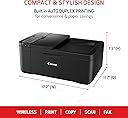
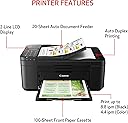
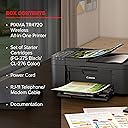
The Canon PIXMA TR4720 is a compact, wireless all-in-one inkjet printer designed for home and office use. It offers print, copy, scan, and fax functions with fast print speeds (8.8 ppm black, 4.4 ppm color), automatic duplex printing, and a 100-sheet auto document feeder. Featuring a high-resolution 4800 x 1200 dpi output and Alexa-enabled smart ink management, it combines professional-quality prints with energy-efficient operation (7W power consumption) and seamless mobile connectivity.


| ASIN | B09CDXKNB9 |
| Additional Printer Functions | All In One |
| B&W Pages per Minute | 8.8 |
| Best Sellers Rank | #398 in Office Products ( See Top 100 in Office Products ) #3 in Inkjet Computer Printers |
| Brand | Canon |
| Built-In Media | Ink Bottles |
| Color | Black |
| Color Depth | 16 Bits |
| Color Pages per Minute | 4.4 ppm |
| Compatible Cartridge | Canon CL-276, Canon PG-275 |
| Compatible Devices | Smartphones |
| Connectivity Technology | USB, Wi-Fi |
| Control Method | App |
| Controller Type | Android |
| Customer Reviews | 4.0 out of 5 stars 16,334 Reviews |
| Display Type | LCD |
| Dual-sided printing | Yes |
| Duplex | Automatic |
| EU Spare Part Availability Duration | 1 Years |
| Global Trade Identification Number | 00013803340648 |
| Hardware Interface | USB |
| Ink Color | Black |
| Is Electric | Yes |
| Item Dimensions D x W x H | 11.7"D x 17.2"W x 7.5"H |
| Item Type Name | Inkjet Printer |
| Item Weight | 12.7 Pounds |
| Manufacturer | Canon USA |
| Maximum Copies Per Run | 99 |
| Maximum Copy Resolution Black and White | 4800 x 1200 dpi |
| Maximum Copy Resolution Color | 4800 x 1200 dots_per_inch |
| Maximum Copy Speed Black and White | 8.8 ppm |
| Maximum Media Size | 8.5 x 11 inch |
| Maximum Print Resolution Black and White | 4800 x 1200 Dots Per Inch |
| Maximum Sheet Capacity | 100 |
| Maximum print Resolution Color | 4800 x 1200 Dots Per Inch |
| Model Name | PIXMA |
| Model Number | 5074C002 |
| Model Series | PIXMA TR4720 |
| Number of Licenses | 1 |
| Number of Trays | 1 |
| Other Special Features of the Product | Auto Document Feeder, Automatic two-sided printing for letter-size documents, Easy to load 100-sheet front paper tray, Hybrid Ink system produces sharp black text and vibrant color prints, Wireless printing and scanning |
| Output sheet capacity | 100 |
| Paper Size | 4 x 6, 8.5 x 11, 5 x 7 |
| Power Consumption | 7 Watts |
| Print media | Paper (plain) |
| Printer Connectivity Type | USB, Wi-Fi |
| Printer Output Type | Color |
| Printer Type | Inkjet |
| Printing Technology | Inkjet |
| Resolution | 4800 x 1200 |
| Scanner Type | Flatbed |
| Special Feature | Auto Document Feeder, Automatic two-sided printing for letter-size documents, Easy to load 100-sheet front paper tray, Hybrid Ink system produces sharp black text and vibrant color prints, Wireless printing and scanning Special Feature Auto Document Feeder, Automatic two-sided printing for letter-size documents, Easy to load 100-sheet front paper tray, Hybrid Ink system produces sharp black text and vibrant color prints, Wireless printing and scanning See more |
| Specific Uses For Product | Home, Office |
| Total Usb Ports | 1 |
| UPC | 013803340648 |
| Unit Count | 1.0 Count |
| Warranty Description | 1 year manufacturer |
| Warranty Type | Limited |
| Wattage | 7 watts |
K**.
EASIEST AND MOST PRODUCTIVE PRINTER EVER USED! DON'T LET THIS ONE SLIP BY, IT IS A GEM!!!!★★★★★
This Canon PIXMA TR$&@) All-In-one Wireless Printer is by FAR the best printer I have ever owned. When a friend recommended it to me, I brushed him off and then decided, I think I will try it and return it if it is a not up to par....Well, to my surprise, this printer is the easiest to use in the entire world, a first grader to connect it and set it up for you, wireless, no problem, instructions, clear and easy, scanning a breeze! AND for the LOW PRICE, I was astonished! Plus they will send you low ink when you start to run out (unlike some other major brands) Canon is on top of their game! This printer's versatility makes it indispensable for all your printing needs, no matter what they might be!
H**2
Canon Pixma TR4720 works great
it arrived in good shape, works well. the only problem was at first it wouldn't work. I then figured out that I had to shut off the connection in the computer, then it worked great, so far
K**R
1990's throwback printer, software download, and manual - Broke after two uses.
EDIT AUG 15 - Printer broke after printing approximately 50 pages - one day after the 30-day return notice. Something guiding the ink and paper feeder snapped and was hanging out of the mechanism. Complete junk. Run far away. I made an impulse buy on Prime Day. I just needed an all-in-one printer to replace the HP that was giving me fits and the price was right. My mistake for not looking more closely at it. The form factor is a complete throwback to the 90s - it's big compared to modern printers, and the loading/printing is from the front, which isn't great. The screen is hard to read, and everything is as flimsy as it could get without breaking immediately. The setup was a pain, and you are directed to a subdomain to download the software, which of course, isn't approved by Apple. The download page, itself was built in the 90's and the search function doesn't work, the printer doesn't come up as an option but if you mess around long enough, the list of printers completely changes and it appears. Network connection takes several minutes. There is no set-up walk-through and the desktop app is not installed with the initial download, so the rest of this review is based on best guesses and user error until I went hunting for a desktop app out of sheer frustration. The downloadable manual, like everything else, was a complete flashback to the 90's technical writing style. It's 434 pages and written with no thought to workflow - Set up isn't even mentioned. Four hundred thirty-four pages and no Quick Start Guide. Cool cool. Each section has drop-downs for the steps with links inside the drop-down. Be sure to note which page you are on because if you click one of those links, there's no going back. You won't find the user manual. (After I found the desktop app, it does have a link to an online version of the manual that is easier to navigate, but it's still really old-school.) The colors are not sharp or saturated. All colors are faded and pastel. After figuring out troubleshooting on the printer menu because I had given up on the manual, I ran all the usual tests and cleaning, hoping for better print quality. Nope. It'll do for printing out text-based material, but you wouldn't dare to try to print an image or photo. I'll keep messing with it. Desktop app - again, it's not included in the original download and it's outdated and most things link to the horrible website. Mac users - you will need to download all the functions software individually, as well. Be sure to buy ink!!! The starter pack of ink will not get you very far. Two test pages, a nozzle clean, and a one-page text document has already made a noticeable dent in the ink levels.
S**H
The connection can be funny from my phone
Works as intended and very easy to use. The print speed is average for a home printer. The photo option does work, but I'm not a fan of the quality that comes out as it appears washed out rather than vibrant. The only issue I have is that the connection doesn't always work for certain files with my phone so I'll have to jump between two different apps (canon app and my phone factory printer app Google Pixel 6 Pro) to try and get a connection to work. I'm thankful it's all in one as well, makes things at home much easier.
R**S
Efficient. Double sided print works fast and seamlessly!
So far so good I like that. It came with a black and colored cartridge usually they’re not the full cartridges, but it did come with it. It also was easy to set up setting up. The Wi-Fi wasn’t as user-friendly according to the instructions, but it was easy enough to figure it out. I manually did it and was able to easily put in my Wi-Fi username and password without any problems. It connected right away, and I went to my phone and the printer was automatically there very easy. I’ll send you a screenshot. Also it was a two sided print. This printer sucked the paper back in so quickly. I got scared because I thought it was gonna do a paper jam. It didn’t it printed the other side seamlessly was really really great big difference from the Canon that I think is like T3 500 but it was so that printer was so bad paper jam just shut the whole thing down. You couldn’t open it to get the printer the paper jam out of it. This printer from the same company is easier to open so if there’s a paper jam that tears, I think it’s it looks much easier to get your fingers in there and open it because there’s several different compartments that you can open in order to get the paper jam without struggle. I like that it has a scanner I was able to set that up and overall I’m happy with the purchase for the price. This is definitely worth it. It looks good and I like that you can close the paper tray when you don’t need to use it the other model. I think you had to keep it open. This is just more compact, neat, and easier to maintain. Also, there are three options to copy and print which I really like that has a top paper tray it has another one that you can use on the full length of the printer, and then it has one paper tray on the bottom that you can pull out and so far so good it does not come with the cord that you need to the USB cord to attach it to your computer to print that way, but like I said it prints just fine through Wi-Fi and I chose to do it from my smart phone and I highly recommend this for the price. If you’re on a budget this would be a good option. I think I also used a generic brand ink for about $19 for the pack. It said that it will print 900 pages so we’ll see but compared to Cannon‘s high price for ink cartridges. That was a huge discount and Cannon took that brand just fine. It takes 275 and 276 and cartridges and I’m happy with purchase so far.
T**S
Great printer for the price
Easy to set up, great prints, does use an app to print from mobile device but I can live with that. I would suggest that those who have trouble with this printer can attribute their difficulties to user error. This printer is very easy and simple to use. Does it print like a much more expensive printer? No. Does it handle my household printing needs? Absolutely.
M**D
Not a great printer. You get what you pay for.
I bought this printer to replace my old Canon all in one printer. I have to say I am rather disappointed. My old Pixma was a genuine workhorse printer. I could easily print, copy and scan almost anything. This one not so much. It is very temperamental about paper loading particularly label printing. It jams easily and jams are rather hard to clear on it. I also think it's a bit of an ink gobbler. I haven't had it but a few months and I've already replaced ink twice and I don't do an excessive amount of printing in general. I wish I had opted for something different. I do like the double sided printing feature though and it handles regular paper quite well. Just don't try to print labels. I haven't dared try to print photos. It was also rather difficult to set up I never did get the wireless connectivity to work. Thankfully I had a printer cable.
A**E
Great Printer for Everyday Use
This printer was easy to set up and works well for everyday printing, scanning, and copying. The print quality is clear, and the wireless connection has been reliable. It’s a good option for home or light office use. The ink life is really good, I need to print constantly and it lasted a long time nbefore I had to change the ink. It’s very affordable and the paper doesn't jam.
E**O
Valeu a pena!
Impressora maravilhosa!Estou amando e super indico.
A**S
New printer
Screen is difficult to read unless you have a light shining on it. Other than that, it works great.
E**S
Excelente, pero cartuchos caros.
Funciona bien, siendo inalambrica, envio datos desde mi mac, ipad, iphone, etc! muy comoda, pero los cartuchos son caros, recomiendo comprarlos y luego recargarlos!
D**S
Avaliação geral.
O Produto é bom, mas usa cartucho de tinta.
B**S
As expected for a canon printer
The product was easy to set up for the basic functions. Still have not got the fax function to work as yet because I do not hear the fax signal when it connects to another fax machine. So far the ink tanks it came with still have enough ink in them but I expect them to run out any day now. The tanks are fairly expensive.
Trustpilot
1 month ago
3 weeks ago