⚡ Scan smarter, work faster — your desktop’s new productivity powerhouse!
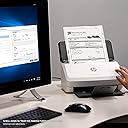
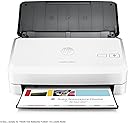
The HP ScanJet Pro 2000 s1 is a high-efficiency sheet-feed scanner designed for professionals who demand speed and precision. With duplex scanning at up to 30 pages per minute, a 50-page automatic document feeder, and 600 dpi optical resolution, it effortlessly handles up to 2,000 pages daily. Its compact design fits seamlessly on any desktop, while one-touch customizable scanning profiles streamline repetitive tasks. Built-in OCR and versatile file format support make digitizing, editing, and sharing documents faster and easier than ever.


| ASIN | B01M0SUNLZ |
| Best Sellers Rank | #647,669 in Office Products ( See Top 100 in Office Products ) #758 in Document Scanners |
| Brand | HP |
| Built-In Media | 2 CDs, Install guide, L2759A HP ScanJet Pro 2000 s1 Sheet-feed Scanner, Power adaptor, Power cords, Supportflyers, USB cables (Allregions), Warranty cards |
| Color Depth | 24 bits |
| Connection Type | USB |
| Connectivity Technology | USB |
| Customer Reviews | 4.0 out of 5 stars 129 Reviews |
| Global Trade Identification Number | 00889894865311 |
| Item Type Name | HP ScanJet Pro 2000 s1 Sheet-feed Scanner |
| Item Weight | 5.7 Pounds |
| Light Source Type | LED |
| Manufacturer | HP |
| Media Type | Business Card, Paper |
| Minimum System Requirements | Windows 7 |
| Model Name | ScanJet Pro 2000 s1 |
| Optical Sensor Technology | CCD |
| Paper Size | A4, A5 |
| Resolution | 600 |
| Scanner Type | Text |
| Standard Sheet Capacity | 50 |
| UPC | 889894865311 889894865373 |
| Warranty Description | One-year bench limited warranty whole unit replacement |
G**Y
This is a great scanner.
The HP ScanJet Pro 2000s1 is a great scanner. I bought it for my home office to scan a lot of documents. I'm using an iMac 10.13.6. I use the scanner software that is builtin with the iMac, it works better than image capture and I can name and select the file type. It was well worth the money, fast and accurate.
T**N
For less than 50pg per day, this is the one.
I first loaded the original software from CD but the latest wildly improved software should install if you are connected to the internet & using Windows7 or higher. Installs quickly without a hitch. You'll know you have the latest software when you create/modify a scan profile and it allows "delete blank pages" and "Straighten Content". The Scan Button on the scanner will follow the "Everyday Scanning" profile. I found this by experimenting. However it will auto-name the file vs a user-supplied name available if you use the screen "SCAN" button on your custom Scan Profile Screen. Scan speed is just as advertised and no problems with feeding unless "bump" scars remain after removing staples. "fingernail" them flat before scanning. The basic software has all you need for business/school scanning. Paperport14 comes on a separate CD if you need exotic scanning choices. I have a Fujitsu IX500 which scans at 35ppm vs this unit at 24ppm. The IX500 is about 410.00 and this is 270.00. If you scan more than about 50p/day, the IX500 is the way to go if you don't need Twain. HP 3000s3 if you need Twain and higher speed. PDF and JPEG is what I use it for. TIFF and BMP are also available formats. The primary advantage to the Scan Profile used by this unit and the IX500 is that the 2000s1 allows the removal of additional pages that you may not want on a 2-sided scan. For instance, we have applications that we scan but the back side is just a page full of instructions for completing the application front page. We can delete those before saving. With the IX500 you must use the "Organizer" software to do this which takes a bit longer. Over all I have no issues for the price. High volume folks should go for the HP 3000s3 (same great software) or the IX500 which also has WIFI and USB3.0
N**L
Four Stars
works, not as fast, but very handy
D**E
Constantly mis-feeds
While easy to use this scanner constantly mis-feeds documents. I always make sure that my scan batch only around 30 pages at a time to try and minimize problems. But this scanner pulls in multiple sheets at a time, thereby skipping them in the scan document probably 90% of the time. This is especially noticeable if the pages have been folded, such as trying to scan something that has been mailed. Don't buy this scanner.
T**H
Great little scanner
I am a lawyer who semi-retired to a home office. I decided to go paperless as much as possible because I don't like to file and now have no one to do it for me. This device is perfect for me. It is fast and versatile. I really like its ability to scan double sided documents as easily as it scans single sided documents. The HP scanner program is excellent and its OCR performance is much better than others I have used. An alternate scanner program was provided with the software, but I haven't felt any reason to fool with it, given the excellence of the HP scanner program. It also came with PDF Plus software, which is a good substitute for editable Adobe.
K**D
Worth every penny!!!!
This scanner is fantastic. The setup was incredibly easy, just pop in the disk and let the setup happen. This has to be one of the quickest scanners I have ever worked with. For comparison, in my office at work I have an HP Office Jet Pro 8600 Premium All In One Printer/Fax/Scanner. The HP Scanjet Pro 2000 s1 can scan a twelve page double sided document faster than my office setup scans a single double sided sheet. To say that I love this scanner is an understatement. After reading what seemed like thousands of reviews I'm glad that I chose this one. Do yourself a favor and make this your first choice.
M**N
Unexpected behaviors
We have 22 of these beasts - easily breaking paper trays, replacing rollers first year, and the software will install DROPBOX, OneDrive, FTP, and GoogleDrive, hooks whether you want them or not. Have to delete these rogue cloud programs individually for each machine installed. PIA HP can't seem to get rid of the bloatware! Operation is a mixed bag, some of the scanners work well and some just go offline repeatedly without reason. The HP rtwain driver triggers SymantecAV so you have to make exceptions to use this.
J**K
Not recommended for Mac users.
Would not recommend for Mac users. Mechanically the scanner works well. Page feed and scan quality are very good. However the HP software, HP Easy Scan, designed to scan to a Mac does not work properly. First, the software disks, included with the scanner, are only for Windows, not Mac. HP Easy Scan version 1.9.1 is downloaded from the HP support website for Mac. The software does not allow you to stop after a scan. None of the edit or transfer features in the software worked for my Mac. I am using a Mac Mini and OS 10.13.4. I spend some time in the HP support website and have not found a solution, including reloading the software twice. It is my assessment that HP designed the scanner and software to work with Windows and added Mac without testing the software. The scanner does work with the Image Capture software that comes installed on most Mac’s. However at this price point I feel that the designated HP software should work correctly as well.
Trustpilot
4 days ago
3 days ago