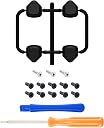
Desertcart purchases this item on your behalf and handles shipping, customs, and support to South Africa.
🎯 Elevate your game with precision-crafted control—because every input counts!
The eXtremeRate Ergonomic Split Dpad Buttons are premium replacement directional buttons designed for PS5, PS5 Edge, and PS4 controllers. Made from durable ABS material, these independent split D-pad buttons enhance input accuracy and speed, especially in fighting games, while allowing full customization with various colors and compatible accessories. Installation requires disassembly of the controller, supported by detailed video guides, making it a must-have upgrade for competitive gamers seeking a tactile and responsive edge.
| ASIN | B097D3GWT4 |
| Additional Features | Ergonomic |
| Best Sellers Rank | #6,163 in Video Games ( See Top 100 in Video Games ) #1,041 in PlayStation 5 Consoles, Games & Accessories #1,675 in PC Accessories |
| Brand | eXtremeRate |
| Brand Name | eXtremeRate |
| Button Quantity | 16 |
| Color | Black |
| Compatible Devices | Playstation 5 |
| Compatible Video Game Console Models | Sony PlayStation 4, Sony PlayStation 5 |
| Connectivity Technology | USB |
| Controller Type | Gamepad |
| Customer Reviews | 4.0 out of 5 stars 421 Reviews |
| Hardware Platform | Playstation 5 |
| Item Dimensions | 1.57 x 1.18 x 0.2 inches |
| Item Weight | 30 g |
| Manufacturer | Extremerate |
| Manufacturer Part Number | JPF8019 |
| Model Name | BDM-010/020/030/040 |
| Model Number | JPF8019 |
| Package Quantity | 1 |
C**R
Amazing for Helldivers 2
I had been getting really annoyed with pressing the dpad in one direction and the controller registering another direction in addition to the one I pressed since I first started playing games on a PS3. It started to drive me insane recently when I was playing Helldivers 2, so after about 8 months of getting annoyed, I finally decided to do something about it. This makes inputting stratagems so consistent I could actually start to seriously speed up my inputs and learn the patterns. I really enjoy swiping my finger around the dpad to turn a four input stratagem code into a single short and satisfying motion. I would personally love if they were a little bit more low profile for the ps5 controller, but they are very great and functional as is. The installation is as easy as it could realistically be given the design of the ps5 controller.
C**S
A great product with a learning curve for street fighter
This is a budget must have for fighting game pad players on PS5. The dpad on the ps5 controller is very finicky and will register double inputs often, this product solves that issue. That being said there is an also a learning curve to this d-pad aside from building new muscle memory and callus' due to the d-pads raised height. Like other reviewers have stated, this d-pad excels in games like tekken 7 and MK11, games that dont often require frequent finessed or fast diagonal movement inputs. In games that require these inputs like GG:Strive or Street Fighter, there is a learning curve in how you chose to use your thumb. Playing the USF4 and the SF6 demo I was struggling to hit confirm strong or fierce into 2xhadoken motion supers on the right side. This is due in part to how I have always used my thumb. Since childhood, I have always used my thumbtip pressed down on the d-pad. Because of this, I was always slow on the second hadoken motion or just missed the inputs due my thumb getting stuck under the right directional button. When I started to use the left inside portion of my thumb on the down and right directional buttons instead of my thumbtip. I was able to hit confirm into super and do FADC combos with higher consistency then before. If you are a pad player who uses the middle of their thumb to play, the learning curve might not be as steep. For those of us, who used our thumbtips since childhood, you will find that there is a learning curve.
T**.
Decent, but Battle Beaver D-Buttons are better
I would really like to love these, as they come in a whole lot of colors which is great for controller customization. The main problem is that they are much taller than the original d-pad, which means they're a bit awkward and uncomfortable. Battle Beaver's D-Buttons are better, even though they only come in two colors.
D**Y
Works Perfectly
I wanted a split D-Pad specifically for Injustice 2. I was getting annoyed with combos/special moves constantly messing up because the game was registering diagonal input. This helps a lot with it. Now any diagonal input is actually my fault. The buttons feel good and fit perfect. Another review said they could hear a rattle, but I don’t hear any rattle. Was fairly easy to install. I went slow but following the video the product links to showed every step making installation easy. Just be careful unplugging the ribbon cables, I accidentally pulled one out but I managed to get it back in. Would recommend.
A**R
Good idea, poorly executed
I bought these for tekken 8 and found that I was playing substantially worse, the main problem I have with these is that they are just way too tall (2-3 times taller than the normal dpad). My fingers consistently would get stuck in between the different buttons and overall it just made the controller feel clunkier.. I have currently swapped back to my old d-pad and the difference is astounding... will probably end up just throwing these away.. a complete waste of money
D**M
Almost Perfect
Super easy to install. A bit snug on the PS4 controller, but button clicks are perfectly fine and responsive. If you are getting these for fighting games, they're decent. The buttons are very high, so movements like quarter and half circles will kill your thumbs. Would be a 5/5 if the buttons were a lower profile.
T**N
Thumbs up!
I got these buttons to better control retro games on Ps5. They're MUCH better than the disappointing stock buttons. Due to the buttons being individual and a bit taller, the control feels quicker and more accurate, though I see other reviews disagree with that. I'm not playing fighting games though, just retro and side scroll platformers... Syphon Filter, Streets of Rage, old Sonic and Sega games...etc. Those type games are much better on Ps5 with these improved D-Pad buttons, for me anyway. INSTALLATION: Definitely watch and pay attention to the installation video. It's not super difficult, but not for the mechanically faint of heart. I'm a 25 year dental tech, a certified guitar repair tech and very used to small tools and parts on a daily basis in my careers and I still managed to tear the controller microphone ribbon cable in half during the button installation🙄. Fyi.
D**Y
Ps Portal fix for Dpad multi press
Fixes multi press for fat fingers, I used this to fix multi touch that kept happening on my ps portal, works like a dream. Great upgrade. Portal can have problems pressing multiple buttons at once.
N**E
Bontons trop GRAND
Il y a trop trop de jus, pourquoi les boutons sont trop grand, un low/midle profile serait été le top, du coup c'est difficile de faire des quart de cerle avec, demi cerle on en parle même pas
B**R
Endlich einzelne Tasten
Top, machen einen guten Eindruck und das nervige D-Pad ist endlich weg, bzw. das Problem, dass man mehrere Tasten gleichzeitig drückt. Die Tasten stehen zwar etwas weiter raus, aber ich finde das gut.
J**R
te hoog
deze knopjes voelen erg fijn... maar zijn te hoog om snel halve cirkels op te draaien.
J**N
They work.
They do their job of separating the pad to reduce misinputs. They do make it slightly harder to slide the thumb over the pad however.
D**O
Troppo cari.
Belli esteticamente, Funzionali, ma troppo cari,. Con il senno del poi non li ricomprerei
Trustpilot
1 day ago
1 month ago