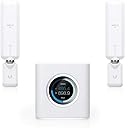
Desertcart purchases this item on your behalf and handles shipping, customs, and support to South Africa.
🚀 Elevate your home network to pro-level speed and style—because buffering is so last decade.
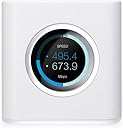
The AmpliFi HD WiFi System by Ubiquiti Labs delivers whole-home wireless coverage up to 10,000 sq.ft. with a Mesh Router and 2 MeshPoints. Featuring dual-band 802.11ac technology, it supports speeds up to 5.25 Gbps and includes 4 Gigabit Ethernet ports. The system boasts an intuitive touchscreen display, easy app-based setup, and advanced network controls, making it ideal for seamless 4K streaming, gaming, and smart home connectivity.
| Antenna Location | Gaming |
| Antenna Type | Retractable |
| Asin | B01L9O08PW |
| Best Sellers Rank | #9,480 in Computers & Accessories (See Top 100 in Computers & Accessories) #177 in Whole Home & Mesh Wi-Fi Systems |
| Brand | AmpliFi |
| Built In Media | Ethernet cord, Mesh Point(2), Power Adapter, Router |
| Color | white |
| Compatible Devices | Smartphone |
| Connectivity Protocol | ethernet, wi-fi |
| Connectivity Range | 10000 square_feet |
| Connectivity Technology | WiFi^Wired |
| Control Method | App |
| Controller Type | android, ios, vera |
| Coverage | Whole home, up to 10,000 sq. ft. |
| Customer Reviews | 4.3 4.3 out of 5 stars (2,229) 4.3 out of 5 stars |
| Data Transfer Rate | 5.25 gigabits_per_second |
| Frequency | 5 GHz |
| Frequency Band Class | Dual-Band |
| Global Trade Identification Number | 00810354025556, 00810354025563, 04058829421359 |
| Item Dimensions L X W X H | 3.85"L x 3.92"W x 3.91"H |
| Item Type Name | AmpliFi HD Home Wi-Fi System |
| Item Weight | 14.4 ounces |
| Lan Port Bandwidth | 1000 Mbps |
| Manufacturer | Ubiquiti Networks (Personal Computer) |
| Maximum Upstream Data Transfer Rate | 1300 megabits_per_second |
| Mfr Part Number | AFI-HD |
| Model Name | AFI-HD |
| Model Number | AFI-HD |
| Number Of Antennas | 3 |
| Number Of Ports | 4 |
| Operating System | Android |
| Other Special Features Of The Product | WPS |
| Router Firewall Security Level | High |
| Router Network Type | mesh |
| Security Protocol | WPA2-PSK |
| Unit Count | 1 Count |
| Upc | 810354025563 817882020985 810354025556 |
| Voltage | 220 volts |
| Warranty Description | Product is warrantied against defects in materials and workmanship for a period of one (1) year from the date of original purchase when used under normal conditions and consistent with applicable Product documentation, subject to the other terms in this Product Warranty. |
| Wi Fi Generation | Wi-Fi 5 |
| Wireless Compability | 802.11a/g/n/ac, 802.11ac |
User
So far, SO GREAT
** I reserve the right update my review if the Amplifi HD goes bad but so far it's been perfect. **I was convinced my home was built over an Indian burial ground. The native American's hated networks and WiFi. I had literally been through six routers in two years. After reading 100's of router reviews I'd take a chance and purchase a new router. Always high-end equipment. I was positive Amazon would refuse to sell me any more routers because I returned so many. Thank you Amazon for understanding my plight.Gave up on Netgear because (3) of my routers either ran 10x slower, dropped connections, or flat out failed following firmware updates. Lost a R7000, R8000, and XR500. I never plan on buying another Netgear router. I truly believe Netgear pushes out new firmware to break your router so you will need to replace it. Had been running DD-WRT on a XR500 (DumaOS is a sick joke) but it was a hack DD-WRT so router limped along still requiring daily reboots.Next tried (3) TP-Link routers (AC5400, C5400x). GUI would hang, would not give out new IP's. 2.4GHz radio would randomly shut off throughout the day. 2-3 reboots per day. No thanks.Next Synology RT2600AC. All good except hardwired Ethernet ports kept dropping my VOIP every 10-30 seconds. Support offered no help even though I sent in all logs and reports showing VOIP coming and going. RJ45 ports unusable.Next ASUS GT-AC11000. 2.4GHz radio would cut out every 2-3 minutes. Clients would not stay connected and some would not connect at all. Sent it back.Okay, another month of research and decided on the Amplifi HD. A mesh for me? Had I lost my mind? I was that desperate. And for all those online videos where people gush over the physical design and even how nice the cardboard packaging box is... ugh. I don't care if the hardware looks like a busted toaster at the landfill. I just need it to work.** I'm a hardware IT professional with >30 yrs experience. I've installed and managed 1,000's of machines and networks. But when I come home I don't want to be bothered troubleshooting my equipment daily. **My home network contains ~120 network-attached devices, albeit load average is low. Nothing a quality router should have trouble with. The Amplifi HD installed very easily but I must report the first system I installed had a defective mesh point so I sent everything back for a new system. 2nd system installed easily and all three components are functioning properly. It's only been online for ~18 hours but that's 17.5 hours longer than any of my other routers lasted. I did call Amplifi tech support with questions about separating 2.4 and 5 networks and port forwarding. The rep was AMAZINGLY helpful. I'm mean shockingly knowledgeable! Bravo to Ubiquity for such high quality phone support. I'm still wondering if it was a dream.I'm old school IT so managing a router via mobile app was weird as heck. I REALLY need a PC/web based interface to be happy... That said, it was so simple, a MAC person could do it... (it's just a joke). Also, the reason I needed a PC/web interface is because I was troubleshooting my old routers daily. But if the Amplifi just keeps working, I can just forget it - and that's the way IT should be. I have many other things here to play with instead of routers ; ). Like a car, you should be able to just "get in it and go". No fiddling under the hood.- WiFi range is very good with the router and (2) mesh points. But 20K sq' might be a stretch unless you're in a warehouse with no walls.- Performance is excellent on my LAN. Not concerned with the WAN because my ISP is so terrible I'm embarrassed to report my service rate.- Installation is very simple. But I did take the time to change the default IP range and a few other settings. Would like web access but I realize I'm a dying breed.- When creating a second SSID, the app forces a -2g or -5g name extension. They need to fix that. Don't tack on anything to our SSID name.- Reliability. Yep, this is the big one. Just work man! And so far, it's working.Yes this review is early in the game but I had to write something due to my horrible experiences with so many dreadful routers. Hopefully I can now cancel some of my psychiatrist sessions.
User
It has been all but impossible to get a good signal in every part of the house
After struggling with numerous Wi-Fi routers and extenders over the years I had all but given up. Our house, including the 1,500 sq. ft. built out basement, runs around 6,500 sq. ft. It has been all but impossible to get a good signal in every part of the house... especially in the far bedrooms and kitchen area. My last attempt was an Apple AirPort Extreme (final generation) and several AirPort Extenders. Our Xfinity plan is supposed to get us in the neighborhood of 100 + mbps. The best I could get, anywhere in the house, was 40 - 50 mbps. We are running an Xfinity modem without built in Wi-Fi or telephone... so its as pure as they have. Finally, when we started having issues streaming live broadcast via Wi-Fi it gave me the insensitive to look for another solution.After a great deal of research I decided to try a mesh Wi-Fi solution and go with the Ubiquiti AmpliFi HD. It is supposed to cover 20,000 sq. ft. with the main router and two mesh point units. The AmpliFi is very unique in its styling and was the only one rated to cover as much as 20,000 sq. ft.I ordered the unit on Amazon Prime and got it in a couple of days. It literally took me 15 minutes to get it set up. You do need to download the AmpliFi App from either the Android or Apple play stores. You control the AmpliFi router from your phone. You can download a software version for your PC or Laptop... but the smartphone version is much easier. Once I downloaded the App and connected the main router to the modem it was a simple task of getting them to recognize each other (which took all of 1 minute) then plug in the mesh units to the wall outlets I felt were the best placement for the best signal. (The App will show you the exact signal strength of each mesh unit once you get them set up.) Again, it took all of a couple of minutes for the mesh units to be recognized by the main router. After that I was off to the races!After a couple of minor adjustments to the mesh unit antenna I had all five blue lights on both mesh units light up. My signal strength is far beyond what I have ever had in the house. I have run speed tests in literally every room and am getting at least 100 mbps in every room. The basement is getting 90 - 100 mbps. Honestly, that is phenomenal!The main router unit is very unique and has a touch screen on the front that gives you a lot of information such as time and date, signal strength and other graph data showing signal strength. The smartphone App gives you a number of options for setting up guest networks, parental control, pause control and the ability to fine tune your network. It does default to 5 GHz, but you can change that to 2.5 GHz if you want to.I have seen a couple of "tech guy" reviews that state this product doesn't give them enough control to completely control the network and do total manual set-ups. Guess that's fine if you are a pure tech oriented person that has to set these things up from the ground up. For the average person and household looking for a solid solution that actually works without having to fight with it to get it set-up.... I would highly recommend looking into the AmpliFi HD mesh system. I used the standard set-up and it worked great from the get go. It is the first time in many years that we have full Wi-Fi coverage in our house and a very strong signal throughout. I would give it 10 stars if I could!!
User
Totally Happy with Company and System!
I did over two months of research on Mesh networks before purchasing one. Initially, I was concentrating on the more familiar ones I had heard of: the Lynksys Velop, Netgear Orbi, Eero, Google, etc. I researched them all extensively and while reading a review of the Orbi on Amazon, I saw mention of the Ubiquity Amplifi HD system. I had never heard of it but it then became part of my research project into Mesh systems.As my research continued, the Amplifi HD System was looking better and better. The first thing that grabbed my attention was the fact that it is less expensive than the others, and the concept looked like a good idea. The Mesh points plug directly into an outlet with no cord. The electrical plug is part of the device itself. So it can be out of mind, out of site. No need for table space for your mesh points. Also, the hardware itself is beautifully designed.The 2nd thing that I noticed was that almost all of the reviews on Amazon and elsewhere were positive. (at the time it was 4 ½ stars average of 408 reviews on Amazon) And any reviews or posts by people having problems showed that they were contacted by the company who was either offering advice on how to resolve the problem or asking the user to contact them so they could resolve any issues personally. The point being; the company (Ubiquity) had responded to anyone who was having problems or was not happy with the system. This showed me that the company cared and wanted to support those who were having problems. This was very important to me. Of course I visited their website and soaked it all in. But I had specific questions I needed answered before I deciding on a Mesh System.While at the Amplifi website I started a chat with them. The wait was less than 30 seconds. My questions were specific and were answered specifically. The support was fast, professional, knowledgeable, and friendly. I probably contacted them 3 or 4 times (sometimes very late at night) before making any decision. The support was exceptional in each and every chat I had with them. And this is a large part of the reason I went with Amplifi HD over the Orbi, Linksys, etc. But not the only reason. After all, performance is the main ingredient everyone is looking for.When the system arrived from Amazon, I quickly unpacked it began setting it up. (Even the packaging was beautiful!) I had seen a video on YouTube where “Pan The Organizer” did a complete Amplifi HD set up and I thought, "why use the manual?" The video is great and gives you all the information you need to set up the Amplifi HD system. I highly recommend it.So, basically I set up the router, gave it a name, password, etc. using the Android app, and connected it to the internet. At that point, essentially, I was done. I plugged one of the Mesh points into the wall upstairs and away from the router and it connected automatically. No fuss, no muss. Same thing when I plugged in the 2nd mesh point. So, after you get the router set up, the rest of the system basically sets itself up. Plug in the mesh points and after a few seconds they work perfectly.Next I gave my mesh points names so I knew which was which while working with the Android app. The app is straight forward, quick to respond, and easy to use. I was able to see all of the devices that were on my network, what each devices mac address was, whether they were on a wireless or Ethernet connection, what mesh point they were attached to, and about anything else you would want to know. You can also give each network device it's own name making it very easy to know what is what. (I have 23 devices both wireless and Ethernet, on my network) Guest network set up was also a breeze and it's very flexible allowing you to set times you want it on or off. Of course there's an option to have it always on or always off. You can limit the number of guests, see who they are, and what mesh point they are connected to.The system uses both 5Ghz and 2.4 Ghz bands. You can walk through your house with your device and the system will automatically switch from one mesh point to the other or to the router itself, depending on which signal is stronger at your location. It will also automatically switch from 5Ghz to 2.4Ghz as necessary when your distance from a mesh point (or the router) is too far. So, one SSID and seamless wireless transfer from point to point to point.After getting the system set up I had a few additional questions for the support team. Again, I received great service each time. And I did not find anything I wanted to do with the system that could not be done. In essence, I saw no real flaws at all nor have I since. And new features are being added via automatic firmware updates.OK, it sounds like I work for the company and that this may be one of those “fake” reviews. Nope! As you can see, I am a verified purchaser and I assure you, I do not work for this company or any tech company. I am retired, curmudgeony musician and computer geek in Minnesota that has purchased many computer products that were disappointing. So, when something like this comes along and exceeds my expectations and the company does this same, I am delighted. Thus I have given this system the 5 stars it deserves. Everything from the product itself, to the design, the packaging, the support, and the company website is 1st class. And I've now had it set up for 3 months and reliability and performance have been flawless. I have had zero problems and have not had to re-boot the system even once.Am I trying to sell this product? Well, as I had not heard of this or the company for the first several weeks I was looking at mesh systems, I realized that it was buried under a lot of very visible products from the major, very visible companies doing consumer and home wireless systems. But this may have been the best of the bunch, and nobody I know had heard of it! So yes, I am. And while I'm sure that a number of these other systems are very good, most all are more expensive than the Amplify HD system.So, as you can see, it's very hard for me to say anything negative about this product. But don't take my word for it. Do the research, visit the website and the websites of the other mesh products, contact the company, compare it to its competition, read unbiased reviews here and elsewhere. Yes, there are differences. But I found this system did everything I wanted and more, and the price was great!.
User
Overall very pleased, fast software updates
On 10/16/17, a researcher publicly released a paper revealing a major vulnerability (KRACK) with the WiFi WPA2 protocol which is used to secure wireless traffic. However, the technical community was notified of this several months prior, to give them time to have software and firmware patches ready before the public announcement. While the biggest issue is with clients (those that connect TO the router), the vulnerability does extend to routers which likely needed software/firmware updates to eliminate this particular issue.Amplifi had a new software release THAT day which fixed the security flaw, which led me to purchase the device and install it to replace my home router when Amazon delivered the next day. In comparison, Eero had a patch in beta testing (which was then released to everyone the next day), Orbi created a webpage but provided no date for a fix, and Google Wifi had an employee post on a public google group with no date for a fix. The router I replaced from one of the major router manufacturers only had a community employee saying once they heard from engineering they will report back, which was unacceptable to me. Even Cisco (which is used by my medium sized company), didn't have a complete statement ready until the afternoon with more details and some fixes following over the next several days. Amplifi's responsiveness to this security concern earned them a new customer and provided me some comfort that should another security issue arise in the future, they would be on top of it.Pros:1) The 4 wired Ethernet ports and 1 WAN/modem port on the base were a requirement for me to plug in hardwired devices in my office. Google and Eero only have 2 ethernet ports and 1 has to be used to connect to your modem.2) It simply works! The corners of my home which previously had poor wifi coverage now have great coverage.3) Install was simple and took around a half hour using the android app (there is an IOS/Apple app as well).4) Updating the software was easily done via the app and now my home network is running the latest software (2.4.3) and my routers are protected from the KRACK vulnerability.5) I like that there is a single SSID for both the 2.4ghz and 5ghz bands by default. My old router required different SSIDs for each band.Cons:1) Setting a static IP address via the app is easy but causes the whole system to reboot without any alert notifying you that's what is happening.2) The HD mesh points are physically rather large. A few of the power outlets I wanted to use had a wall (or other object) too close to the edge of the outlet, which didn't allow the antenna to fit and I had to select another location. Most of the outlets in my house are oriented 90 degrees compared to the pictures, making the antenna stick out horizontally instead of vertically.3) The power cable for the base is fairly short. My old router was on the top of my desk hutch, and the power cable would not reach so I had to move the cube onto my desk surface.4) If you wanted to keep different SSIDs for 2.4ghz versus 5ghz, you cannot customize the entire SSID names by band. The software automatically names the SSIDs for you postpending -2g and -5g for the two bands and you cannot customize the names for each band as of version 2.4.3 of the system. I only wanted to do this to keep the same names for the SSIDs of my old router, so I wouldn't have to change the wifi settings on any of my client devices. In the end, I decided the single SSID for both bands was a better solution and modified the clients.5) The app allows you to easily setup and limit a guest network, but the app doesn't let you see which clients are on the guest network and which are on your internal network as of version 2.4.3 of the software.
User
Do NOT buy the bundled package (routers don't last and mesh points become useless)
Piece of junk system and poor customer support.Was working fine...until it wasn't. It's easy to set up and "just works", until it doesn't. And then you're screwed.My router seemed great. Until it stopped broadcasting more than a couple feet, not long after the one year warranty expired of course.Customer support could have just said go screw yourself, your warranty is (barely) expired. Instead they ran me through the RMA dog and pony show only to say, at the end, go screw yourself, your warranty expired...that was the very first thing I told them, of course, that the warranty had just expired...but they acted like they stand by their products, let's just do the RMA. Big waste of time.In the meantime, I bought a new Amplifi router - since I can't be without internet for a month - only to find out that the original mesh points are hard coded to only work with the original, dead as a door nail, router. So now I have two worthless mesh points too. And they essentially tricked me into giving them more money after screwing me the first time.Crappy company.If you MUST buy from them, do yourself a favor and do NOT buy the bundled router and mesh points. I never would have, had I known that the day my router died - one year and some change in - my mesh points would be useless too. Buy the router buy itself. And any mesh points separately.Would have been nice if they'd advertised that little nugget...
User
Works good but holds some of your data hostage
Ok, let me first say that I am a certified security professional, so this review is a caution for those concerned about their network security and personal information.Cons:1. You can not access the logs of what is happening on your wi-fi network. You can not see if someone is trying to attack your system or if you have a misconfigured device causing issues. The logs can only be viewed by the development team of the company, and they refuse to decrypt it and send it back to the customer. They may answer some vague question, but I have been trying for over a month now to find out if my neighbor is still trying to hack my wi-fi with only "i'm sorry we can't give you that" as answers.2. The boosters are much larger than I thought, and the magnetic mount, while it can turn to accommodate almost any space, the side of the plug part itself and it's inability to turn makes it difficult to place in some spaces.3. The application can reach the AP through your firewall without you being able to configure any additional security. That means your network is connected to their hub, which is outside of your control and collecting unknown data. So it could be collecting passwords or system information. With them hiding the logs, you can not know for sure.Pros:1. The setup was exceedingly easy. can bedone from the app for granular control (like renaming the AP and boosters) or from the small watch sized touch screen.2. The signal levels on the boosters makes it clear how it is communicating.3. The mesh is auto adapting to the environment to keep the best speed.4. Setting the illumination to turn off and on with a schedule makes it easy to place the base anywhere,even a bedroom, and not disturb the occupant.The Amplify over allis a great device. The secrecy and resistance to allow access to the system logs, and the connection to their service without any way to opt out gives me great pause. I have had to make changes to my firewall to block the ports and traffic it sends across the net. This makes any updates almost impossible, but I really do not want my pictures and personal documents I access over the wi-fi leaking out because of their poor security and shady business model.
User
10 Minute Setup and Fantastic Mobile App
I write this review to share my experience, configuration, and general feedback.Ubuiqity Networks [Amplifi Product] has fantastic customer support and answered many questions via chat before I decided to purchase the AmpliFi HD WiFi System [1 Router, 4 Mesh Points, 1 Teleport]. I ordered and received the items within the 2 Day Prime Member timeframe. The packaging design was pretty cool and made the overall purchase feel extra nice as described by another reviewer.I installed the equipment in my 3,648 sq. ft. town-home, which has 3 floors with standard wood construction, drywall walls with hardwood and travertine tile flooring throughout. A few rooms like Kitchen, Dining, and Bathrooms have a high density of floor and wall cabinets made of solid wood. I am sharing these details about my home so that you can relate to the location and access point signal quality comments below.I downloaded the iOS Mobile App and followed the instructions for installation. The Amplifi Router is connected to my AT&T Residental Gateway [U-Verse] on the 3rd Floor, in the Office which is located in the center of the 3rd Floor near an open staircase to lower floors. Upon installation, I was prompted to download the Amplifi Router Firmware Update, which took about 3-4 minutes to install. I found the Amplifi Router is able to provide adequate coverage and 60-70% signal quality for the entire 3rd Floor or 1,200 sq. ft [20 ft x 100 ft]. I used SpeedTest by Ookla App for iOS to determine throughput [up/down] speeds ranging from 100 to 300Mbps from my iPhone and iPad Pro.If you have AT&T U-verse you need to put the Primary Router in Bridge Mode, so that IGMP Snooping from the AT&T Gateway works and is able to handle the AT&T IPTV [ UDP ] Broadcast traffic and the AT&T Set-Top Boxes work correctly. Amplifi does not support IGMP Snooping, which is required on the AT&T U-verse network.The Mesh Point #1 was installed [by plugging into standard electrical outlet] on the 2nd Floor, about 1/3 distance from the rear of the home. Once plugged into the outlet it takes 3-4 minutes until the Mesh Point shows connected to the Amplifi Router on the Mobile App. The Mobile App shows signal quality between the Amplifi Router and the Mesh Point. The Mesh Point also has a visual signal quality meter so when you install and it connects you can see the signal strength without using the Mobile App. I found Mesh Point #1 is able to provide adequate coverage and 50-60% signal quality for the entire 2nd Floor or 1,200 sq. ft [20 ft x 100 ft]. I used SpeedTest by Ookla App for iOS to determine throughput [up/down] speeds ranging from 40 to 100Mbps from my iPhone and iPad Pro depending on which end of the home you test from closer to Mesh Point #1 the faster speeds and farther away slower the speeds. As a result, I plan to install Mesh Point #2 on the other end of the 2nd Floor. By having two Mesh Points on 2nd Floor I was able to provide high-quality signal strength and consistently fast throughput speeds. With two Mesh Points on 2nd Floor throughput [up/down] speeds improved ranging from 150 to 300Mbps from my iPhone and iPad Pro.The Mesh Point #3 and #4 were installed on the 1st Floor or 1,200 sq. ft [20 ft x 100 ft], about 1/3 distance from the front and rear of the home. Due to the density of the Kitchen and Dining Room Cabinets on the 1st Floor, it was important to have two Mesh Points. I used SpeedTest by Ookla App for iOS to determine throughput [up/down] speeds ranging from 150 to 300Mbps from my iPhone and iPad Pro.Overall, I am happy with the network equipment performance, and Mobile App for iOS. There are some very nice Mobile App features, like device assignment to people or classes of devices [Nest, Sony, Wife, Kids], pause internet for an individual [Kids] or group of devices [Sony]. You can also select individual devices and optimize their connection for Gaming, Streaming or Normal Traffic Profile.The Amplifi Router also offers an isolated guest network, that you can allow access to guests for specific time periods, with or without a password. The guest network is isolated from the primary network, so guests can not gain access to your network storage devices, or other devices on the primary network.Some Extra Details for the person who has a lot of IoT and other devices on their network and concerned about throughput and performance. I have 40+ devices connected, with 13 HD Streaming Cameras to Nest Cloud, 3 Nest Thermostats, Wemo Switches, Drobo5N NAS, and many other devices [Macbooks, iPhones, iPads, Gaming PC].After Owning for 1 Month [ Update ]------------------------------------------------I added two Amplifi Standalone Routers and set them up as Amplfi Backhaul Routers. The Backhaul Router connects to an RJ45 network cable/wall jack and has a direct-wired connection back to the Amplifi Primary Router through a smart switch that ties all the wired wall jacks to the Amplifi Primary Router. The Backhaul Routers have much better performance for peak traffic volumes, supporting 1GB up/down throughput. The Mesh Points are nice, but I could only get 150 to 300 Mbps up/down through a Mesh Point.After Owning for 10 Months [ Update ]------------------------------------------------One downside, the Amplifi HD Kit has to be the Primary Router, and the Mesh Points sold in the HD Kit only work with the HD Kit Router [ Matching Serial Numbers ]. I had the Amplifi HD Router (included in the Kit) fail due to a firmware bug that was in an update I accepted. When the HD Kit Router failed I thought I could quickly swap it with one of the two Stand-alone Routers (used as Backhaul) that I had purchased. I was able to switch it physically, however, I had to do a factory reset on the two Routers and 2 Mesh Points [ i had 4 total ] and revert the firmware update. Then I had to go through the entire Amplifi setup process again for all the devices. 1 Primary Router, 1 Backhaul Router, and 2 Mesh Points.I self-diagnosed the issue as a firmware bug. I didn't revert the firmware update on the Amplifi HD Kit Router or 2 Mesh Points, because Amplifi Support had shipped me a new HD Kit thinking it was hardware. The firmware error was "Adapter Error", which had to do with the Power Adapter for the HD Kit Router. When I swapped the Backhaul Router and turned it into the Primary Router I got the same "Adapter Error". Which is why I decided to revert the firmware update.
User
Simply amazing (not something I write easily)
As happens every 12-18 months, my last Asus router started to have issues (dropping 2.4 GHz signal, slower speeds, etc.) and I started to jump off the Asus bandwagon finally. I ordered, tried, and returned a few non-Asus routers, but they all had much lesser range that what I was used to and I even had drop-outs right from the start (Meshforce M3, Synology, Gryphon to name a few). I then decide to drop more $$ and try the AmpliFi HD.All I can say is 'wow'. The best range I have ever experienced, easy set-up, rock solid signal even in the most remote corners of my house and way deep into my backyard. I love the app and the way information is provided to the user. A few reviewers have noted that the networking features are somewhat limited and that's true. However, I got most of what I need, i.e. port forwarding, a second dedicated SSID, ability to customize DNS and range, parental controls (a little limited at the moment), and a firewall (that can't be turned off). This strikes me as a company that will continue to push new features consistently and probably fill some of the gaps for more advanced networking features in the future. Here is what you don't get currently:- AX (wifi 6)- Ability to completely customize your two SSIDs: The first is always dual band (2.4 and 5 GHz) while the second can be configured as either 2.4 or 5 GHz. Oddly, you cannot have different passwords for the two networks. Not that big a deal, but I was hoping for one dedicated 2.4 and one dedicated 5GHz network with different passwords. My old network was set up that way and the ability to 'clone' these settings would have made set up even easier. Maybe, this will be available in the future.Other than these two nitpicks, this machine is awesome and quite honestly the best router I have owned, ever. I hope it will last more than the Asus life expectancy of 12-18 months. I placed this on a laptop cooling pad to give it the best start to life; however, I noticed it does not run very hot compared to other routers I tried. I will definitely report back here if it does not survive for long.Please note I am not affiliated with this company and I did not get this router for free. I am just extremely stoked to have found 'the one' after all these trials and errors. Extremely, highly recommended! (I did not rate Tech support.... didn't need it).
User
Producto de calidad excepcional
He esperado casi un año para escribir esta opinión, para poder hablar con propiedad sobre el producto.Bien, decir que ha cumplido de sobra las expectativas, barajé muchas otras posibilidades a la hora de montar mi red mesh y me decanté por esta sobretodo por su diseño y por la confianza que tengo en la marca ubiquiti.El diseño es precioso en comparación a cualquier otro dispositivo de su categoría.La facilidad de instalación hace de este dispositivo una muy buena opción para cualquier tipo de usuario, teniendo en cuenta que también dispone de configuraciones avanzadas para usuarios más exigentes.El alcance que ofrece y la cobertura de señal es bastante buena, teniendo en cuenta que está destinado a un uso doméstico y no profesional.El software de gestión del dispositivo, aunque simple, funciona a la perfección.Algo a tener en cuenta, es el servicio postventa al cliente, ya que a través de la app tiene acceso a un chat las 24h del día en el cual resuelven las dudas y ayudan con todo tipo de instalación.Solo decir que después de comprar el kit de dos satélites y router, quedé tan contento que he comprado otro router independiente y un satélite más. Ahora jardín y vivienda completa tiene wifi en toda la parcela sin ninguna zona oscura.Aunque el precio puede echar para atrás en un primer momento, comprarlo me ha evitado muchos dolores de cabeza...
User
Not worth it
Below average
User
Finally we have fast, reliable WiFi around the whole house
If ever there was anything that proves that you really do get what you pay for then this is it!Having 200meg Virgin broadband but being fed up with slow, unreliable WiFi around the house, despite having various access points installed (3 AP + the main router). I decided to research in to many mesh systems and having narrowed it down to the final 2 and speaking to an IT technician at my workplace. The decision was made to take the plunge and buy myself the AMPLIFI Home HD mesh system. Never spending so much on a router before, I was apprehensive but something had to be done to put an end to the constant family WiFi frustrations!So here we are 3 months in without a single complaint of drop out or slow speed. Absolute bliss!I have the main router in my lounge and to be fair, even before adding the 2 APs included in the kit, the WiFi coverage was solid and much better than my old setup. With an AP located in my back lounge this gives solid, fast WiFi everywhere in the garden as well! With the 2nd AP placed in a bedroom at the front of the house we now have amazing coverage everywhere around the house! To give you an idea of the size of the coverage area my home is a 4 bedroom with 3 downstairs reception rooms, kitchen and my loft is converted to an office. There’s 5 adults in the house with mobile phones, smart TVs, Xbox, PS5, so there’s always something being streamed and gaming taking place.Setup was very easy and the instructions were easy to follow, although I do have some knowledge of setting up networks. But shouldn’t be a problem for most people.So in conclusion. Yes, the £300+ price is more than some of the other available systems but in terms of overall value for money for the quality you get, I cannot recommend this enough!!!One thing you could try before opting for the full kit is to purchase the router first and see how your coverage is without the APs. Individual APs are available to purchase and you can then build up your system to suit your home/building. This works out slight more expensive but could save you money if you don’t need 2 APs.
User
Excellent produit et trés facile a installer
Installer dans la maison pour couvrir deux étages, garage, bureau et un jardin. Cela fonctionne parfaitement. Aprs savoir trouver les meilleurs emplacmenents pour les antennes c'est un plaisir et avec le control je peux voir qui est connecté et controler les appareils des petits et leur donner des plages horaires d'utlisation.
User
worth it
A great wifi system that, whilst not cheap, is truly easy to set up, bulletproof and works really well. After years of struggling with Netgear and Billion networks, changing networks at the other end of the house, it's a real pleasure to use such an easy to configure and reliable MESH network
Trustpilot
4 days ago
2 months ago