


🎙️ Elevate your audio game—because your voice deserves the spotlight.
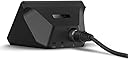
The Elgato Wave XLR is a compact, professional-grade USB-C audio interface designed for streamers, podcasters, and recording pros. Featuring a studio-quality 75 dB preamp, 48V phantom power, and proprietary Clipguard technology, it delivers ultra-clear, distortion-free sound. Its intuitive capacitive mute button and Wave Link software enable seamless multi-source mixing and control on Mac and PC, making it the ultimate mic interface for next-level content creation.


| ASIN | B09738CKKX |
| Audio Input | XLR |
| Best Sellers Rank | #25,914 in Musical Instruments ( See Top 100 in Musical Instruments ) #148 in Computer Recording Audio Interfaces |
| Brand | Elgato |
| Brand Name | Elgato |
| Compatible Devices | Personal Computer |
| Connectivity Technology | USB |
| Customer Reviews | 4.6 out of 5 stars 2,584 Reviews |
| Frequency Response | 20 KHz |
| Included Components | Wave XLR, USB-C Cable, Quick Start Guide |
| Item Dimensions D x W x H | 3.31"D x 3.46"W x 4.65"H |
| Item Type Name | interface |
| Item Weight | 300 g |
| Manufacturer | Elgato |
| Manufacturer Part Number | 10MAG9901 |
| Maximum Sample Rate | 96 KHz |
| Model Number | 10MAG9901 |
| Number of Channels | 1 |
| Number of Items | 1 |
| Operating System | macOS |
| Supported Software | Wave Link |
| UPC | 840006642886 |
| Unit Count | 1 Count |
| Warranty Description | 2 year manufacturer. |
M**O
Awesome sound for my PS5.
Not perfect but it's so good it deserves the 5 stars just for doing what it does so well. Perfectly PlayStation 5 compatible. Both in and out. The mix setting on the dial allows me to adjust what I hear in the headphones. both the game audio and my own zero latency voice monitoring. Or just one of them. The OTG adaptor I got for my Samsung phone caused a ton of buzzing - but sound did come through. So I'll need to order a different adaptor before I can really comment on Android usability. I'm confused as to why there's no gain levels shown on the device's LEDs like many other audio interfaces in this price range. Because they have that functionality but they chose to leave it out. The device only uses those circular LEDs to show gain levels after you've gone into the red and beyond it. Basically it's showing you how much the "clipguard" is working to reduce your volume (some kind of limiter that they added to this). This is great, but it could have easily also shown you how far you are in the green or yellow before reaching the clipping. And the clip guard does and awesome job by the way. I'm getting perfect useable levels that can be heard and understood (without any editing - which is really important to me) all the way from whispering as quietly as I can - to shouting as loud as I can without hurting my voice - with my mic an inch to the side of my mouth. Honestly incredible. And it works right out of the box, no PC required. Using this with Behringer BA 85A mics and WBC/Mogami cables. When I first started testing I noticed a few times when the clip guard was active there was a tiny bit of audible distortion sometimes. but when I set my levels so the clip guard is not used to its maximum then I'm having no noticable issues at all. Would be nice if it had two mic inputs. I was thinking of getting an XLR splitter cable so I can record two people at once. Though I'd have to adjust the volume using the distance of the mic to the person. Not perfect but might be very usable if the mics are the same. I'll have to order one and try it. Also honestly I'd prefer separate dials for the different functions. It's kind of a waste of time to click to scroll between the different settings before you can adjust them..
J**F
A Great GoXLR Mini Alternative!
The Elgato Wave XLR is a great piece of equipment for your sound setup. While deciding whether or not to get this, I had to look at the benefits and drawbacks this device had in comparison to the GoXLR Mini. A drawback of this device is that, compared to the GoXLR Mini, the Elgato Wave XLR isn't as convenient because it lacks physical faders (the sliders for different sound sources). This could be a deal-breaker for some people, but it wasn't enough for me to ditch the option. In my opinion, the Wave XLR has many more benefits than the GoXLR Mini. The compact design of the Wave XLR makes my setup nice and tidy compared to the size of the GoXLR Mini. It fits perfectly on top of my computer, and its cable management is perfectly fine since all its ports are coming off the back. The Elgato Wave Link software is incredibly intuitive. It separates the audio into two potentially identical tracks: the monitor track and the stream track. Because of this, you can adjust your sound levels for your stream track (what the stream may hear or what an audience might hear) separately from what you hear (the monitor track). You can also switch between what track is currently playing through your headphones right on the software so that you can properly adjust the sound levels. The Wave XLR has VSTs for all audio sources, so you can add limiters, equalizers, noise gates, etc. to your microphone or any other sound. It also allows you to use your microphone with the VSTs on any program, so you can speak to your friends through Discord for example with your VSTs. There is a knob on the front of the device that lets you adjust the gain for the microphone you have plugged in. Fortunately, the Wave XLR has enough gain to power power-hungry microphones such as the Shure SM7B, so there is no need to worry about whether your microphone will ever be too quiet. You can push the knob to switch it from adjusting your microphone to your headphone level, and you can push it again to adjust how much of your microphone you hear back and how much of your system you hear back. Keep in mind that monitoring your microphone directly through the Wave XLR and NOT through the Wave Link software will NOT have any of the VSTs you put on. Overall, this is an amazing device, and for $40 cheaper than the GoXLR Mini, you are definitely getting enough bank for your buck. It has everything the GoXLR Mini has except the physical faders (sliders), and more. I would recommend this to any streamer who is looking for an audio interface that is compact and powerful enough to power a microphone like the Shure SM7B.
J**R
Decent as an audio interface but has some weirdness with software
As a basic package the wave xlr is a good audio interface for those looking to step out from usb mics. It provides a very clear signal between your computer and your mic while adding a decent amount of gain to power dynamic mics well it's got a simple to use design with capacitive touch mute buttons and a multifunction dial for controlling gain, and monitor mix it provides near zero latency monitoring but that said it's only useful for single input setups plus it's software while useful for management of audio inputs can cause software conflicts with some games that have issues dealing with virtual inputs
C**C
Works amazing!!!
I don’t usually take the time to write long reviews, but this purchase honestly surprised me in a good way. I went into it with fairly normal expectations and figured it would be “good enough,” but it turned out to be one of those items where you immediately think, “Why didn’t I buy this sooner?” From the moment I opened the box, the quality stood out. Nothing felt cheap or thrown together. The materials actually feel durable — the kind of durability that makes you think it’ll hold up for a long time instead of being something you replace every year. The instructions were clear, and the setup was way easier than I expected. Even the packaging was done well, which I always appreciate because it shows they pay attention to the small details. I’ve been using it for several days now, and it performs exactly the way you want a product to perform: consistently. No weird quirks, no having to “figure it out,” and no disappointment after the first use. It does what it’s supposed to do, and it does it well. One thing I really like is how the design balances simplicity with functionality. You don’t need to be an expert to get the most out of it. If you’re on the fence like I was, I’d say go for it. I’ve bought plenty of things online that look great in the photos but feel mediocre in person. This wasn’t one of them. It actually exceeded my expectations, which doesn’t happen often. I feel like I got more than my money’s worth, and that’s probably the best compliment I can give any product. Highly recommended.
L**T
A microphone interface that gets the streamer job done.
My experience with the El Gato Wave XLR has been positive. It does what I need it to do for my Shure SM7B. Buyers beware that while this interface is great, it is geared for single-person use. That meaning streamers, remote podcasters, or others who need only one mic. If you're looking for something that supports more mics or instruments, look elsewhere! This is for single mic use. On a hardware level, the Wave XLR is very minimalist and functional. The features I like are: big knob, visual volume indicators, and form factor. Things I don't like are: touch-to-mute haptic button, lack of ability to remap haptic button, lack of extra button(s). Regarding the Wave Link software, it is... definitely interesting. It has a lot of options and allows for you to separate programs to different audio channels. Personally, I am a fan of this. It allows for audio recording of one source while the other is still playing in my ears. To wrap things up, I believe the Wave XLR deserves a 4/5 stars because it does what it needs to do while having flaws that some would find to be a mild inconvenience. TLDR; Pros: - Simple and easy to setup - Relatively straight forward program with many features (also a con) - 3.25mm audio jack - USB-C powered - Built in preamp - Built in 48V Phantom Power - Long USB-C cable Cons: - Extremely sensitive touch mute/unmute button - Some may find the Wave Link program cumbersome - No TRS jack support - A bit finnicky to setup in Windows
J**Y
Great combo with SM7B
The Elgato Wave XLR has been a great audio interface for my Shure SM7B. It’s a bit pricey, but this is because of the preamp it has inside. With this audio interface, you don’t really need a cloudlifter, or any other gain booster. This audio interface has a preamp with max of 75dB. Granted, you wouldn’t want to ever use 75dB with this as it will max out the preamp and introduce lots of white noise. With my Shure SM7B, I keep it at 57dB, but anywhere from like 55-60dB should work. You can even use an external preamp if you have extra money and want to have your elgato’s preamp lower. The size is great as it’s very small. It won’t occupy much of your desk. The software, wave link, is amazing too. You can use VST’s in wave link to further tune your voice or audio recording. No need for other software. Just add your VST’s into wave link and use the monitoring to hear the difference. These effects can also be put into game chats if you select the FX input. Very helpful to introduce some noise suppression in game. You can also get some usage of higher impedance headphones with this. There has been one concern though. While using it, I have noticed some popping or crackling whenever I speak randomly. I’m not sure if it’s because of my PC, the audio interface, my microphone, or my XLR cable. It could be any of those factors, I believe. Just keep this in mind that this could happen to you as well. I’m not sure if others can hear this crackling/popping, or if it’s just me. I use monitoring always so it could be from that.
N**K
My favorite Elgato device.
This is such an amazing DAC, that I have two of them. One for my personal rig and one for work. The audio quality with the Elgato solutions are fantastic. You've really good quality nose cancellation, cleanup, and compression with Elgatos provided solutions; however, you can also import 3rd party tools as solutions to help improve or adjust your sound. The audio latency is relatively low for voice play back. The XLR interface is exceptional. The dial is incredibly easy to use. The touch mute area on the top is incredibly handy, especially with the ability to change colors to indicate mute status. The ability to provide Phantom Power is nice; however, I don't use that feature anymore. This is much more affordable than the XLR + Stream deck solution. One day, maybe I'll upgrade, but for now, this product delivers.
D**X
Highly recommend
Wave XLR has worked flawless and the integration with the Wave Link software. I had 2 GoXLR's that died, after the second I looked to change the brand and found this from Elgato and it has been near perfect.
S**K
Buena interfaz, pero hay alternativas
Llevo bastante tiempo utilizándola y la experiencia en general ha sido muy positiva. La instalación es sencilla, la configuración es intuitiva y la aplicación de Elgato es probablemente uno de sus puntos más fuertes. Permite ajustar todo de forma muy cómoda y ofrece una integración excelente con otros productos de la marca. La compré principalmente para utilizarla junto a un Shure SM7B y el resultado ha sido muy bueno. La calidad de audio es excelente y no he tenido problemas de funcionamiento ni estabilidad durante el uso diario. También me gusta el diseño compacto y el control físico que incorpora, ya que facilita ajustar parámetros rápidamente sin tener que abrir software constantemente. Como punto menos positivo, el precio es algo elevado. Actualmente existen interfaces similares que ofrecen prestaciones muy parecidas por menos dinero. En mi caso, el prestigio de la marca, la calidad del software y la integración con el ecosistema Elgato fueron factores importantes para decidirme.
L**E
Changed everything for me (in a good way)
I purchased because you can set up mic filters up on the device, and they then apply to any application you use. I know there is software that can do this without the Elgato ecosystem but this makes it so much easier for me to understand. Additionally I now have separate volume controls for every category of use on my PC which I can adjust for both myself and any audio being output to a stream. Everything can be backed up and restored when needed. Works reliably. Couldn't ask for more.
A**N
Perfect upgrade for the streaming setup
Got this after deciding I wanted to upgrade to an XLR microphone for the streaming setup, and I made the right choice. I wanted something simple, but still high quality like other Elgato products I have used. It is simple, looks very good, and it has given me no issues thus far with audio, sound, or anything like that. Plus, the dial is super fun to use and feels great.
O**G
A great interface
I love having an interface for my sounds, it is great to have more control over the sound of my streams. BUT, the software is complicated and not very clearly written and provided. The online ‘manuals’ are made for ppl who know what this device. After using it for 2 weeks I am enjoying the device.
T**O
SM7B とプリアンプなしで接続してもボリュームがとれます
みなさんがあまり評価されていない点ですが、同等の値段帯の製品と比べてマイクゲインが大きく、SM7B などの低感度のダイナミックマイクもこの製品単体でドライブできる点が非常に良いです。 私自身この構成で使っていますが、ボリュームは十分に取れています。 また、ドライバもプラグアンドプレイで自動でインストールされるので、オーディオインターフェース特有のドライバ関連のトラブルも少ないかと思います。 私の環境(Windows 10/11)では追加のソフト等をインストールしなくとも、USB とマイクを接続しただけで使えました。 ほとんどの配信者は AG03 などを使っていても、実際にはこの製品のようにマイク用に 1ch しか使っていないのではないでしょうか。 Cloudlifter や Dynamite などのプリアンプを必要としないこの製品は、単に音質のために SM7B 等の低感度ダイナミックマイクを利用したい方にとっては、まさにちょうど良い製品だと思います。
Trustpilot
1 week ago
2 weeks ago