Desertcart purchases this item on your behalf and handles shipping, customs, and support to South Africa.
โก Upgrade your network game with Intel-grade speed and stability!
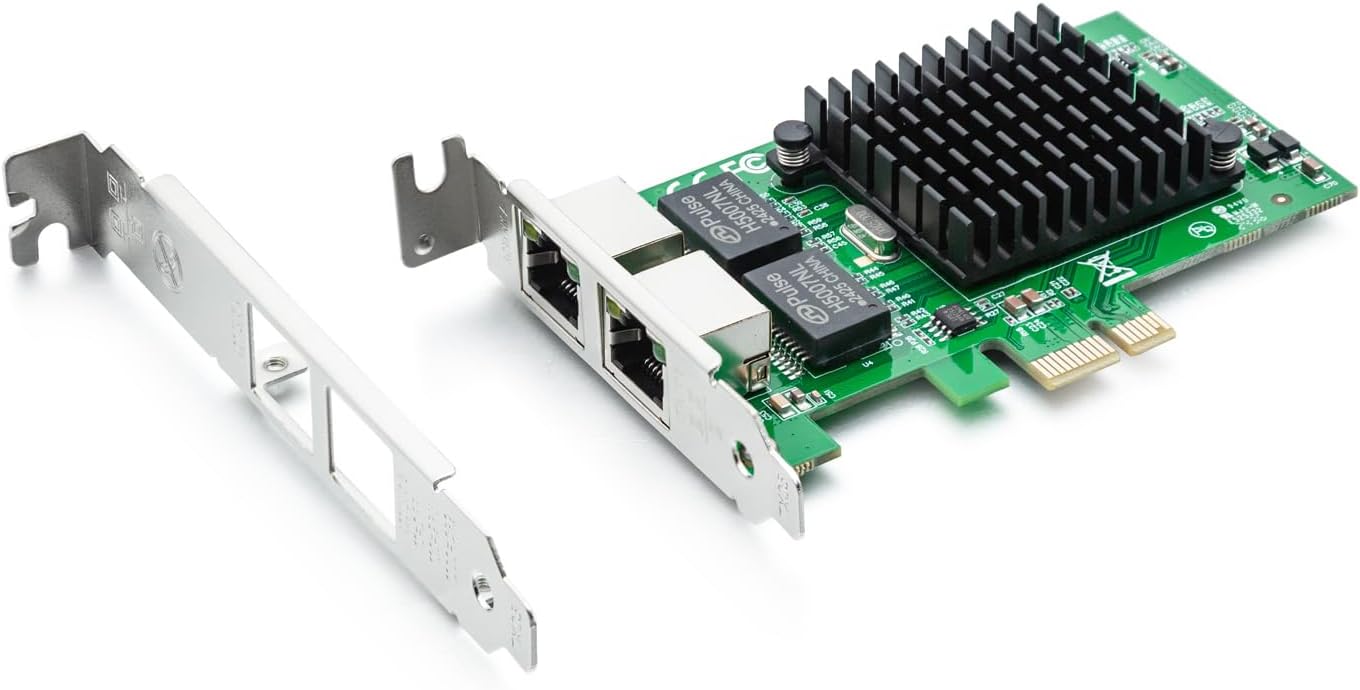
The 10Gtek Gigabit Ethernet Network Adapter features the Intel 82576 chip delivering intelligent offloads and stable server performance. With dual RJ45 copper ports supporting Cat5+ cables up to 100m and PCIe 2.0 x1 interface, it offers versatile, high-speed connectivity compatible with multiple OS platforms. Designed for easy installation with included low-profile brackets, itโs a reliable choice for professionals seeking robust network upgrades backed by a 3-year warranty and lifetime support.


| ASIN | B01LXTF48X |
| Best Sellers Rank | #29 in Internal Computer Networking Cards |
| Brand | 10Gtek |
| Color | X1 |
| Compatible Devices | Server, Desktop |
| Compatible Operating System Family | Linux, Windows |
| Customer Reviews | 4.6 out of 5 stars 325 Reviews |
| Data Link Protocol | Ethernet |
| Data Transfer Rate | 1000 Megabytes Per Second |
| Hardware Interface | PCIE x 1 |
| Item Weight | 82 Grams |
| Manufacturer | 10Gtek |
| Mfr Part Number | 82576-2T-X1(E1G42ET)-(Intel-1pc) |
| Model Number | 8541588131 |
B**.
is same as Intel 82576 Gigabit Network Connection adapter
Very good product and working fine with pfsense and good performance with suricata IPS inline mode. pciconf -lcv #Output of pciconf command on freebsd. igb2@pci0:3:0:0: class=0x020000 card=0xa03c8086 chip=0x10c98086 rev=0x01 hdr=0x00 vendor = 'Intel Corporation' device = '82576 Gigabit Network Connection' class = network subclass = ethernet cap 01[40] = powerspec 3 supports D0 D3 current D0 cap 05[50] = MSI supports 1 message, 64 bit, vector masks cap 11[70] = MSI-X supports 10 messages, enabled Table in map 0x1c[0x0], PBA in map 0x1c[0x2000] cap 10[a0] = PCI-Express 2 endpoint max data 128(512) FLR link x1(x4) speed 2.5(2.5) ASPM disabled(L0s/L1) ecap 0001[100] = AER 1 0 fatal 0 non-fatal 1 corrected ecap 0003[140] = Serial 1 6cb311ffff1b17c0 ecap 000e[150] = ARI 1 ecap 0010[160] = SR-IOV 1 IOV disabled, Memory Space disabled, ARI disabled 0 VFs configured out of 8 supported First VF RID Offset 0x0180, VF RID Stride 0x0002 VF Device ID 0x10ca Page Sizes: 4096 (enabled), 8192, 65536, 262144, 1048576, 4194304 igb3@pci0:3:0:1: class=0x020000 card=0xa03c8086 chip=0x10c98086 rev=0x01 hdr=0x00 vendor = 'Intel Corporation' device = '82576 Gigabit Network Connection' class = network subclass = ethernet cap 01[40] = powerspec 3 supports D0 D3 current D0 cap 05[50] = MSI supports 1 message, 64 bit, vector masks cap 11[70] = MSI-X supports 10 messages, enabled Table in map 0x1c[0x0], PBA in map 0x1c[0x2000] cap 10[a0] = PCI-Express 2 endpoint max data 128(512) FLR link x1(x4) speed 2.5(2.5) ASPM disabled(L0s/L1) ecap 0001[100] = AER 1 0 fatal 0 non-fatal 1 corrected ecap 0003[140] = Serial 1 6cb311ffff1b17c0 ecap 000e[150] = ARI 1 ecap 0010[160] = SR-IOV 1 IOV disabled, Memory Space disabled, ARI disabled 0 VFs configured out of 8 supported First VF RID Offset 0x0180, VF RID Stride 0x0002 VF Device ID 0x10ca Page Sizes: 4096 (enabled), 8192, 65536, 262144, 1048576, 4194304
J**E
Works Great In Proxmox
In my homelab, I have a pretty robust server based around Proxmox 7.1, an AMD 5950X and 128GB of RAM. It's a sweet little playground. I wanted to play around with virtualized firewalls, particularly PFSense. The cheapest way I could find to do it was by adding NIC's to my existing server. I selected this dual NIC primarily because it used an x1 PCIe interface. My mainboard has two of these slots. The 4 port version is an x4 PCIe and my mainboard has none of these, meaning I'd have to use the x16 slot. I generally prefer to reserve my higher end x16 PCI slots for more capable hardware, not a basic 1G multi-NIC. Install was standard PCIe, about as simple as it gets. I read the reviews indicating compatibility with Proxmox and I can attest that it works well in my 7.1 build. I had the typical issue where Linux's dynamic network interface monitoring feature jacked up my interface name and bridge configuration. Easily fixed with a trip to /etc/network/interfaces though. (And to be sure, this is a Linux issue, not a hardware one.) I've had my setup going for a few months now with no troubles. I don't know much about this network card, such as who makes it or where to get drivers that I didn't need in Proxmox. That hasn't seemed to matter. Oh, and if you're interested in virtualized firewalls, I'd encourage you to explore it. I've had a lot of fun with PFSense so far.
J**O
Works well with pfSense
I am using the network board in a running a pfSense firewall. It is providing firewall services for a medium size public library. Just a bit of volunteerism, so I appreacated the extremely rea.sonable price! Since the board features an Intel chipset, it is highly compatible with both pfSense (which does not like realtek network cards). The board has performed flawlessly.
S**S
Works great with pfSense
If you use pfSense you're probably aware that nearly everybody recommends Intel over Realtek. I knew this going in, but I'd never had a problem with Realtek on any other platform so I ignored those warnings when I switched to pfSense. Things were actually stable for the most part, but I kept experiencing some very slight packet loss (less than 0.5%). I knew the hardware was good and I adjusted every pfSense tunable I could, but nothing seemed to fix it. Finally I decided to try an intel NIC. I purchased the dual-port PCI-E x1 version from here since it was much cheaper than most of the "legit" Intel cards. Long story short, it works! Packet loss is gone and I can easily saturate my gigabit fiber connection (one port is WAN and the other LAN). I still wish pfSense played nice with perfectly good realtek hardware, but at least there is this reasonably priced "intel" hardware.
C**N
TrueNAS setup
Not a technical review but my experience from being a sudo-tech. I have a TrueNAS only to host content for Plex. If Plex wasnโt a thing I would never have built two machines over the last seven years. The first one was dated two years ago easily so I had to upgrade. I bought a older MB but still lights out better than before- a ASRock B550 Pro4. What I didnโt know was that MB has a RealTek ethernet chip. I pulled everything in and all was well. I went to move data and my network started to drop. After seeing that I saw an error on the TrueNAS about the network. After researching the problem was the RealTek 2.5. I then bought an Intel 2.5 and found that those donโt have proper driver so that was returned. Then I found reviews about this 1G card and bought it. Immediately plugged in and worked with no extra effort from me. Moved big data files with no errors. I was relieved. How long will this last? I will see. I wish I could have gotten the 2.5G to work to stay up to date but that is fine. On to the next problem!
R**O
VLAN tagging on Windows -- Intel driver won't load but there's a way around it.
I almost returned this NIC. I wanted to do VLAN tagging on Windows 10 but could not get the Intel drivers to load, even the ones that come on the CD. It just doesn't detect an Intel NIC. You'll have to have Hyper-V enabled to get this working, even if you don't plan on running any hosts. Using en elevated Powershell console In Hyper-V, add a virtual switch including this physical NIC. I'm calling it IntelTAG Add-VMNetworkAdapter -ManagementOS -Name VLAN200 -Switchname "IntelTAG" //This will add a virtual adapter to the host system (windows 10) assigning it to the virtual switch of IntelTAG Set-VMNetworkAdapterVlan -ManagementOS -VMNetworkAdapterName VLAN200 -Access -VlanID 200 This tags the virtual adapter "VLAN200" with the 802.1 VLAN ID of 200 Done. You can remove the subsequent adapter of "IntelTAG" that will show up under network adapters. Works like a champ. Hope this saves someone time and aggravation.
T**S
Great network card
I have been using this network card for about a week now and it seems to be reliable. I haven't had any hardware issues yet with it. One concern is that it is almost large enough to touch my GPU. However, they don't actually contact, and it hasn't been an issue.
M**A
Worked flawlessly
I've been having a lot of trouble with my onboard ethernet connection. My pc could see that it was connected but I could never get an IP address or internet connection from my router. This started all of a sudden. After checking the cables, drivers and windows updates I couldn't find anything wrong so I bought this item. Windows 10 recognized it immediately and I didn't have to install any drivers from the provided disk. Now I have a FAST internet connection! I hadn't noticed how bad the speed had become until I got this one. Maybe my onboard ethernet had been going bad for a while but I don't know. This card worked great for me.
A**A
No conecta a 1gigabit
La tajerta funciona tiene 2 puertos independientes, pero no importa si usas linux o windows, la tajeta dice que puede funcionar a 1gigabit, pero jamas enlaza a 1gbit, enlaza a 100mbit, ahi mismo donde otras tarjetas funcionan bien a 1gbit, esta no.
S**G
Use it for pfsense and work right out of the box
A**H
100% recommend
I have purchased 3 of these at this point. Works like a charm!
G**E
One nic low link speed
After multiple hours of trouble shooting, one of the NICs would always link at 100Mbps.
A**E
10Gtec Intel 82576 Gigabit Adapter
A very good card but it is 1.25 gb It says on the card 1 gb You also list the same card as 1 gb You should remove the 1.25 gb listing Minor detail 1 gb plenty fast
Trustpilot
2 weeks ago
3 weeks ago