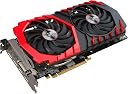
🎯 Level up your game with MSI’s fiery RX 480 — where power meets style and VR dreams come alive!
The MSI Radeon RX 480 GAMING X 4G is a 4GB GDDR5 graphics card built on 14nm FinFET technology featuring the Twin Frozr VI cooling system, a custom 6-phase PCB for enhanced overclocking, and full VR readiness. It supports DirectX 12, AMD FreeSync, and HDR, delivering smooth 1080p to 1440p gaming performance with customizable RGB lighting and Crossfire multi-GPU capability, making it a top-tier choice for budget-conscious gamers seeking high-end features.


| ASIN | B01KIZUF7Y |
| Antenna Location | Gaming |
| Best Sellers Rank | #5,116 in Computer Graphics Cards |
| Brand | msi |
| Built-In Media | Cables and Connectors, Graphics Card, Quick Setup Guide |
| Compatible Devices | Desktop |
| Customer Reviews | 4.5 out of 5 stars 920 Reviews |
| Display Resolution Maximum | 1920x1080 or higher |
| Global Trade Identification Number | 00824142132524 |
| Graphics Card Interface | PCI Express |
| Graphics Card Ram | 4096 MB |
| Graphics Coprocessor | gddr5 |
| Graphics Description | MSI GAMING Radeon RX 480 GDDR5 4GB CrossFire VR Ready FinFET DirectX 12 Graphics Card (RX 480 GAMING X 4G) |
| Graphics Processor Manufacturer | AMD |
| Graphics RAM Type | GDDR5 |
| Graphics Ram Size | 4096 MB |
| Graphics Ram Type | GDDR5 |
| Item Type Name | Video Card |
| Item Weight | 3.5 Pounds |
| Manufacturer | MSI |
| Memory Clock Speed | 7100 MHz |
| Model Name | Radeon RX 480 GAMING X 4G |
| Number of Fans | 2 |
| UPC | 824142132524 |
| Video Output Interface | DVI, DisplayPort, HDMI |
| Video Processor | AMD |
M**N
Best High End Card For The Price, But This Design Has Bad Default Cooling.
Simply put: If you don't have the money to spend nearly a thousand dollars for the best graphics card out there, this card for 200$ is the next best thing. Its a great card for playing games at 1080p on high to ultra settings. And you can play a good amount of modern games at 1440p with high settings all while getting smooth 60 FPS. This is the best high end card available right now for the price. And for 4GB vram is more than enough for most games, unless you want the super high detail some games carry, in which case, you should spend more for the 8GB model. Since those setting are purely based on vram. UPDATE Okay after spending sometime with this card, I ran into one major issue, overheating. As you might have read elsewhere, this card gets very hot, very fast. It quickly goes to 80-84 degrees, and if you don't have good airflow in your case, the card will overheat and cause a black screen crash, forcing you to hard reset the PC. I have a cheap old case I've been using for a very long time. The card's limit is 90 degrees. The problem is in the design that MSI has done. The default cooling method has the fans on the card not spinning while idle, and the fans turn one once the card goes over 60 degrees. The problem is, because the card gets hot fast, the fans don't spin fast enough to cool the heat. It doesn't even spin at 100 percent unless its about to crash. Not good. Fortunately there is a fix, I downloaded MSI Afterburner program. It's completely free and widely used. I used this program to create a custom fan profile to manual adjust the cooling method. I have the fans always spinning at 40 percent while idle, which you hardly hear, and the fans spin at 100 percent once it goes over 60 degrees. The result is idle temps at 30-35 and load temps at 65-70, and 75 at most. So my black screen crashes have stopped. Was thinking about taking a star away for the poor cooling design, but the benefits from the card are still great, so I'll keep it at 5 stars... for now.
N**K
The MSI Rx 480 Gaming X 8GB GPU is amazing. Much better than my old MSI R9 380
The MSI Rx 480 Gaming X 8GB GPU is amazing. Much better than my old MSI R9 380. I can definitely enjoy my games pretty much maxed out at 1080p, and I absolutely enjoy it. I use Afterburner for a custom fan curve, and have noticed that even under heavy load, this RX runs much cooler than my old R9 did. The power consumption is much less that the earlier generation as well, which lends itself to the cooler performance. I am a huge "fan" of the MSI TwinFrozr cooling solution. It looks better than those on the competitor cards, such as ASUS or EVGA, and it super quiet. Yes, this card is a little large, but if you read the dimensions, you should be aware of its size. measure your case before hand. This is user issue, not MSI issue. This card is a little longer and wider than my R9 380, but it's not obnoxiously heavy. The lights on the card are cool. The R9 didn't light up along the edges of the cooler like this one does. I do wish I didn't have to use MSI Gaming App to control the LED though, since I cannot have Afterburner and MSI Gaming App working at the same time. Sorry MSI, but Afterburner is my app for fan curve and OC. I wish you'd have the app for LED only, so it wouldn't mess with anything else from Afterburner. I attached a picture of my Unigine Valley run. This is on stock FX 6350, no OC on either the CPU or the GPU. Haven't had time to mess with OC much, and can provide an update once Ryzen arrives. Great card. I will be purchasing another for Crossfire in the future. *** Update, so I did purchase another for Crossfire. I've been waiting on one last part to assemble my new PC. The only thing I'm dissappointed in isn't the product, but the reseller. They aren't supporting the AMD promotion for free Doom with purchase of an RX 480 GPU. Kind of wish I could return this and purchase through Newegg; however, after the cost of returning and the slightly higher price on Newegg, I could just buy Doom. Kind of lame. I contacted them, and they stated they don't support the promo. Otherwise, great products. MSI knows what they are doing.
K**.
High performance to price ratio, with a caveat
When you shell out your big bucks for a GPU upgrade, you generally want to do your research beforehand whether the graphics card is compatible with your motherboard first. I sure didn't, and my brother and I spent a few days figuring out why his display simply would not show up despite all the technical specs pointing at fine compatibility. It turns out it all came down to flashing the motherboard's BIOS with a newer update which allowed the GPU to function correctly. If you've got an old motherboard, but you're pretty sure it's compatible with the RX 470, you need a lot of courage to pull that BIOS trigger. With that said, once you actually do have it installed, it's a pretty good card. It runs "quietly" for the most part, likely due to its lower power consumption to performance ratio over older cards. You won't hear the fan rev up too much unless you're playing some graphically intense games or mining bitcoins or something. I don't know what you people do, I'm not your dad. With regards to the performance of the card itself, you may find yourself impressed, but not surprised. At this price, you know you're getting into "high end" gaming gear, and the RX 470 fits the bill. If you're a CS:GO man like my brother, you'll enjoy having framerates higher than 100 per second. Of course, you won't see the benefit of that unless you have a monitor with a refresh rate higher than 60Hz, but the STABILITY is key, especially in fast twitch shooters. Lastly, like many AMD cards, you can CrossFire this thing with another AMD card, though just the one by itself is good enough. Many hardware buffs will tell you that adding additional GPUs in series will indeed increase your performance, but at some seriously diminishing returns. If you want more power than this card alone can get you, just save your money and get a later model from AMD. Your extra PCI slot won't explode from underuse. Otherwise, this is a nice buy for the price.
T**N
Overclocks very well, was able to attain 1.4 Ghz on air cooling.
First thing I did after installing all drivers was to see its overclock limits. So far I've been able to overclock: GPU: 1405mhz VRAM: 2200mhz Cooling: Air Core voltage: 1250mV Original clock setting: GPU: 1303mhz VRAM: 2000mhz Core voltage: 1081mV If you want to overclock this card past 1400mhz, make sure you put it on water cooling, and yes, it's true this card uses a huge amount of power if you decide to overclock it. It uses an 8-pin power connector so under full load, the original manufacture settings peaked at 180 watts (yes, I know they claim 150 watts, but real world reviews shows that these cards suck more power out of the PCIe slots than the claimed 75 watts). Overclocked, I was peaking at 270 watts under full load. I'm using a 725 Watt PSU (the 12 volt rail alone provides 576 watts - more than enough for both power hungry CPU and GPU) For some odd reason, this card begins to act weird near 60 degrees C. So your best bet is to keep it happy and cool below 55 degrees C. Make sure your fan speed settings are manually set according to temperature, the default zero-spin quiet operation on a card like this is a bad thing. It puts out tons of heat quickly. Within seconds it can shoot from 37 degrees C. to 55+ degrees. Overall it's an excellent card so far, the only thing is AMD isn't very keen on keeping bugs out of their drivers and utility software, but the hardware is fine. I've had my mouse pointer morph into some odd black box, then I googled and found out other people were having this problem too. I went directly to AMD's website and installed their latest drivers and that black box disappeared. Just make sure you're up to date (up to minute) with the drivers for this card, because it's kind of finicky. I'm running Windows 7 Pro x64, btw. Just keep this furnace happy by keeping the fans spinning (NO ZERO SPIN! bad bad bad!) and drivers up to date. I keep mine at a minimum of 750rpm at all times. These fans can hit 2500-2600 rpm at full speed. As for overclocking software, I'm using MSI Afterburner, but I'm also using Crimson to turn on features like: AMD Freesync and Virtual Super Resolution. AMD has their own overclocking software that comes with the drivers called Wattman, but I'm experienced in overclocking with MSI's Afterburner so I use it instead. System specs: CPU: AMD FX8350 @ 4.2Ghz RAM: Team Elite 4x4GB 1600mhz MOBO: Gigabyte 990FXA-UD3 Rev. 4.0 OS Boot Drive: Dual 256GB SSD in RAID 0 Storage: WD 4TB and Hitachi 2TB Current GPU: MSI RX 480 Gamer X 8GB Former GPU: EVGA GT 740 Super Clock 4GB PSU: Sentey XPLUS 725W
B**E
AMAZING
I don't know what the bad reviews are based on, but this card rocks! I've played about 3 hours of DOOM tonight with ultra settings at 3160p and have averaged 35-40 fps. Afterburner shows the temp never getting above 80c, and the fan maxed at 75%. This is the 4GB version. PROS: * Plays games at 4k when most say it won't. * For less intensive games the fan doesn't even need to be on. * Quality construction, doesn't feel flimsy at all. * Worked out of the box. Plugged it in, updated my drivers all was good. * Doom with Vulkan API is blazing fast. * Every game I have installed looks incredible at 4k. * At 1080p I see fps from 70+ easy. CONS: * Fan is a little noisy (I have my PC in the family room and although they noted it was a little loud, it didn't bother anyone). I can't say enough how impressed I am. I had all kinds of worries prior to receiving it due to some bad reviews. I was very worried about the temperature, and noise. Some reviews said it crashed there machines. I've seen none of that. I don't know if this is an issue with overclocking but I see no reason to mess with that, it is incredible as it is. For reference here are my specs: Gateway DX4870 i5-3330 16GB ram Corsair VS500 PSU LG 4k Monitor
J**Z
Great Card for a Good Price
I am a gamer, but truth be told I don't get bent out of shape over having the highest visuals and frame rates - as long as it's playable, I'm happy. That said, I've been running a 2 GB HD7870 for longer than I care to admit. It's been generally getting the job done, but some upcoming games have had be thinking it's time to start the piecemeal upgrade process. A bit of testing suggested to me that the GPU was my main bottleneck, so I decided to start there. I'm an AMD guy, and the reasonably priced performance of the RX 480 cards looked like they would give me the most bang for my buck. After some research and review reading, I settled on this card, the 8GB MSI GAMING Radeon RX 480. I have to say that I could not be happier with my decision. The performance difference has been night and day. Even though my system is still running on an FX 4130 (the next component in line for an upgrade), I'm hitting 60 FPS at high and ultra settings across a wide range of games. DOOM under Vulkan at ultra hovers around 100 FPS. Unmodded Fallout 4 at ultra is pretty steady at 60 (and what dips I experience I'm blaming the CPU for). Mad Max is rock steady at 60 on ultra. I did have one issue, however. I have a native 1080 monitor, but for some reason I could not get any games to run at 1080 initially. I did a clean reinstall of the drivers and CCC, but to no avail. In the end, I discovered that creating a custom resolution of 1920x1080 (again, despite that being native) in CCC fixed the problem. Despite that minor issue, I would absolutely recommend this card, and am even considering getting a second one to Crossfire - after I upgrade my CPU.
F**F
AMD + MSI = The Game Changer! This is the GPU we have been waiting for.
Ordered 2 of these opposed to 1 MSI GTX 1070. I was hesitant at first due to the known compatibility issues with AMD cards over the years, but I have to say - Way to go AMD and MSI!!! MSI is by far the leading edge for Gaming GPU's right now. Love the Black/Red design and the RGB lighting, which you can set to any color, really sets this off in a nice case. The fans are the patented Twin Frozr fans and the are the quietest fans I have ever heard and they keep my GPU's at 40 - 53 degrees! Nice design, sturdy, reliable, the list could go on. Now the moment where this review can go either way. If you are looking to play games at 4K resolution with ultra settings, these cards are probably not for you. I was getting anywhere from 40 to 60 fps on a wide variety of titles (new and old). However for the price for 2 of these (roughly $550 after mail in rebate, hurry that will be ending soon) these do spectacular at 1080p and 1440p with all settings on ultra. If you are looking for 4K gaming go and spend more money on either a single GTX 1080 for $750 or buy 2 GTX 1070's for $900 or so. You will get roughly 60 - 90 fps at 4K with those setups. Now all in all for the value with these cards, this is the way to go for enthusiasts and professionals alike. I have no cons for this product because for $250 you can not find a better performing or even more appealing card than the MSI Gaming X RX 480 8GB you just can't. Oh and by the way being an AMD product you get to take full advantage of FreeSync technology. FreeSync is easily 2 to 3 hundred dollars cheaper than Gsync and in my actual and honest opinion works just as good. I currently use the Acer Curved 34-inch UltraWide QHD (3440 x 1440) Display with 21:9 Aspect Ratio (XR341CK) and OMG its amazing.
M**S
Working great, OC to 390 2150 without touching voltages.
Picked this up to swap out a pair of 6850's. Parts: MSI 890FXA-GD65 Team Vulcan ddr3 1600 2X8GB ram AMD FX-8350 CoolerMaster Hyper 212EVO PNY 120GB SSD WD Black 250GB HDD 750Watt PSU Windows 7 65" LG 4K TV as monitor Dropped it in and installed the latest Catalyst drivers and was off and running. Ran at stock speeds to break it in for a few days, did a little gaming and cryptomining. Then I started to throttle it up a little, stock clocking is already over factory and was able to take it up to 1390 without a sweat. Gaming it stays around 60c, mining nicehash algo gets to around 53c and getting around a 255 to 260 H/s. Voltage is set to auto so they are whatever the factory set them at. I am sure I could bump them up and go even higher, at 1400 it gets unstable with driver crashes. Running Overwatch on maxed settings at 4K resolution with 75% render scale and getting 50 to 75 FPS in game. Set WoW to 4K and maxed the settings and was able to bring it down to 15 FPS but toning down the AA brought it up to a stable 60FPS in the trees around Elwynn and Stormwind. Have not done much else for newer games testing but pretty much everything else I have can max their settings at 4K resolutions. I can stream to twitch using OBS studio and see MAYBE 1-2 FPS drop in framerate but honestly well within the margin of error and this is while downsizing the stream to 1080p. I am EXTREMELY happy with it overall and some of my setup is likely holding it back not to mention that I the OS has been well used before installing this card. When I swap out the current SSD/HDD combo to a larger SSD and a fresh install of windows it will be even better.
Trustpilot
3 weeks ago
2 weeks ago