We remain fully operational. Our teams are working around the clock to ensure your deliveries continue safely.

DOWNLOAD THE APP


Copyright © 2025 Desertcart Holdings Limited
DOWNLOAD THE APP
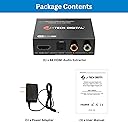
![J-Tech Digital HDMI Audio Extractor 4K 60Hz HDMI to Optical SPDIF + RCA, Supports HDMI ARC Dolby Digital DTS CEC HDCP 1.4 [JTD4KATSW]](https://m.media-amazon.com/images/I/618hqcoSvkL._AC_SL3840_.jpg)


Buy anything from 5,000+ international stores. One checkout price. No surprise fees. Join 2M+ shoppers on Desertcart.
Desertcart purchases this item on your behalf and handles shipping, customs, and support to South Africa.
🎬 Elevate your AV game — don’t just watch, experience every pixel and sound wave!
The J-Tech Digital HDMI Audio Extractor delivers pristine 4K 60Hz video pass-through while extracting high-quality audio via Optical SPDIF and RCA outputs. Supporting HDMI ARC and Dolby Digital/DTS 5.1 formats, it offers customizable EDID settings to perfectly match your AV setup. Designed for seamless integration with home theaters and multi-zone audio systems, it comes backed by a 1-year warranty and free lifetime technical support from J-Tech Digital’s Texas-based team.


| ASIN | B00YHS5E6Q |
| Best Sellers Rank | #219 in Video Converters |
| Brand Name | J-Tech Digital |
| Customer Reviews | 4.1 4.1 out of 5 stars (468) |
| Interface | HDMI |
| Item Dimensions L x W | 3.3"L x 2.4"W |
| Manufacturer | J-TECH DIGITAL |
| Material Type | Plastic |
| Maximum Supply Voltage | 5 Volts |
| Minimum Supply Voltage | 5 Volts (DC) |
| Mounting Type | Tabletop |
| Number of Channels | 3 |
| Number of Pins | 19 |
| UPC | 766150277340 |
| Unit Count | 1 Count |
| Warranty Description | ✔𝐅𝐑𝐄𝐄 𝐋𝐈𝐅𝐄𝐓𝐈𝐌𝐄 𝐒𝐔𝐏𝐏𝐎𝐑𝐓: All J-Tech Digital products include a 1-year manufacturer warranty and free lifetime technical support from our customer support team located in Sugar Land (just outside of Houston) in the great state of TEXAS! We are available Monday through Friday: 9AM - 6PM CST. Contact us by (888) 610-2818 OR [email protected]. |
E**8
they work just fine. No worries
This little gadget really fixed my home theater problem. All the new receivers have HDMI cables, but in many makes, sound zones 2 and/or 3 cannot handle digital audio. I wanted to play music from my Roku both in zone 1 (no problem) and zone 2 (no way). So, I put this box in line between my Roku and my receiver, which are connected with HDMI cables. It takes the digital sound from the HDMI cable and directs it to the analog jacks on the box. Then I plugged the wireless transmitter that sends the signal to my remote speakers directly into the box and, presto, they work just fine. No worries. While the box directs the sound that is on the HDMI cable to its analog jacks, it leaves the sound in the HDMI out jack so it also goes into my receiver and plays on my home theater speakers.
G**N
Great functionality and high quality sound
I used this to replace an FiiO D3 (D03K) DAC converter. Although FiiO D3 worked fine, I was bothered by the fact that it did not have HDMI input and bypass. I used FiiO D3 along with Amazon Fire TV which has HDMI output, and no separate audio output (HDMI itself carries both the video and audio, as usual). With FiiO D3, I had to rely on the TV's optical output. It worked fine, but I'm concerned that the TV's optical does not output high enough quality sound due to its limited resolution. This product, on other hand, extracts high-quality audio from HDMI, and outputs analog sound through a pair of RCA, which can be connected to the amplifier directly. Sound quality is very high. I'm not a so-called audiophile, but I do use a highly purposeful integrated amplifier with some fairly good speakers. I feel they are a good combination. I'm no longer worried about suffering from the limitation of TV optical signal.
F**O
Works with A/V receiver and Sonos playbar
I am using this to connect a Sonos playbar to an Onkyo A/V receiver. The Onkyo receiver is a year old, and we have 5 HDMI components connected to it: a DVR, DVD/Blu-ray, Roku, and cables for occasionally hooking up the laptop and the kindle fire. We wanted to get rid of the old big bulky speakers and be able to have music throughout the house with the Sonos system. I bought a Sonos playbar to start with. The Sonos playbar is intended to replace a receiver, with your components hooked up to the HDMI ports on the TV, the audio to be output through an optical cable to the Sonos playbar. Problem is, our TV only has 2 HDMI outputs, and I did not want to fuss with a switcher. The other problem is, our receiver does not have an optical out port. So, I read the reviews and followed the advice of others who had done this, and it is working well. BUT--first make sure you are ordering the right one, as there are a couple of similar ones on amazon and I ordered the wrong one the first time. This one has support for ARC and a little button to turn the ARC on. I unknowingly ordered the other one first, and every time I switched the A/V receiver on, I had to unplug and replug in the J-Tech unit in order to have the TV work again. Ordering this one solved that problem; it takes several seconds for everything to come on, but it does work well. Two things I still regret: one is that the volume knob on the receiver does not have any effect any more--the volume is controlled by the Sonos app on your device (in our case, our iPhones), or you can control the volume with the volume buttons on your iPhone itself. The other is that I have to have the TV monitor on whenever using the A/V receiver, even when not viewing anything, like playing the local radio or music from my iPod connected via bluetooth on the A/V receiver. However, I am getting in the habit of listening to the radio over the internet right through the Sonos player, not even using the receiver, and it works great, with an incredible range of free choices. I still have to have the iPod connected to the receiver if I want to hear all my DRM (digital rights management) songs however because they will not play on the Sonos. All said, we are glad to have found this, and thanks to the other reviewers for their advice.
S**R
Good price. Easy to use.
I got this because of the J-Tech brand. They have their own web site, so in case of any issue, I have a way to contact them. But I did not need to. Basically, just plug and play, easy. I used the HDMI input and the RCA audio output. My setup is in a church building hall. I have HDMI source from a laptop. The HDMI video signal goes to projector in the ceiling. The audio signal goes to the building speakers in the hall. So I need to use this device to take in the HDMI from the laptop and output the audio to the speakers using the RCA output. Worked out great. No noticeable delay. I tested with 1080p HDMI signal.
A**R
Pink / purple tinted image when using with Chromecast
Bought this to use with a Chromecast and projector, but the image that it passes through is tinted purple / pink. Saw some other users had the same issue with AppleTV and were able to solve it by switching the output color depth, but unfortunately this is not an option when using a Chromecast. If you're buying for with a Chromecast, I'd suggest looking elsewhere. UPDATE: I returned the J-Tech extractor and purchased a Tendak unit instead (http://www.amazon.com/gp/product/B017B6WFP8). The Tendak works nicely with the Chromecast - no image issue on the projector (verified both 2D & 3D) and clear audio routed to my sound system. I'd recommend the Tendak unit over this: Tendak 4K x 2K HDMI to HDMI and Optical TOSLINK SPDIF + 3.5mm Stereo Audio Extractor Converter HDMI Audio Splitter Adapter(HDMI Input, HDMI + Digital / Analog Audio Output)
A**D
Cumple su función, tal como descrito.
Trustpilot
1 month ago
1 month ago