Desertcart purchases this item on your behalf and handles shipping, customs, and support to South Africa.
🚀 Own your WiFi kingdom—fast, far, and flawlessly connected!
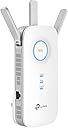
The TP-Link AC1900 WiFi Extender (RE550) supercharges your home network by expanding WiFi coverage up to 2800 sq.ft and supporting 35 devices simultaneously. With dual band speeds up to 1900Mbps, three external antennas, and a gigabit Ethernet port, it ensures ultra-reliable, high-speed connections throughout your space. Intelligent features like signal strength indicators and the TP-Link Tether app make setup and management effortless, delivering seamless, buffer-free internet for work, streaming, and gaming.


| ASIN | B08TLT65WM |
| Best Sellers Rank | #7,335 in Computers ( See Top 100 in Computers ) #48 in Network Repeaters |
| Brand | TP-Link |
| Built-In Media | Power adapter, Ethernet cable |
| Color | White |
| Colour | White |
| Compatible Devices | Extend the range of any Wi-Fi router or wireless access point |
| Connector Type | Wireless |
| Customer Reviews | 4.3 out of 5 stars 17,869 Reviews |
| Data Transfer Rate | 1900 Megabits Per Second |
| Data transfer rate | 1900 Megabits Per Second |
| Frequency | 5 GHz |
| Frequency Band Class | Dual-Band |
| Frequency Bands Supported | 2.4 GHz |
| Frequency band class | Dual-Band |
| Item Dimensions D x W x H | 12.4D x 20.1W x 8.6H centimeters |
| Item Type Name | WiFi Extender |
| Item Weight | 0.51 Pounds |
| Manufacturer | TP-Link |
| Mfr Part Number | RE550 |
| Model Number | RE550 |
| Number of Items | 1 |
| Range | 259 meters |
| Special Features | Extended coverage and multi-device compatibility |
| Special features | Extended coverage and multi-device compatibility |
| UPC | 840030701504 |
| Unit Count | 1 Count |
| Wireless Compability | 802.11a, 802.11ac, 802.11b, 802.11g, 802.11n |
| Wireless communication standard | 802.11a, 802.11ac, 802.11b, 802.11g, 802.11n |
F**H
Sinal de qualidade
Aumentou bem a cobertura e a qualidade do sinal.
K**R
Best purchase in awhile! It saved my marriage!
I live in a fairly small 3 floor (duplex) house, with a small front and back yard. My wifi router from my provider is in the basement. This left me with great reception in the basement, which I rarely spent time in. Medicore reception on the main floor and basically abysmal reception upstairs, where the bedrooms are. That means anytime I would try to use the wifi for anything upstairs I would get kicked to data. Which is immensely annoying and costly as compared to using my wifi, which I already pay for. Then when I got security cameras just outside my front and back door, the wifi is so trash that I would lose connection and be unable to view live feeds. I asked my provider how to improve this, and they sent me two eero wifi boosters, which I would rent from them at an additional $12/month. These boosters can be bought on Amazon for $100 each, but with a rental from a provider I would have paid infinite amounts for them in my lifetime. Anyway, those expensive boosters did not do one thing at all, and I had the provider take them back. When I got this booster, my whole life changed. With one unit, I paid $61 with tax to own. No forever rental fee... I immediately had amazing wifi connection. I had full bars wifi downstairs, main floor, upstairs, outside and I still had access to my wifi from 4 houses away! It was so simple to set up, I am totally unskilled in this tech but I did it in about 10 minutes. It walks you through it so easily and clearly anyone could set one up. It also seems the download speeds are much faster, although I cannot entirely confirm, this is just what I have noticed from Xbox downloads and personal opinion. The app shows you how many devices are connected to the booster, how the quality of the connection is, it has the ability to block devices from the booster and scans for safety and anti-virus. I was thinking you had to have it connected by that special cord but you don't. You can have everything connected and working properly just by plugging the machine into any outlet so long as it is close enough to pull a connection to your wifi. I put mine on the main floor when my router is in the basement and it connects everything dang near to Nantucket. Best sixty bucks spent recently, really thrilled with it. I would recommend this to anyone, especially people tricked into renting a booster from their providers. Do not spent a million dollars over your life, just spend sixty bucks and have something you own and that works. Before I couldn't get wifi upstairs or even if I stepped one foot outside. Now I can get wifi from places so far I won't even be. Buy it!
R**S
Excelente producto!!!!
Hay que seguir con cuidado las instrucciones para configurar el extensor. Lo acabo de usar en zonas de acceso limitado y funciona perfectamente. Señal fuerte y rápida.
C**D
I’m quite impressed
I was in the market for a better range extender, as my old one wasn’t holding up and kept losing its range more regularly, and couldn’t put out a good signal even 15 feet away in a direct line of sight. My Xbox wasn’t liking the old one anymore and is a main reason why I needed to upgrade. I happened to notice a couple of these brand new on a body shops reception desk and immediately searched here for it to read up on later. At the time, they just so happened to be on sale at 40% off and not close to Black Friday. With a range of 2800 square feet, and not hundreds of dollars to get that range; I can even get a pretty decent signal parked in the street, from the other end of a normal middle class house. Well worth the $40 something bucks. Now, I don’t quite have it directly facing my router, more at an angle down the hall next to the kitchen, but even at a 45° angle and probably ~2ft lower than the routers height, I can still get about 250-320 or so during non peak hours of the day, (I have spectrums 1 gig residential plan) sometimes even all weekend. Even approximately 150ft away from the router and out of their recommendations, thanks to 2800 sq ft range, I still average 150mbps or more during normal peak times of the day. Unlike my old range extender, there’s an app to manage, monitor, set up and configure the extender. If there’s any slowness going on, the reboot time is 10x faster than via the old range extenders intranet webpage. I’d still trust ooklas speed test app for tracking and testing the connectivity to make sure it’s as good as it can get; besides, playing a miniature car game while a brief speed test takes place in a separate app is really unnecessary. I can even get notifications if and whenever there’s a new update. I believe that’s automatic anyway. The blue LEDs are quite bright in a completely dark area or room, so I did choose to set up an off and on time. It’s important to me that there are light indicators on, during my normal wake/usage hours. So it automatically turns them on about when the sun rises anyway, and off shortly before getting to sleep. Both manually chosen. Or you can have them off 24/7 by pressing the led button on the re550 itself. It’s been a couple months so far and I’m really impressed with it over all. I truely believe if I had an outlet the same height as my router and I was able to face it directly to my router, I’m sure I could very much get the same neck n neck speeds between the two, wirelessly. So that would make it like having the router on the other end of the house too. Power-line extenders are only as good as the circuit wiring in your walls, otherwise much slower plans would be sufficient.
M**S
Ótimo
Fácil configuração. Muito bom
Trustpilot
2 weeks ago
3 weeks ago