Desertcart purchases this item on your behalf and handles shipping, customs, and support to South Africa.
๐ Elevate your network game with power, speed, and style!
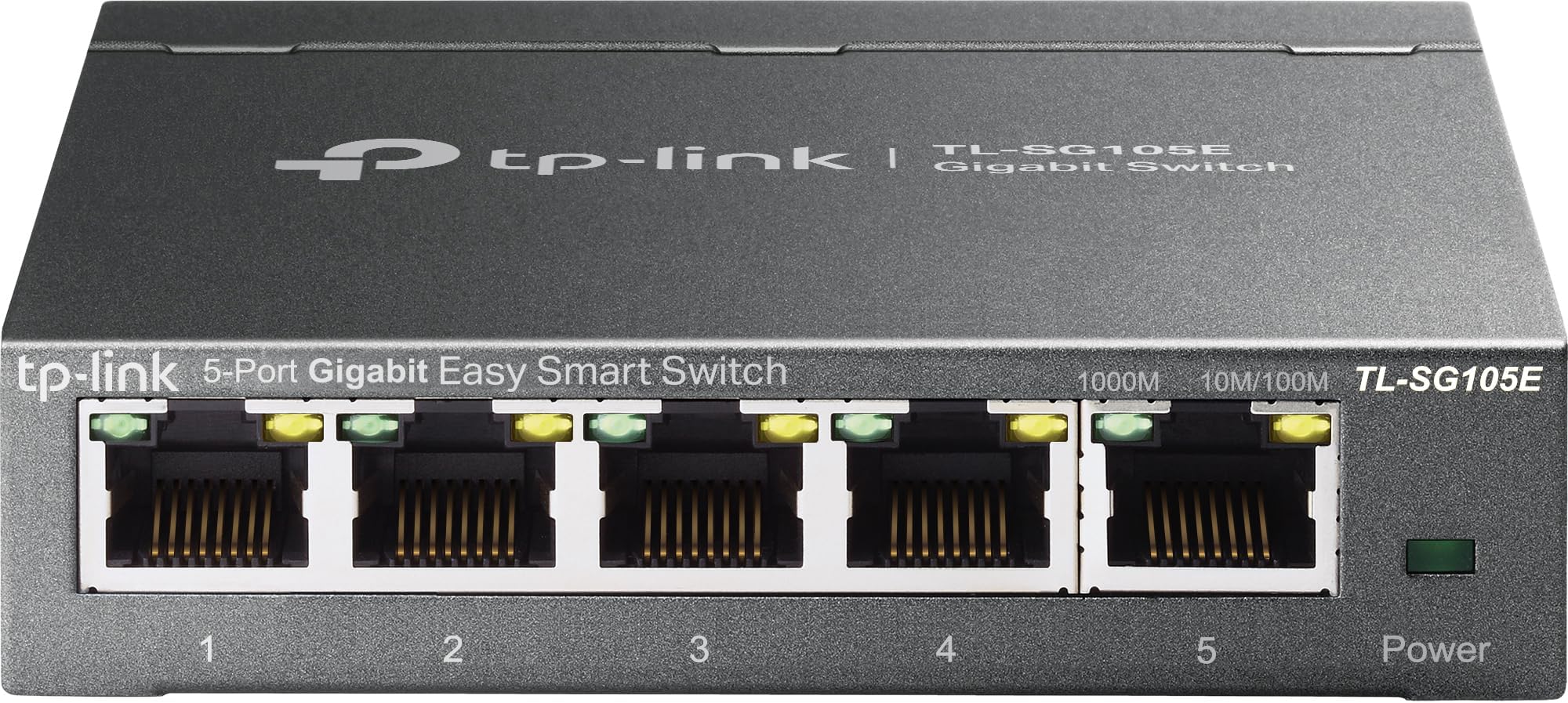
The TP-Link TL-SG105E is a 5-port Gigabit Ethernet switch featuring a durable metal casing and fanless design for silent, reliable operation. It supports advanced network management tools including QoS, VLAN, IGMP snooping, and port mirroring, enabling optimized traffic prioritization and enhanced security. With energy-efficient technology reducing power usage by up to 57%, this plug-and-play switch is perfect for professionals seeking fast, stable, and eco-conscious networking solutions.


| ASIN | B00N0OHEMA |
| Best Sellers Rank | #66 in Computers ( See Top 100 in Computers ) #1 in Network Switches |
| Brand | TP-Link |
| Built-In Media | TL-SG105E |
| Case Material Type | Metal |
| Color | Black |
| Colour | Black |
| Compatible Devices | Desktop, Laptop, Printer, Smartphone, Tablet, Game Consoles |
| Compatible devices | Desktop, Laptop, Printer, Smartphone, Tablet, Game Consoles |
| Current Rating | 1 Amps |
| Customer Reviews | 4.7 out of 5 stars 13,214 Reviews |
| Data Transfer Rate | 1 Gigabits Per Second |
| Global Trade Identification Number | 06935364022037 |
| Importer Contact Information | TP-Link India Private Limited Office No.1, Tower 2, Level 2, Raiaskaran Tech Park, Andheri Kurla Road, M.V Road, Andheri East-400072 Contact: Toll Free 1800-209-4168, [email protected] |
| Included components | TL-SG105E |
| Interface | RJ45 |
| Item Dimensions L x W x H | 9.9L x 9.9W x 2.5H centimeters |
| Item Part Number | 6935364022037, TL-SG105E V2.0 |
| Item Type Name | TL-SG105E 5-Port Desktop Gigabit Unmanaged-Pro Ethernet Switch |
| Item Weight | 0.43 Kilograms |
| Manufacturer | TP-Link |
| Manufacturer Contact Information | 10 Mauchly, Irvine, CA 92618, USA or TP-Link India Private Limited Office No.1, Tower 2, Level 2, Raiaskaran Tech Park, Andheri Kurla Road, M.V Road, Andheri East-400072 |
| Mfr Part Number | 2781095 |
| Model Number | TL-SG105E |
| Number of Items | 1 |
| Number of Packs | 1 |
| Number of Ports | 1 |
| Number of ports | 1 |
| Packer Contact Information | TP-Link Systems Inc. 10 Mauchly, Irvine, CA 92618, USA |
| Platform | No Operating System |
| Product dimensions | 9.9L x 9.9W x 2.5H centimeters |
| Switch Type | unmanaged |
| UPC | 840460604048 |
| Unit Count | 1 Count |
| Upper Temperature Rating | 40 Degrees Celsius |
| Voltage | 220 Volts |
W**D
Quality
Very relatable good quality makes my 4 routers very synchronized .
S**D
ุนู ูู
ุนู ูู
B**E
Solider 5โPortโGigabitโSwitch im Metallgehรคuse
Horch, fรผnf Pforten Gigabit weit, verhandeln flink und klar, AutoโMDI/MDIX beendet Kabelwirr โ wie schรถn, so wunderbar. Einstecken, lรคuft: PlugโandโPlay, kein Zauberbuch vonnรถten, der Datenfluss beginnt sofort, ganz ohne Bittโ und Beten. Im Mantel aus Metall, so ruhig, kompakt und fest, steht er stabil, unbeeindruckt โ ein stiller, treuer Gast. QoS sortiert den Takt, priorisiert, was wichtig ist, IGMPโSnooping bรคndigt Multicast, damit der Stream nicht frisst. Und willst du Feinschliff, fรผhrโ ihn รผber UI mit Sinn oder per EasyโSmartโUtility โ zentral behรคltst duโs drin. Green IT spart Watt um Watt, wenn wenig Last nur zieht, und schont die Steckdosenleiste โ was man im Alltag liebt. โ Stรคrken (fรผr alle, dieโs knapp lieben): - 5ร GigabitโRJ45 mit AutoโNegotiation und AutoโMDI/MDIX. - PlugโandโPlay: sofort einsatzbereit, keine Grundkonfiguration nรถtig. - Robustes Metallgehรคuse fรผr zuverlรคssigen, professionellen Betrieb. - EasyโSmartโFunktionen: QoS und IGMPโSnooping fรผr saubere Streams. - Zentrales Management รผber WebโOberflรคche und EasyโSmartโConfigurationโUtility. - Energieeffiziente โGreen ITโ reduziert den Verbrauch. Hinweise: - โEasy Smartโ = leichtgewichtiges Management; kein voll gemanagter EnterpriseโSwitch. - Fรผr komplexere Setups den Funktionsumfang/Kompatibilitรคt beim Hersteller prรผfen. Fazit des Barden: - Erwartung erfรผllt? Ja โ stabiler GigabitโVerteiler mit sinnvollen SmartโExtras. - Bedienung? Sehr einfach โ lรคuft outโofโtheโbox, Feintuning per UI/Utility. - Empfehlung? Klar โ ideal fรผrs Heimnetz, NAS/Media und kleine Bรผros. - PreisโLeistung? Stark. Kurz & knapp (TL;DR): Solider 5โPortโGigabitโSwitch im Metallgehรคuse mit PlugโandโPlay, QoS und IGMPโSnooping. Lรคsst sich zentral verwalten und arbeitet energieeffizient โ eine zuverlรคssige, unaufgeregte Drehscheibe fรผrs Heimnetz.
A**O
Ottima soluzione basso costo
Non avevo mai acquistato uno switch prima d'ora, e sono stato piacevolmente sorpreso della facilitร e del prodotto in ogni suo aspetto. Piccolo, nascosto dietro alla mia scrivania, senza rumori e con una piccola interfaccia gestionale per settare alcuni parametri che per me sono rimasti invariati. Soliditร , il prodotto รจ in metallo, non scalda e si puรฒ installare in qualunque posizione data l'assenza di parti in movimento. Poca spesa molta resa. Consigliato!
A**E
Does the job
This little switch does the job well, but, it has almost zero features as it is unmanaged. So no security, or anything really. It's basically like have a 1 to 4 ethernet splitter. Anyway, I just needed it to plug in the kids homeschooling computers to a single port on the router. All my security is based on my router and a managed switch I also have and of course on the computers themselves. So, if you don't need any advanced or security features and just need a cheap way to connect upto four devices via ethernet then this little switch is a pretty good choice and solution. It's been running full time 24/7 for about a month and haven't had it lockup or crash or need a reset yet. So it does it's job pretty well. The kids have dropped it off it's perch about 4.5 feet up, a few times and no problems with it. So the durability seems good too. The ports are snug and none seem loose. Cables go in secure and snug. Speed on each pretty is good. Each kid can zoom into class, watch videos in class, and do other demanding things. The switch handles the traffic well. No noticeable errors or drop outs. I'm about to monitor their screens and copy files to and from each computer through the switch without issues. Haven't run into any port issues or blocking issues. I've assigned a reserved local ip address to the switch through the router dhcp server to make life easier. As far as features available in the web interface... Well it's limited but you can set the status (on or off), speed and flow contol on each port individually. You can enable imp snooping do minimal Lag grouping. Port mirroring in a limited state is available if you need that. There is a cable testing feature. And it has loop protection that will block a port of it detects a loop. There are some vlan features as well. Basic vlan where you can put ports into vans (id's 1 to 5). Default is all ports on vlan 1. There is also 802.1Q vlan with id's 1 to 4094 tagged or untagged per port. And you can set the pvid of each port. There is QoS in the form of port based, 802.1P or DSCP/802.1P. There is in and out bandwidth control per port. And finally there is some basic storm control for broadcast messages. Basically, I need almost none of these features for my use and most people won't as they likely just want to connect the switch to a network and use it to be able to plug in multiple devices through a single ethernet port on the network. And right out of the box the switch will do that. You can stop this switch on about 1 min and be up and running with zero configuration. So, I think it's a great price to connect upto 4 computers to my network easily and worry free. Also, for easy setup use port 1 to connect to the router or netwrok then use the other ports for the computers you want to connect. Also note, I use a KVM to remote view and control other computers from my computer on the local netwrok and this switch hasn't given me any issues with that either. Anyway, hope that helps.
A**R
ุญุจูุชู ๐
ุฌูุงุฒ ุฌู ูู ุฌุฏุงู ูุจ ุชูุฒูุน ุงุณูุงู ุงูููุจู ู ู ุงูุฑุงูุชุฑ ู ุน ุซุจุงุช ุงูุณุฑุนู ูุงูู ุญุงูุธู ุน ุงูุจูู
N**R
my honest review
i was in hurry, thats why forgot to take product pictures, still attached few photos and will try to cover all topics IMPORTANT - when you connect router , you need to know its ip address ,just use app made for switch , you can go to tp link site and download "" easy smart configuration utility"" trust me ,their are other ways too but this one is simplest then, simply login , and do the first think go to ip address setting of switch and turn off dhcp and set static ip of switch , and then delete app ,we dont need anymore, to login just use that ip( like i did, i will also post that ) connectivity - all five port support gigabit speed durability - madeup of metal ,and feels solid , its definitely durable size - very small form factor, i think this is perfect size , because smaller than this will make struggle to manage lan, its heavy enough to remain on flat surface when all port are filled testing - i tested , and this switch always delivered solid performance , i can post photo and video but i dont think its required some doubts 1. managed vs unmanaged i personally feel you should go with managed switch , because managed switch gives full control over each port , and good for future ( like you have 2 connection , then you can combine 2 different connection into 1 ) or you might want one port should have priority 2. is it safe to run 24/7 ?? ofcourse, it designed to run 24/7 , and its not like router in which many hardware use ,in switch most of the work is done by chip and cpu hardly does 1% work, and these chip runs many years 3. expected life since their is not that much in switch , all of the work is habdle by chip , so expect 5+ years lifespan 4. does it heat i have 100 mbps connection, and in my case under heavy stress , switch runs cool pros 1. exceeded my expectations , full of features like vakn,qos,, bandwidth control,strom control,vlan etc 2. solid built , feels very good 3. good and bright led light 4. runs cool 5. value for money cons 1. zero cons this is the first time when i have no cons about any product final conclusion - if you stuck and want to buy a solid performance switch and just want 5 port , then this is for you , dont doubt its performance, its looks small but always deliver solid performance go with managed switch ,it gives you full control over switch just think about number of port you required and and connection limit ,and choose accordingly
Trustpilot
1 day ago
5 days ago