Desertcart purchases this item on your behalf and handles shipping, customs, and support to South Africa.
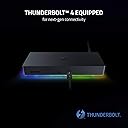
⚡ Power your productivity with the ultimate 10-port Thunderbolt 4 hub!
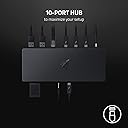
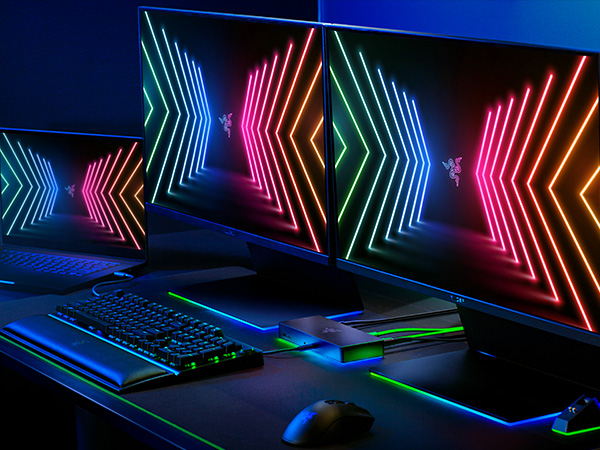
The Razer Thunderbolt 4 Dock is a premium, Thunderbolt 4-certified docking station featuring 10 versatile ports including 4 Thunderbolt 4, USB-A, USB-C, Gigabit Ethernet, and an SD card slot. It supports dual 4K 120Hz or single 5K 60Hz displays, offers pass-through charging to keep your laptop powered, and ensures future-proof compatibility with USB4 and legacy Thunderbolt devices. Designed for professionals craving a clutter-free, high-performance workspace with customizable RGB lighting, this dock delivers blazing 40 Gbps speeds and extensive connectivity in a sleek black chassis.


| ASIN | B091BML59Y |
| Additional Features | Pass Through Charge |
| Best Sellers Rank | #10,602 in Computers & Accessories ( See Top 100 in Computers & Accessories ) #642 in Laptop Docking Stations |
| Brand | Razer |
| Built-In Media | Item |
| Color | Classic Black with RGB Lighting |
| Compatible Devices | Windows and Mac devices, laptops with Thunderbolt 3 or 4 ports |
| Customer Reviews | 3.9 out of 5 stars 385 Reviews |
| Data Transfer Rate | 40 gigabits_per_second |
| Hardware Interface | Ethernet , Thunderbolt , USB 3.0 |
| Item Dimensions L x W x H | 7.48"L x 2.95"W x 1.06"H |
| Item Highlight | Dual 4K or Single 8K Video Output, Mac, and PC Compatible, Thunderbolt 3 & 4 Certified, Chroma |
| Item Type Name | Laptop Docking Station |
| Item Weight | 12 ounces |
| Manufacturer | Razer |
| Mfr Part Number | RC21-01690100-R3U1 |
| Minimum Required Operating System Version | Windows 10 |
| Model Number | RC21-01690100-R3U1 |
| Number of Items | 1 |
| Number of Ports | 10 |
| Operating System | Windows and Mac |
| Special Feature | Pass Through Charge |
| Total USB Ports | 3 |
| Total Usb Ports | 3 |
| UPC | 810056141417 |
| Warranty Description | 1 yer manufacturer |
H**Z
Razer Thunderbolt 4 Dock: Powerhouse Connectivity (but at a Price)
Razer Thunderbolt 4 Dock: Powerhouse Connectivity (but at a Price) Short Verdict: The Razer Thunderbolt 4 Dock is a premium docking station with exceptional performance and versatility, but at a premium price. ⚡ Pros: Blazing Speeds: Thunderbolt 4 ports offer a blistering 40Gbps bandwidth for transferring files and connecting to displays in a flash. Dual Display Powerhouse: Drive a single 8K display or dual 4K displays at 60Hz for stunning visuals and maximized workspace. Port Party: 10 ports total, including Gigabit Ethernet, USB-A, USB-C, and audio jacks, cater to all your peripheral needs. Future-Proof: Thunderbolt 4 compatibility ensures this dock will stay relevant for years to come. Chroma Flair (Optional): The Chroma version boasts customizable RGB lighting to add a personalized touch to your setup. ⚡ Cons: Pricey: This dock comes at a significant cost compared to other Thunderbolt 4 options. Limited Ports: Some power users might miss additional ports like an SD card reader. Size Matters: The bulky design might not be ideal for some desktop setups. Overall: The Razer Thunderbolt 4 Dock is a top-tier contender for users who demand the best in performance, versatility, and style. If you're a creative professional, hardcore gamer, or simply crave a clutter-free desk with powerful connectivity, this dock delivers. However, the hefty price tag and potential port limitations might make it overkill for casual users or those on a tighter budget.
J**L
Great buy, works great, looks amazing. Requires software to get the RGB lights to work.
Great product. This works amazing. I bought this because of the RGB colors. You'll have to download a program to make it work. The monitors work by just plugging them in. This powers my laptop and 2 Monitors at 4k 144hz with zero issues. I highly reccomend this even if you dont have anything else razor.
K**K
Does what’s needed where others don’t.
This is the first TB dock I’ve owned that actually supports two external 4K monitors concurrently at 60Hz. I have one connnected via USB-C directly and the other via USB-C/DisplayPort cable. Also have a USB3 dock attached via the native USB3 ports on back. All working. Finally. **UPDATED: dropped one star. After a few months of use, it gets EXTREMELY hot (like you cannot keep your hand on it) when using two 4K displays with full motion. So hot that the internal USB2.0 controller dies. Going through the RMA process with Razer is PAINFULL. Honestly, who asks for a VIDEO of your peripheral to prove the USB controller has failed. Oy.
H**E
UPDATE: Product didn't even last one year and very disappointing support
Update: 11 months of using the product with intermittent dropouts and now finally stopped doing anything but being an expensive, dumb power hub. No data, no lights. and Razer support has yet to respond to my queries for help. Sorry Razer, done with your product line. Last review:The Razor Thunderbolt 4 Dock looks and performs well for the main function it was designed. It is connected to a MacBook Pro M1. My complaints are a) external drives on the USB ports drop off intermittently causing backups to be missed and a reboot of the dock, and b) it will not power larger devices such as iPad from the auxiliary USB-C ports... iPhone, EarPods, etc. are ok. c) getting tech support help and even registering the device is VERY difficult and I finally gave up and will pass on future Razor products. It is obvious that a lot of thought went into the engineering and I'm sure this is not reflective of all Razor products however, my experience would not be something I would recommend to others.
R**B
Gsync works through the dock!
This dock is the only one I could find that DOES PASS THROUGH GSYNC!! I had previously purchased a Cable Matters dock, and while it worked fine, I was pretty sad that I couldn't use Gsync with my Razer Blade on my gaming monitor with it. So I figured what the heck, might as well just buy the Razer dock to go with my blade even though it's a bit more expensive. Honestly worth every penny, this dock passes through G sync, and it looks cooler on the desk. Also works great with my M1 Macbook Air, having the monitor as an extended display works perfectly fine, ethernet works, everything works on both my Macbook and my Razer Blade. Haven't had any issues!
T**R
Great Thunderbolt 4 Hub for M1 Max MacBook Pro
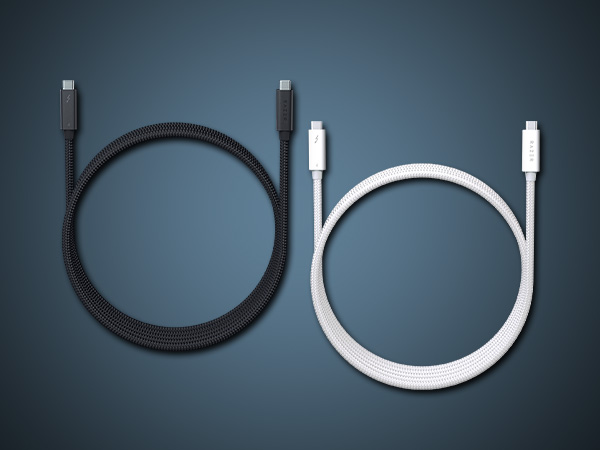
I received my 16 in. M1 Max MacBook Pro (10 cpu cores, 32 GPU cores, 64 Gb unified memory, 2 TB SSD on October 26, 2021, and I have had this Razer dock attached to it since then. I have a Thunderbolt 3 QNAP TVS 872XT NAS, a Pegasus3 R6 Thunderbolt 3 raid 5, a WD Mybook Thunderbolt 6TB, and a Seagate 5TB portable plugged into the hub which is connected to my M1 Max via the supplied Thunderbolt cable. All of the attached HD’s have been tested both plugged directly into the Razer hub and directly into the M1 Max. I see no slow down in the measured drive speeds when using the hub. The hub gets warm but not blazingly hot in use. The hub and all my devices go to sleep when I put the M1 Max to sleep or turn it off. This hub, while not cheap, works beautifully without compromising performance with Thunderbolt and Thunderbolt 3 devices,
O**F
This Dock Does not Deliver on the Dream
There weren't many options in the TB4 arena with as many ports as you could get in 2021 when I bought this, but 2 years later and here I am, on my second device after warranty replacement, not quite happy with my decision. I would not buy this device again. 1) Power Delivery of 90 watts is fine for basic laptops, but Razer gears themselves toward gaming users. My Alienware gaming laptop cannot be powered by this dock...perhaps any. 2) The Ethernet jack dies? randomly. The computer switches to wireless periodically and I have to reinsert the cable to get it to recognize a switch port. 3) The real dream - unplug Alienware, plug in Dell (work) laptop, then reverse later...complete failure. The dock usually goes into a state of complete non-response when I reattach the Alienware. Plug the Dell back in, fine. But then sometimes, the Dell gets ultra-high keyboard latency and repeats when I attach it. The only way to consistently ensure device swapping is to attach things while everything is powered down (unplug the dock) before powering everything back up. If you make a mistake, the dock can be so confused that it takes a couple of back and forth, power-cycling, to get the thing working right again. *Super* frustrating. Keep in mind, this is already a replacement of my original hardware due to a defect in which the DP pass-thru TB/USB-C ports stopped working. I spent a lot of money on this hardware, and I'm here, two years later, hoping to find a commodity replacement with Anker or someone to give me the dream; high-output PD, *lot's* of ports, and consistent device switching with no frustration - no power cycling.
T**M
Odd feature but I love it!
I recently bought a new laptop with thunderbolt 4 and this paired perfectly. Made it easy for 2 separate laptops (gen 3 and 4 thunderbolt) to work with the dual monitor setup that I already had. Pros: lots of ports offer great versatility and functionality. TB displays were recognized right away as gsync devices. It has been a huge help to swap between multiple devices by just moving 1 plug between systems. Cons: Instructions were not very clear that you HAVE to use the front USB C port to connect to your device. Otherwise the dock will not be recognized. Not a huge deal once you know this, but I nearly RMA'd the device as it wasn't showing up as connected. Once I realized that the only port on the device that would take input was the front USB C, everything went smoothly. Just seemed silly to me that it worked that way, but maybe there is a good reason.
J**O
Excelente Dock, si tienes Mac y no quieres luces compra el plateado
El Dock funciona excelente en Mac, el problema es que no se puede configurar como en windows, por lo que es un problema si no quieres las luces, sin embargo la función principal del producto la cumple a la perfección
L**A
Good docking hub
Great device but had to switch to never version with thunderbolt 5 to harness the power of full setup I have. Great quality.
J**N
One wire to rule them all
I recently bought a new razer laptop, and wanted a quick and easy way to connect it back to may core setup. This dock was the only thing out there that I trusted to retain an 8K resolution with a single screen, and it did not disappoint. This was very easy to do out of the box, and literally worked perfectly in 5 minutes. I love that this will also supply power to my laptop, which is not enough when gaming, but good enough for day-to-day. My only wish, is that it had a Displayport, but I was able to solve this with a USB-C to Displayport wire.
O**D
Unstable for Macbook. Not worth the high price
I bought this docking station for my 2021 M1Max Macbook Pro and I had high expectations. Well, my experience is not good at all for this price. My setup includes 1 2K monitor connected using HDMI to USB-c cable, 1 1080 monitor connected using HDMI to USB-c cable, LogiTeck stream cam connected using USB-c, a USB type A blue yeti mic, and Elgato Stream Deck mini connected to USB type A. I have 2 main issues with it: 1- When the Mac wakes up, the monitors' arrangement is a mess. The resolution on the 2K monitor is not correct (it gives 1080 max). The solution for that is to disconnect the docking station from the Macbook and reconnect it again to get the correct arrangement and resolution. 2- all the USB type-A devices are not detected. Cannot use my mic or the stream deck and the solution for that is to disconnect the power from the docking station and connects it again. 3- Sometimes, the streaming cam is not detected and I have to disconnect the power again from the docking station. I tried to check if there is software for this docking station by I found that only synapse 2 is supported for Mac and it does not detect the docking station at all. I have a much cheaper docking station that is not Thunderbolt 4 but it works just fine. I do not have to restart it every time my machine wakes up. Overall I am not satisfied with this product given this high price, I expected a pain-free product otherwise just mention that it is not compatible with Mac.
T**S
Almost perfect, just wishing it had …
BEFORE WE BEGIN I am a Razer superfan. I have more Razer gear than any person who no longer games should have. PROS This dock can support greedy peripherals. I have an ultrawide, ultra high resolution monitor, and this dock allows me to set the native resolution with no issues. It can support my wired keyboard, mouse, headset, camera, and my 3-in-1 mobile device charging station. The Razer Chroma effects are so fun. My keyboard, mouse, headset, and dock all have the coolest colour patterns. It certainly makes work feel like play. CONS More, please! I always feel like my needs are one step beyond the capacity of my current device. I could always use more ports, more power, more everything. I’m not sure if this is a limitation of the dock or a problem with my loyalty to Razer, or simply a glaring reminder that I probably have more tech than I need. I’m sure this dock would be well beyond the needs of the average worker bee. It would certainly be more than enough for my own staff. I might need an intervention instead of a more powerful dock.
Trustpilot
4 days ago
2 weeks ago