Desertcart purchases this item on your behalf and handles shipping, customs, and support to South Africa.
๐ Elevate your network gameโspeed, silence, and simplicity in one sleek switch!
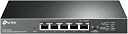
The TP-Link TL-SG105-M2 is a compact, 5-port unmanaged network switch delivering multi-gigabit speeds up to 2.5 Gbps per port with a total switching capacity of 25 Gbps. Featuring auto-negotiation for seamless device compatibility, a fanless metal design for silent operation, and plug-and-play setup, it upgrades your network without costly rewiring. Ideal for professionals demanding fast, reliable, and quiet connectivity, it comes with a 3-year warranty and supports existing Cat5e/Cat6 cables for hassle-free installation.


| ASIN | B08ZHGT2ZP |
| Best Sellers Rank | #31 in Computer Networking Switches |
| Brand | TP-Link |
| Built-In Media | โข 5-Port 2. |
| Case Material Type | Metal |
| Color | Black |
| Compatible Devices | Desktop |
| Current Rating | 1 A |
| Customer Reviews | 4.6 out of 5 stars 916 Reviews |
| Data Transfer Rate | 25 gigabits_per_second |
| EU Spare Part Availability Duration | 3 years |
| Interface | RJ45 |
| Item Dimensions L x W x H | 8.23"L x 4.96"W x 1.02"H |
| Item Type Name | Ethernet Switch |
| Item Weight | 0.56 kg |
| Manufacturer | TP-Link |
| Mfr Part Number | TL-SG105-M2 |
| Model Number | TL-SG105-M2 |
| Number of Ports | 5 |
| Platform | Not Machine Specific |
| Product Dimensions | 8.23"L x 4.96"W x 1.02"H |
| Switch Type | Metal |
| UPC | 840460605335 845973089757 |
| Unit Count | 1 Count |
| Upper Temperature Rating | 40 ยฐC |
| Voltage | 240 volts |
| Warranty Description | Limited Lifetime Warranty |
A**D
Finally, An Easy Way to Get More Than 1 Gigabit
Upgraded my home Internet to 2 gigabit fiber, and home fileserver with SSD storage, so I bought the TP-Link 8-port TL-SG108-M2 and 5-port TL-SG105-M2 to upgrade my home network to multi-gigabit speed. It was easy to swap my old gigabit switches with these TP-Link 2.5 giggers, using my existing ethernet cables. Per-port lights made it obvious which ports run at 2.5 gigabit, 1 gigabit, and 100 megabit. I loved the fan-less design - zero noise coming from these TP-Link switches. I will never buy a fan-based switch again - they collect dust, and eventually die unless kept clean. Speed: Tested throughput extensively using iperf3 on the local network, and speedtest.net for Internet speed. LAN (local network) bandwidth tests reliably 2.3 gigabit average between two computers. Same speed when 2 computers are on the same switch, and when they are connected switch-to-switch. This was a HUGE improvement over a gigabit network which maxed out at about 0.95 gigabits. Was worried whether my investment would actually get close to 2.5 gigabit, especially switch-to-switch, but they did! Two TP-Link switches are linked with a 40-foot in-wall Cat-6 cable, and computers can get 2.3 gigabit between the two switches. Internet speed tested at 2.0 gigabit download and 910 megabit upload with Google Fiber 2 Gig! The TP-Links were fully backward compatible with 1 gigabit and 100 megabit devices and switches. Connected various slower devices including a gigabit switch (1gig), a Ubiquiti AC Lite AP (1gig), a printer (100meg), and voice-over-IP box (100meg). Heat: These TP-Link switches get slightly warm but never hot. Ethernet Adapters: Using Sabrent 2.5 Gigabit NT-S25G USB 3.0 adapters on all my computers, since none of my computers came with 2.5 gigabit as of mid-2021. I had some auto-negotiation issues on bootup, where the adapter would sync at 100 mbit or 1 gbit (not 2.5gig) when the adapter powered on. After boot, I would manually adjust the driver's speed setting from auto-negotiate to 2.5 gigabit, or 2.5 gigabit to auto-negotiate, which would re-sync at 2.5-gig with the switch. Contacted Sabrent support who also believed the issue was with the latest Realtek driver, a fix may be coming soon. Another reviewer here believed the TP-Links are responsible for auto-negotiate issues, it may be a TP-Link issue but I'm not sure. When I connected my TP-Link 2.5 gig switches to each other, they always synced at 2.5 gig. Same with the Google Fiber router's 1/2.5/5/10 port which always auto-negotiated at 2.5 gig. Only my Realtek-chip adapters would sync at lower speed on initial power-on. I figured out that by plugging my 2.5gig adapters into always-on USB 3.0 ports via USB 3.0 hub, kept the adapters locked at 2.5 gigabit even after the PC rebooted. When my adapters did sync at lower speed, a quick re-sync of the driver would fix it. On Windows, Network Connections (Control Panel), double-click the adapter, Configure, Advanced tab, Speed & Duplex, switch it to "2.5 gig full" or "auto-negotiate", either will trigger the adapter to re-try its link to the TP-Link. On Linux, after boot, run: ethtool -s enx002341234567 autoneg on advertise 0x80000000002f (replacing the enx002... with your device name) Ethernet Cables: My rooms have Jadaol flat Cat-6 cables that range in length from 1-foot to 25-feet, all worked with 2.5 gigabit. My home had professionally-installed Cat-6 in-wall cabling, with some cable lengths up to 40 feet long, all worked with 2.5 gigabit. Is this worth the price: If your Internet speed is more than 1 gigabit, then yes! If you transfer files between computers that have SSDs capable of more than 125 megabytes per second, then yes! Otherwise, no. One gigabit is plenty fast for nearly everyone's needs. If you do buy one, you can keep your existing 1 gig switch for your gigabit devices, and plug your multi-gigabit devices into one of these TP-Link 2.5 giggers.
T**4
Works perfectly
Easy to set up, and itโs been working perfectly so far.
L**D
They don't last long
Well, I got this switch sometime at the end of 2023, it lasted to the beginning of 2025. I don't think it's worth the money. I woke up one morning and my network was down, and I looked at the switch, and the only light that was on was the power light. There were no activity lights on any of the ports. I had ethernet cables connected to... so my switch died.
T**N
Fast network speed
TP usual quality. Works great.
J**E
Product plus warranty, plus support equals a great product...
I bought two of these switches and paid the extra money for this product that had a lifetime warranty. I am glad that I did. After a few months of reliable service, one of the switches stopped working. There was no power surge. The lights on the ports indicating usage stopped lighting. I attempted to troubleshoot according the website (unplug all network connections and use one network cable as a jumper between two ports on the switch to check for activity on the ports), but there was no activity. I contacted TP-Link and initiated a warranty claim. I had to register the switch on TP-Link's website and provide photos of the serial number from the unit before an RMA could be processed, but it was a straightforward process once I had the link. I had to provide proof of purchase (easy to do with it in my Amazon history). The process was straightforward and they replaced my faulty switch with a new one. A couple of months after that my second switch did the same thing (bad batch?). Again I contacted TP-Link and repeated the process. Their warranty customer service is top-notch... no trying to shift blame like some other companies. They stood behind their products and I now have two functioning 8-port switches to service my home networking needs. I would give five stars if it weren't for the fact that both switches died inexplicably. They stood behind their warranty and I already bought a smaller five port switch for another need in my home.
C**T
Works great for basic 2.5gb in the home!
Using this as a backbone switch in my new home to enable 2.5gb and it works great! No configuration so nothing to go wrong. It's living in the non climate controlled garage and has never gotten too hot. Made of metal and seems to be high build quality. The wall mounts make it really easy to tuck away in the home and it links up to both 2.5gb and 1gb easily!
B**H
This was the perfect fix for our Fios network. Do ur research.
Totally eliminated bottleneckingand data looping issues to ruin network flawlessly.
M**S
Reliable 2Gb unmanaged switch
Great update for my 2Gb network connection upgrade. Is a little warm but not hot.
T**K
Best value for the money among other 2.5G routers
I recently integrated the TP-Link TL-SG105-M2 into my home setup after getting a new 1.5Gbps Internet connection. If you have a high-end gaming PC, or a Wi-Fi 6/6E router with a 2.5G port, this is one of the most cost-effective ways to actually see those speed benefits. Build Quality & Design: The first thing I noticed is the build quality. It features a heavy-duty metal casing that feels premium and acts as a heat sink. Since this is a fanless design, it is completely silent, making it perfect for a desk or a media center. Despite being fanless, it stays remarkably cool even under heavy data loads. Performance: After getting my new 1.5Gbps Internet connection I switched to this router and tested the LAN speeds. Even though I was not able to check the maximum bandwidth supported by this unit, because of hardware limitations on my setup, I was able to achieve about 1.4Gbps of consistent speed. Key Highlights: Plug-and-Play: Zero configuration required. I just plugged in my Cat6 cables and it worked instantly. LED Indicators: The multi-color LEDs are actually useful here; they indicate whether the connected device is running at 100M/1G or the full 2.5G speed. Backward Compatibility: It worked perfectly with my older 1G devices without any handshake issues. Value: While 2.5G gear is generally more expensive than standard Gigabit, this TP-Link model is priced very competitively. Itโs a solid investment if youโre looking to eliminate bottlenecks in your local network. Pros: High speeds on all 5 ports. Silent, fanless operation. Durable metal housing. No setup required. Cons: Like most 2.5G switches, itโs slightly larger than a standard 5-port 1G switch, but still very compact. Final Verdict: If you are tired of waiting for large file transfers or want to get the most out of your high-speed internet and local hardware, this switch is a no-brainer. Itโs reliable, fast, and built to last. Highly recommended for power users! Also the packing of this unit was also very commendable. No damages during shipping.
J**R
Excelente produto.
Excelente produto. Recomendo. Atende adequadamente as necessidades.
G**N
Plug and play
Plug and play. It's very easy to use
J**N
Does the job
Works as advertised
R**K
Works fine! good speeds. Zero regrets.
Works #1 for many months, getting good throughput. Really impressed for the price. wasn't expecting much but got a pleasant surprise, and yes, it goes way beyond 1GBs. , Its not just a gimmick. If you are having problems getting 200mbs/sec on your local network with this switch, it could be a million of other things (configuration, jumbo packets/MTU mismatch, drivers, negociation problem between different vendors, drive speed (sounds stupid but at these speeds sometime you might forget that the drive could also be a bottleneck and have a hard time saturating the link ;) , interference, poor cable quality... all this while still going the 2.5GBE light or connexion in network manager. If you are not familiar with all of that, ask chat your favorite AI for troubleshooting steps.
Trustpilot
5 days ago
1 month ago