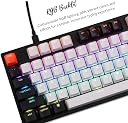
⌨️ Elevate your workspace with compact precision and vibrant style!
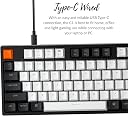
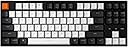
The Keychron C1 TKL Mechanical Keyboard features a compact 87-key layout with tactile Gateron Brown switches for quiet, responsive typing. Its USB-C wired connection ensures zero-lag performance on both Mac and Windows, complemented by 15 customizable RGB backlighting modes. Designed with a minimalist white and black aesthetic, it’s perfect for professionals seeking a stylish, ergonomic, and high-performance keyboard for work and play.


| ASIN | B08CNBNJNM |
| Additional Features | Lighting |
| Antenna Location | Home,Office |
| Brand | Keychron |
| Built-In Media | Extra keycaps for Mac and Windows, Detachable USB-C cable |
| Button Quantity | 87 |
| Color | Gateron G Pro Brown Switch |
| Compatible Devices | Laptop |
| Compatible Operating System Family | Windows |
| Compatible devices | Laptop |
| Connectivity Technology | USB-C |
| Connectivity technology | USB-C |
| Customer Reviews | 4.5 out of 5 stars 144 Reviews |
| Enclosure Material | Acrylonitrile Butadiene Styrene |
| Hand Orientation | Ambidextrous |
| Item Dimensions L x W x H | 13L x 35.7W x 3.8H centimeters |
| Item Highlight | Wired 87-key TKL keyboard with Gateron G Pro Brown switches, rgb backlight and 1000 Hz polling. |
| Item Weight | 0.7 Kilograms |
| Keyboard Backlighting Color Support | Single Color |
| Keyboard Description | Tenkeyless, Ergonomic |
| Keyboard Layout | QWERTY |
| Keyboard description | Tenkeyless, Ergonomic |
| Manufacturer | Keychron |
| Mfr Part Number | C1-B3-USA |
| Model Name | C1 |
| Model Number | C1-B3-USA |
| Number of Items | 1 |
| Number of Keys | 87 |
| Number of Sections | 4 |
| Recommended uses for product | Home,Office |
| Special features | Lighting |
| Style Name | Modern |
| Switch Type | Mechanical |
| UPC | 680306999200 |
| Unit Count | 1.0 Count |
| Water Resistance Level | Not Water Resistant |
A**K
Very good
Best price/quality in class. This keyboard is not perfect, but way better than more expensive keyboards from other and more popular brands. I own a Gateron Brown version and it has close to perfect typing experience.
E**Z
Excelente teclado mecánico de entrada
Un teclado increíble a un precio sumamente accesible, la calidad de materiales es muy buena y el sonido que trae de fabrica sin modificarlo es excelente.
M**A
Great bang for your buck
Really happy with this keyboard, especially for the price. Pros: -Good build quality and finish -Gateron brown switches are quiet and offer excellent tactile feedback -RGB effects are nice and there are several options to choose from, no software required -Included key caps feel nice to the touch and are thick enough to prevent light from showing through where its not supposed to -Hot-swappable so you change out the switches and keycaps to suit your preferences -Braided usb-c cable is plenty long enough and feels as nice as the one that came with my razer tournament edition keyboard, they even include a usb-c to usb-a adapter which comes in handy when switching between devices -Key caps for both mac and windows are included, and they include an easy follow guide for swapping them out -Packaging is simple, but well padded and easy to open -Seemed to be just as responsive as the razer keyboard I own and has been great to game with -The compact layout is perfect for smaller desks and gives you more room to move your mouse. You get used to not having a number pad pretty quickly as long as you aren't working in spreadsheets all day -Lower profile than Keychron's K series keyboards which is nice if you type with your wrists resting on your desk. Cons: -There is a little more play in the key caps than the razer keyboard I own (which has stabilizers built into each key) but I got used to it rather quickly -It can be a tad bit noisy when typing hard and bottoming out the keys, which is expected at this price point. Still sounds nice overall. -No wireless connectivity, which may be a deal-breaker for some but wasn't something I needed. To sum up, I would highly recommend this keyboard to anyone looking for a solid all-purpose mechanical tenkeyless keyboard. It checked all the boxes for me, and the fact that it is so affordable is just the icing on the cake.
K**N
C1
A good keyboard for its price, fast shipping (arrived before the actual delivery date), and good packaging i must say, overall a good product!
A**Y
A solid mechanical keyboard
I bought this keyboard to swap for the Keychron K2. The K2 keyboard I received was not as described as it came with a USB-C to USB-A cable only -- so it couldn't be hooked up to a modern MacBook Pro. The C1 keyboard I am reviewing came as described, with a USB-C to USB-C cable, as well as a USB-C to USB-A adapter, if you'd prefer that. I actually comparison shopped the K2 and C1, and in the end got to try both. For anyone waffling between the two keyboards like I was, maybe this will help you decide: - As I said, my K2 came with a USB-A only cable. I don't know if mine was "defective" but I saw at least one other reviewer for the K2 who said the same thing. The C1 did come with the right cable. - The K2's plug is on the left side. It looked like it might be proprietary to KeyChron. The plug for the C1 is on the top left side of the keyboard, which I prefer. It also looks like you could probably use ANY USB-C cable with the C1, so you could buy a shorter/longer cable/replacement cable. - The K2 is a 75% keyboard and the C1 is a 87-key tenkeyless. Although the C1 is a little longer in terms of form factor being an 87 key keyboard, it isn't as tall when sitting flat on the desk as the K2. I GREATLY prefer the C1's lower profile and slightly more expanded lay out of keys to the taller and too-tight layout of the K2. In particular, I greatly prefer that the regular size right shift key on the C1 to the truncated one on the K2, and I like how the arrow keys more closely mimic those on my MacBook Pro in terms of there being a little bit of spacing between the arrow keys and the CTRL and shift keys. On the K2, I kept getting annoyed by the arrow key placement. - Overall, I think the C1's color black and white scheme is more attractive than the K2's, but that's going to be a personal preference. - My K2 was a red switch. I wasn't able to get the red switch version of the C1 in a timely manner and had to settle for the brown switch. The brown switch C1 actually feels softer (closer to the feel of my MacBook Pro, to be honest) and is surprisingly quieter than the K2 red switch. This may be because I don't feel like I have to hit the brown switch keys quite as hard/they don't have to fully bottom out due to the "bump" in the brown switch versus the red. I think I did prefer the "feel" of the K2 red switch better, but I do like that the C1 is quieter. Overall, I like the C1 a lot. I don't need all the fancy light effects, but the plain white back light looks nice. It's comfortable to type on. Overall, I'm much happier with this one than the K2 - unless you truly NEED a small keyboard that's wireless, I would go with the C1.
Trustpilot
1 month ago
1 month ago