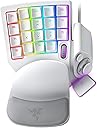
⚡ Dominate every keystroke with precision and style — the future of gaming control is here!
The Razer Tartarus Pro is a premium gaming keypad featuring ultra-fast 0.1mm optical actuation switches, 32 programmable keys, and an 8-way thumbpad for enhanced control. It offers adjustable actuation points (1.5-3.6mm) to customize responsiveness, fully programmable macros via Razer Hypershift, and immersive Chroma RGB lighting with 16.8 million colors. Designed for ergonomic comfort and maximum customization, it’s the go-to peripheral for serious gamers and creative pros seeking speed and precision.


| ASIN | B081BWMFWP |
| Antenna Location | Gaming |
| Best Sellers Rank | 42,636 in PC & Video Games ( See Top 100 in PC & Video Games ) 434 in PC Gamepads & Standard Controllers 1,545 in PC Gaming Keyboards |
| Box Contents | Tartarus Pro |
| Brand Name | Razer |
| Button Quantity | 32 |
| Colour | Mercury White |
| Compatible Devices | Gaming Console |
| Connectivity Technology | USB |
| Customer Reviews | 4.3 4.3 out of 5 stars (1,010) |
| Enclosure Material | Plastic |
| Global Trade Identification Number | 00811659035325 |
| Hand Orientation | Ambidextrous |
| Is Electric | Yes |
| Item Dimensions L x W x H | 15.1L x 20.2W x 6.4H centimetres |
| Item Weight | 0.81 Pounds |
| Keyboard Backlighting Color Support | RGB |
| Keyboard Description | Gaming |
| Keyboard Layout | QWERTY |
| Manufacturer | Razer |
| Model Name | Tartarus Pro |
| Model Number | RZ07-03110200-R3M1 |
| Number of Keys | 32 |
| Number of Sections | 3 |
| Power Source | USB |
| Product Features | Backlit, Ergonomic |
| Style Name | Tartarus Pro - Optical Switches |
| Switch Type | Linear |
| Theme | Gaming |
| UPC | 811659035325 |
R**N
it's a little bit too big
it's very comfortable to use, but I can't use the wrist rest that comes with the keyboard because otherwise I wouldn't be able to reach all of the keys I need to
C**R
I have small hands, 6.5 inches from palm to middle finger tip and ring sizes 4.5-6. I'm able to use this but I did need to shift my hand position to the right so I could use the thumb buttons. I swaped the directional keys to correspond and added some textured gaming keycap stickers to help me learn the new keybinds. I am able to use all of the buttons easily except the top row which requires a little stretch to reach but that's fine with me, I just make those the seldom used keybinds. I needed more pinky modifier buttons as well as thumb accessible modifier buttons (the D-pad is perfect for that). I use this for gaming along with a G600 mouse, it works wonderfully and solved the problem I was having with needing more modifiers and being able to hit binds faster/more reliably. You can record double modifiers with this such as Alt+Shift, I needed that feature specifically. It looks amazing matching my mercury huntsman mini and I love having a separate keypad for gaming rather than using my keyboard. It allows me to have crazy re-mapped keybinds without losing the ability to type normally. I use W A,S D,Q, and E; all the rest of the keys are re-mapped to numpad or modifiers. The space bar key (20) is a bit low and the distance makes it unreliable for me to use quickly so its in the seldom used keybind category. I re-mapped the circular button above the D-pad to map, the D-pad is space bar and 3 modifiers. The little D-pad thumbstick attachment is really great, too! <> - 6 month update- I absolutely love this thing. I've adjusted to using it all the time for gaming and it is so incredibly comfortable. The wrist rest is my favorite part in regards to comfort and the hand positioning in general is relaxing, the shorter keycaps help with this. I found some better gripy texture tape for my most used keys. The joy stick for the D-pad has become pivitol for my gameplay. I love this thing so much that I got a second one for couch gaming. Synapse 3 doesn't support 2 of the same device running at once so I had to get a USB splitter. I purchased both devices "Used like new" and they have been wonderful. Both arrived in perfect condition with no blemishes or malfunction. - 6 mo th update on the second I purchased in "Like New" Condition. One of the keys broke out of nowhere while I was using it. The device had not been damaged while in my care. Razer does not sell replacement keys for this item and refuses to provide them. Keys are not covered in the warranty, so if they break you are out of luck. However, I was able to find these keys on Amazon that replace the low profile Tartarus keys perfectly -amd they are very affordable: X-keys Keycap Cherry MX Compatible -2.5 year update: STILL AWESOME lol. No issues whatsoever. I have 3 now, send help. I made the #20 thumb usable by making a booster seat for it. Took off they key and traced it on firm 1/4 inch thick foam, cut out the exact shape (took a little notch out to keave room for the D-pad thumb stick to clear it), then doubleside taping it to the key- works like a charm now. I use the Tartarus for every game ( FPS, MMO, Competitive) and will never go back to using a keyboard for gaming.
D**E
really comfortable
D**N
Entspanntes Gaming mit allen notwendigen Tasten in Reichweite. Die ergonomische Anordnung macht es mir persönlich einfacher. Klar, man muss öfters jedes Game neu konfigurieren und manchmal werden die Tasten knapp, aber in den meisten Fällen ist es wesentlich entspannter zu zocken.
S**C
The product is good, but design is rigid. This product is is not very suitable for small hands.
B**W
Me encantó este producto la verdad puedes personalizar todooooos los botones cuales sean como sean como quieras, super comodo y si tienes manos grandes bueno ahi si es un pequeño problema ya que con manos pequeñas alcanzas pocos botones pero aún asi si perzonalizas para los que te alcancen la verdad no esta nada mal :)
Trustpilot
1 day ago
1 month ago