Buy anything from 5,000+ international stores. One checkout price. No surprise fees. Join 2M+ shoppers on Desertcart.
Desertcart purchases this item on your behalf and handles shipping, customs, and support to South Africa.
🚀 Elevate your workspace — connect more, do more, be more!
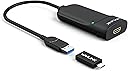
The WAVLINK USB 3.0/USB-C to HDMI Universal Video Adapter is a versatile, high-performance device that supports up to 6 external monitors, delivering crisp resolutions up to 2560x1440. Compatible across major operating systems including Windows, macOS (M1-M5), ChromeOS, and more, it offers plug-and-play convenience with USB-C, USB-A, and Thunderbolt ports. Its compact design, LED status display, and 18-month warranty make it the perfect productivity booster for professionals seeking seamless multitasking and enhanced visual workspace.


| Asin | B01CSG7TUC |
| Best Sellers Rank | #86 in Audio & Video Connectors & Adapters #137 in Computer Cable Adapters |
| Brand | WAVLINK |
| Color | Silver |
| Compatible Devices | Apple M1-M5,New Macbook Neo and Intel Macs (with macOS 10.14 or later) /Microsoft Surface line/HP Spectre x360 series, /Dell XPS 13 & XPS 15 / Latitude, Lenovo Thinkpad T series. Latitute 7280/ Latitude 5310 2-in-1; Precision 7730/7750; Laptop 5590, HP Spectre Laptop 13-af001TU/ Spectre x360 13t/ Spectre folio/ Specter x369; Elitebook 840 G5 series/ Elitebook X2/ Elitebook x360 1030 G3/ Elitebook 745 G6/ Elitebook 830 G6/ 2018 HP Elite 800 G4; Envy Geforce mx250/ Envy x360 Laptop (15z-ds100); Z book 15u G3/ Zbook 17 G4, Lenovo Yoga 720-13IKB/ Yoga 730/ Yoga 900-13ISK/ Yoga 910/ Yoga 920/ Yoga 930/ Yoga 940-14IIL; 3rd generation Thinkpad Yoga; Yoga15 Thinkpad Ultrabook Pro; Thinkpad E590/ Thinkpad P72/ Thinkpad T470/ Thinkpad X1 Carbon; Legion Y530; Lenovo C930/ T480s/ X390/ 81N8, Microsoft Surface Book 2/ Surface Go/ Surface Laptop 3; Surface Pro 7,Huawei Macbook Mate10 or later; Google Slate (2019); Chromebook C340-15; SanDisk Cruise Glide; Razer Blade 2017 (gtx 1060); Pixel book go 2019/2020 |
| Connector Type | USB Type A |
| Current Rating | 1 Amps |
| Customer Reviews | 4.4 4.4 out of 5 stars (1,192) 4.4 out of 5 stars |
| External Testing Certification | Não aplicável |
| Finish | Hdmi,Mirror |
| Item Dimensions | 8.5 x 6 x 1.6 inches |
| Item Weight | 0.09 Kilograms |
| Manufacturer | WAVLINK |
| Mfr Part Number | WL-UG3501H |
| Model Number | WL-UG3501HPDX |
| Number Of Items | 1 |
| Number Of Ports | 1 |
| Package Quantity | 1 |
| Power Plug Type | Type A - 2 pin (North American) |
| Smart Home Compatibility | Not Smart Home Compatible |
| Specific Uses For Product | Monitor, PC |
| Unit Count | 1.0 Count |
| Upc | 695536200712 |
| Warranty Type | Limited |
User
Supports Asahi Ubuntu on Macbook Air M1 at 1080p 60Hz!
I have a Macbook Air M1 that is now running Asahi Linux 6.17.0-1001-asahi-arm Ubuntu 25.10. The external display's HDMI cable is plugged into the Wavlink. The Wavelink's USB-3.0 cable is plugged into its included USB-C adapter, which is plugged into a USB-C port on an Anker 6-port USB-C hub. The hub is plugged into the second USB-C port on the Mabook.At first, it didn't work, but after going to the Synaptics website, then to the DisplayLink Ubuntu drivers page, and downloading the "synaptics-repository-keyring.deb" file, then following the instructions, bingo, it started working, there was a second Ubuntu desktop on the external monitor. Stable, colors look right, no evident cursor lag, it just worked. Didn't even need to reboot the Macbook. Slick.Close the lid, and the "main" desktop jumps to the external display. Open the lid, things go back to how they were.The only downside so far is that the 4K external display is getting a 1080p 60Hz signal, which is definitely a lot more useable than no signal at all. Good enough. Though it is kind of hilarious to use a 43" display at 1080p.Until the day comes when the wonderful Asahi team sleuths out HDMI through USB-C on the MBAs, this is a very workable solution. Recommended!
User
Great Adapter for Adding a Bigger Screen to My Tablet
This WAVLINK USB 3.0 to HDMI adapter works as expected and gives my tablet a nice external screen setup. The picture is clear, and it makes the tablet much more useful for watching videos, working, or using a bigger display.One thing I would suggest is using it with a self-powered USB hub or making sure your setup has enough power, especially if you are connecting it to a tablet. Overall, it does the job well and I’m happy with it.
User
The best solution to add multiple monitors to a laptop when you do not have DP_ALT MODE
Easy to install, I do not like that the driver take the control of all video (maybe this is how it should work,it shuts down itself 2 times in a few weeks, I do not know if it is a standby delay or it is a problem, otherwise is a good device. The specs are not sufficient and I did not have time to dig for other places. It should be good to have the full specs on Amazon.
User
Use DKMS on Linux
Using on Arch Linux, working well on DKMS but I have to edit kernel names in code from time to time as Arch is "bleeding edge". Use on DKMS if on Linux.
User
Handles Landscape orientation with no problems (unlike cheaper USB-to-HDMI adapters)
This adapter is super! It has a very good Video Adapter chip onboard. A cheaper one I bought earlier would not shift to Landscape mode and had other limitations. I had to install a driver on my older Windows machine, but the adapter works great.
User
Wavelink Adapter works
The wavelink adapter worked to replace my usb adapter that was causing issues. My monitors now remain constantly on instead of flickering.
User
Not recognized by Windows 10 on a Dell Optiplex. NOT RECOMMENDED
I have a Dell Optiplex SFF running Windows 10, which this card is supposed to support. My system is recent enough that there should have been no problem installing this. I was very careful about it and had the correct driver (which must be downloaded as it did not install automatically.) Despite this, I couldn't get Windows to recognize this card fully enough to use it. When it did work, it disabled some of Windows, such as the system tray. I returned it after a couple of days of experimentation. Something this hard to set up will only cause constant trouble in the future. Years ago I was a computer repair tech, so I know what I'm doing, but this item does not! I DO NOT recommend this card. I returned it.
User
Funciona my bien
Funciona a la perfeccion y se acomodo a lo que necesita y era que funcionara con linux
User
Bargain multi screen extended desktop
After 10 days of try various cable, docking port and other set ups this adapter has done what I wanted.Now running a Dell Latitude E6430 with built-in display as main screen with 2x Acer K242HL monitors, giving me a 3 screen extended desktop.Easy to set-up. Simply install the drive from CD provided, plug in adapter and monitor and you're good to go.I use USB3.0 connection and not checking backwards compatibility with USB2.0. Also updated my graphics drivers.10 minutes and I was up and running. And at £32 it's a bargain.I haven't tested screen rotation and audio output features, I don't need it.
User
めっちゃ便利!!
windws OSでしっかり作動しました。なんかCore i◯ 12345みたいなところの最後に(F)がつくやつは使えないらしいです。私のパソコンはCore i7 134500くらいのやつでFがつかないので、使うことができました。安い中華製のモニターは反応しません。なぜだかは知りません。繋いですぐ移りました。デバイスの状態によっては、もしかしたら何が動かす機能を入れるようかもしれません。
User
Transmissão sem atrasos
Comprei para usar no celular e transmitir os emuladores de jogos sem atraso. Funciona perfeitamente. Lembrando que ele não transmite áudio. Pra isso aconselho usar a alexa. Com essa combinação da pra jogar na tv sem nenhum delay perceptível.
User
Funciona bien para conectar el celular a la tv y trasmitir pantalla
Exelente, buen precio y calidad, no se nota diley, y es fácil de usar, funciona perfecto en mi moto g54 súper recomendado
User
No lo recomiendo
Inestable. Usado durante varios meses en un macbook pro y no hay manera de hacerlo funcionar de manera regular. A veces se conecta y otras veces no.
Trustpilot
2 days ago
1 month ago