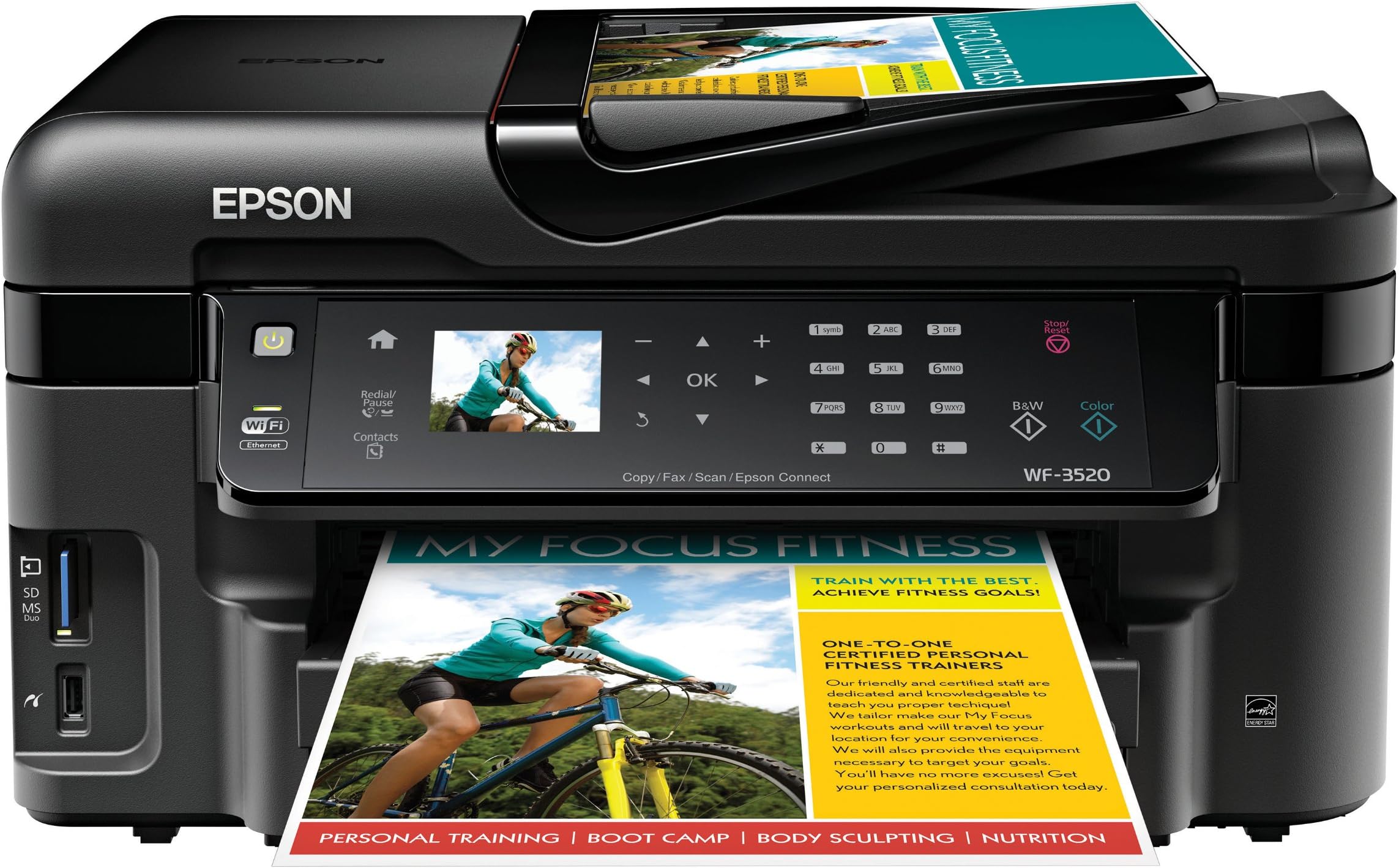
🚀 Elevate Your Office Game with Epson's All-in-One Wonder!
The Epson WorkForce WF-3520 is a versatile wireless all-in-one color inkjet printer that combines printing, copying, scanning, and faxing capabilities. With a 250-sheet capacity and the ability to print from mobile devices, it offers fast, efficient, and cost-effective solutions for any professional workspace.
| B&W Pages per Minute | 15 ppm |
| Color Pages per Minute | 9.3 ppm |
| Hardware Connectivity | Ethernet |
| Connectivity Technology | Wireless;Mobile; Memory Card; USB |
| Resolution | 5760 x 1440 |
| Warranty Type | One-Year Quality Satisfaction Guarantee |
| Control Method | Voice |
| Controller Type | Vera, Amazon Alexa |
| Print media | Envelopes, Card stock, Labels, Glossy photo paper |
| Scanner Type | Sheetfed |
| Maximum Copy Speed Black and White | 15 ppm |
| Display Type | LCD |
| Compatible Devices | Smartphones, PC, Laptops |
| Printer Type | Inkjet |
| Additional Features | network-ready |
| Printer Output Type | Color |
| Item Weight | 19.8 Pounds |
| Paper Size | 4 inch x 6 Inches, 8.5 inch x 11 Inches |
| Maximum Sheet Capacity | 250 |
| Media Size Maximum | 8.5 x 11 inch |
| Wattage | 17 watts |
| Duplex | Yes |
A**R
Nice printer-good print quality-good price-Recommended
Never thought I would say this about an Epson printer due to all the duds I've had in the past but this is a very good printer. Fairly easy to set up and the wireless feature works great. I can send print jobs to the printer from my computers in different rooms all over the house. Print quality is excellent and the scan and copy features are easy to use. Especially like being able to save paper with two sided printing. Print speed is very good and the noise level is acceptable. The document feeder worked fine the few times I have used it. I don't print pictures often so I can't comment much on the picture printing quality however the pictures embedded in the documents I have printed are good. The problem I had with my previous Epson printers was that if you didn't use them for a few days the ink would dry up in the jet nozzles and you would have to repeatedly run the cleaning cycle to get them to work again. This uses up a tremendous amount of expensive ink. Epson sold their printers for next to nothing but they ripped you off something terrible on the ink cost. If I remember right they even had a lawsuit about underfilling the cartridges in order to sell more ink. I have not had any of those problems with my WF-3520. I've had it for about two years now and have never had to run the cleaning cycle. I'm also still on the first set of cartridges which is amazing because I'm sure by now I would have had to put in at least 3 or 4 cartridges of each color in my other Epsons. The Epson cartridges seem to be lasting almost as long as the cartridges in my old Canon i560 which is a big complement. The Epson picture print quality is not quite as good as the Canon but that was one of the best printers I've ever come across. Overall I'm very well satisfied with this printer and the price was very competitive.
E**E
Very Impressed :-)
The Epson WF-3520 is so nice! I work as a digital printer. This printer has a lot of the features that we look for in the much larger printers that we use at work such as 2 sided print, 2 sided scan and scan to a searchable pdf file. For a home or small business use it is a fantastic printer hands down. The scanner is awesome too. I never use the Fax because I don't have a home phone with a dile tone.I love the scanner. What I like to do is take all of my bills that I receive during the week and I scan them in and make them in to a pdf file. Then I email them to myself so I have them with me all the time. When I get paid witch is on my lunch hour while I am at work, I can sit down and pay some of my bills. Works out real nice for me and I don't have to carry a lot of paper bills and envelopes around with me. I just pull up my bill on my iPad, go to there web page on my iPads web browser and pay the bill. Once it is paid I file it away in my email.I have also been taking a hand full of my older photos that I have in an old shoe box and while sitting watching TV at night I have been scanning them and saving them digitally. As I'v been doing this I have been adding them to my iPhoto program and when I am done I am going to burn them to a DVD for safe keeping. I like doing this because a lot of my photos are starting to show signs of age and getting all scratched up. The quality of the scans are real nice.The printer is also awesome. A lot of the products I purchase now come with manuals in pdf format and sometimes I just want and/or need to have a printed copy. I print out the manual double sided and staple it by hand. Looks very nice and saves on paper by printing it double sided rather than single sided.There are some real nice features that this printer has that is real nice for me and would be awesome for students.I was looking at some of the extras in the printer that you don't need a computer to use. This is a few that I like.Most of the time I just print out stuff on Xerox paper but from time to time I need or would like to use lined paper such as you would fine in notebooks. I also like to sometimes use graph paper for different projects. With this printer you can just go in to the settings and print out as many pages of standard rule, college rule note paper or graph paper both single sided or double sided. Also you have a choice to print it in B&W or color. When it prints, it is the FULL width and length of the paper. When it is printed in color, it looks exactly like what you would get in a notebook you would purchase anywhere. You can also print out watermarks on the paper. I have not used that feature yet but I would imagine you can design your own watermark and use that too.It also does a real nice job at setting up a pdf to be printed. I had this one manual that I wanted to setup to be printed in landscape mode with 2 pages on each side that you can fold in half and make it in to a 8.5"x5.5" book. this pdf file had 34 pages in it. The printer set it up properly so that the numbers were in proper order and four pages of the pdf fit on to one full sheet of Xerox paper (Both sides). It also collates the book properly while printing. When I was done all I did was fold the book in half. Looks very professional :-)As far as the setup goes, it was very simple. Everything in my house is wireless now. I love having less wires around. Looks a lot more clean to me. I can print from my computer and I have printed to my printer from my iPad and iPhone with air-print with no problem at all. The initial setup was very easy and only took a few minutes. Now you are all set to go.One of the other features I love about this printer is the individual ink cartridges for each color. If you run out of one color, all you do is replace that color. Cheep and easy with no waste. I keep one of each color on hand just in case I need it. If I use one I order a high capacity color ink cartridge (127) from Amazon for around $20.00 or a standard capacity color ink cartridge (126) for about $15.00 and I am all set. Easy.All in all I love this Printer/Scanner and I think it is worth every penny!Happy New Year all :-)
S**K
Takes replacement ink policy to a new low - Epson doesn't give you a choice as to when you replace the ink cartridge
I used to like epson. I used to like this printer. Actually, the printer has never given me any trouble and all of the functions seem to work. But, I could say the same about every all-in-one, $100-$200 price range printer I have ever purchased. So there is really nothing particularly good or bad about the basic functionality of this printer - it works. In my mind that's three stars - neither bad nor outstanding - average. And yet here is why I am giving them a one-star review.Yesterday I needed to print out an extremely important, time-critical legal document. The day before I received my first ever "Your ink is getting low" message from this printer (it used four cartridges - one for black, cyan, magenta and yellow). Any other printer in the world warns you about this stuff for a while. Typically, they warn you way ahead of time. But you really don't even need the warning because you notice the print quality is degrading - the black is starting to look a little gray, etc. Well, when I tried to print out my two page document, the printer refused to do anything. It threw up a message saying all of the print functions had been disabled (I could still scan and fax if I wanted to). I checked on the internet and it said the epson actually blows fuse in the cartridge so it can't/won't print once it decides the ink is low.And, again, the print quality up to this point was not degraded at all. Nice, black text. I'm sure there was plenty of ink left.This is a first for me. I had to get my sister who lives a couple of miles away to print out the document for me. Otherwise I would have to have gone to a staples or something - as I said, it was a time-critical legal document meant to go to people you don't fool around with.WITH OTHER PRINTERS IT IS UP TO YOU WHEN TO REPLACE AN INK CARTRIDGE - WITH THIS PRINTER IT IS UP TO EPSON!That is ridiculous. It is, pure and simple, a money-grab. They know almost no one replaces the ink cartridge right away. And why should they? The estimates I have read say that the printer may start reporting low ink when up to 50% is still remaining. Or maybe 25%. Don't know exactly, but generally there is still a good deal more ink in there before you need to replace it. Even if you buy into this ridiculous policy, shouldn't they give you a little more warning than a couple of days? But really, I won't buy into this. It's a scam that takes away your choice of when to replace ink so epson can make more money.Never again, Epson.
Trustpilot
1 day ago
5 days ago