Buy anything from 5,000+ international stores. One checkout price. No surprise fees. Join 2M+ shoppers on Desertcart.
Desertcart purchases this item on your behalf and handles shipping, customs, and support to South Africa.
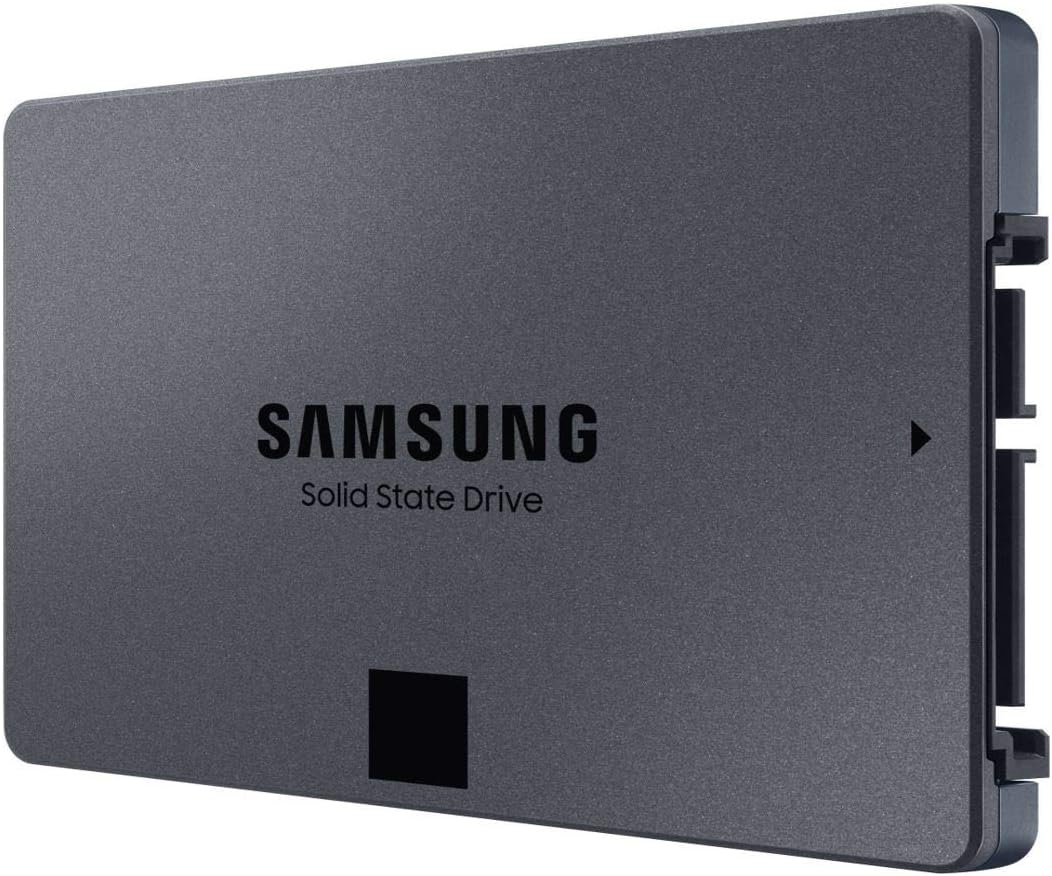
🚀 Upgrade your speed, storage, and status with Samsung 870 QVO SSD!
The Samsung 870 QVO 1TB SATA SSD delivers industry-leading 560 MB/s read and 530 MB/s write speeds, leveraging 2nd gen QLC technology for massive storage and reliable endurance. Designed for easy installation in any 2.5-inch SATA-compatible device, it combines high capacity with advanced error correction and Samsung’s Magician software for seamless performance management—perfect for professionals demanding speed, space, and stability.


| ASIN | B089QXQ1TV |
| Additional Features | Interne SSD-Festplatte, QLC Technologie 2. Generation |
| Best Sellers Rank | #19,412 in Computers ( See Top 100 in Computers ) #179 in Internal Solid State Drives |
| Brand | Samsung |
| Built-In Media | Samsung 870 QVO SSD |
| Cache Memory Installed Size | 42 |
| Color | Black |
| Compatible Devices | Laptop |
| Compatible Video Game Console Models | Microsoft Xbox SERIES S |
| Connectivity Technology | SATA |
| Connectivity technology | SATA |
| Customer Package Type | Standard Packaging |
| Customer Reviews | 4.8 out of 5 stars 35,911 Reviews |
| Data Transfer Rate | 560 Megabits Per Second |
| Digital Storage Capacity | 1000 GB |
| Digital storage capacity | 1000 GB |
| EU Spare Part Availability Duration | 3 Years |
| Enclosure Material | SATA |
| Form Factor | 2.5-inch |
| Global Trade Identification Number | 08806090396038 |
| Hard Disk Description | Solid State Drive |
| Hard Disk Form Factor | 2.5 Inches |
| Hard Disk Interface | Serial ATA |
| Hard Disk Rotational Speed | 7200 RPM |
| Hard disk form factor | 2.5 Inches |
| Hard disk interface | Serial ATA |
| Hard-Drive Size | 1 TB |
| Hardware Connectivity | SATA 1.5 Gb/s, SATA 3.0 Gb/s, SATA 6.0 Gb/s |
| Hardware Platform | PC |
| Installation Type | Internal Hard Drive |
| Item Dimensions L x W x Thickness | 10L x 7W x 0.7Th centimeters |
| Item Type Name | 1000 GB internal SSD |
| Item Weight | 46 Grams |
| Manufacturer | samsung |
| Media Speed | 530.0 |
| Mfr Part Number | MZ-77Q1T0BW |
| Model Name | 870 QVO |
| Model Number | MZ-77Q1T0BW |
| Number of Items | 1 |
| Read Speed | 560 Megabytes Per Second |
| Special features | Interne SSD-Festplatte, QLC Technologie 2. Generation |
| Specific Uses For Product | Multimedia, Professional, Staff |
| UPC | 767531891759 |
| Unit Count | 1 Count |
A**I
Perfect fit
It’s fast speed internal SSD. It fits my eufy home base 3 and the storage unit working fine. I recommend it for the quality and price .
م**ي
ممتازه تخزين سريع
ممتازه تخزين سريع
A**K
Perfect upgrade
Perfect upgrade to my laptop with HDD, very easily to transfer data and install. I replaced it myself, didn’t need to go to the store
C**O
Fast - just be sure to update the firmware
Fast and reliable drive. Some people have encountered issues with file capacity degradation. Samsung has issued a statement to download and install the latest firmware via Samsung Magician. Newly manufactured drives already ship with this firmware installed.
D**T
fast
the sdd is great brand new nothing wrong to it
K**A
Original
Nice performance
O**N
Speed up my Pc
Positivly affect the speed of my pc
M**.
Super fast
This is super fast in comparison to other SSDs Very happy
S**L
mükemmel
harika bir ürün...
Y**H
جوده المنتج و سعره جيده
كان المنتج كما في الوصف وتغليف الشركة المصنعة الهارد مناسب للاستخدام في السيرفرات و خصوصا الداتا بيز في الاجمال الجوده حلوة جدا السعر مناسب جدا ليا و يمكن اقل سعر لقيته في الوثت ده
E**Y
Muito bom
Funciona direitinho.
P**S
Very fast & awesome product
I have replaced this 2TB SSD in the laptop with the old HDD and it's really fast now. I'm going to use for few months & re-review the product. I just felt that it's just a little bit on costly side but it has made my laptop like new. OS boots up in 10seconds
D**.
Great upgrade.
My laptop (3 years old Pentium 2 core, 4GB RAM, 1 TB HDD Acer aspire es1-571-p1vn) was disappointingly slow from day one. As it got older and more programs and updates installed it got painfully slow. Although I use an android tablet for most things nowadays, I still need a windows platform PC laptop for some things like editing my website. After reading reviews about the difference increasing memory and changing HDD storage to SSD can make i decided to do the same. So glad I did, the difference is like night and day. I first just upgraded the RAM from 4GB to 16GB which although improved the speed and range of usable programs it still had painfully slow start-up times and usability. The RAM installation was a bit of a pain having to strip down the laptop and remove the motherboard to insert the memory boards to the underside. The SSD drive installation however was quite easy. After cloning the HDD drive to the new SSD all that was needed was to remove all the screws on the base of the laptop, lift the keyboard sufficiently and slightly move to the side without needing to remove its cables and wedge up with a none conductive pack. Then just remove the retaining screw on the bracket on the back end of the drive. Slide the drive away from the motherboard to unplug it, easy. Swap the securing bracket from old drive to the new, slide in new drive and screw in the retaining screw to bracket. Clip the keyboard back on, shut laptop and put the screws back in the bass of laptop and your done. When booting you are prompted to select the new drive as boot drive and that's the installation done. The cloning software downloaded free from samsung.com was easy to use and it took a couple of hours to copy 250GB from my old HDD to the new SSD using usb3. Extremely pleased with better than new laptop. Cheap laptop now performs like a high end. Bootup, logged in and start using in about 25 seconds now as apposed to 9 minutes. Much quieter with no HDD as well. I should think battery will last longer too but wrote this review straight away as so impressed with SSD. In fact I think I will be using the laptop more often now as a pleasure to use. Note. If you are also upgrading RAM which is a more time consuming process you may wish to consider if the bios battery will need replacing soon as that also is on the underside of the motherboard.
Trustpilot
1 month ago
1 month ago