Desertcart purchases this item on your behalf and handles shipping, customs, and support to South Africa.
🎨 Elevate your art game with precision and speed — don’t just create, dominate!
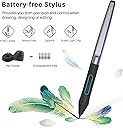
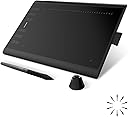
The HUION Inspiroy H1060P is a professional-grade graphics tablet featuring a large 10 x 6.25 inch active area, 8192 levels of pen pressure sensitivity, and a battery-free stylus with tilt support. It offers 28 customizable hotkeys to optimize your creative workflow and supports multiple operating systems including Windows, macOS, Android, and Linux. Designed for both right and left-handed users, this ultra-slim tablet combines versatility, precision, and ergonomic comfort, making it ideal for artists, illustrators, and digital creators aiming to boost productivity and artistic expression.
| Active Surface Area | 10x6 |
| Additional Features | 10mm ultra-slim tablet with larger workspace, 60° Tilt Support, Programmable Press Key |
| Asin | B01FTE9HS2 |
| Best Sellers Rank | #6 in Computer Graphics Tablets |
| Brand | HUION |
| Built In Media | Pen Tablet, Battery-free Pen,Micro USB Cable, USB-C Adapter, Pen Holder, Pen Nibs x 8, Quick Start Guide |
| Color | Black |
| Compatible Devices | Android Mobiles and Tablets, Laptop, Mac, PC |
| Connectivity Technology | USB |
| Customer Reviews | 4.4 4.4 out of 5 stars (7,279) 4.4 out of 5 stars |
| Display Type | LCD |
| External Testing Certification | Não aplicável |
| Item Dimensions L X W | 10"L x 6.25"W |
| Item Highlight | 8192 Pressure Levels, Battery-Free Stylus, Digital Art Tablet Works with Mac, Windows PC and Android |
| Item Type Name | Drawing Tablet |
| Item Weight | 0.77 kg |
| Manufacturer | ShenZhen Huion Animation Technology Co., LTD |
| Mfr Part Number | 2 |
| Model Name | Inspiroy H1060P |
| Model Number | H1060P |
| Native Resolution | 1920x1080 |
| Number Of Items | 1 |
| Operating System | Android 6.0 or later, Linux(Ubuntu), Mac OS 10.12 or later, Window 7 or later |
| Pressure Sensitivity | 8192 levels |
| Screen Size | 10 inches |
| Software Update Supported To Date | unknown |
| Specific Uses For Product | Drawing, Painting, Writing |
| Target Audience | artists, Creators, illustrator |
| Unit Count | 1 Count |
| Warranty Description | 1 year manufacturer |
User
Perfect for animators
★★★★★ I bought this for my daughter for Christmas 2025, and it has easily been one of her favorite gifts.She has barely put it down since she got it! She absolutely loves drawing and creating digital art with it and uses it all the time. It was easy to get set up, the pen responds really well, and the tablet has been great for everything she wants to create. I will also share that I’m so glad I got her the larger size because it gives her much more drawing space to work with.Several months later, she’s still just as obsessed with it as she was on Christmas morning.Definitely a 5-star purchase for any kid or teen who loves drawing and digital art!
User
Top notch drawing pad
My kid has been using this daily since November 2020 and it has only just now stopped working. Incredibly reliable product for the price! I can recommend this without any reservations.Her comments: it's thin and lightweight but a little large for putting in a typical high schooler's backpack. The stylus has good touch sensitivity. It worked exactly how I needed it to and was very easy to figure out. All you have to do is hook it up to the computer, nothing complicated. I didn't ever have problems with it working even when I used it for hours a day.
User
Large screen and very accurate
Excellent drawing tablet for the price. Large screen area, and the buttons are all neatly arranged for ease of access. The pen is excellent and feels natural, although I had to disable the buttons on it as I would accidentally squeeze the pen while pressing firmly and it would activate them. The only one complaint I had was it's not compatible with some programs. Mind you, I use multiple ones, so it's kind of expected to not work with everything. But it has worked very well for everything I need so far.
User
Great budget tablet!
Let me start by saying I am NOT an artist. I am an author, and I've been making my own covers for a few years now. But I have wanted to improve my skills for a long while. Unfortunately, trying to do fine details can be limited by a mouse. And I also have a VERY limited budget. So a fancy Wacom is definitely out of my price range. So far out of my price range it might as well be in another galaxy.When Prime Day hit, I thought let's look at tablets, just for the heck of it. I spent several hours looking at different tablets in my price range, reading reviews not just from Amazon but other sites as well, and finally settled on this one. It had the tilt settings and pressure sensitivity, and with the Prime Day discount I could work it into my budget.Family. Let me tell you something. I am kicking myself in the butt that I didn't buy a tablet sooner. Now, I have never used a fancy Wacom or other high-end tablet. I am moderately intelligent (although on some days I wonder about myself) and usually jump right into things and play around before I actually RTFM.I have a MacBook Pro and used the tablet's included adapter for USB-C to plug it directly into a port on my laptop. I have that docked to a large monitor. I spent a few minutes playing with it before I finally looked at the app that works with the tablet and started playing with settings. (Note: Depending on your computer's configuration, you might want to get a USB extender cord for the USB-C adapter so everything fits in your ports. I have not tried the tablet with a hub, so I don't know if there's any lag or not.)I have the Adobe suite of products and only know a few of the keyboard shortcuts. I programmed several of the hot-keys and buttons on the tablet (although they come with some default settings) and then really started "using" it. There is plenty (for me, at least) of room on the tablet itself to comfortably draw or design without being cramped into a small area.Again, I'm NOT an artist, so if you're doing something like full-on Pixar animation or something insane like that, this might not be the tablet for you. But for MY needs? It's beyond perfect. I made two book covers in less than a day, and before with a mouse and trying to clean up edges and masks and stuff, it would have taken me a LOT longer than that. I've been playing around with graphics tutorials for digital drawing and painting with it, and as long as I follow instructions and use the recommended settings in the graphics software, I get the intended output for my efforts. My goal is to be able to make artwork for my characters that I can add as bonus content for my readers.My only quip with this is likely a me thing, not a knock against the tablet, and that's the buttons on the stylus. They are programmable, but I have trouble holding the stylus in a way that I can either easily hit the buttons, or I accidentally keep hitting the buttons. To the point I might just deactivate them. (Again, this is probably a me thing, not a point against the tablet.) The stylus itself, to me, is comfortable to hold, and I have arthritis, so that's saying something. I can even use it with a wrist brace on with no trouble.I also ordered one of the Huion gloves with it, and that gives me a smooth action across the tablet and helps keep me from accidentally scratching it.I have since ordered another pack of gloves, but a generic "Amazon's Choice" multi-pack, and I notice no difference in performance for the better value. (I also ordered them larger to easily fit over my wrist brace I frequently use.) I also ordered an extra stylus and pack of nibs, because I know me, and I'd rather have extras on hand instead of months from now trying to figure out how to get those things because my AuDHD gremlin brain helpfully put them somewhere I'd NEVER lose them. LOLThe stylus holder that comes with the tablet can either hold it vertically, or you can lay the stylus across it. It also holds extra nibs that came with it, and has a built-in tool to help you replace nibs.The bottom line is if you're looking for a lower-priced graphics tablet that gives decent performance, this is a great model. If you're a parent looking to invest in one for your child, or you're a newbie to computer/digital graphics, this is for you. If you periodically need a good tablet to do things and it doesn't make sense to invest in one of the expensive ones, this is a good one for you.If something should change, I will update this, but so far I'm happy with it and look forward to improving my graphics skills now that I have a proper tool for the job.
User
Super great for amateurs and hobbyists
A while ago I bought the Inspiroy H420X because, despite it being very small, I was new to pen tablets and wasn't sure how much I'd actually be interested. I was blown away by the H420X and decided that a bigger pad was worth it, and, further, that I would be going with a Huion. Enter the Inspiroy 1060P. It is SUCH a joy to work with. The software is very simple and easy to navigate/manage, as well, which is a HUGE plus for me. Huion really has their UI/UX act together, which is so dismally rare in a world where user experience should be paramount, considering how much we rely on tech. It also plays well with third-party tablet software like Lazy Nezumi. This pad, by the way, is huge. So much room, and the usable area is fully customizable via the software, and takes less than a minute to set up for whatever your workspace is. The pen and nibs are also interchangeable between my two tablets, so I don't need to worry about getting more nibs, just for this one. Maybe that's not surprising, but, again, I'm new to the pen tablet world, so I think that's just cool. My one complaint is that the USB port on the tablet itself (or maybe it's the cable, I'm not sure which) is veeeery tight-fitting, and I wouldn't be surprised if bent pins or something are in the future. I hope not, but I feel like even if you're handling this as gingerly as humanly possible, the connection is just so close that an accident might be unavoidable. I suppose I'll cross that bridge when/if I get to it, but other than that, this is a great tablet at a great price. I'm probably going to stick with Huion through my journey with digital art, with my next step being one of their pen displays!
User
Amazing Budget Option That'll Last YEARS !
Alright so - I should have made this a while ago but I've had my tablet particularly for 4.5 years. Yes, YEARS. This tablet has pushed through with me for many years and countless hours of art and struggle and tears. Though, other than occasional driver issues (more so on Huion), it has been a very excellent budget option since I've purchased it and is only now starting to really show its age and starting to act up. I would definitely always recommend Huion, but if you can't afford anything fancy the Inspiroy is the way to go 10000%. Below I've included examples of art that I've done with this tablet many times, and the pressure sensitivity as well as tilt angles are absolutely fantastic. I can get really fluent lines out and yes, it does take a bit to get used to since it doesn't have a display. Though, this tablet will NOT do you dirty if you treat it well and fairly. Sincerely, your local digital artist <3 It also does come with a Huion glove, pen holder, the pen and the tablet itself. Don't expect miracles out of this thing though- it's like $40 dollars and isn't going to make you a world renown artist, but it'll definitely up your digital art game if you've been stuck to drawing with your finger or mouse for years. Also for any of the new artists out there, if you plan to use this tablet with your PC- I would recommend Clip Studio Paint if you are looking for a very good paid app that has a lot of great resources and you only have to pay for once on PC (it is monthly/yearly on mobile tho)
User
Overall a reliable and well-priced tablet for the features that you get
YET ANOTHER UPDATE as of Aug. 16th, 2017I've used this tablet off and on for about 5 or 6 months now, and while my experience has been positive for the most part, I feel like I have to mark this tablet with a 3 out of 5 because of something very particular: Much like the more recent line of Intuos tablets by Wacom, this device seems to have an issue with soldering that will leave it susceptible to losing connection repeatedly. It works fine when it works, but even after such sporadic use it seems the Micro-USB port has been bent out of shape somehow. I recommend against this unit slightly unless you are the type to lay your tablet flat on the desk, and are willing to be diligent in taking care of it (tucking the cords away when not in use, being extra careful not to snag etc). It's definitely a con, but not unlike one you'd find with more recent Wacom hardware, so I still recommend this item over the Intuos 5 or newer. The functionality is still top notch, it's just that the connector could be better supported. Perhaps if the USB connection recessed into the tablet instead of laying on the outside of it.----NEW REVIEW as of Mar 10, 2017I did write a pretty lengthy review on this previously, but after rereading it I felt like it focused too much on nitpicking small things about the tablet without actually touching on how it felt to use beyond making rudimentary marks. This doesn't do the tablet or the prospective buyer any justice, I feel, so I'd like to rewrite it in a way that will hopefully be more useful to someone considering this model.NECESSARY LIST OF PROS:The tablet functions reliably and lasts even very long sessions working with no real huge issues. The pen feels comfortable (even if I wish it had a bit more grip to it at times) and has a nice bit of spring when using it. The drivers install really fast and, minus having to comb your computer for previous Wacom preference files if you've had one installed on your system before, takes no time and doesn't even require a restart in my experience. I do remember having mixed experience with Wacom's drivers taking literal hours to install the drivers in the past, so it was a welcome change.---As a bit of history: I've owned a Huion 580 (White) for about a year now, since February 2016. (Note that this model is listed as having been given an upgrade in the form of the K58 model here on Amazon). I purchased that unit after my Wacom Bamboo Capture (CTH-470) shorted out. I, with only 45$ to my name at the time, needed a replacement ASAP that would do the very basic job of allowing me to finish the client work I had already accumulated. Even though I purchased the 580 with the intention of upgrading back to Wacom at some point when I could better justify the purchase (particularly to an Intuos Pro), I ultimately found a lot of happiness with this brand and have since stopped considering purchasing another Wacom in the foreseeable future.For those that want a quick summary of this review/are scared of big blocks of text: The bottom line for these tablets vs. the Intuos Pro from Wacom that I was considering, and even all Wacoms in general, is that Huion seems to offer the best price for the features and functionality you will reasonably need from a non-display graphics tablet. I cannot comment on their display models because I have never owned one from any brand - Wacom, Huion or otherwise. I do know, however, that all of my practice and learning in digital art has always been with a budget option of tablets, as they offer exactly what I need in practice as a committed hobbyist.===As for the 1060 Plus in particular: The build is very professional and pleasant looking, although I do find it kind of wants for a wipe every other session as it can be a bit grabby on fingerprints. The glove is helpful for this, but I kinda feel weird using it and usually do not use it lol.The smooth, matte active area is really pleasant to draw on - not to mention it is very kind to the overabundance of Huion nibs I currently posses (more on why later on). It's a nice, comfortable upgrade from the 580, which I feel really only left me wanting for function keys and a slightly bigger working area. I do still greatly prefer a third model from Huion I owned, the WH1409 (Giano), but because that unit dwarfed my desk I forced myself to return it and will probably only repurchase it once I have a space to better accommodate it.---The reason why I am so happy with Huion and the way it prices its units, is because I feel like I'm actually paying a price that's in line with what I'm utilizing on the day to day. Even when I had a Bamboo Capture (Which retailed at roughly 75$ USD when it was current), I felt that between the pressure levels, the 4 function keys, and its touch input capability, that I wasn't really getting much for what I spent, and that things like the touch and gesture input it featured by and large saw zero use in my actual daily drawing life. Even when you consider the recent Intuos Pro models, the Medium and Large of which boast "8000+ pressure levels", it comes with the caveat that the program you're using actually needs to be able to recognize that many pressure levels in order to be relevant - never mind that I doubt I'd ever reliably notice or even use that many levels with the incredibly light touch I use in graphics tablets.This is an issue I feel like I'll always have with Wacom as long as they remain the sort of industry standard in drawing equipment - the fact that they spend a lot of time engineering newer and better models with a lot of features that many people will probably overlook or take for granted, if they are like me and need only a comfortable drawing surface with a reliable set of features. Huion offers what I need at a price that is reasonable and seems able to last just as well as Wacom's options when shown proper care. Plus, the fact that there are so many models with similar specs to choose from makes it easy for someone to find something from them in the price range they can afford, while also receiving just the amount of features they'll need for practical execution. When you compare that fact to Wacom, which has only one or two budget options and immediately jumps you up to their "professional" line of tablets that offer a lot of bells and whistles, it can be kind of hard to justify defaulting to that brand anymore after putting the time forward to research the practicality for yourself.---I feel like a lot of people kind of go by their initial impressions of a tablet and how it feels, making a lot of noncommittal marks that are not necessarily true to how they draw normally, which can be a really really poor way of judging whether or not a model ACTUALLY performs well for you. It can be easy to play around with a Wacom's tilt functions, eraser-enabled pen, and high pressure variance and say "wow, why would I go with anything else!" - but then when you actually use it daily, a lot of its features will probably go underutilized because they are inessential to the experience. This is what I think about when I see the price tag of an Intuos Pro being 299$ and up, or even when I see their sort of dinky budget Intuos (which let's be real, they're just Bamboos) with very few options compared to Huion's line of tablets that only ever seems to be expanded upon.===WITH ALL THAT BEING SAID, the reason why I rate this as four stars is because there are some little things that I feel Huion falls short on. I rewrote this review after I came to these criticisms over time, and after regular use that allowed me to form an opinion on the unit based on how it performs on a day-to-day basis. Before anything further: there have yet to be any issues with the tablet largely bugging out, or causing problems big enough that are disruptive to my work. I can work on this unit for hours and it will stay with me the whole way without a problem. This fact is true for every other model from them I have owned - if you find that you have issues with it, I would say pretty confidently that it's because your model is somehow defective.1) When the left-handed functionality is enabled and one flips the tablet to match, none of the function keys actually flip their positions to reflect the change. They all still function as if the tablet is in the default right-handed mode, which means the user will have to map each of the keys in reverse order on their driver menu. Obviously this would be very confusing and even take as much as 30 or 40 minutes to finish, and yet longer to internalize and learn in actual practice. This is almost certainly a driver-specific issue, though, and one that should be able to be fixed in a future update. If you're willing to take a chance on them fixing it/the function keys being perfect are not a big deal to you as a lefty, it should be fine.2) Recently when drawing, my lines will occasionally be interrupted by a skip or jump in tracking - at first I attributed this to the fact that I've dropped both of the pens I had been using for it, but the issue persisted when I bought a replacement. I recommend drawing in such a way that doesn't see you rotating the pen too much, as I have noticed that the skips are sometimes preceded by my turning the pen in my fingers. Huion does not have tilt functionality anyway (which coincidentally is another feature I feel like Wacom upsells on, and very unimportant in actual practice), so it may be a good idea to practice control with this unit to mitigate this issue should it happen for you, too.3) The last little issue i have with this unit is that the pens are, sadly, quite fragile and prone to breaking. I purchased a spare for my tablet just because I could and wanted to have a bit of a safety net while I was actively taking new client work, and sure enough one of the pens I used fell a short distance (presumably on the nib end) and ceased working properly. The worst offender for pen fragility are the P68s (the models which require a triple-A battery), so if you ultimately go with a different model Huion tablet that comes with such a stylus, I'd recommend putting a little extra money toward a P80 model pen in advance. You may remember my mentioning that I have a lot of nibs - this is actually the reason why. Although the nibs do indeed last a long time because of the tablet's smooth surface, the pens themselves require a lot of care to match their longevity. You will probably need a new pen, before you need new nibs. It bears repeating that these issues came about from MY error in dropping the pen, though - Heck, I was hesitant to even list this as a real con at first because Wacom's pens will do the same when dropped enough, particularly on the nib side. At worst, Huion's pens may break a little faster if you were to compare each pen in a drop test, in my experience.---PHEW. All of that being said, my experience with all of the Huion tablets I've owned have been positive. Furthermore, none of the tablets I've owned from them have been replaced via a need for a new tablet, or because of a malfunction of a previous model -The new purchases were spurred on purely by my curiosity and interest in trying the different features that they had, and it's important to note that I was even able to do so because of the price! I could never do such a thing with any Wacom.I do kind of regret not being able to consolidate this review further, but I do feel like it's important for lots of insight and information on a new or growing brand to be given for those looking to research it so that they can come to an educated conclusion on ti for themselves. I really do mean to help you and not just preach at you ceaselessly, I promise. :PDespite it's flaws and little oversights, the brand is overall very solid. Furthermore, when I was doing extensive research on the brand, I read a lot of reports that their customer service was also very good when it did come to smoothing out more serious issues. I can see this company being a really serious contender for Wacom in the market of artists like me who, even though they could potentially afford the bigger pricetag, would prefer to know their money is actually going toward netting them features and functionality they will actually use. The only thing I cannot comment on for Huion's benefit is the longevity of their units, as I have yet to own and use a model longer than I've ever used a Wacom. The 580's year-long use being very consistent is the most I can say on that front.For the money, this brand is more than worth giving an honest try if you prepare yourself accordingly and have done your necessary research on what you need vs. what they can offer you. As long as you don't wrongly come to a conclusion after buying one of their very small signature pads in the interest of digital art, you will probably have an experience as good as mine with them.
User
Love the price- way cheaper than Wacom
Love the price- way cheaper than Wacom. And I got it finally working with my Photoshop CS6. But for me, they deserve only a 3 star. Here are my reasons:1. No drivers came with the package. Their website makes you guess which ones to download. And I found their website hard to navigate.2. I downloaded the newest Windows driver - version 13.14.13.170626. I have uinstalled reinstalled on both my Windows 7 64-bit and Windows 10 Home Edition several times. The driver installs, the Pen works as it is controlled by the Windows Pen and Tablet settings in Control Panel. But you cannot customize the buttons shortcut buttons on the tablet. Which pretty much renders it useless.3. I surfed a bit and found that one of Huion's tech support suggestions were to install the older version of the driver - PenTablet 12.3.7.170420. It is an older interface but lo and behold- all the settings you need to customize the Soft Keys and Express Keys are all in there.So the newest driver sucks and does not work for me at all. If anybody got it working, please let me know how? I can't make it work on both Windows 7 and 10. Same error - Device is Disconnected and everything is greyed out. The older driver works!Now for the Tablet itself, once I got the older driver working, it works great! Big area for you to work with. I set my sensitivity to the highest point and it translates to real time on my PhotoShop.Were it not for the driver glitches, this would have gotten a well-deserved 5 star!Editing my review from a 3 star to a 5 star:The reason being is I didn't see that there was an extra piece of paper (not part of the manual) saying that the driver is in the TF Card which is in the tablet itself. It had instructions on how to access that folder from your pc to install the driver. So I didn't have to go to the website to download the driver. My advise for them is to staple or insert this paper within the manual itself so it will not be ignored by the user.Next customer service is superb! I actually broke my USB cable within a week of use which was really my fault. They immediately sent out a replacement cable and was provided a tracking number. They do offer a warranty for 1 year. So all in all, my experience dealing with their support is extremely pleasant and they are very helpful.
User
ادفع وأنت مطمن
عظمة على عظمة
User
İyi degil
Hiç memnun değilim sakin almayın
User
Five Stars
Best decision was this Huion 1060 plus
User
Económica tableta digital de buena calidad
Me hubiera gustado que viniera con guante como antes. Pero aún así es muy buena compra.
User
Muy buen resultado y muy contento con ella. Tableta Gráfica HUION New 1060PLUS 8192
Envío rápido y producto de buena calidad y que funciona muy bien. Comparada con las que tenía antes, una Wacom Bamboo pequeña de hace unos años (1024 niveles de presión) y una Wacom Bamboo Pen and Touch algo mas reciente y de mayor tamaño y niveles (2048) ha mejorado bastante la experiencia de uso. Es más precisa, mucho más barata y se notan los mejores niveles de presión, buena calidad de construcción, embalaje y accesorios cuidados, facilidad de instalación de drivers, que vienen incluidos en la memoria que trae la propia tableta. Por cierto, ningún problema para instalarlos en Windows 10, cosa que sí me ha sucedido con las dos Wacom.Como cosas a mejorar creo que debería tener el cable USB que la conecta al ordenador más largo, porque puede ser un poco justo de longitud si no está cerca la CPU. El lapiz o stylus tardó bastante en cargarse casi un día conectado a un USB del ordenador, y la luz de estado de carga, apenas se ve, solo se ve entre las pequeñas rendijas de los botones. Si se está cargando mientras se usa, es algo incómodo. En eso llevan ventaja las Wacom, ya que no hace falta cargarlos. Desconozco si conectado a un cargador mejora el tiempo de carga, porque de momento no he realizado una segunda carga y ya ha pasado un mes con un uso ocasional, pero de 4 ó 5 horas cada vez que la he usado. Lo dicho, en precisión, precio y niveles de presión es mejor que mis Bamboo anteriores.Creo que ha sido muy buena compra, sobre todo por haber tenido la suerte de haberla comprado en una oferta Flash, con lo que el precio ha sido bastante bueno: 50 y pico euros frente a los 89 que costaba normalmente.
Trustpilot
1 month ago
1 week ago