Desertcart purchases this item on your behalf and handles shipping, customs, and support to South Africa.
🚀 Unlock your iPhone’s full potential—store more, share faster, stress less!
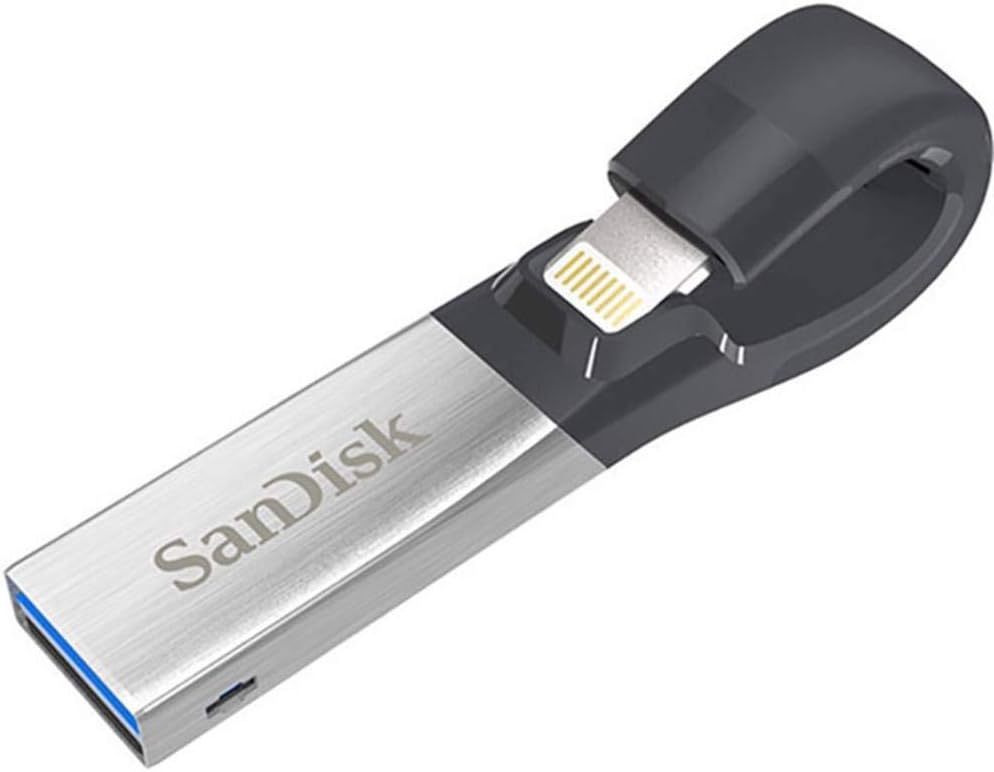
The SanDisk 128GB iXpand Flash Drive is a sleek, high-speed USB 3.0 storage solution designed specifically for iPhone and iPad users. Featuring a flexible Lightning connector that fits through most cases, it enables effortless backup and transfer of photos, videos, and contacts. Compatible with iOS 8.2+ and major desktop OS, it offers password protection to secure your data. With 128GB capacity and transfer speeds up to 150MB/s, it’s the perfect tool to free up space and keep your digital life organized on the go.


| ASIN | B01CIEBXZG |
| Additional Features | Lightweight |
| Brand | Sandisk |
| Built-In Media | IXPAND FLASH DRIVE |
| Color | Silver |
| Compatible Devices | Mobile, Tablet |
| Compatible Phone Models | Iphone 5 |
| Connectivity Technology | USB |
| Customer Reviews | 4.4 out of 5 stars 19,584 Reviews |
| Flash Memory Type | USB |
| Global Trade Identification Number | 00619659143022 |
| Hardware Connectivity Technology | USB Type A |
| Hardware Interface | USB 3.0 |
| Item Weight | 5.4 g |
| Manufacturer | Western Digital Technologies, Inc. |
| Memory Storage Capacity | 128 GB |
| Mfr Part Number | SDIX30C-128G-GN6NE |
| Model Name | SanDisk iXpand Flash Drive, 128GB |
| Model Number | SDIX30C-128G-GN6NE |
| Number of Items | 1 |
| Read Speed | 150 megabytes_per_second |
| Special Feature | Lightweight |
| UPC | 619659143022 |
| Unit Count | 1 Count |
| Warranty Description | 5 year |
| Write Speed | 80 |
E**.
Finally! Transfer photos without any fuss.
PRO - Very easy to open packaging by hand - Very easy to use (including the app) - Does exactly what you would expect CON - A little pricey COMMENTS I decided to give this a try because I had been having major issues trying to save/backup my iOS photos using the USB cable, the cloud—you name it. This was my last hope and I’m so happy that it worked out. I transferred nearly 8 GB of photos and it did take a long time, but it was well worth it. (Considering I would wait long times with other failed methods—this actually works.) TIP If you have a lot of photos like I did, you may want to make sure you either have 100% battery life OR have a wireless/touch charger so that you can keep your battery charged while you are transferring photos from your phone to the iXpand drive. CONCLUSION If you hate dealing with the USB cable for transferring photos, this is a very solid option. Even though it’s a bit more pricey than other “no-name” generic drives also sold on this platform, I decided to opt for the SanDisk and it did not disappoint. I highly recommend it.
A**N
Awesome Drive Very Happy Buyer :)
This flash drive is Sandisk 128GB it a Awesome Drive I order a different brand before I got this one don’t go cheap on a none Brand Flash Drive like I did and had to return it because it was junk i purchase this one was so happy at the easy it work and how fast it downloads all my photos and videos from my iPhone I had about 80GB on my phone overlord for sure this drive took about 25 min to download everything not bad at all Sandisk is well known for it SD CARDS so it a brand Name if you buy a knock off one beware they said they are 128 GB or so but can’t hold that at all are they just don’t work I try for 4 days to off load my phone what a waste of time if you go cheat on one are buy a off Name get ready for trouble Sandisk Brand is Your best bet pay a little more and get it done right :) they have different GB I got 128GB because it can hold a lot before I off load it to a External hard drive are you can off load it to a labtop Or computer but for me external hard drives are the best place to off Load your Flash drive anyway for safe keeping plus they hold a lot of memory buy a 2TB are higher for off loading your flash drive to external Hard Drive hope this help you all PS I keep my flash drive in a plastic little zip bag you can buy a case for them but why pay out more money these bags keep um dry and safe I took a picture of my Drive in it bag check it out
K**A
WORKS WITH MY OTTERBOX CASE STILL ON PHONE!!! yey!
I got this flash drive in the mail yesterday and so far, I am loving it!!! I gave it 4 stars instead of 5 because there's no cover for the USB end which would be nice to keep dust and lint out of it while it tumbles around in my bag but besides that, it does what it advertises. I ordered a more expensive drive a few weeks ago and was disappointed because it wouldn't work while my iPhone case was on (it had specifically said it was made to work with cases on) This flash drive worked like a dream with my Otterbox case still on the phone! It downloaded the pics A LOT faster than my other wifi methods of backing up pics. It worked perfectly when I plugged into my computer and could see my files. The only thing that I didn't like but it's no big deal is that the pictures group by month so it's a bunch of subfolders by month instead of just one file of pics. No biggie, that's just a personal preference of mine. Some may like that. I bought this for myself but am seriously thinking this would make a great gift for my sister who's daily life causes her to use her phone camera all the time as well.
P**O
Yes, it can move a DOC or PPT file from an iPad to a PC!
I'm giving it 5 stars because it does exactly what I needed and solves a huge problem for me. I travel often and have to give a powerpoint file to someone for a presentation. I have replaced my Macbook with the new 10.5" iPad Pro, and I need to be able to get presentations and other files onto a thumb drive from the iPad. I had read several sites, including Apple's discussion site, and it was not clear that you could do this. There was speculation that you could, but I needed to test it for myself as the main use of this seems to be moving photos and videos, not necessarily other file types. However, I can say that I have tested it and it works beautifully! On the iPad I went to Powerpoint (I do have a subscription) and made a new talk. I then selected "Save a Copy" and I picked the SanDisk iExpand Drive. It worked! Then I removed the USB drive and plugged it into a PC... and it worked great! So: problem is SOLVED! This works!!! Whoo hoo! I can now use my iPad Pro as my main machine! So excited as this was the last piece holding me back. This is a great little product and I trust SanDisk to do this right.
P**B
Great for pictures and videos from your iPhone to free up more space on your iPhone
SanDisk iXpand Flash Drive 128GB for iPhone and iPad, Black/Silver, (SDIX30C-128G-GN6NE) Just got this and love it. Very easy to use. If you have any files (movies) that are over 4 gb in size then the 64 or the 128 versions are for you since they support a formatting version that will allow you to transfer from your computer to the iXpand. It will back up your photos and video that you take on your iPhone to the iXpand. You can't back up the music from the iPhone to this. You can copy mp3 music files to the iXpand and play them from the iXpand on your iPhone. It will also work with my Otterbox Defender Case which I love, I found out that there is a version for the Otterbox that you don't have to bend the connector too much but it still works. Great purchase if you are going on a trip and don't want to take your computer with you. 128 gb should hold everything you are taking on any trip and when home just plug into your computer and copy the pics and videos you took to your computer.
D**K
For Music Playback, File Conversion is Key
At first I thought the iXpand 32 I received was defective. I copied about 5 gigs worth of music from my PC to it, only to find that playback on my iPhone and iPad locked up after a few songs, and that files copied from the iXpand drive to either device never displayed. San Disk's staff worked with me patiently by e-mail and phone to solve the problem. When nothing seemed to work, they offered to replace the drive. Yesterday, after deleting all the files on it preparatory to sending it back, I decided to download iTunes to my PC, run their AAC conversion on some of the song files I'd deleted from the iXpand, and copy them back to it. Afterward, they displayed, copied, and played perfectly in every file view (songs, albums, artists) and in every mode, including shuffle. Apparently, Apple's DRM restrictions prevented playback on the iXpand drive, which had been loaded directly from my PC, and prevented copying anything from it. I have since converted and restored all the iXpand files satisfactorily, and am pleased to delete a two-star rating I posted earlier and replace it with this entirely favorable one.
B**M
Great for transferring iPhone photos
Excellent flash drive that works seamlessly with my iPhone 6+ (running latest iOS 10.0.2), PC and Slate PC (both running Windows 7). The main reason I bought this item was I needed an easy way to get photos into my camera roll. As every iPhone user knows, it's easy to get photos out of the iPhone, but very difficult to get photos in. Prior to using this device, I used various transfer apps via WiFi (spotty connection and unreliable) and via Personal Hotspot (uses cellular data and got expensive). I also used iTunes and I found it too complicated and time consuming. This iXpand Flash Drive solves my problem easily and effortlessly. I just had to plug the drive into my iPhone and follow the instructions that automatically pops up. You simply download the iXpand Drive app from the App Store (there’s only one version so there’s no confusion as to which one to download) and it’s ready to go. I also appreciate the high-speed USB 3.0 feature which makes the transfer process fast. I’ve had no issues with the device (so far) and I’m very happy with it’s speed and functionality.Highly recommended.
F**I
PC users have few options with apple UPDATE WITH MORE TIPS TO GET IT TO WORK
UPDATE: This is such an annoying product, it's seriously a complete UGH! But Apple driver issues on Microsoft have limited options. So here's some tips that will save you some massive UGH yelling at the computer. I hope this helps. I still for whatever reason like it, because the driver issue work around is only this, so there's really not a great option, besides emailing yourself all your pictures and videos, so this is way more ideal than that. - Create a folder on your Computer for your Backup, BUT! create another folder with another name (I used "current videos") Only transfer TWENTY at a time. Into the "current videos folder". Then go through the copied videos to make sure they are all there. Then copy them to your BACKUP folder you made. My reasons for this seemingly ridiculous step? 1. It transfers what it wants too. Some videos/pictures won't transfer the first time you try. I assume if you are taking the time to transfer your files, they mean something to you. So it's important to make sure they are all there, even if it is tedious. 2. If you transfer them into backup, and try to review your most recently transferred, there is usually an error. Be it Date Created, Modified, Filmed, Uploaded. There is an issue, that takes so frustratingly long to sort out, and sort through, that it's just easier, to make the separate folder to then check, and then copy to the main back up folder you made on your PC. In even simpler terms, The videos/photos you just transferred might somehow get mixed into another date/video/image name. So basically, your Fall Photos might be half in the FALL according to the date taken, but half might be hidden in the SPRING grouping of dates. It makes no sense, and i've been trying to figure that out, but the easiest way is just to check in a different folder, then transfer to the main one you made (or maybe you like making multiple folders! That's completely up to you!) I REALLY want to love this product, because it seems like a great solution. But it's a hassle. So please get the small one, The large one makes no sense with all the glitches this thing has. REGULAR GLITCH fixes: 1. When plugging it into your phone and trying to copy, the screen might start flashing and say "error". Take out the plug, turn off your phone, turn back on, re-plug it in, try again. Sometimes that doesn't work! So plug it into your computer instead (The sandisk), Then MAKE SURE TO EJECT IT, DON'T JUST PULL IT OUT. Turn off phone again, Turn back on phone, plug in Sandisk to phone, try copying your photos or videos again. If it's still saying "error" etc, then unfortunately you need to give it a few minutes (unplugged again, this little Sandisk overheats too, so make sure it's cool) Then try again. 2. It overheats! so don't copy too much at once. You will literally feel how hot this little Sandisk gets when it's plugged into a pc. I got this because of the driver issues when trying to connect apple phone to computer. It does transfer things, but you have to do only a few at once otherwise you will have a terrible time figuring out which videos/ pictures it didn’t copy. The transfer to the usb is fast. But then going through everything to make sure it copied takes a lot of time. So don’t buy the large one, just get the smallest or cheapest one because you will want to work in batches of 20 to make it more manageable. Otherwise you will miss that it missed something. It’s less terrible than iphone transferring through lightening cable. But it still has so many flaws that I can’t write a review without addressing. I got the smallest one after seeing other reviews and I’m glad I did.
D**L
Functional & Utilitarian Means Of Data Transfer
the product works as advertised and is especially useful when backing up photos and videos directly via physical means between the iPhone and your computer. it's much faster and more reliable when compared with the regular wireless means like air drop.
A**A
Essencial pra iPhones/iPads com 32GB
Se você anda precisando de espaço, é uma ótima pedida. Ainda que você pode usar como um pendrive convencional. Recomendo!
V**O
Quality product
Expensive but SO easy to use and saved a lot of space on your phone.
S**Y
Best alternative for iPhone space.
Best solution to save your iPhone space. Also can buy a lower space iPhone with this alternative.
L**M
A must have gadget
Such a great piece of kit. Simple to use - just plug in and it automatically backs up your phone or iPad. Clip on feature is great - you can leave it connected to your device without it sticking out and getting in the way. Useful for taking away as you can load it up with films to watch on your journey. Easy to add and remove files by simply plugging into a PC. Clearly the manufacturer put a great deal of thought into this product as it ticks every box. A worthwhile buy.
Trustpilot
1 week ago
3 weeks ago