Buy anything from 5,000+ international stores. One checkout price. No surprise fees. Join 2M+ shoppers on Desertcart.
Desertcart purchases this item on your behalf and handles shipping, customs, and support to South Africa.
โ๏ธ Keep your Pi cool, colorful, and commanding attention!
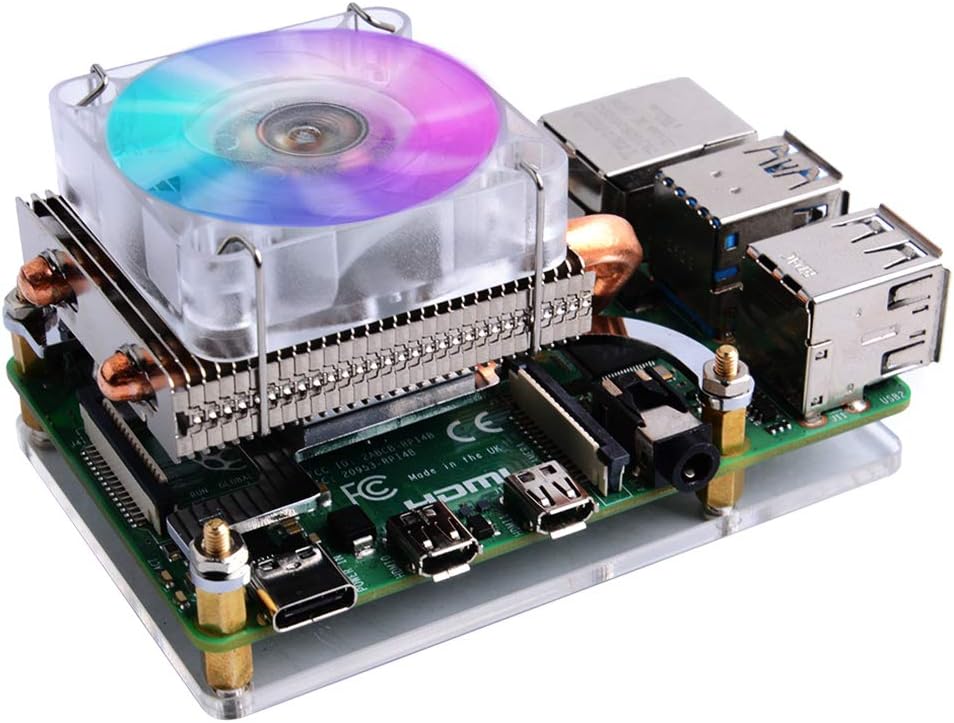
The GeeekPi Raspberry Pi Low Profile CPU Cooler is a high-performance horizontal ice tower cooler designed for Raspberry Pi 4 Model B and 3B/3B+. Featuring a 5mm copper heat pipe and PWM-controlled RGB fan powered directly by the Piโs 5V supply, it delivers up to a 24ยฐC temperature drop while adding vibrant automatic color-changing lighting. Easy to install with included mounting hardware and thermal pads, itโs the ultimate upgrade for millennial pros seeking efficient cooling with a stylish edge.


| ASIN | B07ZV1LLWK |
| Are Batteries Included | No |
| Best Sellers Rank | #21,532 in Computers ( See Top 100 in Computers ) #39 in Computer Heatsinks |
| Brand | GeeekPi |
| Color | silver |
| Customer Reviews | 4.6 4.6 out of 5 stars (1,423) |
| Date First Available | 13 November 2019 |
| Item Weight | 150 g |
| Item model number | EP-0122 |
| Manufacturer | GeeekPi |
| Package Dimensions | 10 x 8.2 x 6.2 cm; 150 g |
| Voltage | 5 Volts |
S**K
Worked well !
Great product ! It lowered down my Raspberry Pi 3B temperature from 88 Degrees Celsius to 64
A**J
I first bought one and then 5 more. Really good, well built (I just dislike the RGB LEDs)! All my RPis are now running 5-10C cooler than befor
R**O
Cumple su objetivo, deja mi placa a 32ยฐc/40ยฐc y lleva prendida 1 semana sin apagar. Es muy buen producto. Lo uso con Orange PI 3B.
D**Y
Interferes with other add-ons
E**N
I picked the downdraft-style cooler by merit of having two heatpipes, and also blowing air onto and across all components of the board. Although, with such power-sipping components, any heatsink with heatpipes at all is easily good enough. Installation: easy. The cooler comes with all the mounting hardware (plus extra standoffs, screws, and nuts), a nice little acrylic baseplate, and some included thermal pads to interface between the processor and heatsink coldplate. (I opted for some Arctic MX-4 I had lying around.) There's probably no need to worry about proper mounting pressure, just screw in everything hand-tight according to the diagrams in the instructions or possibly get a little help from pliers for the nuts. The included fan is a simple 5V, 40mm fan that is honestly just fine for keeping everything cool. There are two jumper wires on the fan that plug directly into 5V and GND on the Pi's GPIO headers. (You can also swap the 5V for 3V3 if you would like the fan to be quieter / dimmer.) The fan makes a slight whine, but it won't be noticeable unless you are in a quiet room with the fan within a couple feet of you without headphones. At least, it's quiet enough that I wouldn't spend another $15 to swap it for a Noctua... for now. Performance: I was able to easily get my Raspberry Pi 4 to 2147MHz core, 750MHz graphics, though the graphics could probably get even higher. I idled at about 32C and had a max CPU temperature of 45C under extended load (~25C ambient), even with a >600MHz overclock. At $20, it's a pretty significant portion of the total cost of a Raspberry Pi setup, but a good cooler is basically the only way to improve the performance you can get out of the processor. This product may be a little overkill but hey, it gets the job done and looks pretty flashy with its TWO heatpipes and miniature fin stack.
K**N
When I noticed that there was only physical contact with the SoC and not the the RAM, USB or Wifi chips I was a little worried that this might not be the solution I was looking for. But it really was. This cooler is very effective. I've got a Pi4 running overvoltage, heavily overclocked with a bunch of hungry accessories like Edge TPU, servo controller, IMU, OLED display (for status only; it runs headless) etc. The whole setup used to run in the 70's or even 80's (Celsius) when it got angry. Something had to be done. With this fan running on the 5V pin it sits around 45C most of the time even while working pretty hard reacting to AI with servos etc. 35C at 'idle'. And I can barely hear the fan - certainly if any other PC or laptop fans are nearby it won't be heard over them. I'm also pretty confident that you could drop down to 3.3v or even disconnect the fan entirely and still experience pretty good passive cooling just from the block, copper pipes and fins. The only real improvement I'd like to see for this relatively simple design would be to extend the block to contact the RAM and maybe add lugs for the USB and Wifi chips. Bottom line: if you need to overclock or push a Pi4 and don't need a tight enclosure, this will do the trick - and it's not a huge vertical block so you do at least have *some* reasonable mounting/enclosure options.
Trustpilot
1 week ago
3 weeks ago