💙 Cool your rig, light your style — don’t let heat kill your game!
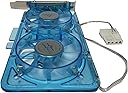
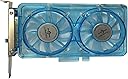
The Vantec SP-FC70-BL Spectrum System Fan Card is a compact, dual 70mm UV LED fan solution designed to fit into any PCI slot, delivering 23.64 CFM airflow at speeds up to 4000 RPM. It cools surrounding PCI/AGP cards directly, reducing GPU temperatures by up to 20°C while adding vibrant blue UV lighting to enhance windowed PC cases. Powered by a 4-pin connector, it offers adjustable fan speeds for customizable noise and cooling balance, making it an essential upgrade for high-performance gaming rigs.


| ASIN | B000233ZMU |
| Air Flow Capacity | 23.64 cfm |
| Best Sellers Rank | #2,581 in Computer Case Fans |
| Brand | Vantec |
| Brand Name | Vantec |
| Compatible Devices | Desktop, Graphic Cards |
| Cooling Method | Fan |
| Customer Reviews | 4.2 out of 5 stars 454 Reviews |
| Global Trade Identification Number | 08447670132068 |
| Item Dimensions L x W x H | 7.68"L x 3.62"W x 0.79"H |
| Item Weight | 7.2 ounces |
| Manufacturer | Vantec |
| Material Type | UV sensitive material |
| Maximum Rotational Speed | 4000 rpm |
| Model | SP-FC70-BL |
| Noise Level | 36 db |
| Number of Items | 1 |
| Number of Packs | 1 |
| Part Number | SP-FC70-BL |
| Power Connector Type | 4-Pin |
| Product Dimensions | 7.68"L x 3.62"W x 0.79"H |
| UPC | 163120886289 012302232751 782386476326 115970979604 731215273803 844767013206 |
| Unit Count | 1 Count |
| Voltage | 12 volts |
| Warranty Description | Product Warranty |
| Wattage | 9 watts |
D**N
Great for cooling Ceton InfiniTV cablecard tuner
I bought this because my parent's new Ceton InfiniTV 4 cablecard tuner was runing fairly hot, up to 75C, while the processor never got above 45C. So I was sure the air in the case was cool but figured it was just not getting moved around enough at the Tuner card. So I placed this card two slots away from the tuner card since the next PCI-Express slot would have been too close. And it started off with no tuner going above 45C, then I started them all up and the highest I got to was 55C. So that is at least a 20 degree difference. Worked so well I went ahead and ordered another one for my system which is exactly the same but was running cooler due to more air flow in my cabinet. Figured if it works that well might as well be safe. On high it can sound a little loud, but once I closed the cabinet you can barley hear it, and once you start watching TV no chance of hearing it.
A**E
Excellent VGA cooler
I'am glad I bought this. I needed this for my new Gigabyte R9 390 because I did not like how hot my card was getting when I was gaming. When I played Black Ops 3 my card was getting really hot up to 92c, that did not make me comfortable at all. So I was looking for VGA coolers to cool down my card, I did not want to do a water cooler because I love the blue LED windforce logo on my card, one of the reason why I went with gigabyte, it matches my blue theme but anyways this fits the bill nicely. It lights up blue lights so thats a plus, and you can adjust the fan speed but I just leave mine at medium settings because high is really loud. The lowest is not that quite its still louder than my other fans in my case but I have fan controllers for those too that make them dead silent. This my R9 390 go from 92c down to 72c which is just fantastic, but I also zip tied 120mm fan on the hard drive cage to blow air onto the card directly but this works though. I put it into a PCI-e slot near to my R9 390, so it indeed does helps you cool your card. Now my graphics card fans do not run loud at all anymore, and the temps are great. I think this is a good investment if you have a high end card and want to extend its life and the fans life on it.
B**S
check your cables before buying!
Well, I read all the reviews for this fan, and everything looked great, so I bought it. What no one mentioned for some reason is that the power cable that comes with this is a "4-pin," which is usually associated with older computers. My computer doesn't have any 4-pin connections inside it. It only has the SATA cables, which are more common in newer computers. I just have a regular Dell computer that I bought in the last couple of years, so I suspect a lot of buyers may encounter the same problem. Basically, you need to open your computer case before buying this and see if you have any 4-pin connectors in there. Otherwise, this won't work. I still don't understand why no one else has mentioned this problem. As far as the product goes, the cable is fairly cheaply made, but the rest looks pretty good. I'm not sure why they couldn't make it powered by the PCI slot itself, but whatever. It's cheap, so I'm sure it works well enough if you can actually get power to it. By the way, if you do decide to get this, you may need to order one of these with it: [...] This should convert your SATA to 4-pin. You could add this into your order pretty cheaply and probably get free shipping. Good luck. :) ***revision: I have updated the review to 4 stars now, as I think I got my point across. Hopefully I will save a few people from buying the wrong cable due to a lack of clarity in the item's description. I actually got a new computer a couple of months ago, and it had the right connection in it, so now I'm able to review the actual fan, and it is working quite well. It's loud when it's turned up, but I don't think it's a problem. For the price, this is a good little fan. It's nice to be able to crank it up when you know you're pushing your graphics card hard.
D**E
Not quiet
This is a wonderful card with a awesome blue light spectrum. It is great to look at and did all I wanted. Except, kinda not really to be honest. It is not quiet and emits a strange high pitch sound which makes it, for me, unusable. Even at the lowest speed setting the fans still make this sound. If the spinning fans didn't emit this strange high pitch sound I would have given it a 100% positive rating. Maybe I got a semi defective card? I don't know, but I had to uninstall it after a days use. The sound it gives off even a low speed is so annoying it caused me to lose focus. It is like a mosquito right near your ear and you're wondering if that darn thing will land somewhere so you can crush it. I will add this; in my comp case, a mid tower, it is possible that I am hearing this high pitch due to reverberations from the card against case and not directly from the card. Regardless, I can't use this very pretty blue lit fan card. Sum: If you can get past the high pitched sound and just love pretty blue light, you'll be happy you bought it.
C**E
Cooling power + bling
This is a simple and effective way to keep your graphics card running cooler. It fits into the a PCI slot (ideally above your graphics card) and directs air unto the body of the card allowing it to run cooler (in theory). I was skeptical how much of a difference this device would make, but with an HD4870 running at 70c under load I thought it would be worth trying. I'm glad I did: the fans on this card lowered my peak temperature to 64c under load and 48c at idle; still pretty hot but then the HD4870 runs hot anyway. This card is a bit obnoxious if you're not a huge fan of LEDs inside your case. Since I use a solid gray Antec case without any windows, I never see the LEDs and so they don't bother me a bit. Whether you love them or hate them isn't the point; it's just something to consider if you're looking at buying this cooling fan card. I suppose you could actually twist them off with pliars if they bothered you--I can't see how that would effect the fans themselves which is the real reason to buy the card. For the price, this was a simple, cost effective, and easy way to lower my graphics card temperatures. It's worth the money if you need one.
M**E
Works perfectly and does everything I wanted and more
I just purchased/received/and installed the Vantec SP FC70-BL Spectrum Fan card with the adjustable 70mm x2 UV LED Fans. First of all, it was extremely simple to install AND IT DOES NOT CONTAIN ANY SURPRISES THAT ARE UNWANTED. Slide the plastic PCI inserts included on the fan card directly into a blank PCI slot and connect the power supply and you are off and running. Secondly, this little double 70mm fan card setup is very powerful and pumps out some serious air flow (3500 RPMs). I used it for extra dual GPU SLI cooling. I put it right between my two EVGA Nvidia Geforce GTX 560ti video cards and it fit "perfectly". It increased the air flow to both of my GPU cards by at least 50%. The video cards already have a single fan installed on each of them, combined with the Cooler Master HAF-X tower's air duct 120mm fan that blows air directly onto the video cards, and the large 200mm case fan that pushes air directly onto the sides of each GPU, the Vantec fan system provides another 3500RPM per 70mm fan, the GPU's provide fan speeds up to 5,500RPM each, the 120mm duct fan provides air flow up to 1500RPMs. This extra air flow the Vantec provided brought my over all GPU temperatures down from approx. 70 to 80 degrees Celsius to 60 to 65 degrees Celsius. You can run your GPUs hotter than any other hardware in your computer. Temperatures up to 95 degrees Celsius are not uncommon, but not recommended over long periods of of high load usage and serious high end gaming. Also, I almost forgot to mention that the Vantec fan card is 100% manually adjustable from the outside/rear of your case in the back where you installed the card into the PCI slot. Thus, at the lowest setting the fan is still spinning, but only at about 700-1000 RPMs, which you can not hear at all. However, when you crank it up for some serious additional air flow you can really hear the super fast 70mm fans spin up to 5000 RPMs producing a lot of extra air flow to what ever component you have it directed at. I would most definitely recommend this modular fan card for anyone who is serious about reducing overall inside tower temperatures on you computer. Oh ya, it also looks pretty cool as well. It has an installed blue LED/UV light that looks good under any circumstance, especially at night. Every now and then you run across something that does "exactly" what you want it to do and what it is advertised to do and this was one of those devices that did exactly that. FIVE STARS ALL THE WAY!!
D**N
Dropped the GPU Temperature by 25 °C!
The fan on my ATI Radeon 4600 card failed, and I could not find a replacement that would mount in the pocket machined into the heat sink fins on the card. Since I don't do a lot of heavy graphics processing or gaming, I was able to run for a week without the fan while I pondered my next move. I decided to try the Vantec slot card as the price was right and a lot cheaper than replacing my video card because of a dead fan. Using the graphics tests from ATI Catylst Control and Passmark's Performance test 7.0, at 92% to 95% GPU activity for 30 minutes, the GPU temperature without the fan, using passive cooling only, leveled out at 72 to 78 °C, depending on the test - this at rated clock speed. After the fan installation, at the lowest fan speed, performing the same tests, the GPU temperature leveled out at 48 to 52 °C, and even when Catylst's Autotuning function overclocked the GPU by 20%, the temperature never exceeded 57 °C. Installation was a snap, and you don't even need an extra Molex connector - the fan has a pass-through type power connector that allows you to piggyback it onto another Molex connector feeding something else nearby - your GPU card, for example. I'm running the fan on the lowest speed, as a higher speed didn't drop the temperatures and just added noise - the air noise is fairly high at high speed, but very quiet at low speed, which was all I needed. I would highly recommend this fan solution if you have a GPU with passive cooling that runs hot or the fan on your GPU is noisy or fails.
G**R
Screw did not fit/size before purchase
Works well, does cool my GPU/provide cooling for my general build; however do research before purchase as the connector for the PCI slot did not fit so I removed them entirely using pliers. The screw that comes with the fan card does not fit on both the card and my case, which sucks but I just used my case screws and it was the same thing. Works well just do research and have spare parts
R**O
Noise and broke. Avoid
Lots of noise at full and mine broke after a week.
A**N
seems overpriced
It works. It's cheaply made and I don't expect it to last for a long time. If it does it will be worth five stars. EDIT: still going. Using it next to a 10gig network card that would otherwise run very hot. On lowest speed it keeps the card plenty cool. FIVE STARS
D**Z
Sólo consideren el ruido
La verdad es que funciona perfecto, ayuda muchísimo a que no se sobrecaliente y por lo mismo ayudó a que tuviera un pequeño incremento de rendimiento (después de jugar mucho tiempo). Lo único que tendría en contra es que el nivel de ruido es bastante fuerte, tal vez comprando un gabinete que ayude a aislar el ruido lo solucionara. En resumen: El ruido es alto pero soportable y la calidad-precio es excelente.
N**V
A well Built & designed unit from Vantec
This is a dual fan cooling unit designed to dissipate hear from your video card or other high performance adapters such as raid controllers, raisers & more. A Great product from trusted VANTEC brand.
S**R
Excelente para mantener fresca tu tarjeta gráfica.
Lo instalé debajo de una NVIDIA GTX 1070 de GIGABYTE, la temperatura máxima que alcanzaba mi tarjeta era de unos 65c, ahora con el ventilador a lo mucho llega a 61c. Se puede instalar en cualquier ranura de expansión de tu gabinete, cuenta con entrada de alimentación MOLEX así que hay que tener previsto que tu fuetne de poder tenga esa salida. En la parte exterior cuenta con un deslizador con el cual puedes regular la velocidad de ambos ventiladores (los dos a la vez con el mismo deslizador), en mínimo y un poco menos de la mitad del rango del deslizador no se escucha y mueve cantidad decente de aire. Incrementando después de la mitad del rango del deslizador es cuando el sonido de los ventiladores empieza a incrementar. A mi gusto tuv que dejarlo exactamente a la mitad, pues el ruido generado puede llegar a ser algo incómodo (pero no molesto) ya que es como una especie de zumbido. Por otro lado cuenta con LEDs de color azul que lamentablemente no se pueden apagar, como todos las luces de mi gabinete son de colores rojizos me iba a desconstrastar la temática, por lo que opté por cortar las conexiones LED, siguen funcionando sin problemas los ventiladores.
Trustpilot
1 month ago
2 days ago