๐ Boost your WiFi, boost your life โ never miss a beat!
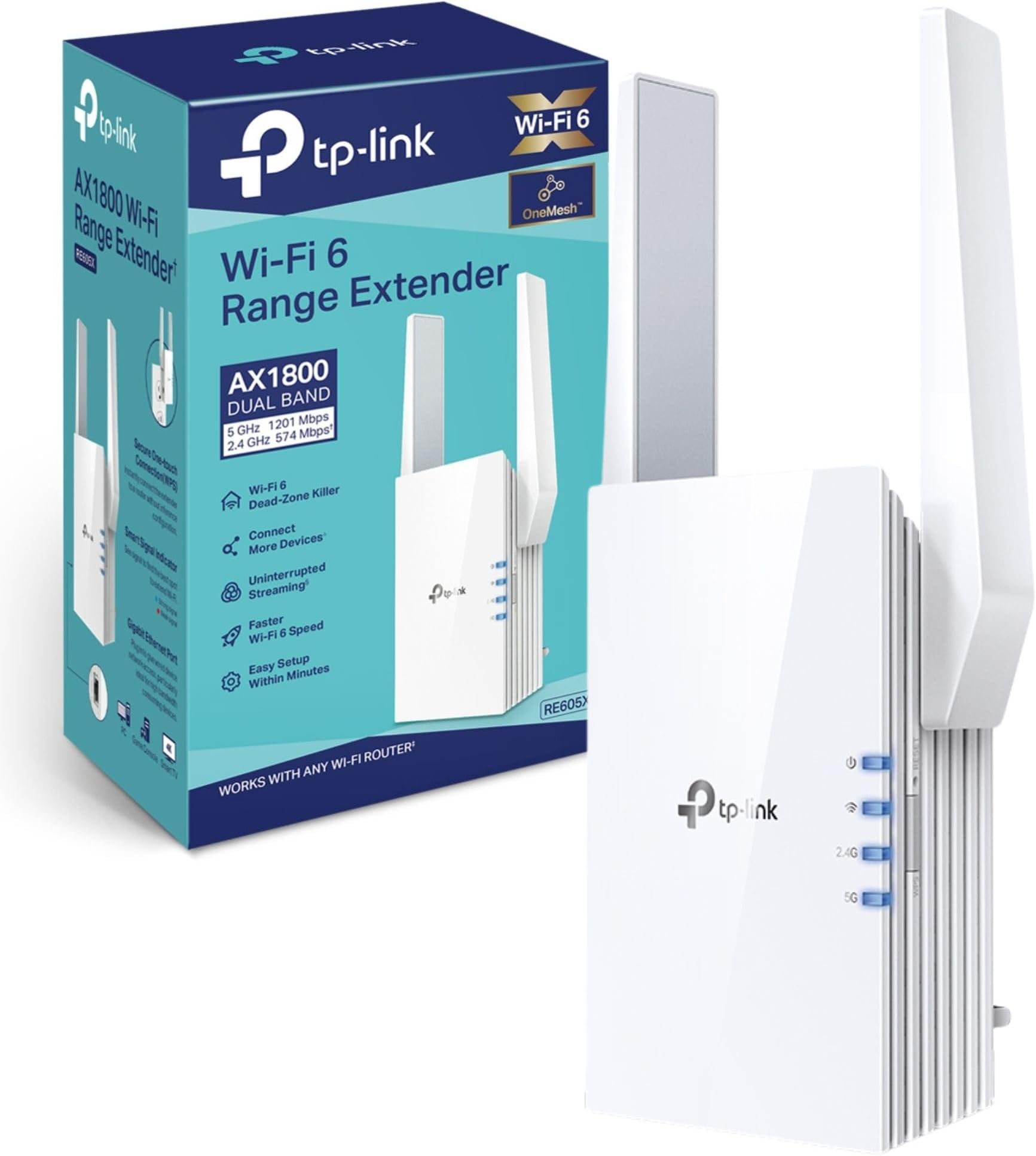
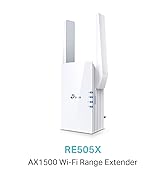
The TP-Link RE605X Mesh WiFi 6 Booster delivers ultra-fast 1.8 Gbps speeds with next-gen WiFi 6 technology, extending your home network seamlessly via Mesh integration. Featuring a smart signal indicator and a gigabit Ethernet port, it ensures optimal placement and wired connectivity for your devices. Easy app-based setup and compatibility with any router make it the ultimate upgrade for a flawless, high-speed internet experience.


| ASIN | B08GYNBVF3 |
| Best Sellers Rank | 47,808 in Computers & Accessories ( See Top 100 in Computers & Accessories ) 349 in Network Repeaters |
| Box Contents | RE605X |
| Brand | TP-Link |
| Brand Name | TP-Link |
| Colour | White |
| Compatible Devices | Wi-Fi devices (OneMesh router, smartphone, tablet, laptop, computer, smart TV, game consoles, printer, security camera) |
| Connector Type | RJ45 |
| Customer Reviews | 4.3 out of 5 stars 787 Reviews |
| Data Transfer Rate | 1.5 Gigabits Per Second |
| Data transfer rate | 1.5 Gigabits Per Second |
| Frequency Band Class | Dual-Band |
| Frequency Bands Supported | 2.4 GHz, 5 GHz |
| Frequency band class | Dual-Band |
| Item Dimensions D x W x H | 8.3D x 9.7W x 15.8H centimetres |
| Item Weight | 418 Grams |
| Manufacturer | TP-Link |
| Manufacturer Part Number | RE605X |
| Model Number | RE605X |
| Product Warranty | 3 year manufacturer |
| Range | 100-120 metros cuadrados |
| Special Features | Access Point Mode |
| Special feature | Access Point Mode |
| Unit Count | 1.0 count |
| Wireless Compability | 802.11a, 802.11ac, 802.11ax, 802.11b, 802.11n |
| Wireless communication standard | 802.11a, 802.11ac, 802.11ax, 802.11b, 802.11n |
J**S
Great signal outside, extremely easy setup.
My home network setup consisted of a Virgin Media hub 4 set to modem only and a TP Link AX1800 router. I was getting a great Wi-Fi signal throughout the whole house of approx. 200Mbps. Unfortunately when I was sitting in the back garden I had to leave either the back door or patio doors open to receive a Wi-Fi signal. The signal was very weak and would disappear completely on numerous occasions. Decided to try a range extender. Purchased the TP Link AX1800 extender. Setup was super easy. Just followed the instructions for "via the tether App". As I was going to be using the OneMesh setup the Networks and passwords stayed exactly the same. After setup I relocated the extender to the plug point nearest the patio doors. Only used for one day so far, but signal in the back garden (at my usual seat) is superb. Tested at approx. 100Mbps on 5Ghz with all the house doors and windows firmly closed. No dropouts or any loss of signal strength in whole afternoon. I was lucky to get a even a weak signal for 10 minutes prior to using the extender. Will update if any problems occur, but looking like a superb purchase. Update:- now used for 3 weeks, working perfectly in the back garden - fantastic signal strength. Obviously no problems with the signal in the house either (never had any to start with). Only thing of note was I had to reset one Amazon Echo controlled light bulb and it happened to be the one closest to the extender, maybe just coincidence, as it has worked perfectly since.
W**E
Quick and Easy Set-up. Working well so far
Our Virgin Media router ( Hub 3.0) is located in our smallest upstairs bedroom used as an office. Always had flaky Wi-Fi downstairs but we soldiered on. Downstairs Wi-Fi mainly used by my wife on her laptop and she was complaining about internet drop-out on a fairly regular basis. I researched online and this TP-Link RE605X came out well in a Which review so I decided to bite the bullet. Extender arrived this morning and plugged it in to a socket in the bedroom. After the solid power light appeared I pressed the WPS button on my router and then the WPS button on the extender. Within about 30 seconds the extender had picked up and cloned both the 2.4Ghz and 5GHz bands on the router. Checked the signal strength for the -EXT clone of my router and it showed almost equal strength to the parent router. Moved the extender downstairs and plugged it into a socket in our hallway about halfway between the router and my wife's laptop. Signal strength had dropped a bit but the -EXT clone was clearly stronger than the parent router. Was keen to push the range a bit and moved the extender into the lounge area and plugged it into a socket near the laptop. Although effectively further away from the router I was surprised to see the the -EXT signal strength was significantly better than when in the hallway. Not sure why but I'm very happy. Wife's laptop now connected to the -EXT clone and working well. Hopefully no more drop-outs and complaints. Just need to bite the bullet and fiddle with the Samsung TV to reset it to the -EXT clone. It's a bit of a nightmare to navigated the sub-menus to achieve that so I may wait until I feel in a more Zen mood. Overall so far - great product and super-easy to set up and locate.
M**U
TP-Link AX1800 Dual Band Wi-Fi 6 Range Extender (RE605X) brilliant Access Point but poor extender
Configured on 22/02/2022 with host router Virgin Media Hub 3 First wasn't happy that Amazon had supplied hardware version 1 when version 2 is now available. The price ยฃ59.99 for a version 1 device seems a tad high. Initially configured it as an Wifi Extender using the TP-Link Tether mobile app which was simple enough. First time the 2.4 GHz blue light wouldn't turn on even though I was able to use the 2.4 GHz extended wifi. Reset it to factory default and reconfigured it and now the 2.4 GHz blue light works. Using it as a WiFi extender is a bit of a hit and miss. Internet bandwidth is sometimes very low even standing next to extender on both 2.4 Ghz and 5 Ghz frequencies. At times the client device shows its connected but has no internet. I would have returned it if I could only use it as an extender, but I had bought the RE605X to use as an internet Access Point (AP). I have ethernet cables running from the Virgin Media Hub 3.0 to the selected location for the Extender to allow this. Set my laptop on the extended WiFi SSID and logged in to the web browser TP-link app. I changed the following to set it as an AP : 1. In Network, set the IP address of the extender to use a static IP address 2. In Network, set DHCP Server to OFF as I believe it cannot be used with Access Point (and I didn't want it to clash with the Hub 3 DHCP server. 3. Changed the operation mode to "Access Point" in Mode (top right of the configuration screen). This will reboot the device. Once rebooted, the extender works brilliantly. I get excellent WiFi coverage and bandwidth at all the previous dead spots and in some cases its the router's max bandwidth. I also downloaded and upgraded the firmware on the extender. Early days, so will monitor if it continues to work as an excellent Access Point and update my review. However only buy it if you can use it as an Access Point. Its very flaky as just a WiFi extender.
M**K
This thing is a BEAST
Upon unpacking this thing you realise just how well made and how BIG it is. This is a substantial unit built and designed to do it's job well, which it does. Setting up was a bit of a pain though, but not too much. There are 3 ways to set it up: first is their app which you download on to your phone, the second is to use their website and the third is the WPS button. So I tried the app. What a waste of time. The instructions are to connect to 'the' WIFI but it doesn't tell you which one. So I connected the app to my home WIFI with passwords and everything, nothing. Then I connected it to the TP-Link WIFI (both of them because this is dual band) and again nothing. So if I were you, do what I did and just press the WPS button on your router and the Link and bingo! You're on! This thing is so powerful! I placed it at the other end of the house and connected the security camera I got from Wish to it. The process was effortless. Next I connected my Firestick to it, again effortless. The signal strength is amazingly powerful. I'm sure the signal could link up with NASAs Mars Rover if they needed me to! This is a modern, well built extremely powerful and easy to set up (if you just press the buttons) WIFI extender and I highly recommend it
A**D
Perfect for OneMesh and WiFi 6
Some of the reviews state that this item does not connect to the OneMesh for TP Link devices. It does with no issues at all. I've got it connect to an AX6000 and an RE550 in OneMesh. They work flawless around the house. 550 is in the attic, 605x is at end of the kitchen to the rear of the house and the AX6000 at the front of the house. No connection issues now at all and have 50 devices connected. No drop outs and getting 200mbps on my phone in most rooms, this is the limits of my phone and not the network. . Have 1gb ftth and getting 800+mbps on wired connections. I might change the 550 for another 605x to have a full WiFi 6 mesh in the house. I've attached the results from a new iPhone SE and an Honor View 20. All tests done in the same location of the house with the final result in the garden shed about 30 feet/10 meters from the house. Nearest extender to the shed is the RE605X in the kitchen. The limitations of the Honor View shows all the lower scores to the iPhone but the Honor is my main phone.
M**.
Disappointed
This booster looks like it has to do a very good job with those fat sturdy antennas, but... When I tried to use these boosters (I bought 2 of them) as range extenders, the signal strength is weaker than my AC1900(RE550). I even bought the router with wifi 6 to match them, but wasn't any better. Then I decided to use them as access points, but and then signal strength didn't improve. I gave up and desided to stay with my previous RE550. I gave less than 4 stars becouse of signal strength and the price. And more than two, becouse of speed and easy to instal.
S**R
Awesomely designed product
Suffering from intermittent wifi coverage in room furthest away from Vodafone supplied router. They gave a dongle 4g for mobile wifi in-case of signal dropouts, but this proved USELESS. So decided to take a plunge in buying - TP-Link AX1800 Dual Band Wi-Fi 6 Range Extender. It arrived next day and it looks well built but the simplicity of getting it running was a breeze. So not only is the signal boosted around the house, but no DROP OUTS.! I would highly recommend this extremely useful piece of equipment to anyone suffering from Band Aid solutions often provided by internet providers when you complain about poor wifi experience.!
L**E
CONSTANT Issues (update - works with logitech router)
[Update] I decided to bite the bullet and get a logitech router (the bt hub we had was not great). Once that was set up I decided to try connecting this again since I was too lazy to return it. With the logitech router it works perfectly and I have had zero issues. Sticking to 4 stars since it didn't work with the bt router but happy with it now. [Original review] First of all, the positives. The connection to the router is spot on, and the wifi signal to my work laptop is brilliant. When it is connected it solves all of the issues I've had with my wifi connection in my house. However, it's constantly having IP issues. Almost every morning, I turn on my work computer, connect to the wifi extender, and am met with an error message that I don't have an IP address and can't connect to the internet. The same happens with my phone, but that just switches to connect to my main router. I have to hard reset the router, then set it up again from scratch in order to even connect to the wifi since I'm unable to log in to the mobile app while this error persists. After searching through google I finally found instructions to connect to the router settings via PC which I'm hoping will help next time this happens but I'm not holding out much hope. I'm in the process of attempting to comb through long support FAQs and forum posts to try and learn how to change the settings but at this point I'm seriously just considering returning it if these issues continue.
R**D
Simple to setup and fast connection.
Simple to setup and fast connection, used it to eliminate wifi dead zone.
M**.
ุงูุตุญ ููู
ุฌูุงุฒ ููู ุฌุฏุง ูู ุงุดุงุก ุงููู ู ุนุงูุง ููู ูููุงู ุดุบุงู ุฒู ุงููู
D**N
great extender
This extender is great and works even better if you pair it with a tp-link router and create a mesh network.
K**N
Improved wifi in my home
Iโve always had a problem getting wifi connection in the study. I reached out to TP link and was recommended to get this model to pair with my AX1800 router. This solved my problems and connectivity is much better now!
A**.
Great extender
The device is great for extending the wifi range and it supports 2.4g and 5g.
Trustpilot
1 month ago
1 month ago