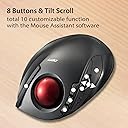
🎮 Elevate Your Game with Comfort and Precision!
The ELECOM DEFT Trackball Mouse combines ergonomic design with advanced optical technology, featuring a precision red ball for superior tracking, eight customizable buttons, and adjustable DPI settings, making it the perfect tool for both gaming and professional use across multiple operating systems.


| ASIN | B08GQZVH78 |
| Additional Features | Ergonomic Design |
| Antenna Location | Business, Home |
| Are Batteries Included | Yes |
| Are Batteries Required | Yes |
| Best Sellers Rank | #28 in Computer Trackballs |
| Brand | ELECOM |
| Built-In Media | 1 X AA battery |
| Button Quantity | 8 |
| Color | Black / Red ball |
| Compatible Devices | Personal Computer |
| Connectivity Technology | 2.4GHz Wireless |
| Customer Reviews | 4.1 4.1 out of 5 stars (3,044) |
| Hand Orientation | Ambidextrous |
| Hardware Platform | PC, Mac |
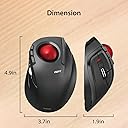
| Item Dimensions L x W | 4.9"L x 3.7"W |
| Item Type Name | Trackball Mice |
| Item Weight | 4 Ounces |
| Manufacturer | ELECOM |
| Model Name | ELECOM |
| Model Number | M-DT2DRBK-G |
| Mouse Maximum Sensitivity | 1500 Dots per Inch |
| Movement Detection | Optical, Trackball |
| Number of Batteries | 1 AA batteries required. (included) |
| Operating System | Windows 8, Windows 8.1, Windows 10, Windows 11, macOS 10.10 |
| Power Source | Battery Powered |
| Range | 10.0 meters |
| Style Name | Wireless |
| Unit Count | 1.0 Count |
| Warranty Description | 1 year manufacturer |
A**Z
UPDATED. 2023.
All in all a great product. Size, feel, quality all on par or better when you consider price. I bought this one just to try it out and see if the company was legit. I can honestly say that i am more than sold on the company and the quality and i have no reservations about spending considerably more for one of their high end models. Im actually excited to see this company's high end features bells and whistles.. The only real issue with it is customizing the extra buttons. The software they provide is garbage. And to make matters worse, isnt even in English. You will have to find another software to customize the 6 7 8 buttons. This is the issue that keeps me from giving it 5 stars. But other than that, its terrific. Fast, accurate, comfortable. And at fair prices... i highly recommend. UPDATE: Its now 2023. Ill save u the details but I was asked to give my opinion on ergonomics as it relates to office workstations. I was given the opportunity to do some research on several companies including Logitech, Kensington, and Elecom. The funny part is no one on the team had even heard of Elecom before my recommendation. Comes to find out, they chose Elecom mice for every new workstation in the facility including the main dispatch center hub where they no doubt are going through a trial by fire. And not a single complaint has come up about the performance, and they were actually praised for their customization as dispatchers like to program their mice with their own shortcuts for maximum speed and efficiency during their shifts. So I must retract my initial review about their programming software and tell you that it's much improved. And that's not just from me. That's from a whole 911 dispatch center crew of over 30 dispatchers who have no skin in this race. I'll be honest I forgot about this initial review and never would have paid any attention to it if I had not given it a poor review initially. I stand corrected and concede that improvements are the new order of the day. So Elecom gets the 5th star. Oh, there is still 1 tiny issue... The product info is still written in Japanese so you have to go to the Elecom website to get it translated to English. Lol. Pound for pound.... And I can't believe I'm saying this... Better than Logitech and Kensington. Elecom quality and price is equal, if not better than the big guys , and they offer more innovative options to their products so u get more for your money. At the end of the day, Elecom is doing what any new guy should be doing., better product at better prices, and letting their performance do the talking. And again, Elecom doesn't even know I exist and they don't pay me a single dime to say any of this.... I just believe good quality products should get a little recognition every now and then .
S**S
LOVE IT, BUYING ANOTHER. Well-designed portable trackball. Awesome Mac OSX software for programming the buttons.
UPDATE - April 2017 - STILL extremely happy with this cool, tuffy trackball!! I'm still working 2 intense business jobs, one of them IT and software implementation for accounting. This mouse has held up amazingly to all the road-wear I've thrown at it with travel/working in 2 locations and switching between PC and Mac. Performs great with both cheap-o Toshiba PC laptop and newer Macbook Pro Retinas (have 2 of them). Company's software for Mac - El Capitan works great for programming buttons. NO COMPLAINTS! ------------ UPDATE - November 2016 and still very happy with unit - it's held up well. Wheel squeaks but only once in a while. Same battery that shipped with it is still in use! ------------- I'm ordering another one. This is the trackball I've been waiting for. And while it's not quite perfect, it's about 90-95% there, at least for me, and worth the $. After 20 years of trackballs and heavy computer work using an array of input devices - this is one of the best. Esp if you're mega-mobile. I work in internet research, accounting software and huge spreadsheets by day then heavy computer music composition at night. Lots of numbers, details and audio/video editing. Pop in and leave the low-profile radio receiver into a USB port and it works even before you install the software. Finger hole through bottom of mouse makes it easy to pop out the ball for roller cleaning. But Trackball STAYS securely in mouse when it's put back in. You'll need to clean the rollers once in a while week if you have greasy, sweaty paws, like I do moving around a lot. Switch on bottom of unit appears to have on, low and high resolution modes. Couldn't tell much difference between low and high but I haven't been working on hi-res imagery lately in Photoshlop. USB Radio receiver tucks elegantly inside for storage if you can't leave it in your computer port. Scroll wheel did squeak for a little while but then it went away. Might be heavy humidity here and temperature shifts. I'm not too worried. I'd rather have durability and consistent performance. I'm writing this review because other trackball afficionados who need ease-of-use and portability should consider this unit. For a newly designed device, Elecom got it most of it right. If this thing is still cranking away like my half-dozen Marble Mice have, they'll really have nailed it. Will repost as this thing gets more use.
V**A
Great design. Comfortable to use.
Overall a great product. I find switching between a thumb trackball and finger trackball is ideal. I've purchased both the gray ball and red ball models and have been happy with them. As they have aged (3 to 6 years old), I seem to be developing a problem. They disconnect or simply do not work. At first I thought it was batteries. I would change them and they would work and this worked for a while with shorter and shorter intervals that the trackball stayed working. Next, I tried unplugging and re plugging the dongle. It worked sometimes. I had/have the dongle plugged into a 4 port (now powered) usb hub. I found that I needed moving the dongle to a different slot worked - for a while. When that quit working, I removed the dongle from the hub and plugged it directly into the PC and that worked - for a while. I think I've found a solution which points to a problem. If I "jiggle" the dongle or push right or left while in the socket, I can get the trackball to connect. They are all at least three years old and most have been plugged into the same slots for at least two of the three years with no problem. My worry is that the contacts are losing connection (oxidizing, maybe?) which concerns me as it seems these are one dongle to one trackball and if either dies, the other us useless. I really like them but I'm concerned about how long they will continue to work. For background, I have a couple of this same brand left handed trackballs - one red ball and one gray ball. No problems with either of them. For reference. I've managed to "wear out" four Logitech 570 thumb trackballs.
C**A
Leggero, preciso, smart 😀👍
R**N
Bin sehr überrascht von dieser Trackball-Maus hätte sie nicht so gut eingeschätzt! Habe ein Billig China Artikel erwartet aber nein das ist nicht der Fall steht den Großen Marken in keinem Fall nach. Nach Installation der Software/Treiber funktioniert sie einwandfrei durch die Software kann die Maus frei Programmiert werden ist aber nur in Englisch verfügbar nicht in Deutsch! Die Verarbeitung ist Top sehr Hochwertig! Bluetooth Verbindung gibt‘s bei diesem Modell nicht!
F**H
Nach 15 schönen Jahren mit dem MS Trackball Explorer, hat dieser leider seinen Geist aufgegeben ;-( Daher habe ich mich für diesen Trackball entschieden. Ich wollte wieder ein Gerät, bei dem man die Kugel mit Zeige-/Mittelfinger bewegt und nicht mit dem Daumen, wie bei vielen anderen Geräten. Die Lieferung ging einigermaßen zügig (ca. 1 - 2 Wochen). Nach dem Auspacken habe ich den Trackball direkt angeschlossen - Batterie wurde mitgeliefert. Erstinbetriebnahme absolut easy! Er reagiert absolut präzise. Das Scrollrad hat eine angenehme Haptik - ebenso wie die Tasten. Der Trackball macht allgemein einen sehr wertigen Eindruck. Einziger Kritikpunkt ist die Größe - ich hätte ihn mir eine Nummer größer gewünscht. (Evtl. liegt es auch an meinen Händen.)
S**A
Mouse veramente interessante e comodo da usare
カ**パ
使い始めはボールの挙動が不安定で、ポイント決めにひと苦労! ボールの性かと、ロジクールのものに変えてみたりしたけど。結局、付いてきた赤ボールがベストマッチだった。手垢や埃がある程度付いて、挙動も安定、こちらの習熟度もアップして、いまではほかには代えがたい、お気に入りとなっています。クリーニング回数は、ロジクールより、大幅に少なくて済むみたい。 ただし、動画から静止画を切り出すなど、微妙なボールの動きはまだ少し不満が残る。
Trustpilot
1 month ago
2 months ago