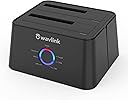
![WAVLINK USB 3.0 and USB C to SATA Dual-Bay External Hard Drive Docking Station for 2.5/3.5 Inch HDD/SSD with UASP (6Gbps), Support Offline Clone/Duplicator Function [16TB X2 ]-Black](https://m.media-amazon.com/images/I/51Ad7HiPgjL.jpg)

🚀 Double your storage, halve your wait—dock like a pro!
The WAVLINK Dual-Bay External Hard Drive Docking Station delivers ultra-fast 6Gbps UASP transfers and supports up to two 16TB SATA HDDs/SSDs. Featuring offline cloning for hassle-free backups, tool-free setup, and broad OS compatibility, it’s engineered for professionals who demand speed, capacity, and reliability in one sleek, energy-efficient package.


| ASIN | B018FTE87S |
| Best Sellers Rank | #9 in Hard Drive Docking Stations |
| Compatible Devices | Desktop, Laptop, Television |
| Connectivity Technology | usb |
| Customer Reviews | 4.4 4.4 out of 5 stars (4,405) |
| Data Transfer Rate | 300 Megabits Per Second |
| Date First Available | November 24, 2015 |
| Flash Memory Size | 8 TB |
| Hard Disk Form Factor | 3.5 Inches |
| Hard Drive | 12 TB |
| Hard Drive Interface | Serial ATA-600 |
| Is Discontinued By Manufacturer | No |
| Item Dimensions LxWxH | 6.57 x 4.92 x 5.2 inches |
| Item Weight | 11.6 ounces |
| Item model number | WL-ST334UA |
| Manufacturer | WAVLINK |
| Material | Metal |
| Max Number of Supported Devices | 2 |
| Memory Storage Capacity | 16 TB |
| Power Source | DC 12V/3A |
| Product Dimensions | 6.57 x 4.92 x 5.2 inches |
D**R
Perfect for me. NO problems.
I immediately cloned a 12tb drive to a 16tb. No problems. In fact it was as simple as inserting them appropriately and hitting the clone button. I extended the 16tb to its full capacity and using it as the main data drive now, without a hic-up. The 12tb is used in WAVLINK as a backup.
M**E
Works great
I upgraded my laptop to a new Solid State hard drive. This docking station was PERFECT for copying my existing hard drive to the new hard drive. If you know what you're doing and follow instructions, it's great for cloning the hard drive. I haven't really used this as an external drive. I did however use it as a temporary boot drive. My laptop is running Linux, but I have the original Windows 10 hard drive that I need occasionally for 1 specific purpose/application. This worked great booting to the windows drive when I needed that application. Again, you have to know what you're doing. If you're not smarter than the technology, then you'll probably have issues. If you are smarter, and know what you're doing, then this drive works great for backing up, cloning, and booting from. In other words.... if you have problems, it's probably your fault and not the docking station.
G**Y
Works as advertised/Limited but works well
Works as advertised. Do make sure you have good drives, and the target drive has the same or more room on it for the copy. It clones very well. I did two drives with no problems using new target drives. I did have a problem with one drive, but it was a format problem. I ended up cloning that drive with a computer program and a patch cable to the computer. It is far easier to do it with the Wavlink. It doesn't work for everything. But when using it as advertised it works good and it's easy to use. It can be used as a docking station regardless of the drive.
K**I
It's a great and convenient dock for the price, but that's it.
The WavLink USB 3.0 Dual-Bay Docking Station, for it's price, is a handy device to have around the office. It's sturdy and stable with a convenient and small footprint. As a dock, it's pretty decent. I ran a test, copying a large file over USB (using a 3.0 port) with the WavLink, and then copying the same file with the same hard drive (freshly formatted) but connected directly to the computer - the difference in transfer times was was less than 30 seconds which is negligible for the convenience. I also tried running a standalone game (Guild Wars 2) directly from the docked hard drive and there was no noticeable lag or difference in loading times. Both slots can be used at the same time for dual-docking, although you need to be sure the drives are properly set up. If your drive isn't showing up on Windows, you may need to open the "Disk Management" tool and make it into a new Simple Volume (Warning: this will format/erase the drive.) I never had a problem mounting a drive in Linux, so if you're stuck and don't want to lose the data, just load up a Linux Live USB and transfer the data from there first. I did not test booting an operating system from the drive, so no comment on that. As a disk cloning tool, it's less than great and I would generally not suggest using this function. It works alright if you are making a 1:1 copy (as in, both drives are the exact same size) but can cause problems with missing partition tables and duplicated drive signatures. If the target drive is larger, it will make the source copy over as a partition, which is absolutely not ideal. It will not copy at all if the target drive is smaller than the source, even if the data on the smaller drive is less than the bigger drive. This style of cloning is maybe fine in an office setting where you need to produce pre-installed staff computers which all use the same hardware en-mass and network installing is not an option, but this is a very specific scenario and I can't see the cloning tool as-is advisable for your regular user - it's certainly not a selling point. I will also comment about the customer service - I had a small issue and it took a bit of running around with WavLink directly to get an answer. In the end, the issue got solved, but I could tell initially I was getting responses that did not regard the status of my order (for example, I was told to please be patient with shipping due to COVID-19 when the item had already arrived.) My suggestion to WavLink is to be sure of the actual status of the order and issue before replying, and my suggestion to anyone having an issue is to be patient and clear - there is a bit of a language barrier but the representatives will help you if you can work with them. Here are the measurements in case someone needs them: Base Size: 5x5"(depth) 4.75"(width) 2.75"(height) Power Cable Length: 56" (not including the power brick) USB Cable Length: 29"
D**.
works well with a couple of tips for first time users
i got this because my years old sdd was beginning to fail. the last time i had to replace my hard drive, years ago with the sdd that was failing, i reinstalled everything which took almost an entire day to reinstall everything and get it set back up. the idea of being able to do it quicker and easier was well worth $30 to try. and it worked as advertised...with a slight learning curve. first, the videos i watched all said directly cloning the hard drive would create an exact clone, meaning the newer, larger sdd i bought would only show the same size as the sdd i was cloning. so i was prepared for that and used free software called AOMEI Partition Assistant to be able to use the entire drive. you CAN use windows disk management to increase the size of the c drive partition. the problem i had was there was a recovery partition between 2 unallocated spaces and disk management would only let me increase the size by the first space. i didnt want to delete the recovery partition and AOMEI allows you to move the recovery partition to the end so i could access both unallocated spaces. it was a very small hassle, nothing that would change my mind that buying this was well worth it. the 2nd issue was more frustrating and isnt a problem with the unit, though i initially thought it was. people who have experience cloning c drives may already know this, but this was my first time and i didnt. i took my old ssd out of my desktop and directly cloned it with this unit. it seemed to be pretty fast. i started it, took a shower and by the time i was done, so was the new sdd. i put it in my desktop, turned the power on...and then got a message that my desktop didnt find a boot disc. after checking connections and getting the same message, i thought maybe the cloning hadnt worked. so i reformatted and tried again...only to get the same result. at that point i decided to try and use the AEOMI software on my laptop to try and clone the sdd using the unit plugged into the laptop. and while searching for the best way to do that, one of the several results i read had instructions to go into the bios and set the boot order to the new disc. so i did that and voila, it booted up perfectly. as i said, many people might already know that, but as this was my first time doing this, i didnt. and i didnt see it mentioned in the instructions or any of the video reviews i watched. so if youre brand new to this, like me, remember to go into BIOS and set the boot order to the new disc.
R**A
WAVLINK HDDスタンドは安定感がありお洒落な感じで良い使用も問題なく使用出来ています。クローンについては試していませんが問題なく出来ると思います。
A**O
Lo recomiendo al 100% excelente calidad de producto.
A**H
Working as expected. Good speed for laptop (i5 4thgen)80-90MBps .not check yet clone. Just tested with old internal HDD to get Some data. Go with this... we have 30 day's return policy give more trust to this product. one thing i have to say product came with only manufacturer box. No additional box Amazon packing. seller have to consider additional package atleast for sensitive electronic products.
T**A
No issue. Read/write Speed as it should be.
T**Y
Have a bunch of old hard drives that contain data that I need to consolidate and needed a external dock to simplify the job. Like that this dock has the ability to quickly duplicate drives even standalone. It can fit both 3.5 and 2.5 drives and it uses a USB3 interface which is fast and a must for my requirements. The dock itself felt well made, as well as the USB3 cable that came with the unit. The power adapter is a bit large and will take up more that one slot on a power bar. The status indicator lights on the front of the dock was handy and easy to read. Installation was so simple, just plugged it into my win10x64 desktop USB3 port and it was picked up right away. Have been using it for a while and so far no issues. No random disconnects or freezing. Really impressed with the copy speed which will range depending on the type of drive connected and the size and number of files. This dock is a pretty solid performer and saved me a lot of time. Happy with this purchase and would recommend for anyone who needs to move data.
Trustpilot
2 weeks ago
2 days ago