Buy anything from 5,000+ international stores. One checkout price. No surprise fees. Join 2M+ shoppers on Desertcart.
Desertcart purchases this item on your behalf and handles shipping, customs, and support to South Africa.
๐ฎ Elevate Your Game with Alienware's Ultimate Keyboard Experience!
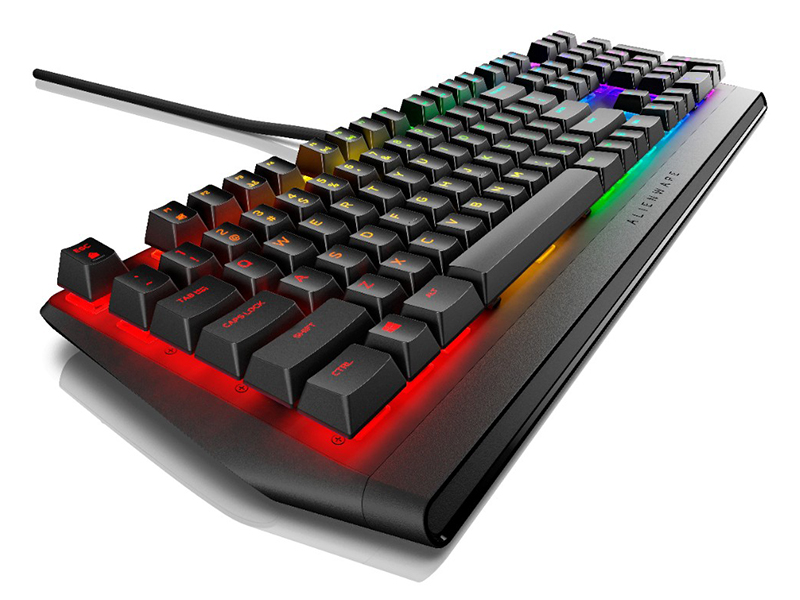
The Alienware USB Low-Profile RGB Gaming Keyboard AW410K features Cherry MX Brown switches for precise actuation, a durable design with a 100 million keystroke life cycle, and an integrated USB passthrough for convenient connectivity. With anti-ghosting technology and a sleek floating key design, this keyboard is engineered for both performance and style, making it the perfect companion for serious gamers.




| ASIN | B08F81KGCX |
| Additional Features | Braided |
| Antenna Location | Gaming |
| Best Sellers Rank | #64,901 in Video Games ( See Top 100 in Video Games ) #2,943 in PC Gaming Keyboards |
| Brand | Alienware |
| Built-In Media | USB Cable |
| Button Quantity | 104 |
| Color | White or light gray |
| Compatible Devices | Gaming Console |
| Connectivity Technology | USB |
| Customer Reviews | 4.1 4.1 out of 5 stars (124) |
| Enclosure Material | Metal |
| Hand Orientation | Ambidextrous |
| Item Dimensions L x W x H | 18.3"L x 6.14"W x 1.4"H |
| Keyboard Backlighting Color Support | RGB |
| Keyboard Description | Gaming |
| Keyboard Layout | QWERTY |
| Manufacturer | Alienware |
| Model Name | 580-AJBD |
| Model Number | 580-AJBD |
| Number of Keys | 104 |
| Number of Sections | 1 |
| Power Source | Corded Electric |
| Series Number | 580 |
| Style Name | Contemporary |
| Switch Type | Tactile |
| Theme | Gaming |
| Total USB 2.0 Ports | 1 |
| UPC | 884116375241 |
| Unit Count | 1.0 Count |
| Water Resistance Level | Not Water Resistant |
L**Y
Great Keyboard
This is my first mechanical keyboard I have purchased and I actually really enjoy it. The tactile switches are nice and the keycaps are pretty good as well. Having a USB pass-through is pretty cool as well. This keyboard was what I decided to go with since my PC is Alienware and I didn't want to mess with multiple programs to get my RGB to be on the same page. This keyboard is comfortable to type on, although I do enjoy the standard keycaps, there is a little case ping. I am unbothered by this as i came from using cheap membrane keyboards all my life and this is a big step up from those. Overall I would definitely recommend this keyboard to anyone that has an affinity for a full size keyboard and wants some RGB that isn't so bright it is blinding. I feel like this keyboard will last for quite some time. For the $70 I spent on this I am extremely happy so far.
M**K
Fear not of loose keys that have fallen off your sent package!
At first, I was startled when I opened my package to the fallen keys...I almost sent it back. DON'T! The keys are meant to come off, and it is common for them to come loose since they allow for easy cleaning and customization. This, by far, is the best keyboard I have ever owned. I love the customizable setting it has with my Alienware laptop, and I love the soft pitter-patter the keys make when I type. I take it with me everywhere and like how my hands rest on it. I do a lot of stats work, and this helps me navigate and type more quickly than my laptop keyboard.
E**D
Alienware command center software is awesome
I did not like that under his vigorous use the number three key would repeatedly pop off. I managed to remedy this with the smallest droplet of super glue on the non-moving components that connect the key. applying super glue to your keyboard is not an acceptable or recommended fix but it's been working flawlessly ever since thank goodness. the main reason I wanted this keyboard is the software that comes with it is extremely helpful.
A**M
great backlit mechanical keyboard
I had been using a Logitech K740 wired, illuminated keyboard for many years, and when it needed replaced I decided to look at some other models to see what was available. My three main requirements were that it had to be wired, backlit, and it had to have volume up/down/mute. Those requirements actually narrowed my search quite a bit. Having worked with Dell products for many years, I took a look at what they were showing and noticed their Alienware keyboards. I looked closely at the AW310K, AW410K, & AW510K. The 310 and 510 use Cherry MX red key switches, while this model as you know uses Cherry MX brown. As the AW410K is a brand new model in summer 2020, I could not find a single user review of it, but I decided to live on the edge and take a chance on it. If you're okay with the clickity-clack, this is a very nice keyboard. I connected it to my Dell Windows 10 PC and it worked straight away. A few minutes later I was prompted to install the Alienware Command Center software. It installed easily and offers the ability to adjust things like backlight color and light-turn-off timeout setting. The default backlighting is a very cool blue-green, while the CAPS LOCK and NUM LOCK keys have a white backlighting when activated. The Alienware name is not lit, and there are no annoying flashing lights. Coming from a low-profile keyboard, it took a few hours to adjust to the new key height. Now that I'm used to it, it's very comfortable to use. Although it's pricey compared to some other keyboards, I like everything about this keyboard and I'm very happy with it so far. Be aware that it requires two USB ports.
L**.
Still works great after 1.5 years
A lot gaming and typing - works well. Very good looking RGB effects; not a single worn-out letter.
C**D
good keyboard, when it works.
if it is not directly plugged in to your laptop (not through a USB adapter or docking station) it tends to freeze typing and sticks keys every 20 seconds or so. For as much money as this is, I am a bit disappointed. I have an Alienware 17 R5 laptop - so i figured it would work just fine through a Dell docking station, but nope! must be directly plugged in to a USB port on the laptop to avoid the above mentioned issue. or, at least that is the only way i could get it to work properly.
B**4
Works on any PC, but you can't adjust the per-key colors on non-Dell computers
When you plug this into a Windows 10 laptop, it automagically installs the Alienware Command Center. Unfortunately, you can't adjust the per-key colors except those that you can changed from the keyboard itself (blue, off, per-key wave effect, and the "flow" effect). The Fx tab is greyed out. Pretty lame decision by Dell, IMHO. If you plug it into an Alienware computer, you can adjust everything, including per-key colors. It kinda sucks. Lastly - when I got the box, 4 keys were loose in the box. I put them back on the keyboard, but they really don't want to stay on. If I were to tip the keyboard upside down to clean it, there go your keys. Other than that, it is very nice to type on. I think it has the Cherry MX Brown switches and they do feel pretty good. I also have the AW510 with the low profile Red switches. If you have the money, that is the one I'd get over this one.
C**S
This is the best keyboard I have ever used
Great feel, lighted programmable keys.
I**C
Great
A+
D**C
It stopped working 5 Months in
It stopped working 5 Months in.
J**E
Great Buy!
Nice keyboard! Great Job Alienware!
Trustpilot
5 days ago
1 month ago