Desertcart purchases this item on your behalf and handles shipping, customs, and support to South Africa.
🕹️ Upgrade your arcade legacy with HD precision and vibrant color — don’t get left behind!
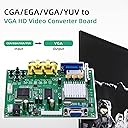
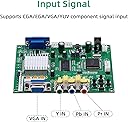
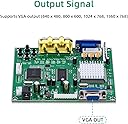
The Mcbazel Arcade Game Video Output Converter Board transforms legacy arcade signals (CGA, EGA, VGA, YUV) into crisp VGA HD output up to 1360x768 resolution. Featuring true 24-bit color conversion and smart auto-calibration, it ensures flawless compatibility with CRT, LCD, PDP monitors, and projectors. Designed for professional-grade arcade setups, it guarantees vibrant visuals and stable performance, making it the essential upgrade for retro gaming enthusiasts.


| ASIN | B078ZDTLBJ |
| Best Sellers Rank | #142 in Video Converters |
| Brand | Mcbazel |
| Color | Black |
| Compatible Devices | Monitor |
| Connector Type | VGA |
| Current Rating | 2 A |
| Customer Reviews | 4.2 out of 5 stars 553 Reviews |
| Finish | Matte |
| Global Trade Identification Number | 00781055982724 |
| Input Voltage | 5 volts |
| Item Dimensions | 5.31 x 4.72 x 1.18 inches |
| Item Weight | 109 g |
| Item dimensions L x W x H | 5.31 x 4.72 x 1.18 inches |
| Manufacturer | Mcbazel |
| Mfr Part Number | es10147at |
| Model Number | Es10147at |
| Nominal Power | 10 watts |
| Number of Items | 1 |
| Number of Ports | 4 |
| Package Quantity | 1 |
| Power Plug Type | No Plug |
| Specific Uses For Product | Converter Board |
| UPC | 781055982724 |
| Unit Count | 1 Count |
| Warranty Type | Limited |
B**K
Great product and easy to use
Easy to set up and worked great for converting a Pac-Man arcade CGA video signal to vga output to a monitor!
S**N
Good price and works as advertised.
Worked great for replacement of CRT to LCD.
J**N
Works replacing CRT monitor for DDR Extreme Cabinet
Ordered this because my DDR Extreme CRT monitor is dying. It converts the 15khz VGA output of my DDR into true VGA signal that a modern monitor can display. Overall it seems to work ok. The language starts in non-english in the menu, so have to change that first. Then, the written instructions do not correspond to the on screen menu. It has no way to move the picture on the display. There is s menu item, not in the instructions but on the on screen menu, called ‘geometry,’ but it won’t activate, at least with vga input. Also my monitor had issues seeing the signal at first until i adjusted resolution settings, but sometimes on re-powering it loses the input resolution and you need to reselect it. Finally, colors aren’t the best or easiest to adjust, but it looks okay in the end after adjusting the monitor and screws on the board. Make sure you buy a dc power converter, i bought a simple 5v, 2a dc plug in adapter with multiple tips, the default tip fit the board, no cutting or soldering needed. The speed timing for ddr is perfect, didn’t need to adjust speed or delay at all. The picture is fine, better than the old CRT, but the colors are so-so. See the video for demo.
D**T
Works good
Easy to install! Provides a great picture. Watch a couple YouTube videos to learn how to set it up once it's installed. Provides an excellent alternative when you need to replace an old crt monitor with a flat panel TV or PC monitor. Can't get it to work on the old 5 card draw games though. I've heard that is common though.
J**N
Great product
These boards always work great.
S**D
Useless due to video sync issues
Horrible, image is shaky and jittery and will not fully sync with my game boards no matter what I do.
J**F
Works just fine after hours of play on location in an arcade- great for the price!
First off, I always disregard when people say get an "official" Gonbes. It's getting increasingly hard to find an "official"(whatever that means anyways) version of these converters. As far as I know I've only ever used 1 legit version, and have about 4-5 other "fakes" currently running video output in some of the machines here at work that I service. I don't even remember where I found an official one direct from Gonbes themselves(maybe here, maybe Al.iexpress?) Anyhow, after fidgeting in the on-screen menus and adjusting the clamp settings these typically do great. The menu language usually needs changed from Chinese to English as well. This time around though I was having a lot of jittering on the screen so I soldered a resistor into place between the board video output and the Gonbes sync connection which took care of that problem for good. I believe I used a 1kOhm resistor. Looks and plays great to me, little to no lag as far as I can tell!
E**N
Works fine for debugging a Galaga board
Used it to debug a set of Galaga boards for a friend using an old 4:3 VGA monitor. Worked great. Initially the picture jiggled a bit, but after I soldered a wire onto the vertical sync (see photo) on the video board and attached it to VS (the yellow wire on the supplied cable) everything works perfectly. The default setting of Chinese is a bit annoying. The seller should include some instructions on how to change it.
A**R
Toppen produkt för ditt arkadkabinett!!
Fungerar jätte bra! Lite svår att förstå sig på i början. Men det finns guider på youtube. Man kan med lätthet få bilden precis vart du vill ha den på skärmen. Perfekt om du skall använda ett gammalt pcb med en ny lcd skärm. Men även bra att ha om du skall installera en 60 in 1 eller pandoras box.
E**W
Works well with my Amiga
I followed the wiring guide on a blog (Google 'Synchronising the GBS-82XX') and got it working, the video was very dim until I adjusted all three input potentiometers fully anti-clockwise. The OSD was in Chinese but check each option until you find language and set it to English. I have seen a few 'sparklies' on the picture, but these are nothing compared to the blurry picture I had previously with CVBS output. It would have been good if this had come with a wiring guide but the blog mentioned above was very helpful as is a Google search for GBS-82XX.
1**E
WORKS with Commodore Amiga.
Connected to amiga 500. used online guides to get RGB connected to the computer. took some time scaling the unit and the overscan on the a500. turns out to be a decent interface. worth the $
J**L
Esta perfectamente embalado
Bien embalado papel de burbuja y todo nuevo nada usado o revendido o de una devolución ni nada todo como de la fábrica a mi casa todo perfecto
K**S
Playstation 2 auf HDMI
Habe es mit einem ESP8266 zu einem GBS-Control umgebaut und verwende es mit der PS2, funktioniert echt gut. Bei den Einstellungen muss ich noch ein wenig "herumschrauben", aber ist auch mit den GBS-C-Standardeinstellungen sehr Brauchbar. Achtung, es ist kein HDMI-Ausgang dabei, dafür benötigt man einen aktiven (mit Strom von USB) VGA2HDMI Adapter oder Kabel. Und nochmal Achtung, man braucht ein Component-Kabel (Grün/Blau/Rot / Rot/Weiß), das Composite-Kabel (Gelb/Rot/Weiß) funktioniert nicht.
Trustpilot
4 days ago
3 weeks ago