Desertcart purchases this item on your behalf and handles shipping, customs, and support to South Africa.
🎬 Elevate your content game anytime, anywhere!
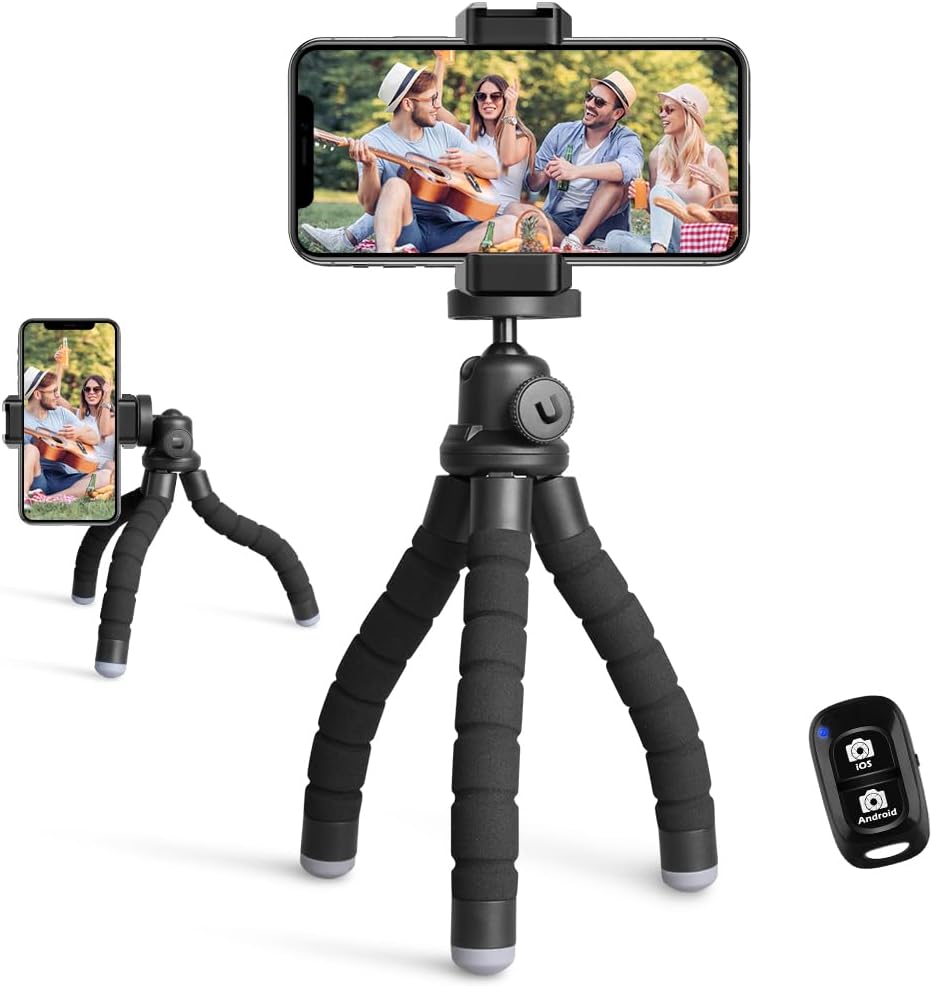
The UBeesize Phone Tripod is a lightweight, 10-inch aluminum tripod designed for mobile creators who demand portability and stability. Featuring flexible, rubber-coated metal legs, a 90° tilting ball head, and a wireless remote with a 30-foot range, it supports phones up to 3.54 inches wide and DSLR cameras via standard mounts. Perfect for travel, vlogging, and hands-free video calls, it combines premium build quality with universal compatibility to keep you shooting like a pro.


| ASIN | B088GNC6TT |
| Best Sellers Rank | #998 in Cell Phones & Accessories ( See Top 100 in Cell Phones & Accessories ) #10 in Cell Phone Tripods |
| Brand | UBeesize |
| Color | Black |
| Compatible Devices | IPhone 15 Pro Max/15 Plus/15 Pro/15/IPhone 14 Pro Max/ 14 Pro/ 14/iPhone 13 Pro Max/ 13 Pro/ 13/ iPhone SE/ iPhone 12/ 12 pro/ 12 pro max/ 12 mini/ 11/ 11 Pro Max/ 11 pro/ X/ XS max/ XR/10, iPhone 8 plus/ iPhone 8/ 7/ 7 plus/6S / 6/Samsung Galaxy S22/ S21 Series/ Galaxy Z Flip/ NOTE/ Google Pixel Series/ One Plus 1+Series Compatible Devices IPhone 15 Pro Max/15 Plus/15 Pro/15/IPhone 14 Pro Max/ 14 Pro/ 14/iPhone 13 Pro Max/ 13 Pro/ 13/ iPhone SE/ iPhone 12/ 12 pro/ 12 pro max/ 12 mini/ 11/ 11 Pro Max/ 11 pro/ X/ XS max/ XR/10, iPhone 8 plus/ iPhone 8/ 7/ 7 plus/6S / 6/Samsung Galaxy S22/ S21 Series/ Galaxy Z Flip/ NOTE/ Google Pixel Series/ One Plus 1+Series See more |
| Customer Reviews | 4.5 out of 5 stars 41,334 Reviews |
| Folded Size | 10 inches |
| Global Trade Identification Number | 00840322321533 |
| Head Type | Ball Heads |
| Included Components | Tripod, Remote, Phone Clip, Manual |
| Item Dimensions D x W x H | 2.24"D x 3.43"W x 11.54"H |
| Item Length | 10 inches |
| Item Weight | 150 g |
| Leg Diameter | 2.24 inches |
| Manufacturer | UBeesize |
| Manufacturer Part Number | TBC001 |
| Material | Aluminum |
| Material Type | Aluminum |
| Maximum Height | 10 inches |
| Media Type | Video, Image |
| Minimum Height | 10 inches |
| Model Name | TBC001 |
| Model Number | TBC001 |
| Number of Items | 1 |
| Number of leg sections | 3 |
| Screen Size | 10 inches |
| Shooting Modes | 'portrait', 'landscape' |
| Special Feature | Lightweight |
| Special Features | Lightweight |
| UPC | 850018402309 840322321533 |
| Unit Count | 1 Count |
| Video Capture Format | MP4 |
| Viewfinder Type | LCD screen |
| Warranty Description | 12 month manufacturer |
| Water Resistance Level | Not Water Resistant |
| Weight Limit | 2.5 kg |
T**L
Excellent value, does exactly what it is supposed to do, assembly is child's play
I bought this as a convenient way to position my iPhone when shooting cute little videos for my friends and family. Set it on a desktop, tabletop, dresser, or any flat surface, and it serves that purpose perfectly. Combining that with the fact it is the most economically priced unit of its kind and what else is there to say? Unless you NEED something fancier or bigger (if you don't that you do, you don't) buy it. When I make a purchase on Amazon, I always check the lowest reviews first. If 75% of people give it five stars and 1% gives it one star, I read the one star reviews first. Many of the low reviews I saw on this product bemoaned the fact that it doesn't come with assembly instructions. People, there are FOUR pieces. So allow me to offer a quick tutorial since it does not in fact come with assembly instructions in much the same way chewing gum doesn't come with an insert that says, "1. Remove wrapper 2. Chew gum." The first part is the tripod, it is the largest part, it has legs. You want the legs to point down. At the non-leg end is the mounting platform. It is flat, platform shaped, and has a small threaded bolt sticking up from the center of it, hinting that in the near future you will be screwing something on to it. On the side of the unit is a big, friendly, easy-to-turn knob. Loosen it (turn to the left) and the mounting platform moves in many exciting directions. Tighten it (turn to the right) and platform is locked in place. Experiment, until you find the direction that works for you. The next part is the remote control. It looks like a remote control with buttons and everything. It is for controlling things, remotely. Set it aside for now. The next part is a mounting bracket for a GoPro style camera. If you've never seen one, this might be confusing (and you probably don't need it.) A simple rule of thumb, "Is there any conceivable way this attaches to my phone?" If the answer is no, set it aside. For the curious, it has a base with a threaded hole in it, and three black plastic tabs, evenly spaced, with a single long screw running through the center of all three. The case for your GoPro style camera will have TWO tabs on the bottom, usually clear, and these are meant to interlock with the plastic tabs on the base, at which point the long screw is inserted through ALL the tabs and tightened down (remember, to the right) to hold your camera firmly in place. The final piece is the spring-loaded camera bracket. Find the threaded hole in the base of it. Screw it on to the threaded bolt sticking up from the top of your tripod mounting platform until it is snug (righty-tighty.) Congratulations, your tripod is assembled. The bracket has two "jaws" that fold down flat for easy storage. Flip them into the "ready for grabbin" position, so that they are at a 90 degree angle (or perpendicular as I like to say) to the piece you just flipped them up from. If you apply pressure to these "jaws" as though you were trying to move them away from each other, you will find that the unit is spring loaded, the jaws move apart, wide enough to accommodate vary sizes of phone. Stick your phone in there. Well done. There ARE instructions included for pairing the remote to your phone. This is very handy as it allows you to remotely activate either the video or photo function on your phone. Personally, I assume my instructions are unnecessary. I believe that you, dear potential purchaser, can (as I did) look at it for 10 seconds and figure it out. If not, I hope my instructions prove useful. If not, there is a clearly visible tab on your "order page" for the product labeled "GET CUSTOMER SUPPORT." They have a support button for a product that any 8 year old who hasn't been eating paint chips for a few years could assemble. So really, dinging a product like this for "not including instructions" is just...well, I probably can't use the word I'd like to so let's just say it's unnecessary and more than a little petty. And if you ARE one of those people who felt you needed to lower your rating because it didn't come with an 8.5x11 glossy manual with supplemental color photos and a support animal please remember, take the wrapper off FIRST, THEN chew the gum, not the other way around. For everyone else, it doesn't cost much, it works just fine, it's probably EXACTLY what you're looking for. I'm certainly satisfied with it. Thank you, and good night.
G**L
Good set of legs for great price
I was asked if I would like to try this product for free, and thought "sure, why not?" Never been asked to do that before. :) I use it for live broadcasts of my calligraphy, as well as for video chatting with my mentor while practicing. I have never owned a tiny tripod like this before. As a former photographer, I have a nice Gitzo set up and came in to this with healthy skepticism. I was happy with how easy these little legs are to use. I have a Samsung 20 Ultra, which is not a small phone. While in position to broadcast (pictures), it worked beautifully. No tipping, easy to set up, etc. When I use it for video chats, and have the phone positioned more upright, it does want to tip. I have figured out how to angle the legs to avoid this, but it took a bit of messing with them. One thing it doesn't do, and maybe this is common for all tiny tripods, I have no experience...you can not rotate the position of the whole head on the legs. I thought that for the tipping, if I could move it around a bit and position it such that the phone was over a leg, instead of the space between legs, it might be more stable, but that is not possible. There is a ball socket on top to angle the phone and pivot it 90⁰, but it can not move around the center axis point. Overall, I like this a lot and would definitely recommend it. I do have a case on my phone, and the clamp easily holds, even with a case. :)
A**A
A Must Have!
Super handy little tripod! It’s lightweight, flexible, and easy to set up anywhere — great for filming on the go or at home. The wireless remote is a nice bonus and actually works well. The grip holds my phone securely, even when I angle it weird. It’s not super heavy-duty, but for everyday content or video calls, it gets the job done.
S**E
Good
Got this for my camera
K**O
Perfect Travel Companion for Social Media Content
I recently took a trip to Puerto Rico, and this Ubeesize Phone Tripod turned out to be a game-changer for capturing content on the go. I wanted something lightweight and portable that would help me record videos of myself for my social media while traveling. This tripod was exactly what I needed. The first thing that impressed me was how compact and easy to carry it is. I didn’t want to lug around a big, bulky tripod while exploring, so the Ubeesize tripod was the perfect solution. It’s small enough to toss in my backpack, but when I set it up, it’s surprisingly stable. The legs are flexible, which was awesome for getting creative with shots—whether I was filming myself against the stunning Puerto Rican coastline or setting up selfies in different spots around the island. I could wrap the legs around tree branches, railings, or even rocky surfaces to get those unique angles, something a traditional tripod wouldn’t allow. Having the wireless remote to start and stop videos is just great. It worked perfectly with my iPhone 13—just plug and play, no hassle. The remote eliminates so many bloopers and awkward moments when you’re filming by yourself. I didn’t have to rush back to the phone after hitting record, and it gave me the freedom to move around, change my angles, or take a step back without having to worry about stopping the recording at the right moment. It made filming so much smoother and helped me get more shots in less time. The phone clip also deserves a mention. I’ve used other tripods where the clip wasn’t secure enough, and my phone would slip out, but with the Ubeesize, it holds my phone tight and stable, even when I adjust the angle or position. That’s especially important when you’re filming on uneven surfaces or trying to capture the perfect shot. Since my trip, I’ve kept using the tripod for my social media content, whether it’s filming videos for Instagram or setting up for TikToks. The flexibility of the legs means I can set it up pretty much anywhere, and the stability ensures the shots are steady. I’ve even used it for Zoom calls and video conferences at home when I need a hands-free option for my phone. All in all, this tripod was a lifesaver during my Puerto Rico vacation and continues to be one of my go-to tools for content creation. It’s affordable, versatile, and surprisingly sturdy for such a lightweight tripod. If you’re looking for something portable to help with vlogging, photos, or social media videos, I highly recommend giving the Ubeesize tripod a try. It’s simple to use, reliable, and has made my content creation so much easier.
D**X
Not completely functional
The tripod itself is of good quality. The flexible legs, in particular, are smooth and hold well in awkward positions. The camera mount is very compact and holds well without slipping. I have a couple of issues overall: 1. The tripod loses all stability when the camera is tilted vertically. When using the ball joint to change the orientation of your smartphone, the tripod tips over. The legs do not spread wide enough to provide enough stability to hold a camera in this position, which is strange because why have a ball joint that you can't support in all positions? It might work if you could rotate the mount to position so one leg underneath the tilted side, but it doesn't do this and it might bump up against the camera itself if it did. 2. The ball joint itself doesn't go all the way to a true 90 deg angle. It stops just short. Again, you have arrange the legs in an awkward position in order to have straight angles on camera in this position. Overall, you're really not getting the full benefit of the ball joint. Hope you don't want to take any pics or do your tiktoking in portrait orientation.
C**N
Perfect!
So cool and easy to use! 10/10
S**T
Great for couples
Works great
R**F
Schönes und leichtes Stativ
ich nute das Stativ für meine Spiegelreflex-, Kompaktkamera, Actioncam und Smartphone. Bei allen Geräten gibt es einen sicheren Stand und mit der Bluetoothfernbedienung kann ich mein Handy sogar fernauslösen. Nach mehreren Einsätzen sind die "Ärmchen" zwar etwas am Moosgummi angeknabbert, aber die eigentlichen Arme greifen noch sicher zu und halten selbst eine schwere Kamera aus. Bei Benutzung der Actioncam schraube ich den Selfiestick auf das Stativ, ziehe den Stick auf etwa 1,50m aus und nutze das kleine Stativ so, wie ein "ausgewachsenes" Stativ ( Deibein aus Alu oder Carbon) Durch das gerineg Packmaß lässt es sich so auch wunderbar transportieren. Der mitglieferte Handykopf pass bei fast allen Smartphones und hält diese durch die recht starke Feder fest. Wenn ich ein weiters Stativ benötige, werde ich mir genau diese nochmals zulegen.
J**G
Plastic
…very toy-like and plastic…
J**H
Mooie pod
Hij werkt goed staat stevig alleen met de app open camera duurt het even voor dat de afstandsbediening werkt met wifi masr verder goed.
T**L
Todo bien
Muy buen producto, me encanta.
A**R
Sturdy and legs are fully adjustable for any surface.
Trustpilot
1 month ago
2 weeks ago