Buy anything from 5,000+ international stores. One checkout price. No surprise fees. Join 2M+ shoppers on Desertcart.
Desertcart purchases this item on your behalf and handles shipping, customs, and support to South Africa.
⚡ Power your home network like a pro — wired speed, zero compromise!
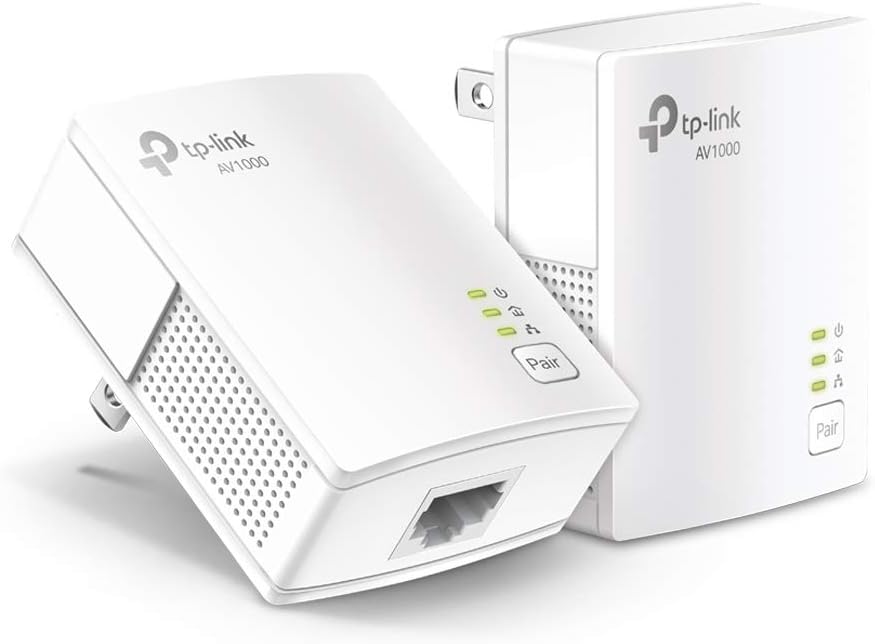
The TP-Link AV1000 Powerline Ethernet Adapter KIT (TL-PA7017 KIT) delivers gigabit-speed wired internet over your home’s electrical wiring, extending connectivity up to 750 feet without new cables. Its compact, plug-and-play design ensures quick setup, while power-saving mode reduces energy consumption by up to 85%. Ideal for multi-story homes and challenging WiFi zones, it provides a secure, reliable network connection for desktops, smart TVs, and gaming consoles.


| ASIN | B084CZMYNM |
| Best Sellers Rank | #1 in Powerline Network Adapters |
| Brand | TP-Link |
| Built-In Media | 6.5 ft. (2 m) Ethernet cable (RJ45), Powerline Ethernet Adapter, Quick Installation Guide |
| Color | white |
| Compatible Devices | Desktop, Laptop |
| Customer Reviews | 4.2 out of 5 stars 11,428 Reviews |
| Data Link Protocol | Ethernet |
| Data Transfer Rate | 1000 Megabits Per Second |
| Hardware Interface | Ethernet |
| Item Dimensions L x W x H | 2.56"L x 2.05"W x 1.12"H |
| Item Weight | 13.6 Ounces |
| Manufacturer | TP-LINK |
| Mfr Part Number | TL-PA7017 KIT |
| Model Number | TL-PA7017 KIT |
| Product Dimensions | 2.56"L x 2.05"W x 1.12"H |
| UPC | 845973089054 840460605908 |
| Unit Count | 1.0 Count |
| Warranty Description | 2 year manufacturer |
M**S
Used to supply wired network connection to Roku TV, solved weak wifi reception issues...
Helped my sister "cut the cord" from cable TV, she has Roku TV's throughout her house, set her up with an outdoor antenna connected to Tablo TV device (look it up, really cool device) to stream local TV channels to all her Roku TV's, unfortunately her bedroom TV was farthest from router and struggled during the evening hours with consistent wifi connection, stream from Tablo TV would stop and start. After exploring mesh network options, etc, I came across this power line adapter to provide wired connectivity to her bedroom TV, worked perfectly and was dead easy to setup, just connect one to outlet near router, plug ethernet cable from router to power line adapter, plug other adapter in outlet in her bedroom, plug ethernet cable from bedroom power line adapter to ethernet port on Roku TV, went to Settings on Roku, it instantly showed wired connection, and her connection issues are gone! I chose this option over a mesh network expander as all her other devices get great wifi connectivity, mesh wireless expanders can slow access to other devices on the network, this power line adapter has no effect on wireless speeds throughout the house.
C**.
Great solution for relocating your WiFi router to a better spot
I've been using powerline ethernet adapters for 20 years to extend ethernet in our 2-story house. The office where our broadband comes in is upstairs in a far corner and not ideal for broadcasting WiFi to the rest of the house. I've turned off the broadband router's built-in WiFi and use the powerline adapters to extend the wired connection to a central area downstairs where I have a WiFi router running in access point mode. I highly recommend this setup to anyone who's unhappy with the coverage from their broadband provider's WiFi signal. Even if the location of the router is a good spot for a 3rd party WiFi router, you want to run your additional router in access point mode to keep it from creating a 2nd isolated network behind your broadband router. This results in a condition called "double NAT" which will cause most routers to generate an error message in their setup software. You may have odd connectivity issues and hard-wired devices on your network won't be able to communicate with devices on WiFi. Access point mode turns off all routing features of the router and it simply adds wireless connectivity to the existing wired network. You can also have multiple WiFi routers in access point mode at different locations and if you use identical WiFi network settings (same SSID, password, and authentication type), your mobile devices will seamlessly roam between them, connecting to whichever signal is strongest. This is my current configuration. I've had many powerline ethernet adapters from various brands over the years (Linksys, Trendnet, Netgear, and now TP-Link) with great results and have typically only replaced them when a new higher-speed model becomes available. This time the Netgears I'd been using since 2015 succumbed to old age and started intermittently dropping packets or failing altogether and needing to be power cycled. The leading brands for consumer networking gear tend to change over the years and I've been very happy with the various TP-Link products I've been using over the past 5 years or so. I have a number of their smart plugs, a couple of switches, and a WiFi router. I wasn't at all surprised that these powerline adapters worked flawlessly out of the box. I didn't even have to go through the pairing operation - they immediately connected when I plugged them in. I should be good for another 10 years or so. Keep in mind that both units do need to be on the same electrical circuit, so it's not guaranteed these devices will work for your specific use case. Negative reviews of these units tend to be from people who've discovered their home wiring configuration makes them unusable. It's also important that you plug them directly into the wall outlet and not into a surge protector. Surge protectors are designed to suppress electrical "noise", and the data the powerline adapters send to each other is literally electrical noise. If you need a surge protector plugged into that particular outlet, plug it into the back of the powerline adapter.
A**H
Satisfactory resolution to my internet issues
Fantastic. I was looking for a way to get better internet. Explored having someone come out and drop lines in all the rooms, but it was nearly 1k to do the job. This was $60ish and it fixed the problems. My speed is immaculate. Zero issues with the internet now. I can plug into any room, which is incredible. It was as easy as plugging it all in. Done in less than 20 minutes.
J**D
Works great, but slows down with surge protectors
It works well. It even works on different circuit breakers in the same house. Throughput slows down the further you are away from the base unit. If you put it on the other side of a surge protector, the speed slows way down again, to the extent of not being able to connect if there are 2 surge protectors between it and the base unit.
N**N
Great WFH Option
I bought this for my wfh setup after having constant connection drops with a Wi-Fi extender, especially when trying to stay connected to my employer’s VPN. I needed a stable and reliable wired alternative, and this delivered exactly that. Setup was incredibly easy. Truly plug and play. While I’m not getting full internet speeds (closer to about a third), the connection is stable, and the speed is good enough for me to work which is what matters most for me. If you work from home and need a dependable wired Ethernet connection, this is a solid option.
C**J
Utterly useless
"Extend your network where extenders and boosters cannot go!" OK. So I'm paraphrasing. What they don't tell you is that both units need to be on the same circuit...as in the same circuit breaker...as in the same ROOM! What good is that? I know it says on the same circuit in the depths of the description, but I naively assumed, since wifi in the same room with the router isn't exactly what I'd call a problem, that that meant on the same breaker box. i.e. the whole house circuit. I could understand it not working across breaker boxes...I know some people have more than one... but I mean, give me a break. The main title for the product should be "I am useless for the purpose you think you're buying me for." I set one up in my upstairs office wherein lies the router. Got all my nice little lights. Took the second to the basement for my smart TV, plugged it in...and got a blinking powerlight. I tried pairing, thinking that would get the units talking to each other. Ha! The middle light on the router end went blank...and the power button in the basement just kept blinking. Tried unplugging and plugging. Didn't work. Tried the link button long press to reset. Still nothing. I do not understand how anyone has gotten this thing to work. Heading now to hit the return button.
R**L
Save time and effort and order the newest model of the AV 1000 which has the pass-through outlet
I am giving this three stars although I can honestly say that I did not open the package to use it. The reason it gets the three stars is that I did purchase the AV 2000 model which has a pass-through outlet on it. That one I definitely would give five stars to because it was easy to set up and worked very quickly out of the box. It also has the pass-through outlet which allowed me to re-plug in the power strip that was originally in the outlet. I did, however, order the newer model of the AV 1000 which does have a pass-through outlet. I will review that when I receive it.
G**N
Works great!
Was having WiFi dropouts during work day and the software we use hates blips on connections. Video calls were also stalling constantly. Took me a whole 5 minutes to setup and so far everything is working great! Great value considering the cost to hardwiring. Only drawback is the size of the unit. Was difficult to plug another grounded cable into the same wall plate due to size.
S**E
Moment
Ponctuel
P**E
On point
I received my order today, the setup was very straightforward and I'm very happy with my purchase. It arrived two days earlier, quite impressed with the seller. Thank you.
E**O
Atendeu minhas expectativas
Atendeu minhas expectativas. Onde preciso de internet é só ligar o adaptador a tomada elétrica mais próxima e resolvido o problema.
K**3
Bastante eficiente.
Lo conecto a mi Xbox para jugar en línea, y es muy estable. Altamente recomendado, y que tenga el Plug adicional se agradece profundamente. No estas desperdiciando contactos.
N**N
3P→2P変換プラグを使って接続できます
TL-PA4010からの変更。 TL-PA7017では4010より倍の速度が出ました。 回線契約が今となっては遅い部類なのでここまでの速度が出れば当方の使途では十分です。 3Pプラグなので、使用には3P→2P変換プラグTAP-AD8BKを用いました。 本アダプターが重いからなのかコンセントに差し込んだ際傾いてしまいます。 3Pプラグ安全カバーAN-203B(要加工)をかませて、ほこりがかぶらないように保護して使用しています。
Trustpilot
1 month ago
2 months ago