


ByronStatics Portable Cassette Players, Walkman Cassette Player Convert to MP3 WAV by USB Flash, Built-in Mic and Speaker Belt Clip Earbud Included 2 AA Battery
Product ID: 206726892
🎧Earbuds Included
🔄MP3/WAV Conversion
🔊Built-in Mic & Speaker
🎶 Relive the Classics, Anytime, Anywhere!
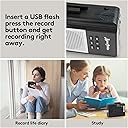
The ByronStatics Portable Cassette Player is a compact device that allows you to convert your cherished audio cassettes into digital formats like MP3 and WAV. It features a built-in microphone and speaker, volume control, and comes with a detachable belt clip for easy portability. With included earbuds and a simple plug-and-play design, this cassette player is perfect for music lovers looking to enjoy their favorite tunes on the go.


| Customer Reviews | 3.5 out of 5 stars 837 Reviews |
N**E
It's easier than the instructions indicate.
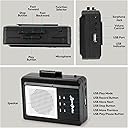
I read reviews for several CONVERTERS and decided on this one in spite of the very confusing reviews. Later I realized that on this site, you have choices of teal, pink, etc., but they are for PLAYING AND RECORDING cassettes, they WILL NOT CONVERT cassettes to MP3s. Be careful what you order. I read reviews mentioning the uncalibrated speed making it sound like Alvin and the Chipmunks and how to calibrate the speed from the little hole in the back, how it chewed up the tapes, how it burned through batteries, etc. You can disregard all those horror stories as not pertaining to the CONVERTER. I specifically wanted a device that had a speaker, as I did not want to have to wear earbuds to monitor how it was going. It does have automatic shut-off at the end of the tape, but if you have a tape that isn't recorded all the way to the end, you will be converting noise, so with a speaker, you can stop the converting manually. I have now recorded more than 70 sides and only had one get chewed and I think it was my fault for not making sure the tape was tight. Thankfully it was about the 3rd one so from then on, I put every side into my good old Sony machine and rewound to make sure the tape was tight, then put it into the converting machine. Also, I recommend using a USB power cable (the jack is not for the USB-C type) to an electrical source for a steady power supply. When I play the converted MP3s, they sound exactly like the original cassettes. I did several tests in the beginning: took the flash drive out of the device and inserted it into my computer to make sure they were converting correctly; the files are sequentially named (TAP0001MP3, 0002, ...) and I renamed them and made sure the renaming didn't corrupt them; I began converting them at the highest volume, adjusting the volume during playback on my computer, but that was too distracting for me to work on other things while it's doing its thing, so I tried lowering the volume way down, and the volume made no difference when it came to playback of the converted file. So, having said all that, here are my instructions for trouble-free conversions -- Have the USB power plugged in, and the flash drive inserted. Set the button on the side/edge to "Tape". Insert the tightly re-wound cassette and close the door firmly. Press the Play button on the side/edge of the device. Then quickly press the Record button on the front surface of the device; the light will begin flashing. If you need to stop it manually, press the Stop button on the side/edge. This has been a long review, but maybe either you'll accept what I've written and dive in, or it will prompt you to double-check some things for yourself. One last thing - of course you can simply play pre-recorded cassettes or record on blank cassettes -- the buttons on the edge/side are for use as a regular cassette player/recorder. The 6 buttons on the front are for the converting process. The Play button on the side/edge does double duty.
C**E
Transfers on USB are not readable on Windows 10
Really disappointed considering it’s listed as an Amazon favorite and has good reviews. 1/ Low volume 2/ Poor output quality 3/ No flashing Red light as stated on the instructions and last but not least: whatever transfers on USB DOES NOT transfer as WAV, they transfer in unrecognizable unusable format. —- and the two AA batteries are not included. Too good to be true!
D**G
digitizing old cassettes
At first I thought it wasn't working, so here's a tip: Don't press the record button too hard! I was leaning on it just a touch too long. Now it's working, and transfers tape to Mp3 with a minimum of fuss and botheration. Sound quality has considerable distortion on the high end, otherwise I'd give it 5 stars. So far, so good. I hope it doesn't break easily. This is the third converter machine I've tried. The first one didn't work at all, the second one recorded to an SD card but only worked once, then couldn't read the card anymore (there was nothing wrong with the card; my laptop could read it just fine). This one records to a thumb drive and hasn't broken yet... wish me luck.
T**T
Thank you for this!
I having been holding onto a tape of a choir I sang in in the mid-nineties and recently my teen son got really into choir. I’ve showed him the songs we sang on YouTube but he really wanted to hear my choir. It seemed like a lot of work to use a service to get the audio off a tape and cost as much as this device. The very day I received this device, I ripped those songs and shared with him. It meant so much! The sound quality is what a tape sounded like, unsurprisingly - it does have that hiss but I’m sure I could edit it out. Also, don’t have headphones plugged in while doing the tape-to-USB recording, it would stop recording after 10 seconds when I did that. Just use the device speaker. Anyway, thanks for helping bring back memories to share with the new generation!
I**O
It works but has quality issues
It's getting the job done for me. I bought it to convert tapes to digital format (mostly voice - educational tapes). I have used it for 6 hours so far and: pros = *I am getting my cassette tapes converted and stored digitally cons= *I learned quickly not to use battery power. I could not get much more than 1/2 hour when powering this with batteries, so I use the USB power interface. * The USB connector seems loose and the cable pulls out easily. I have to be careful not to nudge the device when it's using USB power. * The audio quality seems degraded on the converted copy. Since I am doing voice recordings it's not critical for me, but I notice it. * The speaker sounds very tinny, but since I am not using it as a player it's not critical for me, but I notice it.
A**R
Love the concept, hate the output
After a failed attempt with another one of these cassette players, I decided to try this USB recording player because another reviewer mentioned that it was possible to adjust the motor speed, which was the exact problem I had with a previous (another brand) of player. I would like to digitalize some "nature music" tapes I have that I thought might be more forgiving of the cassette player quality. I love that the player has a speaker on it, and the recording controls are super easy to use. Unfortunately, as you'll read, that doesn't matter. I did, in fact, have to use the motor speed adjustment, as the motor was too slow out of the box and sounded flat. To do this, I had to undo the 4 screws and pop the back off of the player. Fortunately I could play a cassette with this back off because it required some fine tuning. I had to use a precision flat-head screwdriver to reach the adjustment, and it is a VERY fine tuning. You hardly turn it and it goes from being flat to sounding like chipmunks. When I finally got this tuned properly, I began listening to a tape. After about 3 minutes, I had to shut it off - I couldn't stand it. The motor does not turn at a consistent pace, so the music constantly sounds flat, then sharp, then flat. It sounds like it's running on dead batteries, except that it is not. The batteries were brand new, and I had the same result playing it through USB power. I tried recording a tape, which as mentioned, is very easy to do. Pop in the tape, press play, then press the record/pause button on the side of the unit. The red LED on the side will begin to flash indicating that the player is recording. As mentioned, the player sound quality is pretty bad, but in addition, the recorder not only picked up a static-like noise in the background, it even picked up a knocking noise, almost as though head time one of the spindles made a full rotation, it hit something in the player. The recording sounded like a poorly made one in the seats halfway back at a kid's band concert, where you pick up more noise from the surrounding people than the actual music. This is a great concept, but clearly the quality defeats the purpose on this one. Would not recommend.
N**I
Read before Purchase
I purchased the black and white model. Worked very well for a couple hours. After that, the tape deck wouldn’t close all the way and playback speed started fluctuating all over the place, to which there is no easy fix for. Sad it had such a short life span, so DO NOT BUY THIS MODEL. Buy the Jensen brand one of you want quality for 10$ more, that one has out performed this one by a lot and you can adjust the playback speed using a screw on the back that is very easy to access. I never intended to use the tape to mp3 converter so I have no clue if it even works
G**J
USB Recoding attempts failed on TWO different devices!
When I got this, I tried converting cassettes to the USB drive (you know, the ONLY thing 99% of people who buy this device ever plan to do with it) and it didn't work. The tape would play, but when I pressed the USB Record Button, nothing happened. The red light didn't flash and the USB did not record anything from the tape. I got online to get assistance from Amazon and they couldn't help, so they sent me a second device. Well, I'm having the same problem with the second device as the first. Nothing happens when I press the USB Record button. This thing is nothing more than a cheap cassette player/recorder. I'm sending back this second device and getting my money back. On top of all of that, the directions are printed in microscopic font, making them very hard to read. This device has been a complete waste of time.
L**I
Easy to use and great quality
If you're looking to transfer tapes to an USB key / drive, look no further. This is the most ideal product for that matter. Many other brands promote walkmen (plural of walkman) "Tape to MP3" from brands like EZCap, DigitNow, Wendry, BlumWay, Pyle, Rybozen... has all the same casing and are manufactured at the same place and poor quality made. This model from Byron Statics gives a very good sound quality, unless your tapes didn't survive well over the decades. Super easy to use, either with 2 AA batteries or with a Micro USB B to regular USB plugs. I prefer the USB connection personally. While transferring your tapes, you can listen to them via the headphones or directly on the built-in speaker. You can also use this model to record voice onto a tape or directly onto an USB key / drive. I truly recommend this product. I tried the EZCap which last on 5 tapes transfer then stopped working. I tried another one which was supposed to work directly plugged on your computer and didn't work with GarageBand or Audacity programs. Byron Statics KCS-312B IS the solution for all of your tape to MP3 transfer needs
W**A
Excelente
Excelente
A**R
Very poor quality.
Very poor sound and did not work well. Very unhappy until I through it in the garbage bin. Lasted only a couple of days. Very poor sound quality.
K**M
Works good
It works good and the MP3's sound good, but the problem with tapes is that you can record anything and you can't prove you purchased the original music, so, you can play and listen to the MP3's but you cannot download the digital copy to any other device, but that works OK with me, I just have a memory stick hanging out of my player
L**E
el USB
funciona bien, aunque su consumo de baterías es alto, con las mismas convierte solamente unos 30 minutos de grabación, otro detalle importante es que el USB debe ser 3.0, ya que no lee los 2.0
Trustpilot
2 weeks ago
2 weeks ago