Desertcart purchases this item on your behalf and handles shipping, customs, and support to South Africa.
🎮 Elevate your game with wireless precision and style — because your setup deserves the best.
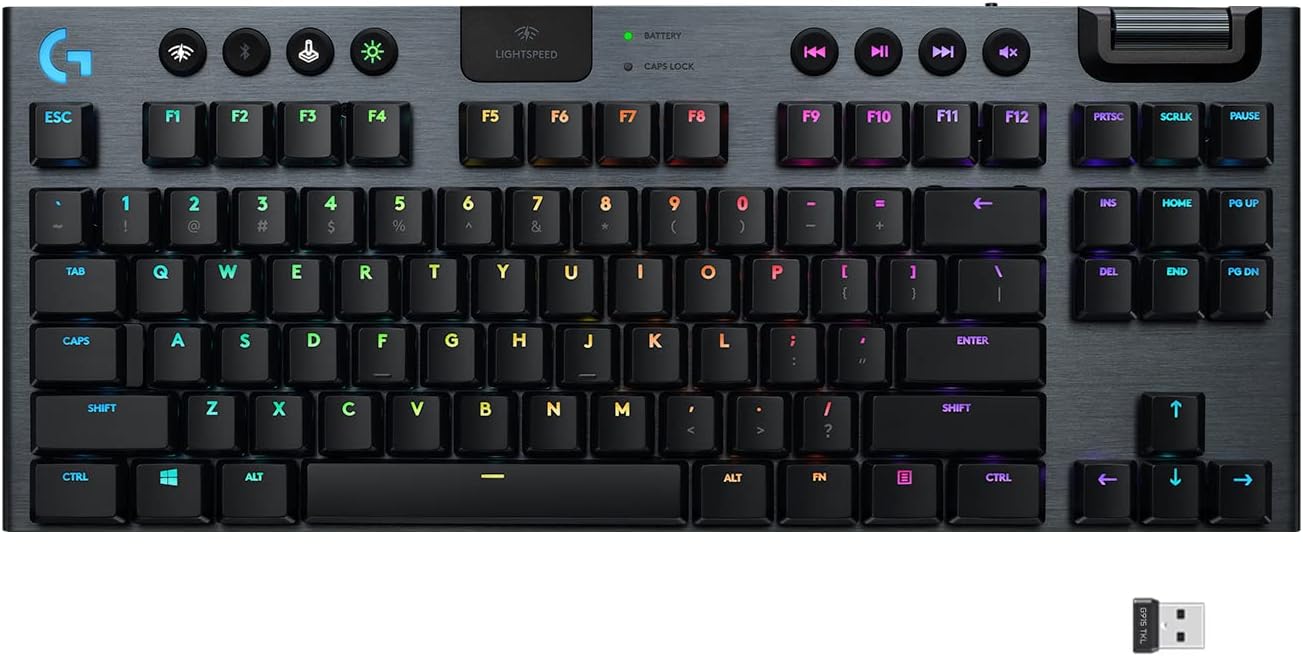
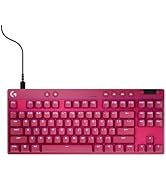
The Logitech G915 TKL is a premium wireless mechanical gaming keyboard featuring ultra-fast 1 ms LIGHTSPEED wireless technology, a tenkeyless design for more desk space, and three low-profile GL switch options for tailored tactile feedback. It offers up to 40 hours of battery life on a single charge and fully customizable per-key RGB lighting with LIGHTSYNC technology. Crafted from aircraft-grade aluminum, it combines durability with a sleek, thin profile. Dedicated media controls and seamless multi-device connectivity via USB receiver or Bluetooth make it ideal for both gaming and professional use.


| ASIN | B085RLZ1C4 |
| Additional Features | Backlit |
| Antenna Location | Gaming |
| Best Sellers Rank | #5,157 in Video Games ( See Top 100 in Video Games ) #441 in PC Gaming Keyboards |
| Brand | Logitech G |
| Button Quantity | 104 |
| Color | Black |
| Compatible Devices | PC |
| Compatible Operating System Family | MacOS, Windows |
| Connectivity Technology | LIGHTSPEED wireless, Bluetooth |
| Customer Reviews | 4.5 out of 5 stars 5,605 Reviews |
| Enclosure Material | Aluminum |
| External Testing Certification | ANATEL: 56361803229; 93951903229; |
| Hand Orientation | Ambidextrous |
| Item Dimensions L x W x H | 15.2"L x 5.9"W x 0.9"H |
| Item Type Name | Wireless Gaming Keyboard |
| Item Weight | 150 g |
| Keyboard Backlighting Color Support | RGB |
| Keyboard Description | Gaming |
| Keyboard Layout | QWERTY |
| Keyboard Plate Material | Aluminum |
| Language | English |
| Manufacturer | Logitech |
| Mfr Part Number | 920-009495 |
| Model Name | G915 Tenkeyless |
| Model Number | 920-009495 |
| Number of Batteries Required | 1 |
| Number of Items | 1 |
| Number of Keys | 90 |
| Number of Sections | 4 |
| Power Source | Battery Powered |
| Processor Count | 2 |
| Recommended Uses For Product | Gaming |
| Series Number | 915 |
| Special Feature | Backlit |
| Style Name | G915 TKL |
| Switch Type | Clicky |
| Theme | Gaming |
| Total USB 2.0 Ports | 1 |
| UPC | 097855155757 |
| Unit Count | 1 Count |
| Warranty Description | 2 Year Limited Hardware Warranty |
J**.
Great keyboard with a great typing experience.
I bought this keyboard at the recommendation of a friend that has the ten key version. I prefer the TKL layout to save space on my desk. I really like the formfactor of this keyboard. The low profile of the housing and the keyswitches is very sleek and looks great. The switches themselves are great to type on and the shorter throw is easy to adapt to from Cherry MX. The Wireless receiver took no setup to work and plugging in to charge the battery was a sinch. I also love the volume roller on this keyboard. It has enough friction to not freewheel but you know how much you're turning it up or down. I haven't synced this keyboard up via Bluetooth to anything yet. I imagine the bluetooth experience is also solid. The battery seems to last a reasonable amount of time. I prefer to leave the keyboard plugged in to keep the backlight active as I often game in the dark. Logitech's game mode is also a great way to suppress certain keys that you won't use while in a game (Looking at you Windows key!) I also tend to turn off Capslock in game mode as well. The RGB effects are not too bright but provide a splash of color to a gaming setup. There's four brightness levels accessible with a nice dedicated button. If you prefer, the keyboard can be set to single color, though I'm a sucker for RGB effects. I put this keyboard up there with my other custom mechanical keyboards at a similar pricepoint in terms of quality. Logitech didn't disappoint.
S**N
Better than the reviews lead me to believe
I was skeptical about buying this keyboard based on the reviews I saw. I took a chance and am happy that I did. I wanted a TKL, wireless, USB/Bluetooth keyboard that is good for typing/work and gaming, has the Home/End/Pg Up/Pg Down keys in the traditional locations and also has the F keys offset (not directly above the number keys). $200 is a lot for a keyboard, but I trust Logitech and wanted to give this a try. It exceeded my expectations. I need the keyboard to be able to switch back and forth between a PC (Gaming) and a Mac (Work). On PC, I plugged in the lightspeed wireless dongle and I was done. On Mac, I paired the keyboard with bluetooth, it asked me press certain keys on the keyboard and I was done. When connected to the Mac via bluetooth, the Windows key changes to the Apple/Command key and the Alt key changes to the Option key automatically. It was seamless. I did not have to download any software or set any preferences to make this happen. I wanted to point that out because I couldn't find any other reviews that touched on that subject and this was important to know for my needs. They Keychron I was using did not have a wireless USB option, so I had to toggle back and forth between Wired USB and Bluetooth. To do so, you have to flip a switch on the side of the keyboard, then you have to flip a second switch based on if you want the keys to be Mac or PC. With the G915, all of this is gone. Its all wireless, and when you press the USB button its automatically set to PC keys...when you press the bluetooth button its automatically set to Mac keys (because I paired it with a Mac). Huge QoL improvement for me. Gaming wise...my first night I played with it, I won 6 straight in overwatch and got promoted to platinum so....take that as you will. In all seriousness though, there is no delay, no ghosting issues, no missed key presses or anything like that. It works perfectly. Typing wise, I prefer the tactile keys. The actuation point isn't super deep (like it is with Keychron) and the keys feel crisp and make a slightly audible click. I am fast and accurate. Very happy with this. The profile is suuuuper thin. So thin in fact that I don't need my wrist rest anymore. The Keychron I had was incredibly thick and without a wrist guard, it felt like my wrists were constantly angled up. Not the case with this keyboard. I don't care about lights but.....it has them, and there are several options available in the G-Hub software. On the negatives, the keys aren't as tight as I am used to. They wiggle around kind of like a loose tooth might. It's not a huge deal, but its something I noticed that I thought was weird. The price is going to be the biggest negative for me. Paying $200 for a keyboard is unattractive, but since it covered all of my (weird) bases, I paid it. Wish it was close to $150. Overall, it fit my needs, performs better than expected and it cleaned up my setup quite a bit. Happy with the purchase, even if it was pricey.
M**S
Great gaming keyboard with weak shift key
Keyboard Super Review (gaming and basic computing perspective) Logitech G915 TKL: The keys on this board are lightweight, which is a selling point. I have large man hands scuffed up from working outdoors with the lifelong dexterity of a computer gamer -- yet the lighter keys can be easier to counter strafe in FPS games. The layout of the board feels natural and I do not misfire keys. I immediately played very well with this keyboard. Compared to the Corsair K65 with its instant activation, I game much better on this keyboard. My criticism is the Shift key, a common button for games, is a wide key but supported like it is a single wide key, unlike the rest of these keyboards which reinforce the shift key. This can be frustrating when toggling sprint in a game like Tarkov. Corsair K65 65%: (OPX Switches, PBT Double-Shot Keycaps) The switches are very easy to activate, there is no wiggle room, as with other switches/keyboards, they will activate and reset with little distance before the switch can be triggered again. This can take some getting used to for twitch competitive gaming. My main criticism is the size. I ordered the 75% for the Function Keys although it has different switches. If you dont use those readily then the small size of this is a boon. The small size takes a bit getting used to, for better and worse, as its very nice to have page up/down so close to the arrow keys, etc. Also, this keyboard is FUN to use, I want to press the keys; despite buying several keyboards to test, I am not a keyboard/switch fetishist either. The size is great if you dont need function keys. Corsair K65 75%: (PBT Dye-Sub Keycaps, Pre-Lubricated MLX Red Linear Switches) The prelubed switches are amazing; I don't know why more keyboards come this way (it is a lot of work to lube them yourself). If you are partial to buttery sounding/feeling switches then this is a good contender. The switch activation point is ideal for my crack FPS playstyle. The bluetooth and wireless dongle are useful for playing on the TV. The sound knob is not easy to turn and is even more difficult to grab with the Home key right next to it. This is my overall favorite keyboard and what I use for computing and gaming. Sadly, it is my least favorite keyboard aestetically, from keycaps to backlight effects. Ducky One 3 TKL: (Double Shot PBT, Cherry MX Red) This might be my favorite keyboard. The switches have a bit of give before activation which is a concern for my precise FPS gaming playstyle--I am not as confident when a key will trigger compared to some other boards. This is understandable, the Ducky is not marketed as a gaming keyboard; which might also be why it is my favorite to use for typing/word processing. The Corsair, for comparison, has no give and trigger with the slightest force. Maybe its my past habit of using keyboards but I like to put a little weight down on the keys, especially when strafing in games or waiting to press a key. Somewhat unrelated, this keyboard was missing a few keycaps but Ducky mailed me the missing caps ASAP. tldr: Not the best keyboard for freak FPS gaming, short of that it is tied with Corsair K65, with difference being when you like the key to trigger (a little give with Ducky or instantly with K65). Might also be worth noting I am typing a lot of reviews with this keyboard. Logitech G413 TKL: Amazon cancelled my order of this, probably because they doubled the price after I purchased it. Unfortunate because one of my past favorite gaming keyboards was a similar Logitech, which I gifted to my sister. Das Keyboard 6 Professional: (Tactile Cherry MX Brown Switches) This was my old keyboard. It is very disappointing. It is incredibly overpriced. The caps are not PBT (newer, nicer key cap plastic tech). I lubed the switches myself and it is slightly better. I have posted a very long review on its page. Das 4 keyboard was one of the best of its time (cat urinated on mine). I hope the future iterations will be better for Das' sake...since the rest of these boards are almost half the price and better per most metrics.
C**D
Excellent Low Profile Wireless Keyboard
In short, this keyboard feels extremely satisfying to type on, and for someone coming from a laptop keyboard I highly recommend it. For those coming from mechanical keyboards, you really need to feel this to know if you like it or not, but I really like the feel of the tactile switches. Pros: - Tactile switches feel excellent for both typing and gaming (although pure gamers might prefer reds) - Wireless (basically zero latency; no cables; just fantastic) - RGB is extremely bright (turns off quick, but you can adjust the sleep times and colors in GHub) - Great battery life (I have to charge maybe once every two weeks, although that is usage dependent) - Volume wheel is fantastic Cons: - Expensive (Do not pay $230, that is absurd. For the $170 I got it for, it is an expensive but great keyboard) - Micro usb to charge (In 2022, placing Micro usb instead of usb c for $230 is absurd, but again, find a sale) - GHub is required to adjust sleep states and RGB (I don't mind much, but some do, so it's worth mentioning) I am a longtime laptop user, and only in the past year or so did I begin using external keyboards. First, I used apple's magic keyboard, and while this keyboard enabled me to type accurately (I'm a longtime mac user), it does not feel great due to the incredibly short keys and lack of tactility. Then, I used a ducky one two mini given to me by a friend with Cherry silent red switches, and this keyboard was just much too sensitive. The actuation force required by the keys was ridiculously low, which is fantastic for gaming, but for anything else it creates typos unless you can adjust. Thus I went looking for low profile mechanical keyboards. This was the only low-latency wireless one I could find. It is premium, feels great, and I really do not have any major complaints so far. No, the switches aren't replaceable. But that's also not really their target demographic. If you want the best in low profile mechanical keyboards for work and gaming, this is it.
A**E
Great keyboard (other than Keycaps Wearing Away In a Year)
UPDATED REVIEW Concerning the keycaps wearing out within the first year: I made a warranty claim using the keyboard's serial number and Logitech instantly offered to replace the keyboard. I'm hoping this was a known defect with early batches that has been corrected in the replacement. I'll update this review if the new keyboard has the same issue. GENERAL KEYBOARD REVIEW: I like *nearly* everything about this keyboard. The TACTILE keys feel good. Plenty of feedback in both spring, travel, and audible click. If you don't like sound as you type don't get the tactile version. The narrow keyboard size is good since I don't need a numeric keypad these days, and I personally like the look. I also like the separation of keys into groups. I quickly adapted to their positions. The arrow keys are easy to reach and find. I like the media buttons and audio scroll bar being on their own and easy to find rather than being mixed into the function keys. I use the color led key lighting feature for games and in applications where I use keyboard shortcuts frequently. I also use the game mode button that turns off certain keys so they don't get hit accidentally. The wireless speed is excellent. I never notice any delay and the battery lasts a good long time. I do wish it was USB-C instead of Micro-USB though. I had to get an adapter so I can use the same cable I use to charge my G502 X mouse. I don't care for the shift characters not lighting up. The special characters are all printed on, which makes them hard to see if the lights are dim. I would have preferred those to lite up as well. This is perhaps the biggest flaw to me (other than the keycap wear issue). ORIGINAL REVIEW: I would have rated this as a fantastic keyboard at first, but there are issues with the keycaps where the paint wears off in less than a year. I have multiple keys where the letters are no longer readable. The paint coating has worn away. It looks awful. For an expensive keyboard this is not acceptable. As much as I like other things about the keyboard, I would not buy it again.
M**Y
Dual Review of TKL and Full Size
Update : I originally said you could not assign colors to individual keys. Not true. In the G-Hub software there is a tab called "Free Style" where you can set any key or group of keys to any color you like. Perhaps they should include a _complete_ tutorial with the software. I only found out because I googled what that tab does. I initially purchased the G915 (full size version) Tactile. HUGE (no pun intended) mistake. I have always had full size keyboards and had no issue. But the G915 is larger than normal. My mouse was constantly hitting the right side of the keyboard and the G5 key by accident when muscle memory was going for the CTRL key. So I returned it and got the G915 TKL. Nice. Overall both have the same pluses. The keys are bright and smooth. It's actually fun to type on these keyboards because the switches are so silky smooth. It's true the special symbols on the numeric keys don't light, but seriously, how often is that a problem. I use $ and * all the time so I already know they are on the 4 and 8 keys. It's not really a problem. I have also read some reviews that don't like the volume knob-bar. I don't get it. It turns the volume up, and it turns it down. What's the issue? The charge time to 100% is 30 mins - 1 hour while using it. And the charge lasts for days. What I really like is the backlights have auto-off to save battery when you haven't hit a key in a minute or so. Then as soon as you touch a key, they all come back on. This can be turned off or on through the G app. It's true, you can't set each key or key group individually. For me, it would be nice but it's not a deal killer. And the best part, and the main reason I bought these, is you can switch between bluetooth and lighting with the press of a button. I connect to my work laptop with bluetooth, my desktop with lighting. And when you switch it's instant. No waiting for a handshake. Goodbye usb switch! Dig it! Overall I am very happy with these keyboards. If I could change anything about them it would be : 1. USB C on the charging port (it is 2022 afterall) 2. Individual key color assignments 3. Did I already mention USB C? 4. A USB Passthrough port
T**R
Exceeded expectations
I bought this keyboard after a month of going back and forth deciding whether or not to fork out $230 for a keyboard. It's more expensive than the desk it sits on! I even got back online like an hour after purchasing and was damn close to cancelling the order out of sheer buyers remorse... but i am very very glad i did not. Yes the price is still crazy, but it is hands down the best feeling keyboard ive ever used. You get what you pay for and this to me is well worth it. I'm using the Tactile version of this keyboard after using a Linear version of a Corsair keyboard previously. I was worried the clicking of the keys was going to be to loud but these are about as quiet as my previous keyboard and still provide the key click you get out of a "clicky" keyboard. I'm told these are comparable to the Cherry MX Brown switches. They feel amazing. The main reason i wanted to buy this to begin with was for the low profile as i'm sure most are here for the same reason. I always used a wrist wrest with my Corsair keyboard, and while it didn't bug me at all it just ate up space on my desk. Going from a full size keyboard regular height to a TKL keyboard thats low pro has been so flippin awesome. So much more desk space. Do not need a wrist rest at all. I have ran into a couple of instances where i wish i still had a num pad but oh well i'll take the trade off. RGB looks great, though i'm the wrong guy to ask on that one i could care less about it as long as i can see my keys. Lastly, minor detail the volume dial is excellent. Strongly recommend this keyboard if you can bite the bullet on the price.
E**I
My Favorite Keyboard
A little overpriced, maybe. It is definitely, by far, my favorite keyboard. Never really had a problem with it. I once had a problem with one of the keys, and while the keycaps are rare, getting replacement keycaps is doable nowadays. Wireless functionality has worked flawlessly. I would recommend trying it out at a Best Buy just to make sure you're ok with the low profile nature of it (I love it).
N**C
Me encanta
Cuando vi este teclado quedé enamorada y me decidí por comprarlo. Es un teclado excelente, no hace mucho ruido que es lo que yo quería, la sensación es muy buen y los colores son brillantes y lindos. Con el software de logitech puedo cambiar los modos y colores, así como puedo monitorear la batería además de que cuando tiene poca batería entra en modo ahorrativo e indica que este se está acabando la batería. La batería dura bastante aún con la iluminación al máximo. El tiempo de respuesta es prácticamente inmediato de ambos modos tanto bluetooth tanto con el conector lightspeed y es una ventaja poder cambiar de modo instantáneamente para contralar diferentes equipos, igual como se puede utilizar mientras este se carga. Al ser teclas de bajo perfil son muy cómodos, me encantó. Sin dudarlo volvería a comprarlo, si tienes la oportunidad de adquirlo no lo dudes, no te arrepentirás.
L**R
Easy to setup, good for fps
One of the best tenkeyless keyboards on the market, while a bit more expensive than others it performs for the price. I bought the keyboard at a 30% discount so was happy with that. The keyboard comes out of the box needs to be charged with the usb to micro usb cable included in the box, afterward you can switch to light speed with the usb dongle or Bluetooth, the battery life is crazy and does vary depending on how bright your rgb is (can be changed in G Hub), the keys have a fast travel time excellent for fps games such as Counter Strike and Apex Legends. {Note: if you play fps games it’s recommended you use the light speed connection rather than Bluetooth which is slower and not as reliable. One little thing that might irk people is the ergonomic aspect but I don’t find that to be a problem for myself. All in all it’s a great gaming keyboard and I highly recommend, probably even more when it’s on sale 9.5/10
A**.
De todos que já tive, esse é perfeito.
Avaliação detalhada: Primeiro acho legal falar quais teclados eu já tive experiência para ter como referência. Redragon Kumara, Logitech MK220, Logitech K380, Logitech G613, Logitech G815. Bom, usando teclados de perfil mais alto e mais baixo, claramente me acostumei de forma melhor, mais rápida e mais confortável no perfil baixo. Então decidi procurar um teclado com perfil baixo... Depois que tive um teclado sem fio, é um caminho sem volta, ainda mais com a tecnologia LightSpeed da logitech que mesmo em jogos online de FPS ele funciona perfeitamente IGUAL cabo. Então decidi procurar um teclado sem fio... O software de programação GHUB é fantástico, são infinitas as opções, macros, alterações de teclas de software que estou usando, jogos que estou jogando etc... ele faz tudo isso de forma automática e fica tudo muito perfeito e funcionando sem erros, depois de usar difícil ficar sem. Parte multimídia é toda em silicone igual o G815 que é super suave ao toque e de boa construção, acho que a mistura dos switchs com essas teclas multi em silicone fica muito luxuoso e acabamento bem premium. Por fim, as teclas G1-6 do G815 fazem um pouco de falta, coisa que temos no G915 normal sem ser o TKL, mas no GHUB vc faz essa alterações para as teclas F1-12 por exemplo e nem vai sentir falta das teclas extras. (imagem em anexo) LEDS do teclado é super sutil, nada gritante e não transborda das teclas deixando o digitar e o setup de noite bem premium nada ofuscante igual outros teclados com led vazados que parece um show de luzes. (tem quem goste) Conexão WI-FI e B.T funciona perfeitamente, conecta muito rápido, praticamente instantâneo ao apertar o botão de seleção Wifi ou B.T. Essa função é muito boa para quem usa 2 computadores, ou computador + tablet, etc... Scroll de volume, Isso a Logitech realmente inovou e ficou incrível, toque super suave com o scroll em alumínio, acabamento super delicado e funciona perfeitamente. PQ comprei esse teclado ? Bom, estava procurando as seguintes características: - Perfil baixo de teclas - Conexão Wifi com receptor USB - Multi conexão entre B.T e WIFI - Teclas programáveis - RGB - TKL - Perfil internacional (ABNT é muito ruim) Essas especificações encontrei apenas em 2 teclados, no Redragon Horus versão internacional que vai sair na casa dos R$ 600,00 reais já com taxas e impostos importante do Ali. Porém o acabamento, RGB, scroll de volume etc.. ficam bem a baixo do G915, um ao lado do outro parece que o Horus é uma cópia fuleira ao lado de uma peça original. Enfim, vendi o meu G815 e comprei esse G915 TKL na promoção por R$ 730,00. Super satisfeito, RECOMENDO!
G**S
Apaixonado.
Perfeito em quase tudo, tem a função de confiuguração das cores individulamente para cada tecla e possibilidade de personalizaçao em cada jogo também. a Bateria é incrivelmente duradoura. uma vez por a cada 10 dias +-. depende da confiiguração, o controle de volume com rolagem infinita trás praticidade e segurança na durabilidade desta função, com o LightSpeed consigo jogar sem sentir qualquer lag nos comandos, posso sincornizar via bluetooth outros pcs de usa-lo junto ao mouse (que tem a função flow), além disso pode programar para diminuir ou aumentar o delay de desligamento dos leds o que garante mais tempo longe da tomada, agora o ponto que me desagradou um pouco e a conexão via micro usb, diferente do mouse mx master 3s que é Type-C. Fora isso, foi uma excelente aquisição, recomendo.
C**Z
Mejor teclado gaming/trabajo
Estaba buscando un teclado mecánico, bonito, inalambrico, para jugar, y para trabajar. De tamaño chico, pero no tan compacto, transportable, pues viajo mucho y hago documentación en los viajes. para jugar en la casa, y al mismo tiempo que tuviera una distancia suficiente para poderme sentar y hacer la busqueda en Prime Video, Netflix, y Crunchyroll, desde la comodidad de mi sillon. Y este teclado lo cumplio. Primero, las teclas son Gl tactil perfil bajo, se supone que son buenos para los FPS, pero para trabajar me encantan, hacen un sonido clicky, pero no demasiado, es lo que buscaba, y el perfil hace que a la larga te canses menos de teclear. Tiene bluetooth (la que gasta menos bateria), conexión lightspeed (por medio de receptor UBS A) y es la que gasta mas batería, y si se prefiere, conectarlo alambricamente por USB A. El lightspeed tiene menos alcance que el bluetooth, pero trae un extensor de distancia. Es recargable, no usa baterias. No tiene parte del teclado numérico, por es el TKL (TenKeyLess), y es formato idioma inglés (no trae ñ), en mi caso no me molesta porque escribo ya por automático. Es caro, pero sus materiales son aluminio cepillado, con teclas de plástico y las de formato y media de goma, todo RGB y se puede modificar el mapeo de las teclas y el RGB por el programa Logitech Hub, muy intuitivo. Si tienen el dinero, necesitan un teclado, y los ven en descuento, cómprenlo.
Trustpilot
1 month ago
1 month ago