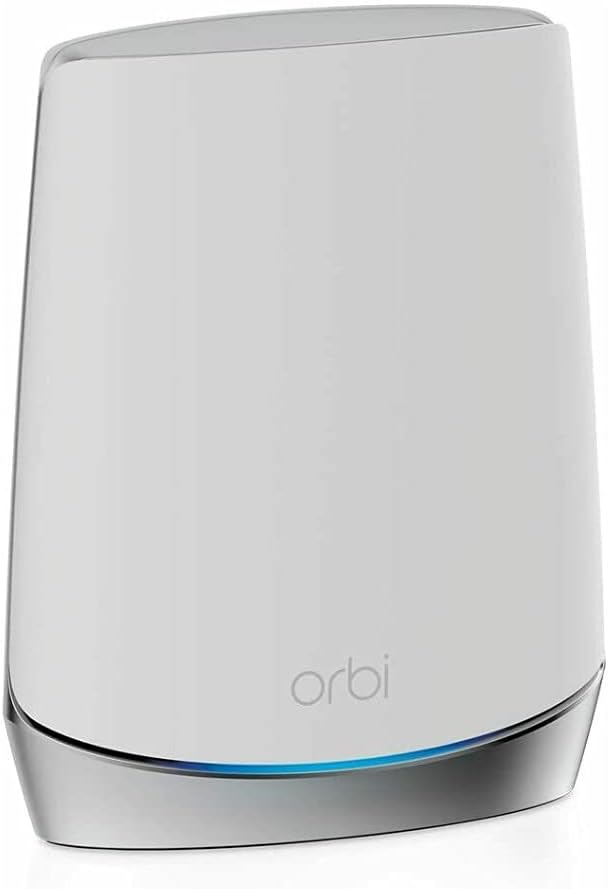
๐ Elevate your home WiFi gameโfast, seamless, unstoppable!
The NETGEAR Orbi RBS750 is a WiFi 6 tri-band mesh satellite that boosts your existing Orbi system by adding up to 2,500 sq.ft. of coverage and delivering ultra-fast AX4200 speeds up to 4.2Gbps. Designed for seamless roaming with a single network name and easy management via the Orbi app, it eliminates dead zones and supports high-demand activities like 4K/8K streaming, gaming, and video conferencing.
| ASIN | B088B9S52T |
| Antenna Location | Home |
| Antenna Type | Internal |
| Best Sellers Rank | #2,983 in Computers & Accessories ( See Top 100 in Computers & Accessories ) #78 in Whole Home & Mesh Wi-Fi Systems |
| Brand | NETGEAR |
| Built-In Media | One (1) Orbi Satellite (RBS750), One (1) 12V/2.5A power adapter, Quick start guide |
| Color | White |
| Compatible Devices | Gaming Console, Smart Television, Smartphone, Tablet |
| Connectivity Protocol | ethernet, wi-fi |
| Connectivity Range | 2500 square_feet |
| Connectivity Technology | Ethernet, Wi-Fi |
| Control Method | App |
| Controller Type | amazon_alexa |
| Coverage | 2500 sq.ft. |
| Customer Reviews | 4.4 out of 5 stars 1,069 Reviews |
| Data Transfer Rate | 4.2 gigabits_per_second |
| Frequency | 2.4 GHz |
| Frequency Band Class | Tri-Band |
| Item Dimensions L x W x H | 9.75"L x 7.75"W x 6"H |
| Item Weight | 2.7 pounds |
| LAN Port Bandwidth | 4.2 gigabits_per_second |
| Manufacturer | Netgear |
| Maximum Upstream Data Transfer Rate | 2100 megabits_per_second |
| Mfr Part Number | RBS750 |
| Model Name | RBS750-100NAS |
| Model Number | RBS750-100NAS |
| Number of Antennas | 4 |
| Number of Ports | 2 |
| Operating System | ZyNOS, Junos OS, Cisco IOS, or RouterOS |
| Other Special Features of the Product | Wi-Fi, WPS, Parental Control, LED Indicator, Guest Mode, Access Point Mode, Beamforming, Internet Security, QoS |
| Router Network Type | hybrid |
| Security Protocol | WPS |
| Special Feature | Wi-Fi, WPS, Parental Control, LED Indicator, Guest Mode, Access Point Mode, Beamforming, Internet Security, QoS Special Feature Wi-Fi, WPS, Parental Control, LED Indicator, Guest Mode, Access Point Mode, Beamforming, Internet Security, QoS See more |
| UPC | 606449146233 |
| Unit Count | 1 Count |
| Voltage | 100240 volts |
| Warranty Description | 1 year warranty |
| Wi-Fi Generation | WiFi 6 |
| Wireless Communication Standard | 802.11n |
| Wireless Compability | 802.11n |
R**S
Might need firmware update to sync satellite to router
The review from GUANGRONG ZENG under "Top Reviews from Other Countries" saved me. I made the mistake of buying the Orbi router/modem (CBR750) with no satellites, thinking my apartment was so small I wouldn't need a satellite. Big mistake, the wifi signal from the router in the living room did not reach the bedrooms in the back of the apartment. So I purchased the Orbi stand-alone satellite (RBS750). The instructions for syncing the satellite to the router/modem did not work at all (plugging the satellite in to an outlet and then pushing the sync buttons on the satellite and router). I kept getting the magenta light. So I followed the instructions from GUANGRONG ZENG (who got them from another reviewer). The only change I had to make, was that I found the specific IP address of my satellite in the Orbi app after I had connected the satellite via ethernet. I then entered Admin and Password as the username and password. It then took me to the page in the first image. Next step was update the firmware. I found my router's firmware version in the orbi app under router settings. Then I kept uploading the wrong file (CBR750 instead of RBS750). Once I get the right file uploaded, the firmware updated. See the second image. Then I refreshed and saw the third image. I then refreshed the Orbi app, and instead of saying "Satellites: 0 of 1," it now said "Satellites: 1 of 1." I have copied the original review below so that people can see all of the steps. Can not syn my new satellite for 2 hours, After review and tried C&J review, my system work great now, thank you for the help, i repost his post. credit to him. anyone having this problem, follow the step and give this a shot, thank you. 5.0 out of 5 stars Advanced setup may be required. Reviewed in the United States on October 21, 2023 Verified Purchase I've had good luck with my Orbi 750 system but wanted to expand the coverage with this satellite. I spent over 2 hours trying to get this to sync with my system with no luck. This is what I ended up having to do, and Iโd assume this will work for whomever runs into this issue. โข Start by plugging the new satellite into the Orbi router with an Ethernet cable. Plug the new satellite into power and wait for it to boot up (usually 2 minutes). โข Wait for the light on the satellite to turn blue and then turn off. โข At this point open a web browser and log into the Orbis interface (192.168.1.1) enter your username and password when prompted, then select attached devices and find the IP address of the new satellite. โข Once you've located the new satellites IP address open a new tab and enter the new satellites IP address into the address bar and login (Username:admin/password:password). โข Once you've logged into the new satellites web interface look for the firmware version and compare it to your existing Orbi firmware. If it doesn't match you need to manually update the new satellite firmware. โข Open a new tab and search RBS750 firmware. Find the firmware version that matches your current system from the Netgear support site only (not 3rd party). โข Once you've located the correct firmware download it to your desktop. When it's finished downloading extract the zip file to your desktop. The firmware file will end with .chk . Now go back to the browser tab for the new satellite and select firmware/update Firmware then select browse and navigate to the unzipped folder you downloaded and select the file ending .chk and update. This process can take up to 19 minutes. โข Once the satellite is finished and there is no light coming from the new satellite unplug it from your router and place where you want it and plug it back into power. โข After the light on the new satellite finishes blinking it should go blue for a moment then off. If the placement is poor you may get an amber light instead of blue and magenta if it's too far from the Orbi router. โข This is how I got mine to work, I hope this helps someone in the same situation. After all this it works great for me.
R**S
Good choice.
Arrived a day early in good condition. Instructions were clear and easy to follow and it connected exactly as written.
D**N
Excellent Mesh Router Network
I upgraded from my Orbi RBK750 and it has been a significant improvement, particularly because I regularly have around 100 devices connecting to the network. The range of this system is also significantly better (my detached garage is about 100 feet from the nearest router satellite, and the security camera in there works flawlessly with full bats, whereas the old Orbi barely had 2 bars). While the speed is obviously faster with my Wi-Fi 6E and Wi-Fi 7 devices, the real boost has been the ability for this mesh network to maintain the connection AND bandwidth with over 100 devices connected to the network. With my old system, devices would constantly get kicked offline or speeds would slow to a crawl because it couldn't handle all the traffic. It is also worth noting that Orbi is a secure and trustworthy brand. I realize no router is impenetrable and that all companies are only really ever in it for the money (especially with Orbi's constant nagging to buy their Netgear Armor), but it does matter which companies have an incentive to keep your data safe. Orbi is based in America and has a reputation to uphold. They constantly provide timely security updates. When buying any router, always consider the kind of data you access via your devices and whether you would put it at risk to buy from a brand that may not have the same incentive to keep your information safe. Overall, if you have around 100 WiFi devices and are in the market for a reliable, secure, and future-proof mesh network, you can't go wrong with this one.
S**E
Effective Expansion for Improved Coverage
The NETGEAR Orbi Whole Home Tri-band Mesh Add-on Satellite (RBS750) has been an effective solution for expanding the coverage of my Orbi WiFi 6 System. While it works great and has significantly improved the WiFi signal strength in my home, I was disappointed that I had to purchase it separately to achieve the coverage I needed. The performance of the RBS750 satellite itself is impressive. It seamlessly integrates with my existing Orbi WiFi 6 System, providing a strong and reliable WiFi signal throughout my home. Furthermore, setup and installation were straightforward, thanks to the user-friendly Orbi app. I was able to quickly add the satellite to my existing network and optimize its placement for maximum coverage. However, my disappointment stems from the fact that I had to purchase the satellite separately after finding that the router alone did not provide adequate coverage for my 2,000 square foot home. Despite the router's claim to cover 2,500 square feet, I found that it fell short in certain areas of my home, leading to dead zones and unreliable connections. In conclusion, while the NETGEAR Orbi Whole Home Tri-band Mesh Add-on Satellite (RBS750) is a highly effective solution for expanding WiFi coverage, I was disappointed by the need to purchase it separately after finding that the router alone did not provide sufficient coverage. Despite this drawback, the satellite has greatly improved the WiFi experience in my home, making it a worthwhile investment for anyone seeking to enhance their Orbi WiFi system's coverage and performance.
M**K
Works perfectly! Trust seller 5 stars =)
I canโt say enough great things about this purchase and the seller, Sophia. Before shipping the NETGEAR Orbi Whole Home Tri-Band Mesh Add-on Satellite (RBS750), she took the time to confirm that I actually needed this specific satellite and that it would be compatible with my existing network. That extra step really shows how much she cares about making sure customers get the right product. Once everything was verified, she shipped it immediately. It arrived just a couple of days later, and I had it set up and running in about 10 minutes. The satellite works perfectly and expanded my network exactly the way I hoped. The packaging was absolutely superbโseriously some of the best Iโve seen. The unit was protected so well that it probably could have survived a fall from a 20-story building! Iโm extremely happy with this purchase. The item was exactly as described and exactly what I needed. Huge thanks to Sophia for the excellent service and attention to detail. Highly recommended seller!
A**R
Better than expected.
Works great. Easy to set up. Much better WiFi coverage. Was able to put one in our mother in lawโs house. She uses our Internet. Saves her some money!
P**Y
Didn't work as expected
Well, I've been very disappointed with my Netgear Orbi system. I've owned it about seven months now and it continues to disappoint. I bought the top of the line model (RBR850) which for whatever brilliant reason Netgear has removed parental controls from. So don't think you'll be able to turn off the internet at night to prevent your kids from using it. Not on this model. While the internet is fast with this system, the connection has always been spotty and Netgear Technical support is VERY frustrating and other than a factory reset doesn't offer much support. I have FIOS internet at 1GB, the Orbi's wifi is fast but that doesn't prevent the movies I stream from buffering and from Netflix and the like from saying it lost my internet connection. So on to this Satellite purchase. I can't return the existing Orbi system or I would have, so I'm kind of locked into it. I'm still seeking stability in my wifi system (I live on acreage so I don't have any interference) and thought, maybe I need another satellite to provide this stability. Supposedly the 850 with one Satellite covers 4200+ square feet, but I'm not seeing anything close to this. So I bought a second Satellite. Now I have the router and two RBS750 satellites to cover 3500 square foot. Anyhow, the satellite install is as easy as 1, 2, 3 so says the directions which come with it. Not the case here. I had to tinker with it for an hour just to get it to connect to my router. Once connected the items in the house that connected through it became spotty (unfortunately this is my Smart TV so you can tell a soon as the satellite drops signal). Step one of trouble shooting begins on this brand new purchase with 1,2,3 easy install. OK the Firmware is out of date and needs updating. Let's get that resolved. Nope that didn't solve the spottiness. Disconnect the satellite, the internet is weaker but stable, connect the satellite, the internet constantly drops. Now out to google to see how others resolved this. Guess what, a factory reset. Not sure I understand this as it's brand new minus the recent firmware upgrade. Anyhow, I had no luck with this satellite and for the money, I'm not going to wait like I did with the router. 1st sign of issues and it needs to be returned. I would not recommend an Orbi system. When you read reviews look for ones where folks have had it for awhile, not those who just purchased it.
G**C
ORBI
Well worth the money and so much better than Wifi extenders. I use them in my home and apartment buildings, and never a dropped signal. Signal is strong throughout.
G**G
Advanced setup required
Can not syn my new satellite for 2 hours, After review and tried C&J review, my system work great now, thank you for the help, i repost his post. credit to him. anyone having this problem, follow the step and give this a shot, thank you. 5.0 out of 5 stars Advanced setup may be required. Reviewed in the United States on October 21, 2023 Verified Purchase I've had good luck with my Orbi 750 system but wanted to expand the coverage with this satellite. I spent over 2 hours trying to get this to sync with my system with no luck. This is what I ended up having to do, and id assume this will work for whomever runs into this issue. Start by plugging the new satellite into the Orbi router with an Ethernet cable. Plug the new satellite into power and wait for it to boot up (usually 2 minutes). Wait for the light on the satellite to turn blue and then turn off. At this point open a web browser and log into the Orbis interface (192.168.1.1) enter your username and password when prompted, then select attached devices and find the IP address of the new satellite. Once you've located the new satellites IP address open a new tab and enter the new satellites IP address into the address bar and login (Username:admin/password:password). Once you've logged into the new satellites web interface look for the firmware version and compare it to your existing Orbi firmware. If it doesn't match you need to manually update the new satellite firmware. Open a new tab and search RBS750 firmware. Find the firmware version that matches your current system from the Netgear support site only (not 3rd party). Once you've located the correct firmware download it to your desktop. When it's finished downloading extract the zip file to your desktop. The firmware file will end with .chk . Now go back to the browser tab for the new satellite and select firmware/update Firmware then select browse and navigate to the unzipped folder you downloaded and select the file ending .chk and update. This process can take up to 19 minutes. Once the satellite is finished and there is no light coming from the new satellite unplug it from your router and place where you want it and plug it back into power. After the light on the new satellite finishes blinking it should go blue for a moment then off. If the placement is poor you may get an amber light instead of blue and magenta if it's too far from the Orbi router. This is how I got mine to work, I hope this helps someone in the same situation. After all this it works great for me.
M**S
BEAWARE THIS IS ONLY 110V
The description says this is 100-240V, but the unit I got is only 110V. If you live in a place with only 220V, then this unit is NOT usable. I had to request a return, which is not a fun process. It is been three weeks now and the request is still pending...
M**T
Coverage area is limited for each unit
Good and fast, but coverage area are limited for each unit and barely leaves the room, you need to be near the unit to enjoy fast connection!
B**H
Excellent whole home internet
I have a orbi router supported with 2 satellites. This setup gives seamless internet signals in all rooms of our home. I wired one satellite with cat5 into my office. The other satellite is wireless which boosts the basement signal The three Orbi devices send a signal Wi-Fi signal for the entire house. Wireless mesh is the way to go
C**S
Great wi-fi coverage in large 3 storey home
Love the ease of setup and the coverage for the entire house and connectivity speeds are blazing fast - would recommend 1 satelite per floor with the main hub being located close to your modem/router. I noticed a massive improvement in upload & download speeds when running a before and after installation test using a third party speedtest app.
Trustpilot
4 days ago
3 weeks ago