


Desertcart purchases this item on your behalf and handles shipping, customs, and support to South Africa.
⚡ Cool, fast, and universally ready — upgrade your storage game now!
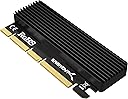
The SABRENT M.2 SSD NVMe to PCIe Adapter with Aluminum Heatsink delivers high-speed PCIe 3.0 x4 data transfer, advanced heat dissipation via integrated aluminum heatsink and thermal pad, and broad compatibility with PCIe x4, x8, and x16 slots. Designed for easy plug-and-play installation, it ensures reliable, stable performance for gaming, professional workloads, and system upgrades—all in a lightweight, durable aluminum form factor backed by a 2-year warranty.



| ASIN | B084GDY2PW |
| Best Sellers Rank | 3,104 in Computers & Accessories ( See Top 100 in Computers & Accessories ) 1 in Computer Memory Card Adapters |
| Box Contents | NVMeM. 2 SSD To PCIe x16/x8/x4 Card |
| Brand | SABRENT |
| Brand Name | SABRENT |
| Colour | M.2 2280 Heatsink (EC-PCIe) |
| Compatible Devices | Desktop |
| Compatible devices | Desktop |
| Connector Type | PCIe x16 |
| Connector type | PCIe x16 |
| Country of Origin | China |
| Customer Reviews | 4.6 out of 5 stars 6,136 Reviews |
| Global Trade Identification Number | 00840025214163 |
| Item Dimensions | 10 x 3 x 1 centimetres |
| Item Weight | 80 Grams |
| Item dimensions L x W x H | 10 x 3 x 1 centimetres |
| Manufacturer | SABRENT |
| Manufacturer Part Number | Sabrent |
| Model Number | EC-PCIE |
| Nominal Power | 12 Watts |
| Number of Items | 1 |
| Number of Ports | 4 |
| Package Quantity | 1 |
| Power Plug Type | No Plug |
| Product Finish Type | Aluminum |
| Product Warranty | 2 Year warranty after registration |
| Specific Uses For Product | Improving computer storage |
| Specific uses for product | Improving computer storage |
| UPC | 840025214163 |
| Unit Count | 1.0 count |
| Warranty Type | Limited |
A**K
Brilliant product for a very low price
I have installed an MSI SPATIUM M482 SSD 2TB NVMe in this and fitted it in the bottom PCIe x16 slot on my Asus ROG STRIX B450-F. Fitting the drive onto the adapter was very easy and the thickness of the thermal pad, which has been commented on by other reviewers, didn't cause any issues with this particular drive. The MSI SPATIUM (weird name) is a PCIe 4.0 unit rated for 7300 MB/s reads and 6400 MB/s writes and is somewhat over-spec for this adapter and my system in general. Furthermore, the PCIe x16 slot I have fitted it in is PCIe 2.0 with 4 lanes - so the max possible speed here is 2GB/s. Testing with CrystalDiskMark I get 1800MB/s reads and 1700MB/s writes give or take, which is a bit better than I was expecting and more than fast enough for my needs. If you are wondering why I bought a drive that is well over-spec'd for my system - it's simply that I got it for a bargain price. I was slightly concerned that there is no bracket to secure it to the case as you would expect on a PCI card, but it fits solidly into the slot and the locks on the end of the slot hold it well enough so it's fine and there have been zero issues with it. For just under 13 quid it's great value.
D**S
A great adapter card for NVMe M.2 SSDs
I bought this adapter card to install an NVMe M.2 SSD on my desktop PC that does not have an M.2 slot on the motherboard. It was very easy to install and set up. The card is well made and sturdy. It has a metal bracket that fits into any PCIe x16/x8/x4 slot on the motherboard. It also has a screwdriver and screws included for securing the SSD on the card. The card has a large aluminum heat sink that covers the entire SSD and helps dissipate heat effectively. The heat sink has thermal pads that make good contact with the SSD surface. The card works flawlessly with my NVMe M.2 SSD. It recognizes it as a bootable drive and delivers fast transfer speeds via PCIe lanes. I did not notice any performance issues or compatibility problems. The price is reasonable for such a high-quality product. The only minor downside of this card is that it might block some adjacent slots on the motherboard due to its size. However, this is not a problem for me as I have enough free slots. Overall, I would highly recommend this adapter card to anyone who wants to upgrade their PC with an NVMe M.2 SSD
J**S
Works Perfectly! Really Great PCIe SSD Solution
Thankfully, it worked first-time in the only PCIe slot that I had available (in my Acer Aspire desktop). The installation was even easier than I expected - it doesn't use a mounting bracket because it actually sits completely inside the case. I've had a few Sabrent products and they are always very well engineered and built to high standards. I attached the supplied silicone heat pads which transfers the SSD heat to the big integrated heatsink. The heatsink keeps the heat level down much better than the usual small external NVMe USB enclosures. I'm amazed at the low cost - less than 15 quid! It's a real high quality bargain! Compact size fits perfectly and it's a speedy installation. HIGHLY RECOMMENDED! AAA+++
G**8
Does it's job and build quality is high. Instructions, very poor though!
The Sabrent M.2 NVMe (that bit is important) drive enclosure is well built, as you'd expect from a company like Sabrent and it performs it's job very well with my ADATA 1Tb drive seeing much lower temperatures than just on the M.2 slot itself without affecting the speed (both install methods clocked in Crystal DiskMark at c. 2600MB/s Read and c. 2300MB/s Write). My main reason for using this is that the power cables to my GPU make accessing the lower M.2 slot difficult and this enclosure makes it easier for me, whilst offering superb thermal performance. It's not all roses though! Fortunately, I am a competent system builder and knew exactly how to install this. The instructions are so poor that it may confuse folks that aren't as familiar with installing components. It jumps straight from connecting the NVMe drive to closing up the back plate. It doesn't mention how/why/where to install the supplied blue "strips" that are thermal pads. So let me help folks if needed; The kit has three blue thermal pads, one thick and 2 thin. The order that you need to use them will depend on if your drive is single sided (chips only on one side) or double sided. If you have chips on the bottom side, use one of the thinner pads to interface between the drive and the PCB plate. The thicker pad, in most cases, will go on the top chip sets and controller (this is the important bit as this is what gets hottest). The third strip can go on the back side of the PCB plate to interface to the outer casing. It does make it a bity of a squash though so be careful. One thing to note is that this enclosure does not work with SATA M.2 drives, it will only work with NVMe keyed drives. (SATA drives will have 2 "notches" on the connector tab, NVMe drives have one on the right hand side of the connector tab). Hope that this helps people to overcome the terrible instructions.
K**T
Excellent product, retainer orientation is ambigious!
This item is well machined and feels excellent in quality. I found the holes and screws perfectly aligned and had no such issues reported by other purchasers. Performance wise, it worked first time. Just one thing was confusing. The inbox instructions show the retainer screw going in the bottom of the retainer. The online PDF instructions from Sabrent shows it going in from the top! Neither show which way round the retainer goes very clearly. I tried the retainer both ways. One way is better than the other. The recesses in the retainer allow your SSD to slot into it, which holds the SSD in place snugly and the SSD lies parallel to the adapter. If you use the retainer the other way, your SSD will be at an angle and will potentially be bent. View the photo to see which way round I inserted the retainer.
A**R
working well but needs motherboard uefi mode enabled to work
Working fine in a msi b450 tomahawk max (am4) in the lower pcie x16 slot, but due to my boards limitations its only running in x4 speed which is cutting my expected bandwidth of my gen3 nvme drive by over half (see image) but i was aware of that before i purchased this but its something to be aware of with these cards and to check your motherboards limitations when using multiple pcie cards. Troubles ..... initially i installed the card and my system would not boot and complained about uefi settings. I was running my OS drive in csm (legacy) mode and to get my system to boot and see the drive i ended up having to convert my OS drive from MBR to GPT format so i could enable uefi in my bios and thankfully this process was pretty simple after searching for convert from MBR to GPT and following gemini's instructions then rebooting and enabling uefi in my bios, windows took a bit longer to boot but it got there. all in all it works fine but you need to be aware of the bandwidth limitations on some motherboards when using this type of expansion card
N**N
Great piece of kit for adding another drive
Worked great for adding a second drive to your system when you have spare pci slots. The included tools made it easy to put together and for the price its a good bit of kit, on a pci 16x lane you get the same high speed as what you would in a regular m.2 slot but I doubt it would be the same if you put it in a lower spec slot like x8 or x4 slow.
M**T
Easy upgrade for extra speed boot drive.
Worked perfectly in my old pc. It comes with 3 different thicknesses of thermal pad. Doesn't explain why or whether all pads should be used. I just used the thicker one as I wasnt sure whether the thin ones would make contact with the thermal plate once closed. Was easy too install in a pcie slot. For some reason it would not show up in my pcie 2 slot but did in my pcie 3 slot (all being x16 slots) That may be a conflict on my system as it already has 6 drives onboard! As of time of writing, very impressed at tge increase in speadvand ease of fitting. Would recomend.
D**O
Excellent adaptateur NVMe PCIe, simple et efficace
J'utilise cet adaptateur Sabrent dans mon serveur MINISFORUM MS-S1 Max avec un Samsung 990 PRO 2 To, intégré à une configuration RAID 1. L'installation est très simple : le SSD se fixe correctement sur l'adaptateur, le dissipateur thermique est bien conçu et l'ensemble s'installe directement dans le slot PCIe. Le SSD a été immédiatement reconnu sous Ubuntu Server et fonctionne parfaitement comme membre du RAID. Les performances sont excellentes et la connexion est parfaitement stable. Le dissipateur est également appréciable pour un SSD NVMe performant utilisé en continu dans un serveur. La qualité de fabrication est sérieuse et l'adaptateur remplit exactement son rôle, sans pilote ni configuration particulière. Très satisfait de ce produit, particulièrement adapté pour ajouter un SSD NVMe à une machine disposant d'un slot PCIe libre.
D**R
Problemloser Einbau in einen PC aus 2013!
Ich hatte schon früher mehrere 1TB NVMe Laufwerke gekauft, die kamen dann für Sicherungen in USB-Adapter Gehäuse - so wie ein riesiger USB Stick nutzbar. Das hat auch prima funktioniert, aber in meinem älteren PC wollte ich auch mal so eine Platte auf dem Mainboard einbauen. Hab jetzt nach einem günstigen Adapter gesucht und diesen entdeckt. Ein freier Steckplatz dafür war im PC noch vorhanden zwischen Grafikkarte und einer zusätzlichen Soundkarte. Nun zum Adapter, der in dieser recht kompakten Schachtel kam (12cmx6,5cm groß). Er ist an der Unterseite mit 4 winzigen Kreuzschlitzschrauben verschlossen, aber es liegt ein dazu passender Schraubenzieher in der Schatel dabei. Das Öffnen und spätere Schließen ist etwas fummelig, aber der Schrauber ist magnetisch was dabei hilft die kleinen Dinger wieder in die Gewinde zu bekommen. Innen sind 3 verschieden dicke Kühlelemente zur Auswahl vorhanden, da muß man halt probieren was am besten passt. Wenn alles eingebaut ist muß man nur noch die Karte in den PC-Slot stecken, das schwrze Zipfelchen auf dem Bild oben kommt zuerst rein - dann Rest durch kippen bis es nicht mehr wackeln kann. Der spannende Moment war ob es nach dem Einschalten funktioniert, kurzum ich musste nichts im BIOS eintragen. Windows hat die leere Platte als neues Laufwerk erkannt und dann wie gewünscht extrem schnell formatiert. Ich habe zwei logische Laufwerke daraus gemacht und NVME_1 und NVME_2 als Namen genommen, alle anderen wären natürlich auch gegangen. Auf dem 2. Bild sind man im roten Oval wie der Adapter im PC verbaut ist-
K**S
Nice
Nice does the job
S**N
ممتاز لزيادة مدخل الm.2
استخدمته لي فوق السنة وشغال زي العسل
F**A
Produto de boa qualidade e funcionalidade ok
Apreciei a qualidade do produto, aliás consultei o site do fabricante... Fácil de instalar, não causará danos ao Pciex. Sim, barramento é X4, rodando com SSD Crucial M.2 P3 500MB. [obs. Pciex Asus sabertooth 990FX é 2.0, conforme foto, velocidade de leitura e gravação foi a máxima adquirida para este Pciex 2.0... SSD é para Pciex 3.0.] RECOMENDO o produto e vendedor, produto chegou antes do prazo estipulado pelo Amazon. Obs. Para este modelo de Main board, afim de fazer boot Windows 10, tive que atualizar para a última versão de BIOS afim de ser detectável SSD M.2 NVME, então é obrigatório consultar compatibilidade de funcionamento da Main board para com este periférico SSD M.2 NVME.
Trustpilot
2 weeks ago
1 day ago