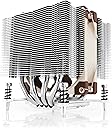
Noctua's DX line of coolers has become a default choice in high performance quiet cooling solutions for Intel Xeon CPUs. The i4 revision supports LGA2011 (both Square ILM and Narrow ILM), LGA1356 and LGA1366 based Xeon platforms and the new D9 model provides better performance and better compatibility than previous 9cm versions: Thanks to its 95x95mm footprint and reduced 110mm height, the NH-D9DX i4 is fully 3U compliant and clears the RAM slots on LGA2011 Square ILM and LGA13xx. At the same time, the dual tower design and the new NF-A9 PWM guarantee further improved quiet cooling performance. Fitted with the professional SecuFirm2 mounting system and bundled with Noctua's industrial-grade NT-H1 thermal compound, the NH-D9DX i4 3U forms a complete premium quality package for quietly cooling Xeon based workstations and servers. Review: Worth the cost - There aren't a lot of options for 3U CPU coolers that don't sound like a jet engine. I personally would have preferred to cheap out a little, especially since I needed two - but there just aren't any cheaper options that come close to this performance and noise level (at least, none I was able to find.) And having bought these, I have no regrets - you definitely get what you pay for. If you have a 3U case, this is the heat sink you want. Even with the fan at 100%, it's quieter than the enterprise case fans I have at their lowest setting. My old heat sinks - with their frustrating shroud to funnel the air from the case fans - would let the CPUs get to the high 70's (°C) while sounding like the case was taxing down a runway.With these, the temperature on the back CPU - which has the front one blowing directly on it - still didn't crack 60 °C at full load, while making less noise than the already quiet computer next to it. At idle, don't even worry about it - temperatures are only a few degrees above room temp. The only flaw in the design that I can see is that it is possible - just barely, if you are extremely bone-headed - to mount the heat sink with the plastic protector still in place. The manual is very clear about not doing this, and it's a real struggle to do. You'll definitely get the impression that something isn't fitting right - but if you happen to ignore all that, you can actually mount it that way. To Noctua's credit, if you happen to do so, and happen to have done so in a case with insanely powerful fans that can ramp up to 9k rpm and somehow manage to keep the CPU just short of shutting itself down despite the plastic trapping most of the heat - the plastic won't melt. So at least I didn't have that mess to clean up. Clearly that was my fault, but maybe in the future the plastic shroud could extend to block the mounting screws - just in case someone as stubbornly incautious as me gets hold of one of these. Or maybe a sticker on the HSF itself, so that once you've put the instructions down and forgotten all the warnings, you are still reminded. Overall great product - clear documentation, all the tools you need, fits in the size they said it would, and amazing functionality. Worth the price. Review: Noctua always delivers! My Dell T5610 is happy and cool. - This is my second set of Noctua coolers. Outstanding quality and performance. I installed them on Dell Precision T5610 and the temperatures are 15C lower than the stock coolers. It exceeded my expectations. With the stock coolers, CPU2 was always 5-10C hotter than CPU1. This is due to the motherboard design and airflow. Although CPU2 being hotter than CPU1 is perfectly normal I find 10C (sometimes even more) temperature difference a little bit too much for my liking. With these Noctua coolers CPU2 is only 2-4C hotter than CPU1 which is fantastic. Now regarding the mounting. I had a very hard time mounting these coolers on my Dell Precision T5610. But that was Dell's fault. In contrast I have never had any issues mounting Noctua coolers on Supermicro motherboards. Let me explain. When you place the heatsink on top of the CPU it is impossible to screw the bolts into the nuts which sit bellow the motherboard. Either the bolts are too short or the springs on the bolts are too long. The nuts simply sit much deeper than on any other motherboard. Obviously I cannot make the bolts longer, so naturally I decided to make the springs shorter. I squeezed them to the maximum with pliers a few times and they did shrink a little bit. But that was not enough. Then I decided to sand them and/or cut them. Not having a dremel or any power tools made this task impossible since the springs are made out of spring steel - super tough. At that point it was obvious that I should get rid of them and fill the gap with something else. So, I went to HomeDepot and picked a lot of #10 zinc washers in order to use them as spacers. After some trial and error I discovered that 7 washers deliver the perfect height - the bolt can easily reach the nut and when tightened everything is very snug. So this is my final solution, folks. I am extremely happy with the result. My workstation sits right next to me and extremely quietly and without any hesitation runs a ton of VMs.
| ASIN | B00PIPCGWC |
| Best Sellers Rank | #346 in Heatsinks |
| Brand | Noctua |
| Brand Name | Noctua |
| Compatible Devices | Desktop |
| Cooling Method | Air |
| Customer Reviews | 4.6 out of 5 stars 497 Reviews |
| Global Trade Identification Number | 04716123315599 |
| Included Components | mounting kit & thermal paste |
| Item Dimensions L x W x H | 3.74"L x 3.74"W x 4.33"H |
| Item Weight | 428 Grams |
| Manufacturer | Noctua |
| Material Type | Copper (base and heat-pipes), aluminium (cooling fins), soldered joints & nickel plating |
| Maximum Rotational Speed | 2000 RPM |
| Model | FBA_4716123315599 |
| Noise Level | 22.8 Decibels |
| Number of Items | 1 |
| Part Number | FBA_4716123315599 |
| Power Connector Type | 4-Pin |
| Product Dimensions | 3.74"L x 3.74"W x 4.33"H |
| Unit Count | 1.0 Count |
| Voltage | 12 Volts |
| Warranty Description | 6 year manufacturer’s warranty |
F**Y
Worth the cost
There aren't a lot of options for 3U CPU coolers that don't sound like a jet engine. I personally would have preferred to cheap out a little, especially since I needed two - but there just aren't any cheaper options that come close to this performance and noise level (at least, none I was able to find.) And having bought these, I have no regrets - you definitely get what you pay for. If you have a 3U case, this is the heat sink you want. Even with the fan at 100%, it's quieter than the enterprise case fans I have at their lowest setting. My old heat sinks - with their frustrating shroud to funnel the air from the case fans - would let the CPUs get to the high 70's (°C) while sounding like the case was taxing down a runway.With these, the temperature on the back CPU - which has the front one blowing directly on it - still didn't crack 60 °C at full load, while making less noise than the already quiet computer next to it. At idle, don't even worry about it - temperatures are only a few degrees above room temp. The only flaw in the design that I can see is that it is possible - just barely, if you are extremely bone-headed - to mount the heat sink with the plastic protector still in place. The manual is very clear about not doing this, and it's a real struggle to do. You'll definitely get the impression that something isn't fitting right - but if you happen to ignore all that, you can actually mount it that way. To Noctua's credit, if you happen to do so, and happen to have done so in a case with insanely powerful fans that can ramp up to 9k rpm and somehow manage to keep the CPU just short of shutting itself down despite the plastic trapping most of the heat - the plastic won't melt. So at least I didn't have that mess to clean up. Clearly that was my fault, but maybe in the future the plastic shroud could extend to block the mounting screws - just in case someone as stubbornly incautious as me gets hold of one of these. Or maybe a sticker on the HSF itself, so that once you've put the instructions down and forgotten all the warnings, you are still reminded. Overall great product - clear documentation, all the tools you need, fits in the size they said it would, and amazing functionality. Worth the price.
P**N
Noctua always delivers! My Dell T5610 is happy and cool.
This is my second set of Noctua coolers. Outstanding quality and performance. I installed them on Dell Precision T5610 and the temperatures are 15C lower than the stock coolers. It exceeded my expectations. With the stock coolers, CPU2 was always 5-10C hotter than CPU1. This is due to the motherboard design and airflow. Although CPU2 being hotter than CPU1 is perfectly normal I find 10C (sometimes even more) temperature difference a little bit too much for my liking. With these Noctua coolers CPU2 is only 2-4C hotter than CPU1 which is fantastic. Now regarding the mounting. I had a very hard time mounting these coolers on my Dell Precision T5610. But that was Dell's fault. In contrast I have never had any issues mounting Noctua coolers on Supermicro motherboards. Let me explain. When you place the heatsink on top of the CPU it is impossible to screw the bolts into the nuts which sit bellow the motherboard. Either the bolts are too short or the springs on the bolts are too long. The nuts simply sit much deeper than on any other motherboard. Obviously I cannot make the bolts longer, so naturally I decided to make the springs shorter. I squeezed them to the maximum with pliers a few times and they did shrink a little bit. But that was not enough. Then I decided to sand them and/or cut them. Not having a dremel or any power tools made this task impossible since the springs are made out of spring steel - super tough. At that point it was obvious that I should get rid of them and fill the gap with something else. So, I went to HomeDepot and picked a lot of #10 zinc washers in order to use them as spacers. After some trial and error I discovered that 7 washers deliver the perfect height - the bolt can easily reach the nut and when tightened everything is very snug. So this is my final solution, folks. I am extremely happy with the result. My workstation sits right next to me and extremely quietly and without any hesitation runs a ton of VMs.
W**Y
Outstanding value from Noctua
This unit arrived extraordinarily well packed by today's standards. Very sturdy and well-cut cardboard packing as opposed to the flimsy Chinese stuff we usually get. Even the directions were clearly printed on premium stock. The unit was accompanied by a quality bondhus wrench for slipping down between holes cut in the cooling fins and used to tighten the mounting screws. Also included was a tube of thermal conducting paste in an injector format. Installation was a matter of applying the thermal paste and settling the cooling tower over the CPU and ensuring that the screws were properly located. The bondhs head wrench was a neat touch, as it made engaging the screws a cinch. A small detail that really pays off. Operation is flawless and reasonably quiet. Noctua even included instructions and hardware for mounting a second fan should that prove necessary. All of the forethought, detail and quality that went into this product makes it a clear standout among other similar products. Highly recommended.
D**Y
High quality for a great price!
Works great without costing as much as some of the other options.
N**K
Long time investment.
Was working on a new build but realized the AIO cooler I had stored away for some time turned out to be busted and leaked most likely due to it being there for too long despite being in its factory sealed packaging. Upon doing some research, there are some more affordable units out there but have always heard great feedback about Noctua's products and personally didn't want to deal with AIOs as well as not go over budget. I needed something that will last a long time. Even go into another build if the need ever arose. The NH-D9DX i4 3U is perfect for me. Not expensive and compatible with LGA (2066, 2011-0, 2011-3 (square and narrow ILMs), 1356 and 1366). This cooler is compatible with 3U server rack units as described in its product name. It's important to note that you'll have to ensure you have the backplate for the LGA 1366 board you plan to use as that is not included. Thankfully I was able to use the one that came with the busted cooler spoken about earlier and worked just fine. The packaging is definitely not flashy and is pure business with just their logo and model name on the brown cardboard box. I guess this is part of their brand because it stands out without having to throw it in your face as some other companies normally do but that's just my observation. All the accessories along with the manual (which is easy to read and understand) are included and the cooler itself is neatly packed. With patience, setting it up was a breeze-- and speaking of breeze, this thing moves air (obviously) but is SUPER QUIET. On turning on my system, I initially thought something went wrong but nope.. the thing is quiet and, come to think of it, doesn't need to be loud with this type of heatsink design anyway. It apparently can get even more quiet with the included low-noise fan adaptor and has the hardware to add yet another fan. Jeez (in a good way though). I love it already and the major plus in my book is the 6 year warranty. 6 years. Believe me this thing will definitely be in use for that time and hopefully a bit longer. Absolutely recommend it. This is my first Noctua product and it already impresses me. I plan to push this to see how well it really does. An X5675 Xeon should be a piece of cake. Will update.
M**N
Decent for single-socket 3u and 4u, not for most dual socket
If you're buying the NH-D9DX i4 it's most likely because you have a motherboard with a narrow ILM and 4u or less clearance. If that isn't the case - if your motherboard has the more common square ILM and/or you have more clearance - there are better options available, including from Noctua. The only reason you should consider this model is if the first two conditions apply. Like all Noctua heatsinks this does a fine job of cooling even high TDP socket 2011 CPUs and the fan is quiet across all speeds (up to 2k RPM). You can also adjust the fan upwards a little to provide better clearance for ram slots, though I wouldn't recommend tall modules if they are going in the slots next to the heatsink in any case. The big problem I have found with these is with dual-socket motherboards; the heatspreaders are large enough that in a front-to-back airflow configuration the excess heat from the first socket blows directly on to almost half of the second. This is even with offset sockets, as most dual CPU setups are. You can orient the heatsinks (and fans) to point upwards, assuming you have a top exhaust fan in your case, but for a lot of servers - or more to the point, 3u and 4u servers, which are the only kind you should use this with for the reasons outlined above - that isn't a viable option. What I found is in practice the CPU in slot 2 was consistently 5-6c higher in temperature at idle than the one in slot 1. And with both under load (I tested with Prime95) the delta is considerably wider - 10c or more difference. This after carefully remounting/cleaning/re-applying thermal compound/etc. for both. You can feel the problem the airflow creates easily even with the side cover off - hot air from CPU directly hits almost half the heat spreaders on CPU 2, due to how wide the spreaders are (they overlap the ILM considerably). Again this is even with offset CPU sockets. I replaced both of mine with the Supermicro SNK-P0050AP4. They are cheaper but work just as well and due to both the size of the spreaders as well as how they've ducted the fans the above problem is much less of an issue. This was born out in practice for me - now both CPUs stay within 1c, at most 3c, of each other. The fans do go higher in RPM (another reason they cool better) however sound-wise like all Supermicro fans this is easy to control with good PWM fan management via the BMC - something you should be doing in any case. I have mine limited to 75% speed at the top end, usually they idle at around 1.4k RPM and at that level they are barely noticeable. I still think this is a good solution for single-socket systems, just be aware of using them with 2. And if you have square ILMs and a little more headroom there are a lot more options to choose from.
E**G
Small foot print and Keep my dual Xeons cold as ice
Great CPU cooler. I bought two for my dual-Xeon build. They fit perfectly for the sockets and didn’t interfere the RAM. Installation was straightforward. They kept my Xeons (150W each) cold as ice. It kept my CPUs under 39C at 50% load. Even in turbo mode under 100% load, the temperature never exceeded 62C. This is much better than my 360mm AIO water cooler for my other CPUs. Although long term quality is yet to be determined, I would recommend it for now.
A**T
xeon cpu heatsink cooler
this xeon cooler is very good and quiet, i like the simple design, works...my xeon cpu reads ~30C , very stable
S**O
Good afternarket cooling solution
Good product Cools our Dell T320 edge server by around 10 degrees give or take
H**H
Decent but expensive
Works for narrow ILM 2011 socket, the only option that's available locally. Expensive for what it offers although it's mostly about supply and demand and the socket in question being EOL.
G**N
perfecte koeler
Ik heb een Lenovo P520 workstation en de OEM koeler krijgt de processor niet echt gekoeld, ik las online dat deze Noctua perfect past en daarom deze dus ook aangeschaft. Ik kreeg hem rechtstreeks van Noctua in Oostenrijk opgestuurd en was zeer tevreden over de verpakking en de koeler zelf uiteraard, deze voldoet perfect, is zeer geruisloos en werkt perfect. De processor is beduidend koeler (zo'n 15-20 graden lagere temperatuur dan de fabriekskoeler.
D**S
very good cooler
I installed this cpu cooler in my Lenovo Thinkstation P520 which went very easy. It's a pricy cooler but is so much quieter than my stock cooler and my cpu temperature is much lower.
K**Z
Super kompakt und leise
Der Kühler ist mit einer Xeon E5-2680 v4-CPU (120W TDP) bei guter Gehäuseentlüftung selbst bei Volllast und geschlossenem Gehäuse nicht zu hören. Die CPU-Temperatur bei 100%-Last auf 14-Kernen beträgt max. 60 °C und bei Leerlauf 35 °C. Ideal geeignet für flache HTPC-Gehäuse. Wer also noch Systeme mit LGA20xx-Sockel betreibt ist hier bestens bedient. Das Zubehör ist vollständig und kommt inkl. einer guten Wärmeleitpaste.
Trustpilot
1 week ago
1 month ago