Desertcart purchases this item on your behalf and handles shipping, customs, and support to South Africa.
❄️ Stay Cool, Game Hard, Work Smart — Don’t Let Heat Slow You Down!
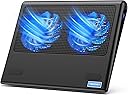
The TECKNET Laptop Cooling Pad is a sleek, lightweight cooling stand designed for 12"-15.6" laptops. Featuring two large 110mm fans with adjustable speeds and a smart internal airflow channel, it delivers targeted cooling to your laptop’s CPU. Dual USB-A and USB-C ports provide versatile power options, while its ergonomic flat base ensures comfort during extended use. Ideal for gamers, professionals, and students, this cooling pad prevents overheating, enhances performance, and supports your on-the-go lifestyle with a durable, portable design backed by a 3-year warranty.


| ASIN | B014F4SBMK |
| Best Sellers Rank | #715 in Computers & Accessories ( See Top 100 in Computers & Accessories ) #17 in Laptop Cooling Pads |
| Brand | TECKNET |
| Color | Blue |
| Cooling Method | Air |
| Customer Reviews | 4.3 out of 5 stars 11,430 Reviews |
| Enclosure Material | Metal, Plastic |
| Global Trade Identification Number | 05060449849498 |
| Item Dimensions L x W x H | 14.17"L x 11.02"W x 1.77"H |
| Item Weight | 798 g |
| Manufacturer | TECKNET |
| Material | Metal, Plastic |
| Mfr Part Number | FBA_49498 |
| Model Number | FBA_49498 |
| Number of Fans | 2 |
| Number of Items | 1 |
| Number of Packs | 1 |
| Product Dimensions | 14.17"L x 11.02"W x 1.77"H |
| Unit Count | 1 Count |
| Warranty Description | 1 |
D**M
It works great!
Just what I needed! My battery kept overheating and this is perfect to keep it cool. The fan is very quiet. The pad is very lightweight and I don't even notice it on my lap. The material is durable and stable for my laptop.
S**E
Worth it!!!!
This works great! I got it for my MacBook because I love to play Sims but it makes my MacBook overheat to the point of being able to fry an egg so I couldn’t play it all and I have been heartbroken. Well, NOT ANYMORE- this thing cools my MacBook so well that I can play sims for hours! I bought an adapter so I can plug it right into my computer for power and it works great! I’m so happy!
M**Z
It does it's job but is not USB-c cable compatible as it says
It is quieter than cooling fans I've tried in the past. I got this one because my laptop only has USB-c connection points only. I did purchase a cable separately as this does not come with a USB-c connector. I tried a few different USB-c cables and unfortunately none of them worked. I was able to use a USB to USB (male-to-male) connected to a charging block and that is working.
D**N
Quiet, cooling and portable
The TECKNET N5 cooling pad is 11” deep x 14” wide. There are two LED lighted 110mm fans with a power switch that controls both lights (2 tiny LED lights under each fan) and fans (they cannot be controlled separately.) To indicate when the power and fans are on, there is a blue LED light in the back beside the red, rocker power switch. It is quite bright and might bug your friends if you work facing one another on a desk. The TECKNET cooling pad also comes with a welcome guide that has a welcome, specifications, features, contents, configurations, ergonomics, safety and the 18-month warranty. TECKNET includes a card that specifies you can claim a 6 month warranty extension for a total 2-year free warranty if you register! It comes with a USB to USB cable and there are two USB 2.0 ports on the back next to the power switch, one which you must use to power the fans via USB from your laptop of other USB power source. That leaves one open USB for other uses. The second USB port will charge my phone (iPhone 5s) but not open the phone to transfer photos or connect to iTunes as I can with a direct cable. However, my flash drive DOES open and I can open and transfer files. The base of my laptop while on the pad sits about 1.75” (to a maximum of 2” inches if sitting higher up on the pad) high in the back and about 0.9” high in front giving it a slight upward slope (which I like). The slope is actually a very natural angle for me. The fans a very quiet when switched on. Just a swishing noise. The fans pull air from the side and below and push air to the laptop bottom. It has actually been very hot here and the fans have kept the normally warm underside of the computer cool to the touch. But the real test of a cooling pad is the effect on the cores. Here are RealTemp reports for temps (in °C) in 2 sensors uncooled and cooled at two working levels 10% work uncooled 50 47 10% work fans on 45 43 90% work uncooled 62 61 100% work fans on 57 55 These were taken on a 15.6” Acer ASPIRE 5733 with Intel Pentium P6100 that has been “amped up” a little. As an aside, I also just took the whole laptop apart a while back and cleaned out the mass of dust that was in the fan and vents! It was overheating so badly that it would shut down. Once I cleaned it out, that stopped. As you can see, it is cooling the laptop about 5°C +/-. I work on a standup podium desk or seated and the cooling pad is very stable and sturdy. The laptop is also very stable on the cooling pad. I have to actually pick up the laptop to reposition it on the cooling pad. I also have to pick up the cooling pad to reposition it on the desk. The cooling pad has rubberized feet on all four corners on the bottom that keep it from sliding around and raise it to allow airflow. On top it has a single long rubber bar to keep the laptop in place. Also on the bottom are open slats to allow airflow. I have used the cooling pad and laptop on my lap and it works well. It is far better than putting a bare computer on your lap! Previously, I used the Targus Laptop Chill Mat 17”. It died after two hot years of use, but had only a 1-year warranty. It also cost almost twice as much. The Targus also had two fans where the air was pulled in and up toward the laptop but it lacked an extra USB port to make up for the one used up. The Targus had no LED lights, a slightly steeper tilt and a neoprene covering. The neoprine is the only difference I note when I have the laptop in my lap and I have bare legs, however, I almost always raise it up on a pillow to be at the right height for me, so that is moot. It does not appear to put much of a drain on the computer...it says 0.41A current and 2.05W input. I have not noticed a dramatic reduction in laptop battery time while unplugged and using the TECKNET cooling pad. I am happier to have the extra USB on the TECKNET, as I seem to always be using all the ports on my computer. Further, the lesser slope of the TECKNET cooling pad feels more natural and less straining on my wrist and I am happy about that. Plus, the 2-year warranty is better! As a note, the fans on both units seem underpowered (reported as 1200 RPM and 38.5 CFM), though both offered similar cooling. However, this may be a USB power consideration, and you can see that they do provide some cooling. I was initially worried about the LED on the TECKNET, but I find, even in low light, that I don’t notice it while I work. Further, as you can barely hear the fans, it acts as a reminder when the fans are still on! I am happy with the TECKNET cooling pad and will report back throughout its life!
M**O
I'm THANKFUL this cooling pad cools not only my bizarrely hot ASUS ZenBook laptop but me as well!
I worried about some bad reviews for this product, but I'm so glad I went with the fact that most recent reviewers were very happy. My ASUS ZenBook laptop runs crazy HOT, and this cooling pad does a great job offsetting that. PROS: 1) cools effectively and makes my ASUS much more comfortable to have in my lap; 2) is quiet 3) its power coming from my computer via its built-in USB dock and cable (included) means no batteries to replace or no hindrance to my moving to another piece of furniture that is not near a power outlet; 4) the pad has an on/off switch for the fans; 5) my laptop will surely last longer because of the assist in dissipating its heat; 6) the pad's rigid plastic frame and fan blades within held up nicely when someone accidentally momentarily sat on this cooling pad while it was unnoticed sitting on a black chair after unpacking it, and it continues to work for days and days in spite of that; 7) and did I say...COMFORTABLE! Merry Christmas to me in the summer!!! CONS: 1) the blue light of the fans has no downside for me and its color does evoke a sense of temperature chill, but if you use your laptop in a dark room where a companion is trying to sleep, red lighting would be better for not disrupting sleep-related hormones; 2) a switch for optionally turning off the fans' lights would be a nice addition; 3) maybe in the winter I'd appreciate being able to turn down the fan level to less fan. But please do not mistake my "CONS" list for dissatisfaction because this cooling pad--exactly as it is-- made a huge difference for me this summer working from home during Covid-19, and I wholeheartedly appreciate it and am sooooooo glad I gave it a chance. If your laptop runs super hot like mine, you'll thank me later. 7/19/21, ONE YEAR LATER, THIS SUMMER IS EVEN HOTTER, SO I AM LOVING THIS COOLING PAD EVEN MORE FOR HOW MUCH BETTER I FEEL WHEN USING IT. THE FANS NOT ONLY ARE VERY EFFECTIVE, BUT I AM IMPRESSED HOW QUIET THEY ARE. I HAVE USED IT EVERYDAY, NO MATTER THE WEATHER, BECAUSE MY LAPTOP ALWAYS RUNS HOT, AND THE FANS IN THIS PAD HAVE NEVER FAILED ME. THIS WAS ESPECIALLY NICE DURING THE PANDEMIC BECAUSE I DID MOST OF MY WORK IN A LOUNGE CHAIR WITH THE COMPUTER ON MY LAP RATHER THAN AT A TABLE.
C**A
Does the job, good for home or office.
It does the job, cools down your laptop, looks good, is lightweight, and can be powered via USB Type-C to Type-C, Type-A to Type-C, and Type-A to Type-A cables. The plastic casing isn’t so sturdy, so it’s suitable for home or office use, but not so much for heavy-duty use; however, if you do use it that way, be careful not to hit the corners too hard, as they can crack easily. Although minor damage to the plastic frame doesn’t affect the fans’ operation, they are protected by a metal mesh on top. You can’t turn on/off the lights and the fans separately, the intensity of the lights is proportional to the speed of the fans, which it’s adjustable. It works, I don’t need more, I’m happy with it.
S**G
Nice design and works well other than some durability issues
Have had 2 of these. The first one (purchased Feb 2025) had the USB-A connector for powering the fans from the laptop came loose inside the chassis after about 7 months (Sep 2025). I rarely if ever disconnected the short USB cable from the unit. I always disconnected at the laptop end. When we reported it via Amazon, the manufacturer -- TECKNET -- responded immediately and shipped a replacement. After about 7 months use, when we went to turn on the fans via the blue power "wheel" on the right side (which serves as on/off switch and control for fan speed) came loose inside the unit (see photo). I am IT consultant/dev that only uses the unit when I take the laptop (14-inch Lenovo ThinkPad X1) from in-home office to bedroom at night where the cooling pad stays so damage is not from lots of travel or industrial use. Unit serves well to keep laptop off of legs and providing ventilation and keeping laptop away from bedding. Typically only turned fans on when laptop fans came on or became warm. Always cooled the laptop within minutes. Provides slight angle for laptop tilt. Also has USB-C port for power from the laptop. All-in-all nice layout, weight, design and package -- other than the durability of the power switch and USB connectors.
J**.
power switch is nice
I purchased this mainly because it has an on/off switch. I have a couple friends that *think* they burned up a USB port in their laptops by powering cooling pads. NOT any particular brand, just that they think the port was never intended to deliver constant power to such a device. I elected to utilize an old wall charger and purchase an long cable to power the pad from a wall outlet. It works great, and I need not worry about my laptop. (This may simply be an unfounded concern on my part but I would rather not take the chance. Note this would be a function of amperage, not voltage since the voltage on a USB port is standard. Milli-amp output may vary.) Something of note, between the time I purchased mine, and I recommended this to a friend, the design has changed. In mine, there are two USB ports and the power switch centered in the back. The one my friend got has one USB and the on/off switch on the right side near the back. Hers is already giving her trouble due to cable strain. (Off the left would have been better for her. In my case, coming off the middle back, I used some tape to create strain relief right away and it has been fine. Both hers and mine are the blue LED version and the pics reflects the new USB/switch location on the side. The red LED version still shows the rear USB/switch location. Fan noise is minimal and for my needs, it does a great job of keeping things cool. I am not a gamer so I cannot speak to heavy gaming use. The LED is not annoying as I thought it might be. You really don't see it when in use and I find it helpful to know it is on or off. It is stiff enough that I don't really get flexing, so no worries there. This cooler is serving duty with a small HP Spectre computer with a best of everything build. It used to get to warm for my comfort and this works as I hoped. If you are going to use this with a wall outlet, I might suggest some kind of strain relief for the cable right away. I'm using tape. Otherwise, pulling on the plug will eventually result in a failure as noted with the one my friend has. If TEKNET is reading this, a couple small holes in either end of the back to put a small Ty-Rap through would really be a nice addition. (To address the strain relief I mention.) Also, a power cable protruding off the back seems more practical for sitting on someones lap than a cord protruding off the side IMHO.
A**X
Good
It works. But there is a quirk: it has both USB and USB-C sockets for power input, but it only works if you either connect it USB to USB or USB-C to USB-C. Strangely, but it doesn't work if you connect USB socket to USB-C output of the laptop (MacBook Pro), it just doesn't powers up. Everything else is good, the fan is very quiet, the LED light is not annoying.
S**.
Top Preis aber kleine mängel
Wir haben uns den Untersteller gekauft weil wir gerne auf der Couch spielen und das sich angenehmer macht. Jedoch muss man aufpassen das der Laptop nicht zu hoch geschnitten ist wir haben einen HP Omen dieser Rutsch fast immer über den "Steg" sodass dieser nicht zu hundert Prozent sichersteht. Aber für den Preis kann man sich nicht beklagen
A**W
Recommend
Works great, kept my laptop cool while I was gaming and I like the rgb and the ability to control the speed of the fans.
U**1
خامتها حلوه جداا مرواحها تبريدها عالي وتستحق سعرها
جميله جدااا تستاهل تمنها 👌
S**L
STILL WORKING 2018 to 2022-- AWESOME.
EDITED -- 02-01-2022 -- It is still working and I use 8 hrs per day every day. THIS IS SUPER ITEM. SO I EDITED THIS AND GIVING 5 STARS. Yes, Fan On/Off switch is not working. As I had problem as described in my first review below. OLD -- I purchased it on 5th Jan 2018. I am regularly 6 hours monday - friday user of this on my regular same table. It worked till now 9th Sep - Approx 8 months. Today it stopped without any damaged from my side. It better to purchase low price same product than this if THIS KIND OF HIGH PRICE products also even not work for 1 year at least.
Trustpilot
4 days ago
1 week ago