๐ฅ Elevate your video workflowโconvert, scale, and distribute like a pro!
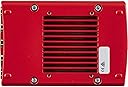
The Decimator MD-HX is a compact, professional-grade HDMI and SDI cross converter featuring 4 SDI outputs, support for 3G Level A & B standards, and integrated scaling with frame rate conversion. Its rugged aluminum design and intuitive LCD control make it ideal for live production and multi-display environments, delivering versatile signal management without the need for external computers.
| ASIN | B00QPRGGCS |
| Best Sellers Rank | #599 in Video Converters |
| Brand | Decimator |
| Brand Name | Decimator |
| Compatible Devices | TV, PC, Gaming Console |
| Customer Reviews | 4.8 out of 5 stars 324 Reviews |
| Global Trade Identification Number | 05060417390007 |
| Interface | HDMI, SDI, USB |
| Interface Type | HDMI, SDI, USB |
| Item Weight | 748 g |
| Manufacturer | Decimator |
| Model | DD-HX |
| Number of Channels | 4 |
| Number of Items | 1 |
| Number of Packs | 1 |
| Part Number | DD-HX |
| Unit Count | 1 Count |
T**A
Get One! (At least one)
This is a must-have utility tool for anyone who works in a multi-camera/multi-source video environment. If you're looking at this item you're probably already familiar with the sort of things it can do and it does all of them well but i particularly want to praise: 1 - The simple UI & functionality - No app, no login, no wifi, no touch screen, no multiple points of failure, no dip switch, no rotary encoder, no hold-up when working a broadcast where seconds count. It's just a back-lit LCD and some big fat buttons, perfection. 2 - Essentially indestructible - I once had a student drop on of these from about 25 feet onto solid concrete. Picked it up, plugged it in, worked just fine. I don't know if it's rated for that kind of abuse but it didn't seem to mind. You could probably use one to tunnel out of Shawshank. 3 - 12v 2a Locking 5.5mm barrel jack PSU - Most pro gear has locking power options but sometimes they have an obnoxious feature to the input that more-or-less forces you to use their own power connections. You can use standard stuff for this unit in a pinch or if you need to power it off a battery, voltage range is awesome (5v to 32v dc). It's great. Buy at least one just to have on-site to solve problems. If you don't need the adaptability of the unit you may want to buy a less-expensive, purpose-configued device for static installations (although I'm sure this performs well in that role) but for all the unit can do at the speed that it can respond it is worth the cost to have in a kit for sure.
E**N
Quality and capability at a great price!
This is the coolest thing ever! Much better build, quality, versatility, and functionality than Blackmagic products. First, the digital display makes it super easy to set up. Itโs sturdy, made well, and comes with everything you need...even a mounting bracket! Itโs not made in Germany, but you would think it was! The instructions could be worded a bit better but they are very helpful if you have a good understanding of what youโre trying to accomplish. The dual inputs also eliminated the need for a switch box if you happen to have two sources you want to occasionally switch between. The only things I could possibly ask for is the ability to adjust the output IRE to 7.5, and to assign different scaler settings for the two outputs, but thatโs not a huge deal for what it already does at this price point.
M**L
Excellent product, great support
I bought the MD-HX for the sole purpose of using it for flipping my image horizontally for a teleprompter for my video conferences, so this is an overkill in some sense: an expensive solution for a simple problem that I unfortunately couldn't otherwise solve. You would think Microsoft should build such a simple feature in Windows, but they didn't. I tried other software utilities but none worked well. So this looked like the only solution I have. When I first got the MD-HX, I tried to fiddle with the small menu built into the device to effect the horizontal flip, but that didn't work, and the menu was hard to work with. So I emailed Decimator and they responded almost immediately, prompting me to install their USB Control Panel software and send some settings snapshots. I did and the utility worked well and was much easier to work with than the little menu in the device. Once I shared my settings with them they sent back advising me to make a few changes in the setting, and horizontal flipping worked right away! This product has many advanced features and detailed settings that I am not using, but I am sure they come handy for professional video production settings, and I believe they would be well worth the price.
T**Y
Decimator MD-HX... WOW!
First of all, let me preface this by saying that if you're on the fence with this... BUY IT! Amazing product! I had always read review of people raving over this and while it had a VERY good reputation in the broadcast world, it was never something I NEEDED. Until last week. Long story short we had a Mac Pro not being recognized by an ATEM Production Studio 4K and needed it. Bad. We had tried software, SwitchResX and the like never seemed to work for us. After hearing about this product for so long I bit the bullet and bought one. Best purchase I have ever made hands down. Works like a charm after figuring out how to properly set it up. No issues for us whatsoever and I would highly recommend this product to anyone else!
B**L
Great for so many routing/scaling needs
For the price, unbeatable. If you know what this is, you should have many of them. Great for so many routing/scaling needs. Only drawback is that the menu terminology needs to be unified. SDI outputs are labelled 1 and 2, and referenced differently in the menu. Scaler is referred to as "scaler" and DUC interchangeably, which can be confusing to those that don't know the unique naming scheme. Fixing menu issues would result in 5 star review.
I**T
HDMI/SDI Heaven in little red box
If you're a video engineer and do not own one of these, brace yourself. Rugged, reliable, and it does some crazy usefull conversions/DA things. I only wish the anamorphic scaler had some more usefull ratios. I have used Decimator products since some of their first products. We use and own multiple MD-HX and MD-CROSS converters at my work. Decided it was time to get my own. Works like a champ and has saved my butt multiple times. I only wish I would have sprung for the CROSS with the test pattern generators built in, definitely a worthwhile upgrade. Next time I buy, it will be the CROSS. But for now, I rest assured any time I'm dealing with SDI and HDMI together.
P**T
Works well in my teleprompter setup. Instructions could be clearer.
I ended up using this in a large teleprompter install to correct for a monitor being reflected on a mirror. My client couldn't get used to linux (Which can flip an output video signal natively in the OS), so I switched the machine to windows and used this to horizontally mirror the video output to the monitor. Expensive fix, but it worked like a champ. The included instructions were pretty lean, but after a lot of tinkering I got it to work in my use case. On the plus side, it saves all its internal settings, even when power is removed, so it's a nice set it and forget it tool for me.
K**M
Excellent device for money and performance
I've used Decimators for a number of productions, especially when converting laptops to SDI for broadcast, and they've never failed me--PC and MacBook HDMI outputs can be converted with relative ease. This may require some set-up, depending on your source and required output, so do take time to download the Decimator software; it will be easier than trying to go through the physical menu on the device. You will also find plenty of excellent resources on YouTube that will help you configure it.
Trustpilot
2 days ago
1 month ago