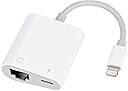
![RJ45 Ethernet Adapter for lPhone[Compatible with Apple MFi Certified],10/100Mbps,Support iOS 15, Ethernet Adapter with Charge Port](https://m.media-amazon.com/images/I/41m3SWfb4eL._AC_SL3840_.jpg)

Buy anything from 5,000+ international stores. One checkout price. No surprise fees. Join 2M+ shoppers on Desertcart.
Desertcart purchases this item on your behalf and handles shipping, customs, and support to South Africa.
⚡ Stay connected, charged, and ahead of the curve.
This Lightning to Ethernet Adapter with Charging is a compact, MFi-certified accessory that delivers stable 10/100Mbps wired internet while simultaneously charging your iPhone or iPad. Compatible with a wide range of iOS devices (iOS 10-15), it offers effortless plug-and-play connectivity, eliminating Wi-Fi instability for professionals who demand reliable, high-speed networking on the move.


| ASIN | B082PBZ6CF |
| Best Sellers Rank | #324 in USB Computer Network Adapters |
| Brand | Giochem |
| Color | White |
| Compatible Devices | PC, Router |
| Connector Type | Lightning, RJ45 |
| Customer Reviews | 4.0 out of 5 stars 428 Reviews |
| Item Weight | 0.02 Kilograms |
| Manufacturer | Giochem |
| Mfr Part Number | DE-R08-GY |
| Model Number | DE-R08-GY |
| Number of Items | 1 |
| Number of Ports | 2 |
| Package Quantity | 1 |
| Power Plug Type | No Plug |
| Smart Home Compatibility | Not Smart Home Compatible |
| UPC | 780317827742 703656677427 |
| Unit Count | 1.0 Count |
G**S
Connecting An iPhone To Ethernet Cable And Internet
I do not use Wi-Fi, preferring instead to use a safer, radiation eliminating, Ethernet cable connection. I had been using a similar, much more expensive device to connect my iPhone 11 to the internet, but this component along with an outside power supply that conveniently plugs into it, is superior. The following is not a criticism of the functioning of this device. Sometimes when a device stops operating properly, a reset of the device is required. However, this comment is intended as a heads up: in time this device will hiccup, making it appear that the iPhone connected to it is malfunctioning in terms of being charged or being able to connect to the Internet. That probably will not be the case. Instead, simply unplugging all inputs to the device will cause an internal device-reset, and all operations will be back to normal. My only criticism is that mention of such needs to have been made in the instruction manual. I would have preferred a meter-long lightning cable to connect this device to my iPhone 11, but a cheap, lightning-to-lightning extension cable corrects that. Using this device to connect to the internet does not always allow Apple to ScreenShare with my iPhone — not a big issue. If I use a cell tower data connection at first, ScreenShare works properly. Then, on that same call, I can immediately go back to using the Internet connection provided by this device. Internet Speed may have been halved from 210 Mbps to 95 Mbps, but I’m not sure that such is the fault of the device. Even at what might be the slower speed, streaming all videos is not affected. I am not a gamer, so I can’t speak to any affect 95 Mbps download might have. I share my internet connection with one MacBook Pro. After using this current device for eighteen hours a day for over two years, I find this device is more reliable than the previous internet-connection device I had used. Overall, I’m very pleased.
M**N
I Dumped WiFi
This thing mysteriously failed after a couple of months of light use. I paid 15 bucks so I'm willing to see if I just got a bad one. Otherwise, this is a great way to use an iPad for surfing without having wifi. It connects automatically so there is no setup, plug it in and wait until it starts flashing with network activity.
L**Y
Don’t bother
Does not work. Apple doesn’t make Ethernet to Lightning because that doesn’t work. Buy a new phone with USB-c. But don’t buy this. Waste of money.
V**Z
Works really good!
I use this twice a week to get better wifi as I go live on TikTok. This works really well! It has greatly improved my wifi on my iphone. I love that it has an option to plug a lightning cable in it. I use that to either charge my phone, or to connect mics to it using an adapter. I wish it had a type c input so I can plug mics to it directly. Or an audio input to connect headphones.
G**O
My second purchase of a similar item
A couple of weeks ago, I purchased an ethernet adapter. It got so hot it would burn me. It would shut itself off, and I had to unplug and plug it back in to get it working again. I had owned it longer than the return window, but when I contacted them, they allowed me to return it, and I purchased the one I’m now reviewing. The only reason I bought the first one was that it was the only adapter with a cord of substantial length. That’s my only issue with the new one—I had to buy an extension cord to keep the adapter away from my device. Otherwise, the device would basically be the phone in my hand, and that didn’t work for me. But the bottom line is this adapter doesn’t get hot, it provides ethernet to my phone, and it saves me on cellular data at home because I don’t use Wi-Fi (by the way, Wi-Fi is injures human beings). Bottom line: I recommend this device. It works, and that’s all I ever ask for when I buy something. Please, just work as advertised!
L**Y
Works for iOS 15.6!
I am so glad I discovered this product. Recently, I wondered if it was possible to connect my iPhone (SE2) directly to my router, which lead me to searching for such an adapter on Amazon. Based on some negative reviews, I was a little worried that it would not work for iOS 15, but my iPhone is running iOS 15.6, and it definitely works. Plus, it is so easy to use! I connect it, and after a couple of seconds, the blue light on the adapter starts flashing and after a few more seconds my WiFi icon disappears, and I am good to go. Then, when I disconnect it, the WiFi icon and connection resumes.
J**N
Great product
Quality metal and plastic construction is why I bought this product over cheaper options. Setup didn't work on the first Ethernet network I tried, but did when I plugged it in on a short cable directly to my internet router and it automatically set up the IP address. -The 3' cable length is very convenient. -I like that I can connect my iPhone 7s to the internet without using Wi-Fi or data. -I wish the USB cable also could be used to transfer data to a computer rather than only for charging. I also wish that the phone could take phone calls and texts over the Ethernet cable, so the phone could be used in Airplane Mode and not emit RF radiation. -I have only had it for a week, so don't know how long it will last, since reviews of other brands had issues after a month or two...
S**U
Breaking just 45 days after purchase
While it seems like it is made of quality materials and it has worked quite well during this time, the lightning adapter isn't well attached to the cable and is now separating from the cable... just after the return period :(
R**X
Unreliable adaptors
I ordered two of the following RJ45 Ethernet Adapter for lPhone[Compatible with Apple MFi Certified] they have both failed just outside the return date: one will not charge the iphone, the other will not connect to the internet
P**N
Defective
The ethernet to USB adaptor didn't work from the start. I wonder if it would with a USB 3.0 instead of 2.0....?
Trustpilot
2 months ago
3 weeks ago