Desertcart purchases this item on your behalf and handles shipping, customs, and support to South Africa.
🎨 Elevate your digital canvas anywhere, anytime — don’t just create, captivate!
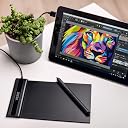
The VEIKK S640 V2 is a compact, ultra-thin 6x4 inch graphic pen tablet featuring 8192 levels of pressure sensitivity and a battery-free pen with 290 PPS report rate. Compatible with Windows, Mac, Linux, and Android 6.0+, it supports a wide range of creative and productivity software. Lightweight and portable, it’s designed for professionals and creatives seeking precision and flexibility on the go, backed by a 1-year warranty and lifetime driver updates.


| ASIN | B07SFT9MYN |
| Active Surface Area | 6 inches x 4 inches |
| Best Sellers Rank | #18,864 in Computers & Accessories ( See Top 100 in Computers & Accessories ) #85 in Graphic Tablets |
| Box Contents | Digital Pen x1, Pen nibs x 8, OTG Connector x1 |
| Brand | VEIKK |
| Brand Name | VEIKK |
| Colour | Black |
| Compatible Devices | Android 6.0 or later, Linux, Mac 10.12 or later, Window 11/10/8/7 |
| Connectivity Technology | USB |
| Country of Origin | China |
| Customer Reviews | 4.1 out of 5 stars 3,397 Reviews |
| Importer Contact Information | IGER PUG COMMERCE PRIVATE LIMITED A-302, Dipiti Classic, 32-34,Suren Road, Andheri-east,Mumbai Suburban Maharashtra 400093 Tel:022-6879 5151 Email:[email protected] |
| Item Dimensions L x W | 21.8L x 13W Centimeters |
| Item Highlight | Graphic Drawing Tablet, Battery-Free Passive Pen, 8192 Levels Pressure |
| Item Type Name | Graphic Tablet |
| Item Weight Unit of Measure | 205 Grams |
| Manufacturer | VEIKK |
| Manufacturer Part Number | S640 |
| Model Name | S640 |
| Model Number | S640V2 |
| Native Resolution | 1920x1080 |
| Network Connectivity Technology | USB |
| Number of Items | 1 |
| Operating System | Windows 7 or later , Mac OS 10.12 or later, Linux and Android 6.0 or later |
| Packer Contact Information | Shenzhen Hezon Lito Technology Co.,Ltd. C3,No.45ShasanRoad,ShasanCommunity,ShajingStreet,BaoanDistrict,Shenzhen,China Email:[email protected] Tel:022-6879 5151 |
| Pressure Sensitivity | 8192 Levels |
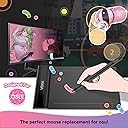
| Product Features | Built-in USB cable design, Compact and Portable, Desined for OSU! |
| Screen Size Unit of Measure | 64 |
| Special Feature | Built-in USB cable design, Compact and Portable, Desined for OSU! |
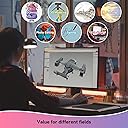
| Specific Uses For Product | Drawing, Painting, Designing, On line teaching, Remote work, Electronic Signature ,Playing Game |
| Target Audience | Artist, Designer, Student, Teacher |
| UPC | 601707035045 |
| Warranty Description | 1 Year |
C**S
Great product and Excellent Customer service
After a lot of searching I ended up on choosing the Veikk S640. The company’s pricing is extremely competitive as compared to the other established brand like Wacom or Huion. This pen tablet is suitable for anybody interested in digital arts. As a graphic designer, I use coreldraw, photoshop and lightroom for majority of my work and this tablet does that job extremely well. The build quality of the tablet is exceptionally good for the price and the pen is very responsive. The nibs provided are of good quality and based on my use I have not faced any problems. The tablet has an attached USB cable. The surface of the tablet is pretty smooth. The only problem I faced was with the driver. If you are a windows 10 user, you might face a small problem during installation. To install the driver you need to disable secure boot in Bios and then disable the driver signature enforcement for the pressure to work. This can be done by a simple code in the command prompt “bcdedit.exe /set no integritychecks on”. I had trouble with the driver and contacted Veikk on their official website through online chat. I was pretty impressed with the way they handled their after sales support. They got in touch with me by email that I had provided them and helped me troubleshoot the problem. Veikk has filed an application with Microsoft regarding the Digital signature of the driver. I applaud their patience and dedication. All in all, the tablet does what it says. The interface is pretty simple and straightforward. The package contains a Tablet, Pen, 8pcs of replacement nibs and a nib remover. The products works well with Photoshop, coreldraw, Medibang Paint and illustrator (These are the softwares I use) If anybody wants to give digital arts a try. This can be the tablet to start you off cheap and easy.
I**M
Worth the Money
I bought the Veikk S640 mainly to try digital art and honestly, it surprised me. The pen feels smooth, pressure sensitivity works really well, and I love that it doesn’t need charging. The tablet is super slim and lightweight, so I can just throw it in my bag with my laptop. Setup was quick and it worked fine with my software. For the price, the performance is amazing. The only small downsides are the fixed USB cable (wish it was detachable) and the small drawing area, which might feel cramped if you’re used to bigger tablets. Overall, it’s perfect for beginners, students, or anyone who wants a portable tablet without spending too much. Definitely worth it!
A**H
Best in segment
The S640 is a wonderful tablet . I’d even consider traveling with it. I’ve only had it for 3 days but I’ve been charmed by how functional and useful it is. It's the best drawing tablet for beginners. The VEIKK tablet comes in a nice-looking package containing a tablet, a pen, pen sleeve, nib remover, extra nibs, instruction manual, driver reminder, USB cable. Pros- Inexpensive Lightweight & Portable Works well Nice design Highest available pressure sensitivity (8,192 levels) Simplicity .This Veikk S640 review is a thumb’s-up if you want a very portable drawing tablet. The value and portability are great and it has the maximum levels of pressure of any tablet. It offers smooth performance and easy installation. Its size is something like a signature pad. It’s simple to set up and use.
P**I
Very easy and lightweight to use
Purchased the S640 Veikk tablet it is very thin and lightweight to use. It comes with a drawing pen, usb, c type usb, extra pen nips and instruction manual. I have used this tablet for over a week now and is very easy to use and setup. I have used it on photoshop and illustrator draw and the illustrations have come out perfect. The tablet pen has a very good solid grip and has two buttons from which one is an eraser button. The pen just flows on the surface smoothly and makes the illustration look so neat and good feeling like it’s made so effortlessly. I have connected this tablet to a MacBook and an android phone and it works well in both the devices. I feel this is one of the best purchases I have made and I recommend to all beginner designers!
N**Y
Unsatisfied performance.
Performance of the product is not up to the mark as expected.
E**R
Good tablet but the pen is a headache
Before buying this Veikk A50, I was using One by Wacom. Compared to that, this Veikk definitely runs smoother, the cursor movement is great on any app. However, my review is only 3 stars because there are some issues I have experienced. Here are the pros and cons: Pros: 1. Sturdy build, the tablet will not bend 2. The track pad function is great for adjusting brush size and zoom 3. The surface is quite scratch resistant Cons: 1. The pen buttons are not raised enough so it's hard to feel them when you want to use either button so you have to take your eyes away from your work just to see where they are 2. The pen nib slightly goes in and out of its place which is there in normal pens but this causes a huge issue while the cursor is pressed down in your art app. As soon as you lift the pen, the pressure will still be on for a minisecond and then release as you get further away. This makes precision very very very hard and frustrating. There is no fix for this in the Veikk driver app. Otherwise, pen to tablet feel is nice. 3. There is no stand which can be issue to some but I put it on my lap so it's fine. I have listed equal number of pros and cons, however con no. 2 is such a big issue that I think the 3 star rating is fair.
S**T
perfect for beginners
If you work with this pen at the highest sensitivity levels this will work like a charm. No problem except for a few occasional glitches. But that is not at all annoying. Here is an example of what I tried using this tablet. Can buy this product. Sleek light weight plug and play pen is easy to handle and grip perfect for online teaching or converting your laptop to a touch screen only downside is it has a usb connection. Could have been wireless. But it is manageable. Check out my channel on youtube. Professor Pal.
A**I
Easy to use and saves lot of time.
This is one of the best purchase I feel :) I am writing this review after 1 month of usage and I am in love with it. What’s comes in the box? VEIKK S640 comes with the following - S640 Pen Tablet (active area 6x4 inches) - Passive Pen (Battery Free with 8192 pressure sensitivity levels) - Pen Pocket - OTG Adapter (Micro USB and C-type) - Quick Start Guide - Pen Nibs (8 of them) - Nib Removal Features- Tablet: The Tablet is lightweight, thin and sleek and is easy to carry. The USB cable is of fixed length and is directly attached to the tablet and is enough to connect to the USB port if you are connecting it to your laptop. Pen: The Pen tablet is light weight and compact and is easy to carry. The battery free operation removes the headache of batteries. There is a pen pocket provided which is easy to carry and protect the nibs from damaging. Compatibility- The tablet is compatible with Android, MAC and Windows platform. Apps supported- - Sketchbook, Photoshop, etc. - Microsoft Office Apps such as Word, PowerPoint, Teams - Many more Uses- - Perfect for beginners for drawings. Can be used by professional as well - With this WFH pandemic I have found one additional use for my meetings. It is very easy to use the screen as the whiteboard and use this tab to draw and explain things which takes more time to explain. So, it saves lot of time there because a picture is worth 1000 words and I save time by choosing picture here. - I teach my son alphabets and numbers on this tablet and save paper. With this I contribute to the environment by saving papers. Conclusion: This is a great investment as it saves lot of time for me. So, if you want to save your time as well please go for it. The pricing for the S640 is perfect for any budget. This is a truly amazing drawing tablet! If you’re interested in digital are and have been turned off by the expansive tablet prices out there, this is very affordable one to get started. It’s definitely possible to create professional drawings on this tablet.
J**G
WOW $59.99 CHEAP price, QUALITY product!
The tablet is nice slightly bigger than my android tablet that I used to use. This has a 10x6 drawing area with 8192 Pressure really nice The pen is battery less but quite uncomfortable for my small hands too thick and hard no cushioning Good software to set shortcuts to all the buttons for easier drawing. The buttons on the tablet have a nice easy feel to them. Coming from drawing on a screen with my android tablet feels kinda off I'm not used to NOT looking down at my hand and screen at same time so it is slowing me down for now until I get used to it. There is a large improvement in the quality of my drawing due to software and fine lines and thick lines and what not, even though I'm slower right now, with the overall better drawing I definitely say it's worth it! It makes me want to practice more and really improve my skills. My problems are basically not important to others who have experience drawing on pc tablets so you really should get a Veikk Tablet! I have included a drawing from using the Veikk Tablet and my Android Tablet to show the improvement
L**G
Love it!
From before I even used the VEIKK A50 I was impressed. The design was sleek and sophisticated, I liked that it was lightweight and easy to travel with. The working space is a decent 10x6 inches and in the mid-size range compared to other tablets on the market. The pen is also a decent thickness, it doesn’t strain my hand, though it is pretty lightweight. There is only one cord to connect the tablet to your pc, it is a USB to USB-C so very easy to replace should you not like the length of the one provided. The one that comes in box is actually quite long and I found myself with a lot of extra cord to work with, though this is because I work from a laptop and all of my USB ports are close to me. I had never used a tablet with a gesture pad before this one so I was a bit wary of it (if you’re certain it’s not your thing there is an off button for it on the side of the tablet) but I found I actually quite like it! The default gestures are up and down to zoom in and out, and left and right to change your tool size. You can change these gestures and also the double tap on the gesture pad in the driver menu. The other shortcut keys can also be bound to whatever keys you prefer, and I liked that two of the keys on top and bottom had bumps so that I didn’t confuse them since I find myself rarely looking down at tablets when I draw. Once I had changed the keys to my preferred shortcuts I was drawing instantly. I tested it on Clip Studio Pain, Photoshop, and Adobe Sketchbook with no issues. I found it super nice to draw on and I liked the feel of the tablet, and the keys all worked well (especially had fun with the gesture pad). If you have ever worked on a graphic display you know that your posture is bad, leaning over the display, and usually putting pressure on your shoulder and arm, so I find it relieving to work on a tablet like this where I am not straining my arm. Every artist should be mindful of how their body is sitting when drawing for hours, these tablets are great to give your body a rest and sit at a more neutral position. The one thing I noticed while working on it is that there isn’t anywhere to keep your pen when you want to put it down. The tablet comes with a little soft case, but that is something you have to insert it into, and it’s not easy to grab out. I ended up using a pen stand from another tablet while working on this one to avoid my pen rolling away. But this is something super minor because I really didn’t have anything bad to say about the tablet. This tablet was a very pleasant surprise and I find myself coming back to it. For the price you pay I think it’s worth every dollar. The built quality is great, the driver worked fantastic, and I got to create some art with it, what more could I ask for?
D**D
Don't buy a wacom, BUY THIS!
I'm very impressed with the quality of this product for the price! I was deliberating for months to either buy this or a Wacom which are SO very overly priced. After watching many videos, I decided to give this a try and wow I am impressed. As a professional photographer and retoucher, I give my approval of this product. It did take some time to configure it with separately and specifically for Lightroom and Photoshop. I did contact the manufacturer for some support and they responded with very step-by step videos to aid in my needs. I felt like they were there for all my inquiries as a customer. I would support and recommend this product as a professional. It great for beginners with basic needs and easy shortcut programming as well. Wait a go VEIKK, I'm here for you! You've helped me save A LOT of money by buying this product. I would love to test more products for you in the near future. All the best! I'm looking forward to a new affordable bluetooth/wireless version next :)
S**A
Really good talet for a cheap price
The tablet has 8 keys to use as shortcuts as well as a touchpad, which is super convenient as I don't need to reach over to my keyboard for ctrl-z or zoom in/out. The pen gives such a good variety of pressure and feels really smooth when drawing (tested with Paint Tool SAI). In addition, it feels really good to hold and the buttons are easily accessible. The little pen pouch was a really good touch! Customer service on Twitter was very kind and helpful, and also the delivery was super fast. Overall, this tablet is really worth getting as it has everything you need in a graphics tablet at an unbelievably low cost.
S**A
Amazing tablet with a lot of customizable buttons!
I love this tablet. It's a great size, it's nice and lightweight, and isn't too big so it doesn't take up much room at all. It uses a USB-C cable so if the provided one is too short, it's easy to swap it out with another one. The pen is lightweight with 2 buttons. The tablet itself has 8 programmable buttons, which is honestly awesome considering many other companies do not have this many, but it also has a programmable touch square that you can do gestures on. The pen pressure is great, it works well on every program I have. Installation was a breeze - the drivers are very accessible and easy to use. The driver software is also great too - the layout is user friendly. I would absolutely recommend this to any beginner or intermediate artist looking for a new tablet.
Trustpilot
5 days ago
2 weeks ago