Desertcart purchases this item on your behalf and handles shipping, customs, and support to South Africa.
๐จ๏ธ Donโt let clogged nozzles kill your workflowโclean smarter, print sharper!
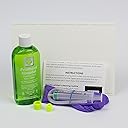
The Printhead Hospital Printer Cleaning Kit offers a 150ml alcohol-free cleaning solution designed to quickly dissolve ink clogs in Canon and HP inkjet printers. Compatible with multiple ink types, it supports up to 30 cleaning cycles and comes with comprehensive instructions, troubleshooting tips, and dedicated UK-based customer support. Ideal for home, office, and professional use, it also prepares printers for CISS installation, restoring vibrant, streak-free prints and extending printer life.


| ASIN | B00UEQUCOO |
| Best Sellers Rank | #538,176 in Office Products ( See Top 100 in Office Products ) #18,532 in Inkjet Printer Ink Cartridges |
| Brand | Printhead Hospital |
| Built-In Media | 150ml Cleaning Solution, Syringe(s), Instructions, Troubleshooting Tips, After-Sales Tech Support |
| Cartridge Type | Compatible |
| Color | Green |
| Compatibility Options | Compatible |
| Compatible Devices | Printer |
| Customer Reviews | 4.2 out of 5 stars 853 Reviews |
| Item Weight | 210 Grams |
| Manufacturer | Printhead Hospital |
| Mfr Part Number | HP-CAN-KIT-AU |
| Model Number | Phh-Can-HP-CleanUSA |
| Model Series | HP |
| Number of Items | 1 |
| Other Special Features of the Product | CISS Compatibility |
| Print media | Paper (plain) |
| Printer Model Compatibility | HP Latex |
| Printer Output Type | multiple colors |
| Printer Type | Inkjet |
| Special Feature | CISS Compatibility |
| Specific Uses For Product | Office use, Home use, School use, Professional printing, Industrial printing, Printer maintenance |
| Unit Count | 1 Count |
A**R
Great result, solved my HP printer issues and worked much better than I expected
In the past I have purchased "repair" products like this that are not worth the packaging they come in. Not so with this one. It worked just as advertised and restored the performance of my son's HP 6960 office jet printer to like new performance. My son had returned from college with his printer and he told me he was getting errors related to the print head. When I powered it up to see what was going on, the unit would not print at all. Sending a job to the printer resulted in an error and no movement. I tried the automated cleaning function on the printer and after 3 tries followed by 3 more cleaning evolutions (recommended by HP on line) all I had was a printer telling me that the HP cartridges that were installed were counterfeit, a big mess in the inside of the printer where ink had sprayed out during cleaning, and a test page that only showed only a light reddish rectangle in the middle of the page instead of any black text or or yellow or blue colors. I decided to try new cartridges and spent over $70 on a new set of HP cartridges. I installed them and the error regarding counterfeit cartridges was gone, but the printer still was not printing any black and only very light reddish colors on the test sheet. I was pretty frustrated now and started looking on line for any other ideas. I came across a YouTube video showing the Printhead Hospital kit working on a nearly identical HP printer. Well I was a bit skeptical of this product but I figured $18 for a chance at getting it to work seemed like a last ditch effort worth the time and money. I ordered the cleaner and it arrived a day sooner than promised. I followed instructions for overnight cleaning - allowing the liquid to sit for 3+ hours instead of 1 hour, and did exactly what the instructions said to do. On my unit I did not need much pressure to push the cleaning liquid through the print head. After using the syringe to push the first 2.5 ml through each color, the blotter paper was a mess. I used new blotter paper for the final 1 ml (per color) and reinstalled my new cartridges immediately after running the 1 ml of solution through the print head. I powered the unit up, ran a test page and amazingly the color was even and bright just as you would expect. Reds, yellows, blues, and crisp un-smeared text all appeared on the test sheet. I printed several pages with color and with black text and all still looked great. And the great thing is that I still have enough left over to clean my printer 8 or 9 more times if needed. I am really pleased with this product and I and am really glad I found this. I have tossed several printers in the past that I think this would have fixed. Now I know.
B**K
Works with Canon PIXMA TS9020
I felt like this was a last-ditch attempt before replacing the original print head (or replacing the printer, which would've been an even bigger waste). But this kit totally worked! And it worked even better than expected - printed a clean nozzle check on the first try, even without running through more ink-consuming cleaning or deep cleaning. Plus additional test pages afterwards: test patterns, text, graphics. Really fantastic! Attempt #1: "Canon manual procedure" - I hadn't used the printer much, then tried multiple deep cleanings, and ended up with practically blank pages coming out. (The nozzles must've been clogged, though I didn't know it at the time.) Attempt #2: "YouTube clean-your-print-head-compilations" - subsequently soaked the print head in warm solution (50% water, 50% Windex, plus a drop of dish soap), then ran warm water over the nozzles and bottom plate (but without much pressure). Lots of wasted ink came out randomly (and down the drain - surprising how much ink can be in the print head), but the reassembled printer still kicked out one empty or random color/line pages. Attempt #3: this "Printhead Hospital Cleaning Kit" - at this point, surely I'd screwed it up pretty badly. Had already removed and replaced the print head 3 or 4 times, retried steps #1 and #2 to clean. Left to dry for days, didn't print at all. Surely there were ink clogs in the print head, and maybe i'd damaged the nozzles or the PCB electronic board. I ran the first "overnight passes" method: A.) "heat the cleaning solution", B.) "stand the head on a wad of wet paper towel for 2 hours, then inject 5ml fluid at high pressure through each affected colour." (Didn't need the hose attachment). Two nozzles looked like they wouldn't inject, but with slightly higher pressure, stubborn globs of ink expelled, and it started to look like the clear spray patterns from the videos! I reflushed the nozzles just to be sure (roughly 10-12mg fluid total per nozzle x 6). Those final-pass pumps looked clear, and half of the 150ml bottle is still left. Dabbed dry the carriage and contacts, re-seated the print head, re-installed new ink cartridges (which is advisable, per the instructions), then ran the first nozzle check - which again, came out fantastic. Re-start the presses! Review rating: 6 out of 6 ink cartridges (including Grey), or full 5 out of 5 stars. And 11 out of 10 hurrahs to Printhead Hospital for the kit, instructions, and videos!
M**L
DEFINITELY A RECOMMENDED PRODUCT
My printer is a Canon MG7120 (which is no longer made unfortunately) and it was one of the better printers they ever made. When working properly, it's not the fastest that they're capable of today but it makes outstanding photo prints and great text as well and so I was determined to get it working again. This product works well, especially if you don't do like I did and let the damn printer sit way too long without using it. Because of my own neglect, it took A LOT of cleaning power to get it clean. I actually doped up the cleaner with a little bit of 10% ammonia base to help cut through the dried ink and that worked but it still wasn't easy. While I'm on that point, let me just mention, you DON'T want to mess with 10% ammonia in an unventilated space. It will knock your socks off....so beware. My only complaint about the product at all is with the adapters. I would like to see them molded with a rubberized compound rather than a nylon so that they would be a slight bit tighter around the jet intakes. That will boost the pressure and be less prone to allowing the fluid out around the edges. It's definitely not a deal-breaker but maybe in the future they can research something like that to see how it works. I paid full price for my kit and in no way received compensation from the manufacturer for this review. I am simply very pleased with the outcome and would recommend this to anybody who wants to use it for just general maintenance cleaning and for the occasional bigger problem like I created for myself (though I wouldn't recommend you try that!}
P**4
THIS PRODUCT WORKS!!! IT'S AMAZING AND I WILL TELL EVERYONE I KNOW ABOUT IT!!!
This stuff is AWESOME. My Epson Workforce 2540 printer for the first time in the 4 yrs I have had it now stopped printing because the ink heads were clogged. I was going to take it in and have all 4 ink heads cleaned and repaired if needed. I went on Youtube and found a man that was cleaning the ink heads on one the same as mine mentioned above. He suggested this product and said it would work with this printer. I immediately brought up Amazon and found the Canon Hewlett Packard HP Deskjet Officejet Photosmart Printer Cleaner: 5oz 150ml Kit and purchased it. I purchased it and it arrived 2 days later and immediately did what it said to do. It was one messey job but I will do it all over again if it becomes necessary. It cleaned my print heads and now they function like brand new. I can't thank that guy enough on Youtube for doing that video and telling us about this ink cleaner on Amazon. This cleaner is FABULOUS. It would have cost me over 100 bucks to get them heads cleaned and I am sure it would have taken a couple weeks or more to get it back. The printer is not worth spending that much money on either. So, if your print heads get clogged try this one. It works so well, I will purchase it over again, when what I bought is gone. I still have 3/4 of the bottle left as it only takes a small amount to clean them with. Amazing product and it was worth every penny!!!!
M**O
Decent product - unfortunately did not fix my problem
I bought this cleaning kit when my Canon Pixma MP970 started printing documents with green bands across the pages. Following the instructions was very easy although it took a few tries to get the technique right and get the cleaning liquid to flow through the different color ports in the print head. However even after several cleanings I wasn't able to get rid of the green bands. After doing some additional research I concluded that my problem was not a clogged print head but a a problem with the electronics in the print head or main board of the printer that was resulting in the magenta channel to be dispense the magenta ink to the page only through the lower half of the magenta channel on each pass. So overall, I'd recommend this if your printer output has random gaps or streaks that you suspect are caused by a clogged print head. Seems like a good product with clear instructions and online support if you need it. Unfortunately it was not what I needed for my particular problem. Now I need to start shopping for a replacement printer. The seller says they will refund $15 if it doesn't fix your clog. Since my problem turned out not to be a clogged head, not sure if that qualifies.
C**.
Great kit!
I used this kit on an HP Officejet Pro 6978, which was having severe problems with the cyan cartridge streaks. Pros: - It's a very complete package, including blotter paper, and even a set of gloves. - Two pieces of blotter paper are provided which, when cut to size, supplied me with 10 strips which fit into my printhead channel perfectly. - There's enough fluid included to clean the printhead many times. - The syringe adapters fit the printhead nozzles perfectly. - A partial refund is offered if the kit does not fix the problem. Cons: - None. My experience with this kit: 1) Use 2 or 3 stacked strips of blotter paper under the printhead, to soak up as much ink as possible and prevent it from leaking inside the printer. 2) Fill the syringe with the appropriate amount of cleaning fluid for all four nozzles at once (refer to instructions for the amount for one nozzle, and multiply by 4). Even if you're only having issues with one nozzle, you might as well clean them all while you're at it to avoid future problems. 3) When placing the provided adapters over the nozzles, be sure they are firmly seated over the entire nozzle by applying gentle downward pressure. If you fail to do this you'll experience leaks, which are a mess to clean up. 4) IMPORTANT: Step 1 states that heating up the syringe (containing the cleaning solution, with the cap on) in a glass of boiling water is optional. DON'T TREAT THIS AS OPTIONAL, BE SURE TO DO IT FOR AT LEAST THREE MINUTES! One my first cleaning attempt I warmed it using tap water as hot as I could get from the faucet, and the cyan streak problem remained exactly as it was when I started. On my second try, I used boiling water. The problem still persisted even after 3 cleaning cycles, but nowhere near as badly as it originally was. 5) I then moved on to the "Troubleshooting" section, which suggests moving the syringe injector back and forth while over the nozzle. This forces cleaning fluid through the nozzle in both directions. I continued doing this until the solution came back into the syringe completely clear (no ink). This cleans the nozzles much more thoroughly and ultimately fixed my problem, so I would recommend you do this even on your first cleaning attempt. 6) After nozzle cleaning and removing the blotter strips, place a folded up piece of paper towel under the print head, push it down gently, and move the printhead back and forth to clean and dry its underside. Then, move the printhead out of the way and thoroughly blot up any remaining fluid on pads and other parts residing under the printhead with another paper towel. 7) Be sure to replace the ink cartridges with new ones as they could very easily be the cause, especially if the printer had not been used in a while. In my case, I was out of town for 5 weeks, and the problem began when I got home. I suspect one or more of the cartridges contained ink that was drying out and clogged the nozzles, because replacing all cartridges with new ones at that point did not solve the problem. 8) After reinstalling new ink cartridges, you're going to see a LOT of page smears, and the paper may feel moist. Run the "Clean Smear" routine until all smears are completely gone, and the paper is totally white. I had to do this 5 times before the printer began producing clean sheets. 9) Definitely run the "Clean Printheads" routine all the way to 3rd level cleaning, even if a print quality report looks okay after a 1st level cleaning. It takes a lot of ink to prime the printhead properly, especially since it should be completely free of ink after the cleaning. Run the "Align Printheads" routine after that for best possible print quality. 10) The printer may still produce print-outs that are damp in spots, likely because a small amount of cleaning solution has worked its way inside the printer. Power down the printer and leave the top open for a few hours, to ensure the solution completely evaporates. Performing the steps above totally solved my issue, and my Officejet is now printing like brand-new. I've attached the second page of the "Diagnostic Information" print-out which contains large color boxes, in my opinion the ultimate test in checking for color smearing. Notice how saturated and streak-free all of those boxes are. I'm extremely happy with this product, which saved me from having to replace the best printer I've ever had. 5/5 stars, all the way! * Note: I strive to write concise reviews with honest opinions to assist you as a potential buyer, and receive no monetary compensation for doing so. If you've found this information useful, I'd appreciate a click on the โHelpfulโ button below. Thanks!
V**A
It worked!!!
After searching the internet for a possible reason/solution for my HP 6968 printer not printing in black I found a video by Printshop Hospital. It was well done and easy to follow the step by step directions to see if you could resolve the issue. I ordered the kit used in the video which was offered at a reasonable price. I figured it was worth it instead of buying a new printer right away. I received it in two days on prime and rewatched the YouTube video to perform the steps on my printer. At first I thought it didn't work and i was out of luck but i did it again and waited several hours before printing another test page. This time I had success!!! My printer is working fine. I might add I am a senior mom who is not especially tech savvy but with the ease of use of this product I am totally proud of myself for fixing the problem. Even my kids said "way to go mom" I recommend this product highly. It's definitely worth giving it a shot before spending money on someone else to do the same thing or buying a new printer.
A**T
"Cleaning" Cost Me $300+. Ruined My Printer and New Cartridges.
I would like to start by saying that I always see negative reviews and think the person must have just not followed the directions correctly or didn't know what they're doing. The same was true with this purchase. In this case I followed the instructions EXACTLY. I read through them multiple times and it seemed easy enough. I cleaned one color on my HP8615 print head one time because there was a few streaks. It didn't solve the problem so I proceeded to the next steps for a deeper clean on the instructions. I used exact amounts and set a timer for exact times to make sure I did everything correctly. Reinstalled the removable print head and immediately the printer said all 4 of my cartridges were bad (even though I followed the trouble shooting steps to avoid this). These were brand new, genuine, HP cartridges at $35 each. The print head moved back and forth as I kept trying to reset my printer. Then I turned it on a final time and the cartridge is stuck on the right side of the printer and will not move to the center to replace the cartridges. I have spent hours trying to find a solution and reading through HP threads and apparently the only fix is to take my $150 printer to be serviced. Since that will cost more than a new printer, my only choice is to buy a new printer, break my old one to get the cartridges out that I just purchased and hope they work in a new printer. If they don't, I'll need to buy another round of them which means this will end up costing me well over $400. I have had instances of products not working, and didn't write reviews, but in this case it cost me hours of my day and hundreds of dollars.
B**E
Very impressed
Great product, did what was intended to do, and was easy to learn how to do it yourself. Has both french and english instructions, a tube, and 2 different connecters to use over top of the ink tray holes. I was surprised as the bottle of cleaner looks kind of small in pic, but is a decent size. Will last you forever. Shipped super fast. Only took two days and I haven't had that happen since before Covid. Totally recommend and they offer your money back if it doesn't work. Can't go wrong.
B**A
Don't have to buy a new printer! IT WORKED!!
Have a HP 6978 Printer. Installed a new genuine black cartridge and it didn't work. Cleaning print head on printer did not work. I chose to warm up the syringe but I used paper towel - not the blotting paper. Make sure there is no excess water in printer... THEN add cartridge. Did another cleaning on print head and all colors were clear and crisp. lots of cleaner remaining if I need to clean the print heads again.
W**N
cleaning print nozzles on HP Officejet 4620
The kit cleaned the print nozzles after two tries. The nozzles were probably quite clogged so the two tries were probably reasonable. After the cleaning the nozzles the printer is working quite well. The kit is a lot easier and cheaper rather replacing the printer. I've got enough left over for four more cleanings.
R**L
Value not as expected
Did not clear as expected.
R**B
Printhead Cleaner for new and maintained Inkjet Printheads
The cleaning kit not do its job to clean printhead if ink allowed to dry in prinkhead. Manufacturers should make cleaning kit standard part of printer along with instructions on when and how to clean printhead beginning right from when printer's package is opened.
Trustpilot
2 months ago
1 month ago