๐จ๏ธ Keep Your Prints Pristine!
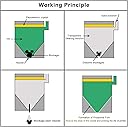
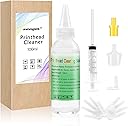
The seogol Printhead Cleaner Kit is a comprehensive solution designed for HP, Canon, Brother, and Lexmark printers. It features a powerful enzyme formula that effectively cleans and protects printheads, ensuring optimal performance. The kit includes all necessary tools for easy operation without disassembly, making it suitable for various ink types.
| ASIN | B07Z9YBCFW |
| Brand | seogol |
| Color | Green |
| Compatibility Options | Compatible |
| Compatible Devices | Printer |
| Customer Reviews | 3.8 out of 5 stars 1,269 Reviews |
| Ink Base | Water |
| Ink Color | Tricolor |
| Ink Colour | Tricolor |
| Manufacturer | TrendVision TechnologyCO,. LTD |
| Mfr Part Number | VKUSAPSQXY02 |
| Model Number | VKUSAPSQXY02 |
| Other Special Features of the Product | Printhead Protection |
| Printer Model Compatibility | Brother MFC 6890CDW, Brother MFC J430W, Brother MFC J4510DW, Brother MFC J6920DW, Brother MFC J835DW, Canon PIXMA MG5320, Canon PIXMA MG5420, Canon PIXMA MG6220, Canon PIXMA MG6320, Canon PIXMA MG6620, Canon PIXMA MG7120, Canon PIXMA MG7520, Canon PIXMA MP560, Canon PIXMA MP640, Canon PIXMA MX892, Canon PIXMA MX920, Canon PIXMA MX922, Canon PIXMA TS9020 |
| Special Feature | Printhead Protection |
| Unit Count | 3.38 Fluid Ounces |
M**.
It worked!
Blue ink would not print at all on my HP OfficeJet Pro 8028. Syringe plunger with cleaner was a little hard to press in at first- probably due to dried ink. I stopped and let it sit a little, then tried it again. Still difficult to press in... then it went down about half way before I could stop. After that I emptied the syringe contents thru the printhead without any difficulty. I filled it and ran the cleaner thru again... much easier. I then let it dry for about an hour, put the ink cartridges back and printed a test page. The blue was back- not perfect, but back. I printed a few more pages and now it is fully restored. I am glad I bought this, and recommend it.
D**A
Works, but not easy!
Although this product is advertised as working for Canon MX922 printers, the pieces do not really fit the nozzle heads. I contacted the Seller about this, and they promptly sent me a replacement kit; however, the replacement kit contained the same pieces as the original kit. Nevertheless, you may be able to maneuver the pieces - using tweezers while pushing down the yellow piece onto the nozzle head - to get it to work, as I eventually did. (It keeps popping off otherwise.) Itโs not easy to work with but if youโre persistent, you may be able to fix your printer. I commend the Sellerโs customer service rep for being so courteous and prompt with a replacement.
C**H
Saved my neglected printer!
I have an old Canon TS8020 that I got for super cheap ages ago that I'd only ever used to print out a few resumes and a short story around 3/4 years ago, and it had sat collecting dust ever since. I needed to print out a picture for a friend and realized almost every ink cartridge was empty, found some compatible 3rd party ink cartridges on sale, plugged them in, and printed out the pictures in the "before cleaning" picture attached. I figured that spending around $10 on this was worth a shot before entertaining the thought of just tossing the printer and getting a new one (I just got a new Epson EcoTank, but had already converted it for sublimation so it wouldn't work for regular prints) and flushed the print heads as soon as the package arrived. The "after cleaning" picture is worth 1000 words, as my crust dusty old printer is printing like new! The provided attachments were a little snug to fit on (especially connecting the long tube to the end of the syringe and connecting the yellow tip to the large clear tip to flush my PGBK slot) but that was fully expected since you have to slowly push the cleaning solution into the print head rather than just dripping it in from where the cartridges feed in ink, and it was well worth the effort! Tl;dr if you're thinking of getting a new printer due to blocked print heads, I highly recommend trying this out to revive your old printer before getting a new one!
E**L
Broke my printer
Printer stopped working after using this....but, it already wasn't printing well. I should have just bought a printer to start with.
P**.
I don't recommend doing this.
I just want to say I'm not sure if it's something I did or if it was just cleaning solution but I was very careful while I used the solution. Okay so my printer was 8 years old. I was using some non HP ink never had any problems with non HP ink but at least once a month I'd have to clean the printhead by using the feature that's built into the printer. The one thing I did and you shouldn't do is to totally let the cartridges run out of ink, come to find out you're not supposed to do that, the reason being is the ink dries up and gets stuck at the exit port in the printhead. That is probably why I had print issue problems over the past 4 years. I would run the printer in it's clean printhead mode and that would fix it for a while. Just so you know it was working perfect prior to this cleaning. after I was done I reinstall the printhead and the cartridges and it wouldn't work kept saying printhead error or print cartridge error. I tried everything to fix the problem I couldn't do it. I was very gentle using the cleaning solution so I'm not sure what happened. It's all good though my printer was 8 years old I paid $200 and printed over 20,000 pieces of paper were printed so I definitely got my money's worth. Only use this if you have no other choice before buying a new printer. Don't use it just because you wanted. If I didn't I'd still have my printer right now. But you don't have a new HPe printer so I'm sure it's about time to replace it.
L**Y
Great product! Cheaper than buying a new printer!
Worked great! My printer was not printing because my printer head was clogged from dry ink! It took a couple of tries to get the old ink out! I watched a couple of YouTube videos and now my printer works great again! Easy to use once you figure out how to do it! I highly recommend this product! A lot cheaper than purchasing a new printer! A+
V**R
Does Not Fit Canon Pixma MX 922
I have a Canon Pixma MX922 printer and the small cyan port was clogged. This kit came with a limited number of attachments to fit the printer port. The large was too large to fit and the small yellow attachment was too small. After much effort I was able to get the small yellow over the cyan port but it kept popping off. I finally was able to hold the attachment against the port while simultaneously injecting the solution for cleaning. It worked and the clog was cleared but it was a difficult process due to the limited sizes of the port attachments.
R**D
Saved an older printer
Iโve tried using a printer that had not been used in multiple years. I tried using the printer software print head cleaning services to no avail. I tried using alcohol wipes, and everything else and still could not get black ink to come out. I purchased this and used the product to do a cleaning cycle. I started getting black ink coming out but not perfect. So like the product said, I ran a second cleaning cycle on it, letting the product sit in the printhead for up to an hour if not more at a time to help dissolve the clock. After the second cleaning, the printer is printing fine now.
Trustpilot
2 weeks ago
1 week ago