🎨 Elevate your art game with precision and style — don’t just create, captivate!
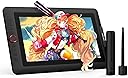
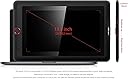
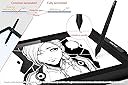
The XP-PEN Artist 13.3 Pro is a professional-grade 13.3-inch drawing pen display featuring a full HD fully laminated anti-glare screen with 120% sRGB color accuracy. It offers 8192 levels of pen pressure sensitivity and 60° tilt support via a battery-free stylus, ensuring a natural drawing experience. Equipped with 9 customizable shortcut keys and a red dial, it enhances workflow efficiency. Compatible with all major design software and operating systems, it comes bundled with essential accessories including a stand, glove, pen holder with replacement nibs, and a 3-in-1 USB-C cable for easy connectivity.


| ASIN | B07XLYQCYN |
| Best Sellers Rank | #42,762 in Electronics ( See Top 100 in Electronics ) #73 in Graphic Tablets |
| Box Contents | 1x 13.3 Inch Display, 1x Portable Stand, 1 x Battery-free Stylus, 8 x Replacement Pen Nibs, 1 x Pen Holder, 1 x Quick Guide, 1x 3-in-1 USB Cable, 1 x Cleaning cloth, 1x USB Extension Cord, 1 x Black Drawing Glove |
| Brand | XP-Pen |
| Brand Name | XP-Pen |
| Colour | 13.3 PRO |
| Compatible Devices | Laptop, Personal Computer |
| Connectivity Technology | HDMI, USB |
| Country of Origin | China |
| Customer Reviews | 4.4 out of 5 stars 532 Reviews |
| Display Type | LCD |
| External Testing Certification | Não aplicável |
| Importer Contact Information | M/s DNS Overseas: 1003, Raheja Chambers, 213 Nariman Point, Mumbai 400031 |
| Item Dimensions L x W | 39.5L x 25W Centimeters |
| Item Height | 15 Millimeters |
| Item Type Name | Graphic Tablet |
| Item Weight Unit of Measure | 2800 Grams |
| Manufacturer | No. 4 Building, Fulongte Industrial Park, Huaxing Road, Dalang Street, Longhua District, Shenzhen, China 518025, XP-Pen |
| Manufacturer Contact Information | No. 4 Building, Fulongte Industrial Park, Huaxing Road, Dalang Street, Longhua District, Shenzhen, China 518025 |
| Model Name | XPPen Artist 13.3 Pro V2 |
| Model Number | Artist13.3Pro |
| Native Resolution | 1920x1080 |
| Network Connectivity Technology | HDMI, USB |
| Operating System | Windows, MacOS and ChromeOS |
| Packer Contact Information | M/s DNS Overseas: 1003, Raheja Chambers, 213 Nariman Point, Mumbai 400031 |
| Pressure Sensitivity | 8192 Levels |
| Product Features | 60° Tilt Support, 8192 Levels of Pressure Sensitivity, Shortcut Key |
| Screen Size Unit of Measure | 13.3 Inches |
| Special Feature | 60° Tilt Support, 8192 Levels of Pressure Sensitivity, Shortcut Key |
| Specific Uses For Product | Animation, VFX, Game design, Illustration, Graphic design, Interior Design, Teaching, Note-taking, Business meetings |
| Target Audience | Student, Teacher |
| UPC | 654913041348 |
| Unit Count | 1 Count |
| Warranty Description | 1 year manufacturer |
R**T
Loved the product with great value for money
The XPPen Artist 13.3 Pro undoubtedly stands as a top-tier drawing display tablet, it is good value for artists seeking a superior drawing experience. XPPen has delivered an exemplary product with the Artist 13.3 Pro, offering a user-friendly setup, impressive display quality, and enhanced drawing performance. For artists seeking a reliable and feature-rich drawing display tablet, the XPPen Artist 13.3 Pro remains a compelling choice. Loved the product and here is my feedback on different parameters Pricing - The XPPen Artist 13.3 Pro has an attractive price point below 30k and is amazing value-for-money. I upgraded from my old Huion Kamvas and glad I made the switch. Unboxing - The XPPen Artist 13.3 Pro arrived in an aesthetically pleasing package. Design and Build Quality - The build quality is good. The materials and assembly feel solid and I like how smoothly the dialer wheel spins. It’s almost kinda addictive to keep spinning it. The buttons are also responsive with a nice sound and solid travel. The tablet has a sleek design with rounded edges. The addition of a red dial makes it look really sophisticated and cool. Display Quality is very good. I use it for illustrations and the colour accuracy is on point. Performance Drawing and painting on the XPPen Artist 13.3 Pro delivers a good experience. There is no parallax and the screen is anti-glare. Tested with applications like Photoshop and Sketchbook, my Artist 13.3 Pro works smoothly. The tablet's stand, while functional, is not height adjustable. However, since it comes in the box it’s not a big issue
M**T
Love it..
I love it all details and good quality I am an artist .. I use it
S**H
A great pick but it glitched alot
Reviewing it after a year of use, a really great tablet with alot of pressure sensitivity option. I was using it for purpose of art and design but now using it as a secondary screen. It is color accurate, responsive, and gave me such wonders while working over my windows screen. All in all a great product except one part that the pen or the tab glitches that my cursor goes down to the bottom of the screen automatically! tried fixing it but i think it's the problem of the device, because my windows and every software is up to date and then it got so annoying that i had to remove the cable that helps in using pen over the screen
A**N
Super display tablet at an economical rate.
Had read some great reviews about this product on the global site so was waiting for the launch in India and the product is worth all the wait. I've been using this for more than two weeks now and I am having a great experience. It may take a day to adjust to the shortcut keys and the red dial but once comfortable, it is a treat to use them. The tilt function was one of the key things I was looking forward to and trust me it's bang on. The other thing that impressed me the most was the pen and paper feel or what you call no parallax. The pressure sensitivity works great too I had some issues while setting up but the customer support team solved it in less than 5 minutes. It came with a stand that is quite sturdy but not adjustable so if you're used to the adjustable stand you might have to invest in a stand but this works fine for me. All in all a super display tablet at a very economical rate.
P**T
Very useful for artists.
Very handy for artists or budding artists. Daughter enjoys it for her drawings. Only disadvantage is that they should include free drawing software with it.
S**A
Worst product and customer service
i buy this product last year but it display was not working properly. I complained in customer service they take my device through courier and send me back without any check. He said your device was working correctly. Then i went to service centre in nehru place he said problem in port and this device will change and again file complained in customer service to change my device and again picked this device through courier but again send this same device and said this is working correctly. My money wasted in this product.
A**.
One of the best display tablets out there.
I've used the same tablet twice now and it's been great. It's probably the most ideal screen size in a tablet, 16 inches is the sweet spot for me. Pros: Decent build quality Great functionality and design Great service from Xp pen. Good colours, hardly any glare on the screen. Good pen, almost no parallax. Cons: The stand that comes with it isn't that great. The power off doesn't switch from two monitors to one, so you always have to unplug the wire to switch it to your monitor display for singular use. All in all, it's a great intermediate level product.
G**N
Worth the shot for intermediate users
It is very good personally for me. I do a lot of drawing and note taking and therefore needed infinite canvas digitally. Coming to build it is really good! And the software is also well updated. No regrets! Extremely happy. Although below is a detailed analysis of how it can be better. Below is Usage: it's very good ..there is a glare on screen of my tubelight (but not a big issue) Also it gets powered on usb to pc (without adapter) I wish there was just 1 clean cable to do it rather than 3. The type c cable could be loose if played with coz the wire is thick..they have support for it and it helps..so keeping it stationary as much as possible will do the job. For beginners? I don't think so coz it's the price factor. Although the ability to see it on screen what u draw digitally is a big solve for the learning curve. I preferred it over huion coz if it's all in ome package..giving all that I need (glove adapters stand ) online you might find sites suggesting huion build being better..but believe me this is really very good build itself and it's obvious we take care of these and they will last reallyyy long Personal advice If it's not urgently needed I would suggest to wait because till now wacom was the monopoly and they raised the price bar really very very high.Now companies like Xp pen and huion are bringing it down.. but it still has a BIG scope to reduce further (the jio way) as we know at 50k we get an iPad..or a large smart TV.. so yes the price is still hiked but lot better than wacoms. Suggestions: 1.For the 8 shortcut buttons ..it would be nice adding the shortcut stickers 2.The pen nib could be like apple pencil which is more Intuitive (the nib doesn't go in but detects pressure) 3.the cables could get a technological update coz it's 3 going around on the desk ..it would be amazing if we have just one usb c cable doing all the work. 4.design revamp : there is a very thick border around the screen but off design trends ..so if that could be worked upon ..or we could have a pen slot there if it can't be eliminated. 5.glare: it's hard to solve coz of friction issues and therefore what we can do is make the stand height adjustable because that will help us set a glare free angle.
Trustpilot
3 weeks ago
2 weeks ago