Desertcart purchases this item on your behalf and handles shipping, customs, and support to South Africa.
🖤 Cool, quiet, and sleek — the ultimate stealth upgrade your rig deserves.
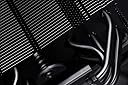
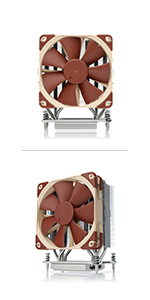
The Noctua NH-U12S chromax.black is a premium 120mm single-tower CPU cooler featuring an all-black coated heatsink and NF-F12 PWM fan. It offers award-winning cooling efficiency combined with whisper-quiet operation, exceptional compatibility with modern Intel and AMD sockets, and an easy-to-install SecuFirm2 mounting system. Backed by a 6-year warranty, it’s the perfect choice for professionals and enthusiasts seeking reliable, stylish, and silent CPU cooling.


| ASIN | B07Y88BNYZ |
| Best Sellers Rank | 17,228 in Computers & Accessories ( See Top 100 in Computers & Accessories ) 290 in Fans & Cooling |
| Brand | Noctua |
| CPU Socket | LGA 2066, LGA 2011-0, LGA 2011-3, LGA 1200, LGA 1156, LGA 1155, LGA 1151, LGA 1150, AM2, AM2+, AM3, AM3+, FM1, FM2, FM2+, AM4 |
| Cooler Heatsink Compatibility | Intel LGA1851, LGA1700, LGA1200, LGA115x, AMD AM5 & AM4 |
| Cooler Heatsink Material | Copper, Aluminium |
| Cooler heat sink material | Copper, Aluminium |
| Cooler heatsink compatibility | Intel LGA1851, LGA1700, LGA1200, LGA115x, AMD AM5 & AM4 |
| Country Of Origin | Taiwan |
| Customer Reviews | 4.8 out of 5 stars 5,365 Reviews |
| EU Spare Part Availability Duration | 2 Years |
| Global Trade Identification Number | 09010018000177 |
| Included Components | NH-U12S chromax.black |
| Item Dimensions L x W x H | 15.8L x 12.5W x 7.1H centimetres |
| Item Weight | 580 Grams |
| Item weight | 580 Grams |
| Manufacturer | Noctua |
| Manufacturer Part Number | NH-U12S CH.BK |
| Model Number | NH-U12Schromaxblack |
| Mounting Type | Chassis Mount |
| Mounting type | Chassis Mount |
| Product Warranty | 6 year manufacturer’s warranty |
| Product dimensions | 15.8L x 12.5W x 7.1H centimetres |
| UPC | 841501100178 |
D**N
Quiet cooling for a Ryzen 5 3600x
I was looking for a replacement to the AMD stock cooler, which in itself is fine but I wanted something quieter and more effective when gaming. Having heard about Noctua's excellent reputation I decided to pull the trigger on a Chromax u12S. For starters, the packaging is excellent and comes with a lot of the accessories you'd need (but perhaps not all, more on that later). It comes with a tube of NH-H1 thermal paste for usage in more than one system, a low-noise adapter, anti-vibration pads for the fans, the NF-F12 fan, clips for a second fan, and mounting hardware for both AMD and Intel motherboards. Pulling the cooler out the box, the build quality is stunning, the cooler is all matte black and every surface is colour matches (something not all cooler manufacturers bother to do). Installation with my x470 Gaming Plus Max motherboard was really easy, using the existing backplate. Simply add the four stand-offs, and screw in the four screws with the two mounting brackets. Add the thermal paste, put the cooler on, screw it down and slip on the fan, very very straightforward. Performance-wise this is more than adequate for a Ryzen 5 3600x, with idle temps around 30-33 degrees and gaming temps of around 50-55 degrees (depending on the circumstance). This is in a Fractal Meshify 2 Compact with good airflow, for reference. This cooler performs fantastically, and eliminates the incredibly annoying Ryzen fan ramp-up when doing simple tasks like opening chrome. The fan is basically silent at idle, and when gaming it is still super quiet. It only really gets loud towards the higher end of its RPM range i.e. 1300-1500rpm. It is on the pricier side, hence why I have only rated it 4/5 stars for value for money, however I do realise that you are buying Noctua's excellent customer service e.g. they will provide future bracket hardware for mounting new CPU's free of charge (if engineering it is possible), which is simply awesome. The downsides of this cooler are basically nit-picks, but nonetheless I feel its important to share them. Some of the Chromax black coating comes off fairly easily e.g. on my unit the fan clips have scratched some of it off, but not a lot. Secondly, and rather bemusingly (given the chromax variant costs more than the regular one), the regular U12S comes with a fan y splitter in the box, but this unit does not. Therefore, I had to purchase a separate y splitter for this unit to add both fans to the same CPU fan header. Overall though, I would 100% recommend this CPU cooler. Top-notch build quality, excellent thermals and quiet operation from a brand that provides excellent customer service and seems to care about its customers.
N**I
Incredible Air Cooler
This is an upgrade from an Intel stock cooler I have been stuck with for 3 years, and I will lay down the facts of this cooler! Things to make sure you have before buying this cooler: The only thing you need is Ethanol or Isopropyl. I recommend at least 90%, which is what I used. You can buy 1L of 99.9% Isopropyl Alcohol for £5. Noise: It is so quiet. The noise levels are very low; it’s very quiet. At maximum 1500 RPM, it’s noticeable but nowhere near noisy. The noise in the video I attached was actually my GPU, which needs an upgrade (GTX 1650). Accessories: The included mounting kits are great. If you, for some reason, struggle with manuals, Noctua has videos for installing this cooler for different boards. It was pretty easy; just make sure you follow carefully and don’t rush anything. The included screws were very well made and did the job; they even included an Allen key with a screw on the end, so don’t panic if you don’t have a screwdriver on hand. Also included is their thermal paste! They have very good thermal paste, and it spreads very well. Make sure you put no more than a pea-sized amount in the center of your CPU. Way too much and too little can both result in overheating. How cool is my CPU?: Before my CPU was hitting 91° MAX while gaming on an Intel stock cooler. I have stress tested this CPU on 100% and it barely hit 60°. This is a HUGE difference; however, please note that this will vary from user to user, for variables like Case Airflow, fans, proper installation, usage, etc. The Specs: It works fantastic. I have it on an i5-9400F, my motherboard is a Micro ATX ASUS PRIME H310M-R R2.0. Make sure your case is big enough, mainly due to the fact that if your RAM blocks the fan, and so the fan sticks out a bit, make sure there is clearance. I have a mid-tower case, and it fits just fine. Is it worth it?: It’s on the pricier side; however, it was easy to install and works fantastic. If for some reason you don’t have the correct fittings for your motherboard, simply contact Noctua and they will send out what you need for free, no charge. So yes, it was absolutely worth it.
M**0
Great performance, quiet and east to install
This cooler from Noctua is priced towards the higher end of the air cooler market but with that price comes some benefits including excellent cooling performance and low noise. Another feature of this cooler is how easy it is to fit. All of the fittings required for both Intel and AMD boards are included but kept separate so you won't get them mixed up. Installation is as simple as screwing in a couple of brackets, attaching the cooler to them and then attaching the fan. The fan is attached to the cooler in the box and it is worth paying attention to how the clips are attached when you remove the fan before installation as this will make it easy to remember when you re-attach it at the end. Another word of advice is to install the cooler before placing the motherboard in the case if possible as the cooler is quite large and it may prove difficult to attach the fan clips at the top inside the case. The cooler comes with a long screwdriver and Noctua thermal paste so the cooler provides everything you need. This is the second build in which I've used this cooler (the first time I installed the signature brown version which is otherwise identical but significantly cheaper) and both times it's been a breeze to fit. Performance is excellent and the fans can barely be heard when the PC is on. Not cheap but for me it's been worth the premium on both occasions.
P**T
Silent, Powerful CPU Cooler | Flawless Build Quality And Customer Support
The NH-U12S CPU cooler is very well packaged and presented, and comes complete with everything needed to make installation effortless. Noctua consistently produces excellent products, and this is no exception. Opening the substantial packaging immediately gives you a sense of confidence in the product. Everything feels solid and well made, and the fit and finish is superb. Installation is simple. The instructions are clear, concise, and very thorough. The mounting hardware is substantial and makes a positive connection to the motherboard. As long as you follow the instructions systematically, installation should be easily accomplished. Installing this cooler was simple, and no clearance issues occur with the cooler mounted horizontally or vertically. Compared to stock air coolers, average operating temperatures are approximately 20°C lower; adding a second fan [not included] to operate in push-pull configuration improves this, reducing the temperature by an additional 3-5°C. The Chromax Black range of Noctua components look beautiful, and are also a little more 'aggressive' in terms of cooling performance. A slighter higher noise level is accepted in order to achieve better cooling. Noctua are noted for the quiet dependability of their fans; the faster Chromax fans are still barely audible in use, and their cooling performance is second to none. The NH-U12S has performed flawlessly since it was installed, and I have no hesitation in recommending it.
F**S
Not quite as quiet as claimed
The noctua NH-U125 chromax black is no doubt a quality product, with fantastic packaging, documentation and a decent product there is no question this is a stand above the rest. However these have always been known as the most quite fans high quality fans and I expected nothing less for the high price. I though this fan was going to make my computer play anything and cure cancer, spoiler it does not.
T**M
Top Tier Product
Easy installation guide for and compatibility for both Intel and AMD CPUs, took me about 15 minutes to install (first time doing it). It comes with plenty of thermal paste. It comes with its own installation brackets and spacers for the different CPUs. Size of the product fit perfectly in my normal sized NZXT tower. The fan keeps the CPU at a very good temperature even whilst playing high demanding games that require CPU power. It quiet and has adjustable speeds if required. The built quality is solid. 10/10
R**5
What a great cooler
I've just replaced the cooler on my 8700k with this and I'm seriously impressed. I've never bought Noctua before because they were always so ugly (the same colour scheme as my grandma's bathroom) but since you can get them in black now I thought I'd give them a shot. I have done a before and after temperature comparison below. Looks: This cooler looks great, it's completely black and looks very "stealthy" inside my case. Noise: So quiet. At idle it's completely inaudible. Under heavy load, you can hear it slightly but it's more of a quiet hum than a screaming fan sound. Performance: My 8700k is over 3 years old now so I'm looking to get a bit more performance out of it. Before, I was running it at stock speeds with a Cooler Master 212 Evo. The cooling improvement is huge. Here are my temps before and after (at stock speeds), so you can compare: CM 212 Evo | 8700k (stock) Idle: 32°-35° | Full load (Cinebench) 85°+ NH-U12S | 8700k (stock) Idle: 22°-25° | Full load (Cinebench) 64° max The 8700k runs hot. The highest I have seen it since installing the NH-U12S, while running Cinebench, is 64° (at stock). At idle it's only a couple of degrees warmer than room temperature. I'm really impressed with this cooler, I know people have been banging on about how great Noctua is for years but I guess you have to try it for yourself to really know. Overall it's a great-looking cooler, that performs extremely well, and is really quiet. 5/5 stars from me and highly recommended.
L**E
Keeps my i5 13600k cool
I used this in my first PC build after much research. I was a little bit worried but after running this for a week it's keeping the temperatures for my i5 13600k (which is running on a TUF Gaming B760 mATX motherboard with DDR5 memory) at around 30 degrees celsius at idle and light application use such as internet browsing, YouTube, photoshop. This is with only the PWM Noctua fan and 1 exhaust fan (no others). Rendering a 10-minute HD video in Davinci Resolve (2 min render) i saw the the temps reach about 89 degrees celsius with all cores running at their max MHz. I'm not sure i will see any improvement on this with some extra case fans but seeing as this is about as stressful as the computer will ever probably get ie. video editing then i am quite happy with this. I'm not going to get into Cinebench as I'm really only interested in real-world temps. It was easy enough to install with the instructions and the LGA1700 fittings which came in the box, and i used the thermal paste that Noctua also supplied with the cooler. I removed the cooler after its first install to see how the thermal paste had reacted and it was nicely evened out over the CPU as you would hope to expect. Overall, so far I'm very happy with this.
C**N
Güçlü ve sessiz
Ryzen 7 7700X (105W) işlemcide Aida64 stress testinde 70 dereceyi geçmiyor. %100 Fan hızına karşın çok hafif rüzgar sesi çıkarıyor. Thermal Grizzly macun ile kullanmanızı şiddetle öneririrm.
B**B
Excellent CPU cooler fan - Absolute Silence - Amazing Performance
I too would normally never write a single review on anything. Until I came into contact with the Noctua NH-U12S. Just built a new PC and was using the AMD stock wraith prism RGB cooler on my Ryzen 3900x. As a RGB fangay, I'm definitely one to not shy away from RGB and love the gimmicks that come with it. The AMD wraith prism cooler looked alright but was significantly loud on both idle and active use (streaming/gaming/editing/etc.). I managed to reduce the noise levels during idle but it was still fluctuating between extremely loud and okay/decent. I've heard from many sources stating that this could be changed in BIOS/software and I had taken the necessary steps to reduce the noise but I noticed it would come at the cost of CPU temp or inconsistent fan levels (might be a BIOS issue). The Noctua NH-U12S puts all of these worries to waste and more - it's a high performing fan that runs basically fully silent in both idle and active load (running at around 30-35 degrees celcius on idle). Simple to set up, manual guide easy to follow that even a monkey could do it and its compatible across both Intel and AMD sockets (seperate guides for each, all in the box). I would hands down recommend this to anyone that is thinking between the AMD wraith prism or another CPU fan. No doubt in my mind that this would impress anyone looking to upgrade/build a new PC with AMD's latest Ryzen CPUs.
G**O
Excelente
Não faz nenhum barulho.
R**N
One of the best air coolers
i use this for an i7-13700kf, for two years no issues with heat
C**N
efficacité remarquable
Le Noctua NH‑U12S chromax.black est un ventirad d’une efficacité remarquable. Son design entièrement noir est élégant et s’intègre parfaitement dans n’importe quel setup. Le refroidissement est excellent, silencieux même en charge, et la qualité de fabrication est irréprochable. Une valeur sûre pour ceux qui veulent allier performance, fiabilité et esthétique dans leur PC.
Trustpilot
1 month ago
1 month ago