


Desertcart purchases this item on your behalf and handles shipping, customs, and support to South Africa.
🚀 Upgrade your home network to WiFi 6 — because buffering is so last decade!
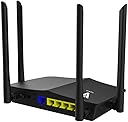
The AX1500 WiFi 6 Router delivers next-gen 802.11ax dual-band speeds up to 1500 Mbps powered by a 1.5GHz tri-core processor. Featuring OFDMA and MU-MIMO technologies, it supports multiple devices with reduced latency and enhanced efficiency. Equipped with 4 high-gain antennas and mesh networking capability, it ensures strong coverage across large, multi-level homes. Backward compatible with older WiFi standards and secured by WPA3, this router is ideal for gamers, streamers, and smart homes seeking future-proof connectivity.




| ASIN | B07X9K1N2N |
| Antenna Location | Gaming |
| Antenna Type | Fixed |
| Best Sellers Rank | #281,905 in Computers & Accessories ( See Top 100 in Computers & Accessories ) #4,634 in Computer Routers |
| Brand | Vanin Portas e Janelas |
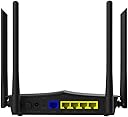
| Built-In Media | Product includes 4 detachable high-gain antennas, 1 WAN port, and 4 LAN ports. |
| Color | Black |
| Compatible Devices | Smartphone |
| Connectivity Protocol | Wi-Fi |
| Connectivity Technology | Wireless, Ethernet |
| Control Method | App |
| Coverage | large |
| Customer Reviews | 3.9 out of 5 stars 751 Reviews |
| Data Transfer Rate | 300 megabits_per_second |
| Frequency | 5 GHz |
| Frequency Band Class | Dual-Band |
| Item Weight | 1.4 pounds |
| LAN Port Bandwidth | 1000 Mbps |
| Manufacturer | VANIN |
| Maximum Upstream Data Transfer Rate | 300 megabits_per_second |
| Mfr Part Number | RX4-1500 |
| Model Name | AX1500 |
| Model Number | RX4-1500 |
| Number of Antennas | 4 |
| Number of Items | 1 |
| Number of Ports | 5 |
| Other Special Features of the Product | WPS |
| Router Network Type | hybrid |
| Security Protocol | WPS |
| Special Feature | WPS |
| UPC | 886268868213 |
| Unit Count | 1 Count |
| Voltage | 240 volts |
| Wi-Fi Generation | Wi-Fi 6 |
| Wireless Communication Standard | 802.11a/b/g/n |
| Wireless Compability | 802.11a/b/g/n |
B**A
Easy setup and works well
tldr: This is a great router. It is very cheap for what you get. If it lasts a year it will have paid for itself by not renting one from an ISP. Signal is ok, could be stronger. Don't buy unless your wifi can already take advantage of at least 802.11ac, and preferably ax to get the most out of it. Buying our own router instead renting from the ISP saves about $10 to $15 per month, so they have a tendency to pay for themselves if you choose wisely. We had an Archer C7 router for about 6 years that I paid about $100 for and although it worked great overall it was starting to show its age a little too much. When the time came to upgrade I looked for an ax router to future proof our home network for a while and was hoping to find something in the same price band. For an ax router in this price band the pickings were slim. I ultimately chose this one because (a) it was the cheapest option, and (b) it had good reviews. So far I am very happy with the selection. It was very easy to set up out of the box. In a ~2600 sq ft three level townhouse with the router on the middle floor we get signal throughout, although the 5 ghz band is weak upstairs and on the far side from the router. The Archer C7 5 ghz band didn't reach there consistently, though, so at least now there's access. Previously, I had to use the 2.4 ghz band and was getting about 2 Mb/s over usb wifi using 802.11n. A combination of this router, an ax-capable PCI-E wifi card, and being able to get a 5 ghz signal means I now get about 80 Mb/s on the same computer, which caps out what the ISP will give me. The difference is night and day. So far, any issues I have would be nitpicking. I wish the 5 ghz signal were just a little stronger and the router's interface is merely functional which means it could be cooler to interact with. I personally am very happy that it just has one small LED indicator light on the front instead of the nearly dozen flashing icons on the Archer, but I guess some other people might prefer it the other way. I had to get a new wifi receiver for the computer to take advantage of the 802.11ax standard, but that was something I knew going into this. Do not buy this router unless you (a) already have a wifi receiver that can use at least 802.11ac, or (b) plan to buy a new one that can use the 802.11ax standard. If you don't do that then just get an even cheaper one that still uses 802.11n because the extra bandwidth will never be used.
N**.
Awesome, especially for the price!
I just got this router a couple days ago now, so I don't have any long term testing. But what I can tell you is that this was extremely easy to set up. The instructions were very simple and quite clear. It took me about 5 minutes including clearing the space to put it. So yeah, very easy and user friendly. The speeds are fantastic too. My internet is capped at 50Mbps, but the router I had before with a wired connection delivered just under that. The wifi was almost half. But now with wifi6 I can reach 50 and sometimes it wavers just above the cap. On wifi! The wired connection also feels a bit smoother. Everything loads quick and without any hiccups. I can easily recommend this. The price alone was enough to have me convinced. This router was only $25 and some change at the time I got. Meanwhile almost every other option on all of Amazon were priced at $40 or more. Sometimes much much more. I saw one for around $400! I can't imagine what kind of features it would have to justify a price tag like that. Maybe it's worth it, who knows. I will never be able or want to get something like that when there's a $25 router right here that just kills it. Granted, my internet isn't crazy fast, so I can't attest to the higher end of the speed spectrum. But for my purposes and capabilities, this is an amazing find and I love it.
J**.
Good Bang for the Buck
It works! Router setup not that difficult if you know a little about what you are doing, and can follow instructions. Be sure to obtain latest firmware version and install on unit before beginning configuration. Am using this a primary router for residential high-speed broadband WiFi (WAN is Mediacom on Docsis 3.1 router with 500 Mbps service). Radio range is not as strong as I would have expected, but have not yet optimized router placement or antenna positioning to see if that helps. As a result, I have also added my old AC router as a wired access point on the LAN to this device. As I do not have any WiFi 6 capable devices yet, I cannot test or comment on its capabilities there. Nice to be future-proofed though for the eventual transition. I mainly purchased this AX replacement to see if it could better handle my home networking needs with a congested device count on mainly the 2.4GHz band. So far, so good - with the exception of the previously mentioned range concerns. Happy with the results given the price point, though!
R**R
AVOID AT ALL COSTS. Terrible.
Set up was relatively easy if you remember Setting up a wireless router in the early 2000s. Definitely not as clear and straightforward as newer routers, especially ones that have dedicated apps. It’s very important that you run a firmware update upon installation, and I have noticed that they’ve been adding features via the firmware update. However, in the few weeks that I’ve had it my wireless seems to have gone out several times after a week or so requiring a reboot of the router. Most recently, all of my devices were unable to login and it said that my password was incorrect, a reboot fixed it. I’m not sure if I have a faulty unit, has anyone else experienced this? UPDATE: Every morning when I wake up, there's a 50-50 chance that my wireless devices will no longer be connected and I need to reboot. Removing one star. UPDATE: The product keeps degrading. Craps out and needs to be rebooted every 24 hours or so. Absolutely terrible. Avoid at all costs. I contacted the company. They were responsive over email and said they would send me a new unit (or a certificate for one). That was 6 weeks ago. Nothing has yet come. UPDATE: It has now been over 2 years since my last update. The company has not yet sent me a replacement and my unit has been comfortably residing in a landfill for a very log time. Truly a horrible purchase, but hey, at least it was cheap.
G**Z
Very satisfied with this product.
The router was very easy to setup. Very stable wifi with good range. i didn't expect to get guest wifi also. For the price it is very well balanced and good bang for the buck. have already recommended it to more people , friends and work colleagues have also bought. After like 1 month of use the router at first had no DNS settings that could be set manually. now with the firmware update it can be set. the interface has gone through refresh and lot has changed. but i have a big issue with disconection. every week i will suffer from disconection from this router. i am talking with support they are willing to send me a new or replacement router. but i read that this is not gonna be the solution since there is a problem in the router or firmware itself that needs to be adressed. and simple take care of. Removing 2 stars. Hope you guys can deliver in the next firmware. Take time and really work the issues on disconection this can be a great product but you really need to step up on the plate right now!
D**N
Best Economical WiFi 6 Technology
I live in a rural area where AT&T is 3mbps, Spectrum is non-existent, and Excede/Viasat is the only limited 35mbps (throttled) option available. (By the way, I do NOT recommend Viasat). My current internet service provider (ISP) is Excede/Viasat. :c I purchased the Vanin RX4-1500 in hopes to device control traffic better and increase the Viasat modems limited and weak signal to my open floor plan 2300sqft house). My current router (Viasat RG1100) touted specs of 802.11 ac 3x3 MU-MIMO 2.4/5.0 GHz Dual-Band, but it drops every device I try to connect to it AND service is spotty at best; it’s a horrible router. I did a speed test via the Vanin RX4-1500 and got wireless test speed 46.62mbps down and 3.49 mbps up!! With my desktop connected directly to the Viasat RG1100 the test speed results yielded 38.90mbps down and 2.20 mbps up with my current internet service provider (ISP) (Viasat). Excuse the profanity, but WHAT THE HELL???? Enough of the ISP rant. The Vanin RX4-1500: I have to say, this product is simple, but it WORKED. The simple and easy setup got me up and running quickly. I am NOT a techie, but I understand technical instructions fairly well. The setup instructions are a little confusing for the first read, but the below details may help other non-techies like me: 1- Follow the printed “Step 1: Basic Installation” instructions BUT make sure you use a desktop and/or laptop to connect DIRECTLY to the RX4-1500 (This is Important). I had a difficult time finding the landing page via my iPhone. 2- Step 2 is self explanatory 3- Step 3 AND 4: Click on the “NETWORK” tab, then click on each sub-tab for “2.4 WIRELESS” and “5G WIRELESS” and reset the passwords for the 2.4G and 5G. This, essentially, is all there is to it. The Vanin RX4-1500 manages the data traffic much better than my current ISP router alone. I could not explain how this logically works, but it works!
M**.
Blazing fast speeds from a budget router! No USB ports though.
The Juplink AX1500 is an amazing router for the price. Compared to my prior TP-Link Archer router (AC 1350 model) it has more than double my desktop PC's internet download speeds (from the high 90s to 208 mbps). Pro's: It's an incredible value. Most other WiFi 6 routers (with more features of course) cost in the $200 and up range. The AX1500 has 4 antennas. My Archer router only had 3. WPS Button for easy device connectivity. Con's: No USB type A or C ports available for expansion. A single green status light (no labeling). If you are having connection issues, the light won't be of much help. The device's status page, where you go to set passwords and update the firmware, isn't nearly as polished as TP-Link's software. The page suffers from poor Chinese to English translations and the certain features are hard to find. For example: under Management -> Device Management -> Manual Upgrade is where you will find the firmware upgrade capability. You also have to download the latest firmware from Juplink's website whereas the manual says that you can grab the file from your ISP. Overall, the spelling issues and layout issues are minor. Plus, they can always be fixed in a future software update. And the hardware is rock solid and the speeds from the 2.4 & 5ghz bands, as well as the WAN port, are FAST. P.S. There are no pictures of the backside of the router. So, on the back of the router, there is a reset button, a WPS button, 4 internet ports, a WAN port, an on/off button and the power cord receptacle. P.P.S. If you use a VPN may also need to uncheck 'Invisibility on LAN' if you want to access the router's device status page (where you set admin and WiFi passwords).
J**H
Could not get the promised speed
To set the stage, we have 25+ wifi devices in the house. These include computers, phones, tables, TVs, wifi connected switches, and various home automation devices. When an older AC router became unreliable, I was intrigued with the idea of a WiFi 6 router to "future proof" our networking and support the larger number of devices in the house. I purchased the AX1500 WiFi router with the idea that I'd be getting speed and support for multiple devices. Not the case. Unboxing and set-up was relatively straightforward until I tried to update the firmware. The website for the router is incomplete and links simply deadened or navigated in circles. Abandoning the firmware updated I connected all of our devices and moved onto every new router owner's favorite activity... speed testing. Another let down, WiFi 6 is meant to be fast and this router was only delivering 10% - 20% of the speed of my previous router. The picture included has the results of speed tests taken on an iPhone 11 Pro. Similar results were true on my computers. The only bright spot was wired connections seemed to be working well. I also tried separating the 2.4GHz and 5GHz channels, putting only our phones and computers on the 5GHz channel. No change in speed or performance. Skip this router or spend the extra to get a WiFi 6 or mesh router from Netgear or Linksys.
Trustpilot
1 month ago
1 week ago