
❄️ Stay cool, stay ahead — because overheating is so last season!
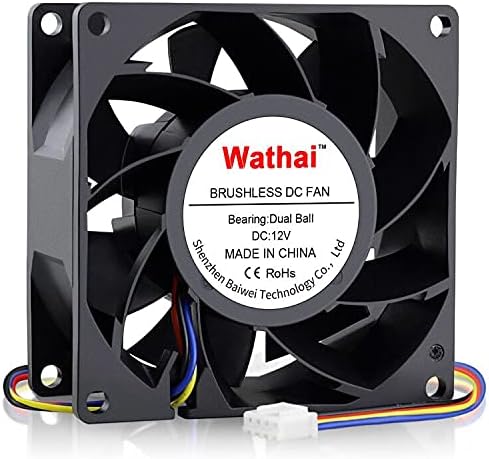
The Wathai 80mm x 38mm High Static Pressure Fan is a high-performance 12V cooling solution featuring a powerful 72.6 CFM airflow at up to 5500 RPM. Equipped with durable dual ball bearings and 4-Pin PWM control, it offers precise speed adjustment and long-lasting stability. Ideal for PCs, servers, and 3D printer enclosures, this fan excels in dense radiator setups with its high static pressure design, ensuring efficient heat dissipation while maintaining manageable noise levels around 47 dBA.


| ASIN | B07QX3QCP5 |
| Air Flow Capacity | 72.6 Cubic Feet Per Minute |
| Best Sellers Rank | #444 in Computer Case Fans |
| Brand | Wathai |
| Brand Name | Wathai |
| Compatible Devices | Desktop, Gaming Console, Inverter, Server, computer case |
| Cooling Method | Air, cooling fan |
| Customer Reviews | 4.5 out of 5 stars 363 Reviews |
| Item Dimensions L x W x H | 3.14"L x 3.15"W x 1.5"H |
| Item Weight | 2.1 Ounces |
| Manufacturer | Wathai |
| Material Type | Plastic |
| Maximum Rotational Speed | 5500 RPM |
| Noise Level | 47 Decibels |
| Power Connector Type | 4-Pin |
| Product Dimensions | 3.14"L x 3.15"W x 1.5"H |
| Unit Count | 1.0 Count |
| Voltage | 12 Volts (DC) |
| Wattage | 7 watts |
D**A
Low amperage draw and moves lots of air without much noise.
using this with a temp sensor to keep a inverter and Lithium battery compartment cooled. I'm pulling air from a AC area and forcing into a compartment below. I was concerned about volume of air and noise level. The amount of air is incredible and it's louder than what I had in it but not really that bad. It's a thicker fan so I guess how they get the CFM that I needed. I've ordered a second one along with the duct work w flange. Also it only pulls 1 amp. It's under the bed and if it's quite in RV you can hear it but it won't be enough to cause a issue. I comes with 4 wires on a connection that I was able to pop out the red and black and slide into a connecter that was used with other fan. It comes with two fan covers which is usually extra. I wish it came with the connection that would plug into connection on fan
N**R
It's a server fan, not a normal desktop PC fan.
I bought this as a cheap fan to pair with my Noctua as my motherboard takes four-pin connector and with the exception of that Noctua all I have are 3-pin 80mm fans. The Noctua came with some adaptors, including a splitter and noise reducer. When I first fired this baby up when it was connected to the splitter with my Noctua, it was louder than a jet engine. I ended up hooking the noise reducer between it and the splitter and it quieted right down. Even with the noise reducer, it has great airflow. It was after I set it up that I went back to the product page to realize it's a server fan. Explained the noise and the fact it was cheap. It's actually a good fan, it was my fault for not paying attention about it being more for servers than normal desktop PCs. So yeah, five stars due it it's ability to keep my PC cool.
P**S
Great upgade!
I have a Dell 7060 MT I7-8700 (mid-tower) desktop I recently purchased and upgraded. One of those upgrades was to replace the original case fan with this fan. So a couple of things to consider. The original fan was 12V / .36A and rated at 40 CFM, and was whisper quiet. This fan is 12v / .45A and rated at 65CFM and is not whisper quiet, but is not in my subjective opinion very loud. In fact I like being able to hear it because I know it's working and have no false sense of security. I should add that I have been in IT for many years and am therefore innately suspicious of electronics in general. But I digress. So here's my end game - this fan generates way more air flow that the original. It spins at a much faster RPM and has almost 3 times the number of blades. Hence its relative noise to the original. I could barely feel the air from the old fan with my hand, but this fan's air flow is way more than the difference in the specs would indicate. My internal 512GB SSD (Win 10 Pro drive) dropped 5 degrees F and my 3T HHD (data drive) dropped 7. Well worth a little additional background noise because heat is a common killer of any type of drive. In addition to having the same DCV rating of 12 it's also important to use a replacement fan that has the same or lower current rating. A little higher difference is ok in *most* cases, again depending on a number of system variables. So to be absolutely safe use a fan with the same DCV and an amp (A) rating the same or less. In my case new fan's .45A was close enough to the old of .36A to not matter. Installation was easy as far as the new fan goes. Getting out the old fan was a pain in my case (no pun intended). However, I did have to trim off a piece of the new fan's 4-pin connector on its backside in order for it to fit into the socket on the motherboard. You may, or, may not, have to do that. Good luck!
F**5
Not the quietest fan
Noise at full tilt is a bit droney. At lower speeds it's not as bad as the fan I replaced. I did not use this in a computer application. I used this as a fan for a electronics device that needed a good amount of air flow. I tried in of those quiet fans and altho it was quiet it did not move enough air. So I took this fan and put a 50 ohm resistor in series to slow it down a bit. Noise was acceptable and still moved enough air. So it's not a bad fan. I just had a difficult criteria to meet using this fan but found an acceptable solution.
A**R
Works in my Dell Optiplex 7010 SFF…mostly
I wanted to beef up my Optiplex 7010 to the highest performance possible so I swapped out the i5 CPU for an i7-3770K, which I read is the fastest CPU available for the LGA1155 socket. I also maxed out the memory to 32GB CL9 and added an NVIDIA GeForce GT 1030 graphics card. I figured these upgrades would generate more heat so I wanted to increase the air flow as well. The stock Foxconn fan pushes 45cfm of air, so this Wathai fan caught my notice because it’s rated at 65cfm yet is almost the same dimensions. I say “almost” because, although the width and height are the same (80mm x 80mm), it is 5mm deeper than the stock fan, and there is very little extra space in those Dell SFF cases. Well the good news is I was able to squeeze it in…just. I was even able to reuse the stock rubber fan mounts. Also, the thing is so quiet I can’t hear it running. Now for the bad news. First, the power connector doesn’t match the socket on the motherboard so I had to use an adapter cable like the Fosa 5Pin to 4Pin Fan Adapter Converter Extension Cable for DELL Dedicated Fans. Second, this is a PWM fan, which the motherboard doesn’t recognize so on boot up it triggers a “case fan is not running” error even though the fan is spinning just fine. Pressing F1 gets me past the error so I figured that is an acceptable tradeoff for the additional airflow. It is now installed and running and keeping the CPU at a very acceptable 40-45 degrees celsius.
A**M
Loud, but great air movement.
I put these in a server to replace some of the old 80mm fans. They're definitely loud, but that's what I expect from something this small, that moves this much air. Good price for the amount of air it's moving.
K**A
Great but loud
Fits perfect, great airflow, but this one fan is almost louder than any datacenter i've been in
C**C
Installed in RackChoice 2U micro ATX server rack. Noisy, but less than my HP Proliant DL380P. Very good airflow.
コ**O
冷却能力は高いですが、若干風切り音が気になります。商品としては十分機能しています。静かな部屋での使用には向かないですね。
K**N
50%越えるとケース内から、「ウィーン」と聞こえますが風量はかなりあります。 ケース内の冷却したいデバイスにピンポイント設定し、指定温度で一気に廃熱したり空冷目的で使う設定すると効果抜群です。
M**9
This is a high speed, extremely noisy fan, but if you download fan control, it makes it so you can control the RPMs until you hit high temperatures.This fan will cool any CPU for sure.
A**ー
順調に回転してるので安心です。
Trustpilot
2 months ago
2 weeks ago