Desertcart purchases this item on your behalf and handles shipping, customs, and support to South Africa.
🌡️ Upgrade your airflow game — because comfort is the new luxury.
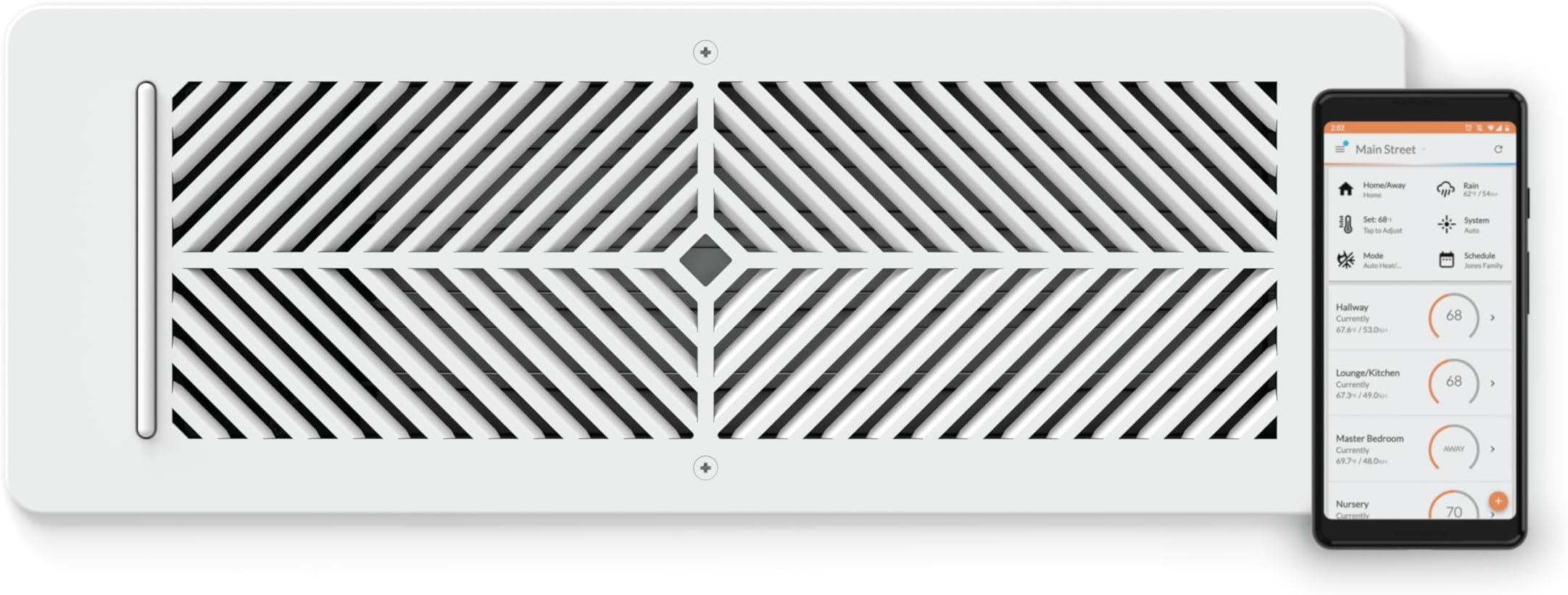
The Flair Smart Vent 4x12 is a battery-powered, steel-constructed smart vent cover designed for floors, walls, and ceilings. Utilizing 915 MHz RF communication and ZigBee protocol, it integrates with smart thermostats and the Flair Puck to deliver precise, automated room-by-room temperature control. Easy to install without wiring, it supports app and voice control, enabling energy-efficient HVAC management and consistent comfort throughout your home.


| ASIN | B07TKHXX8S |
| Additional Features | 915 MHz radio for communication, works with Flair Puck, steel construction, attaches to wall and ceiling with screws |
| Best Sellers Rank | #79,170 in Tools & Home Improvement ( See Top 100 in Tools & Home Improvement ) #510 in Registers, Grilles & Vents |
| Brand | Flair |
| Brand Name | Flair |
| Color | White |
| Connectivity Protocol | ZigBee |
| Connectivity Technology | RF |
| Control Method | App, Voice |
| Control Type | Voice Control |
| Controller Type | App Control, Voice Control |
| Customer Reviews | 3.8 out of 5 stars 535 Reviews |
| Display Type | LCD |
| Finish Types | Powder Coated |
| Included Components | Batteries |
| Item Dimensions D x W x H | 5.1"D x 14"W x 2.7"H |
| Item Type Name | Vent |
| Item Weight | 2.7 pounds |
| Manufacturer | Flair |
| Material Type | Alloy Steel |
| Model Name | Flair Smart Vent |
| Model Number | FLAIRVENT412 |
| Mounting Type | Wall, Ceiling, or Floor |
| Number of Batteries | 2 C batteries required. (included) |
| Power Source | Battery Powered |
| Product Dimensions | 5.1"D x 14"W x 2.7"H |
| Product Style | Modern |
| Screen Size | 4 inches |
| Shape | Rectangular |
| Special Feature | 915 MHz radio for communication, works with Flair Puck, steel construction, attaches to wall and ceiling with screws Special Feature 915 MHz radio for communication, works with Flair Puck, steel construction, attaches to wall and ceiling with screws See more |
| Specific Uses For Product | Residential |
| Temperature Control Type | Automatic, Manual |
| UPC | 868596000244 |
| Unit Count | 1 Count |
| Voltage | 24 volts |
B**N
They work amazing
I love these, super expensive for everything but its nice you can just add extra vents as you buy them. They are built for the price, very sturdy and look nice. They work which is the best part. I always had my room either to hot or to cold and constantly was adjusting my vent. These do it all for me and I dont have to worry about anything. Its always a comfortable temp now. And customer service is great I had an issue with one vent sticking open or closed and they just sent me a brand new one. The fit and size is what you expect. I do wish they had other colors like black, white isnt what I would pick but again I cant complain I love how well they work
S**R
A game changer!
Our house is about 35 years old and we have had issues keeping the temperature of our upstairs even close to uniform, even after extensive updates to the house. These vents have changed that all together. We installed these vents in two rooms and have another smart vent pre-ordered directly from the company. The two vents that we installed have been working very well. They are keeping two of our most problematic rooms much closer to the set thermostat temperature! On the con side, you will need to also pick up the fairly pricey Puck to act as a gateway for these vents. Fortunately the Puck also pairs with our Ecobee thermostat and can use the Ecobee sensors in lieu of additional Pucks. Another con is that the app is fairly finicky about setting up the Puck. I had to go through the process about 6 times for the setup to actually work as intended. The Puck requires a 2.4GHz wifi connection in order to operate. We have a dedicated 2.4GHz wifi system as we have set up a whole smart home, but in spite of this the Puck still took multiple tries to set up. Still, in the end the system did get set up, and after the Puck paired with our wifi system the vents paired quickly and easily. I would heartily recommend these vents for any home that has issues maintaining a constant temperature across different rooms.
T**9
Great...when it works like it is supposed to.
These are great, when they work like they are intended. For all of the other times, it is extremely frustrating and I really wish I would have looked into the company and their support structure a little further. The single biggest point of frustration for me is that there is no live support option. You have to send an email to their support email box and just wait for a response and then go back and forth with them until your issues are resolved. There's not even a live chat option. The products seem to be extremely touchy. My current problem is the vents keep resetting the mode that the Thermostat is in to Heat, even after I manually update it to Cool. This results in the vents operating off the wrong trigger temperatures and defeating the entire purpose of having them. Great thought and idea for the product, but awful execution in terms of support structure for working through buggy systems and issues. **5/23/2023 Update** Now, when the Air Conditioning is on, half of my vents say they have poor signal and just stay closed. They've not moved, the pucks haven't moved so I'm not sure what is causing it but the problems coincided with the transition from Furnace use to Air Conditioning use. 10/9/2023 Update Flair vents and pucks are doing the exact same thing as before, but in the inverse where they wo t register a change from cooling to heating. Update to reflect 1 star. A "smart" device shouldn't require constant oversight and manual interference for them to work properly. Avoid until they figure out how to offer live tech support and/or build a more reliable back end.
M**C
Good system, but not straight forward to configure.
Having run these vents for over a year now (since September 2022), I've found their functionality to be reliable. A rating of this product with only one star seems unfair and likely stem from a misunderstanding of its technical capabilities and intended function. The basic functionality of the vents is to shut off a room from being heated or cooled. They respond to trigger temperatures, and this will open or close the valve automatically. The vents lack a built-in temperature sensor and need a Flair Puck (available from Flair) or the temperature sensors of the thermostat (in my case Ecobee). Successful operation requires a Flair Puck (as gateway) and a robust Wi-Fi connection. Overall, I found that the Vents/Puck installation does not require an above average technical understanding (though some technical familiarity is necessary). What is very counter intuitive is the app settings. It is clearly made by engineers and is not very user friendly. The software doesn't feel very mature yet. A couple of items which helped me get the system to do what I want. This is for a home with a smart thermostat: 1) After integration of your smart thermostat go to 'home settings/thermostats' and turn off 'Allow flair to adjust thermostat'. The scheduling and temp control of the flair system is significantly less sophisticated than your smart thermostat and you want to prevent this app from overriding your home settings. 2) Stay in 'home setting' and go to the 'System' section. Set 'Set point controller' to 'Thermostat'. Same reason as point 1 3) Only create rooms in the app where you have Flair Vents. I installed Flair vents in rooms which I want to close off from my forced air heating/cooling system when not occupied (I have a larger house 6000 sq.ft.). You will need to have a temp sensor in each of these rooms, either a Puck or a thermostat sensor. The flair Puck is 2x the price of an Ecobee sensor, so it was an easy choice for me. Zones are created automatically by the flair app when you complete the smart thermostat integration. I have two zones as I have two Ecobees in my home. 4) Get a cup of coffee and patiently start making the schedules per room/room group/zone. It is a tedious affair. I had to make one for the winter and one for the summer as Flair works with a single trigger value for both cooling and heating. Normally your trigger temperature for cooling is set higher than your trigger temperature for heating, so a single trigger value didn’t work for me. Set ‘Mode’ to ‘Auto’, the flair system will detect whether the system is heating or cooling, prompting Flair to adjust the open/close action accordingly. 5) Go to 'Device settings' and turn off 'Push notifications' and 'Geofencing'. These functions are redundant when using a smart thermostat. 6) I would recommend to not install Smart vents in Bathrooms. I learned this after my install. You want Bathrooms to be warm. In the winter, the vent has to be all open to let the heat in, in summer fully closed to keep the cold AC out. This can easily be done by a regular (mechanical) vent, which you open/close before the summer and winter period. The issue with using smart vents is that the APP will open vents to ensure a minimum of vents are open to safeguard your AC system. Unfortunately you can not dictate which of the smart vents it will open (or keep closed). This results in frequent freezing bathrooms. Also, the Smart vents are not able to provide a 100% closed vent. The system works great and does what I intended it to do. The flair engineers created an over complicated app by inserting features which are (and should only be) controlled by your smart thermostat. Turn that off. The scheduling is tedious, but you will need to do it to get the max out of your flair system. Best of luck in your implementation! -----###----- Edit: I have been running my system without the bridge for years without any issues. I'm adding this comment because I believe the Flair marketing of the new bridge device is misleading. It suggests you need the device even if you have a solid home Wi-Fi network, which is incorrect. Be aware that this system is cloud based (not sure why) so Flair severs are required to operate the system. If your Internet down so are your vents (open in case of lost connectivity). Even worse if Flair goes out of business your system is inoperable. An alternative to Flair vents are vents from "Keen home". Have a look, read the reviews and make your pick.
M**S
Know What to Expect and You will be Thrilled
I just placed an order for vent register 16 of 19 in my home as part of a two-year conversion. I saw some negative reviews and felt compelled to clear up a few items. First and foremost (and this is critical), install these where you want LESS AIRFLOW, not more. These restrict airflow to places that get too much heat in the winter or too much AC in the summer. Do not start in rooms that need more airflow; get to those last. Second, the impact to rooms needing more airflow will benefit as you add more of these vents in your home. As more of these vents restrict airflow to rooms that do not need it, the remaining airflow will be available for the rooms that do need it. I saw very little benefit with the first five or six vent registers. The system needs control of most or all of the house, not just one here and another there. Second, installation is indeed painful, from the pairing voodoo that no one seems to understand to the agony of installing the cover plate upside down into a ceiling vent. These are mostly one-off painful events per vent register. Once that pain is a memory, you will love the increased temperature stability in your home. Last, get temperature readings in each room. Pucks will read temperature for the Flair system, but Ecobee cannot see that data, whereas both Ecobee and Flair can see Ecobee sensor data. I currently have 15 vents, 3 pucks, and 10 Ecobee sensors. I will have more by the time I am done, but I have been fighting temperature imbalance for 13 years and my home is finally livable throughout.
S**N
Works great, when the app doesn’t break….
Worked great for 1 year, then one of the vents batteries died. Replaced. No problem. But then the app had some update that moved vents to different “rooms” and my sons room got to 82 and my office which was supposed to be closed is 72. Wow! Thermostat is set to 76. It completely flipped the vents to the opposite rooms! Now they won’t even open manually or anything. Extremely infuriating.. Update: now they won’t even open when in manual mode Edit: i did hear from flair support: I deleted everything and resynced with ecobee and it worked for 3 days then the schedule broke again. Then they said to hold off on any schedule for a week or more so that they could repair something on their end that caused the issue. It took about a week and we are back to having a working s huddle and are problem free for the last 3 months.
A**R
Read the fine print, but don't believe it.
It does not work with your own thermostat, according to Luis at their tech support. You have to buy the Puck for temperature sensing regardless of all the other sensors you have. My goal was to have Home Assistant control the vent via their expensive bridge, but apparently that is not an option without a Puck. So spend hundreds of dollars on a bridge and vents, to be limited because you did not buy the $140 Puck, which is a temperature sensor, not a thermostat (according to Flair). This is a great idea with a bunch of crappy upsell products to make it work.
J**M
9 Month Review
The Flair vents are sick—in the best way. Upstairs, I’ve got three bedrooms on their own HVAC unit. It was like a Goldilocks story up there: one room was too hot, one was too cold, and one was juuust right. To fix this, I installed three Flair smart vents (8x8, 10x10, and 6x14). I already had a Honeywell T9 thermostat, but I leveled up by adding smart room sensors for each bedroom. To tie everything together, I got a Flair puck, which acts as the hub and the middleman between the vents and the internet. The puck lives in the hallway, diligently managing the system. My goal was simple: when Bedroom 1 hits its target temp, its vent closes. Same with Bedrooms 2 and 3. Flair works really well with the Honeywell sensors to make this happen. Now, about that guest bathroom vent. I left it unchanged because I worried about backflow pressure—if all the vents closed while the HVAC unit kept running, it could damage the system. Flair has an algorithm to prevent this by keeping vents open, but it wasn’t exactly what I needed. Flair’s default is to keep two vents open at all times, but I only wanted one. So...I lied to Flair (sorry, Flair). By telling it I had more vents, I got it to work the way I wanted. Play with that at your own risk. FYI, the guest bathroom vent is now the designated “always-open” vent, but flair always ensures that one of the flair vents are always open. I also set the system to fully open all vents when the unit switches to circulation mode (just moving air around, not heating or cooling). The result? Flawless. Seriously, I barely even notice it’s there—it just works. Once you’ve set it up to your liking, maintenance is practically nonexistent. It’s one of those systems you forget about because it’s doing its job so well. Buy them now before the HVAC contractors find a way to put them out of business. Far superior system in both terms of cost and efficiency than your standard HVAC approach. Eventually, I want to do the same thing downstairs, but that is going to be it's own animal to tackle. Highly recommend!
Trustpilot
1 month ago
5 days ago