Desertcart purchases this item on your behalf and handles shipping, customs, and support to South Africa.
๐จ Elevate your digital art gameโcreate boldly, anywhere, anytime!
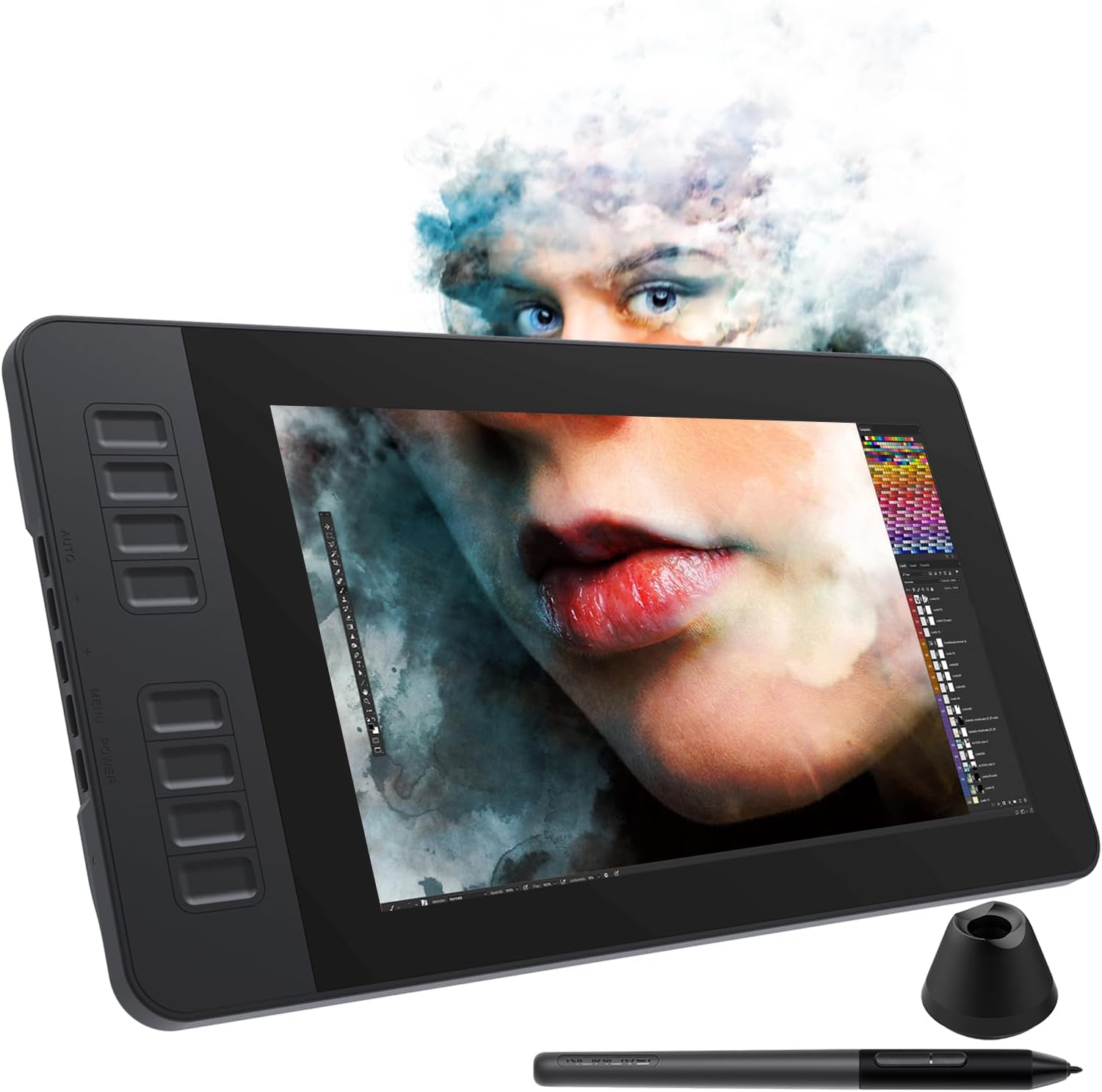
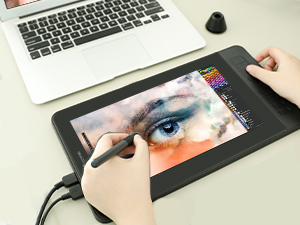
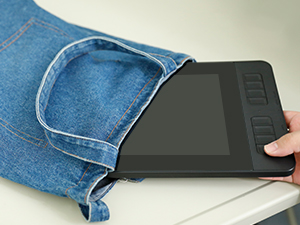
The GAOMON PD1161 is a portable 11.6-inch pen display tablet featuring an IPS Full HD screen (1920x1080) with 8192 levels of pressure sensitivity and tilt support. It includes a battery-free stylus with 2 programmable buttons, 8 customizable shortcut keys, and comes pre-applied with an anti-glare film for eye comfort. Weighing only 866g, it connects via HDMI and USB to Windows or Mac computers and supports popular creative software, making it ideal for digital artists, designers, and remote professionals seeking precision and portability.


| Active Surface Area | 11.6'' |
| Additional Features | 8 Express Keys, Portable & Lightweight |
| Asin | B07VTKYH9D |
| Best Sellers Rank | #136 in Computer Graphics Tablets |
| Brand | GAOMON |
| Built In Media | 3-in-1 Cable & US STD Power Plug, Digital Pen, GAOMON PD1161 Pen Display Tablet with AG Film Pre-applied, Glove, Pen Holder with 8 Pen Nibs |
| Color | Black |
| Compatible Devices | Mac OS, Windows OS |
| Connectivity Technology | HDMI, USB |
| Customer Reviews | 4.3 4.3 out of 5 stars (2,031) 4.3 out of 5 stars |
| Display Type | IPS |
| Item Dimensions L X W | 14.21"L x 7.87"W |
| Item Weight | 866 Grams |
| Manufacturer | GAOMON TECHNOLOGY CORPORATION |
| Mfr Part Number | A2.PD1161-0-EN0000-1-US |
| Model Name | GAOMON PD1161 Pen Display |
| Model Number | A2.PD1161-0-EN0000-1-US |
| Native Resolution | 1920x1080 |
| Operating System | Windows |
| Pressure Sensitivity | 8192 Levels |
| Screen Size | 11.6 Inches |
| Specific Uses For Product | Drawing, E-Signature, Painting |
| Target Audience | Student, Teacher |
User
Pretty good for my first display tablet (read full review)
I'm not sure if this drawing tablet was worth its price, but it's definitely not a bad one (I haven't tried out other models/brands, so I don't know how this one compares).I wish the screen were higher definition, but that might be just my problem since I have a bad habit of drawing small rather than zooming in... (Also, my fault for expecting iPad quality, obviously it's not going to live up to that!) I noticed the color accuracy was a bit off, but it was an easy adjustment to make thanks to the tablet's easy-to-navigate system settings. Another issue I ran into was the pen being a little off from where my mouse was, but again, easy fix with screen calibration! This tablet in general takes some getting used to, and you have to spend some time figuring out how to customize it to be comfortable.However, for my first pen display tablet, the functionality is 100% fine, and I like how it came with a glove, pen stand, extra nibs, and a tablet case and stand. That made it worth the extra dollars, I think. I love the paper-like texture and buttons on the side. I've used GAOMON before for my previous non-display tablet, so I might be biased.Honestly, I really like this tablet despite some other reviews saying it's not the best. I myself was on the fence about whether or not I should purchase it since the ratings seemed mixed, but I find it neat. Overall, would recommend.P.S. In my opinion, it works best when you set it as an extended display instead of mirrored. You can have a movie, reference, and chat open all while drawing, which is perfect for someone with an abysmal attention span like me!
User
Generally Great All Around Minus a Couple Quality of Life Quirks
I got this tablet on sale for about $300 USD in December 2020 and so far it's been a good purchase. This has been my first dedicated Pen Display tablet, although I've worked with Wacom Bamboo and Intuos Pro M and I can't tell the difference in term of input reading for the pen of either motion pickup or pressure sensitivity. I'm going to mainly be comparing it to those two tablets are a user who has made the leap from non-display graphics tablets to GAOMON pd156 Pro display drawing tablet.The display itself can be pretty bright, especially in a dark room, although I probably need to play with the hardware settings a little more.The shortcut buttons, in my opinion, are a step up from the Bamboo and Intuos Pro because they're very distinctly clicky with no annoying "half-press" that Wacom tablet buttons have as a result of the Wacom touch sensitivity on their tablets' buttons, the pd156 PRO buttons are strictly PRESSED/NOT PRESSED in function, which I didn't think I'd have to praise but it was a genuinely frustrating feature that couldn't be disabled on the Intuos. There is also an extra shortcut button available which has proven redundant at worst and highly convenient at best (with the second extra button being reserved for tablet monitor settings).The pd156 PRO also has, in my opinion, a more intuitive radial wheel button as it does not utilize touch sensitivity and instead opts for a simpler analog scheme wheel. It functions identically to other radial wheel buttons with the scheme of: Press interior button to cycle through customizable functions -> rotate wheel up or down to activate the function with each partial turn. As of now, there is only 3 customizable up/down function slots for the wheel button, for a technical total of 6 function slots.The stand is nice and made of sturdy materials, although it could be better as it just operates like a kickstand and a board. I've seen other stands that have a more complicated and customizable configuration, but if you're a stickler for stands, you've likely bought a specialized one anyway.The wire plugin for the tablet is also very stable, meaning you're unlikely to accidently knock it loose. To my knowledge, the tablet is exclusively wired.The pen is mostly a step down from the Wacom pens I've used. Its design is totally straight and cylindrical, which I have no real issue with, but if you find yourself needing that extra rubber padding or curvier design for a steadier grip then you're currently out of luck. There is no eraser on the pen, meaning you'll have to depend on your shortcut buttons or some other custom action if you have need of quickly accessing the erase function. Most importantly, the pressure sensor for the pen is located slightly farther up into the pen than the Wacom pens I've used, meaning that tilting actions and grip techniques are going to have less freedom at sharper angles, which is especially important to me when I'm in the zone drawing, tilt my pen at those sharper angles, and suddenly find that the cursor doesn't line up with the pen nib, instead lining up with where it is seated inside the pen, or even the plastic of the pen bumping into the display. My suggestion would be to either somehow extend the nib seating forward, or make longer or more projected nib seating in the pen.The driver software is also a minor step down from Wacom as it only provides two pips on the pressure sensitivity graph, where I believe Wacom supported at least 5, meaning that the pd156 PRO only supports a quadratic formula for pen pressure natively through the driver config, although this shouldn't be a dealbreaker as almost all drawing software has built-in pressure sensitivity options. The driver has also been upgraded in major ways several time since I purchased to improve stability and majorly any decrease software issues.The customer service was quick, friendly, and lenient. I had experienced a glitch in my pen causing it to continue drawing as I lifted it off the tablet, which the support representative informed me that it was probably because I dropped the pen, which had happened. Me dropping the pen should have voided the warranty, but they were nice enough to send me another pen free of charge after I provided proof of the issue.For its price of $350 , size (15.6 inch) , usability, comfort, customer service, and lack of major issues, I would definitely suggest this as a nice display tablet, especially for beginner and intermediate users.
User
Beware the screen protector.
I was in the process of writing a bad review about the screen being scratched. I noticed others complaining about the same thing, so I read the comments to those reviews. Much to my surprise, a screen protector is placed on the screen so well, that I didn't see that it was only a plastic protector. There really is a glass screen under that plastic protector. It is amazing to peal off the screen protector and find a brand new looking tablet underneath.During the install of the software, it will give you the option of changing the location of the installation software. Do not change the location. I did and it installed in Chinese. Stick with the default location.The tablet has problems working with my Corel Painter. I think the problem is with the mouse cursor constantly jumping around. So, when you are not using the table, make sure you shut off the table software. For some odd reason, I would select the paint brush icon and after a few strokes, it would switch to eraser or fill bucket. It could be the tablet is haunted. Sometimes, in the middle of using the pen, it just stops working. After rebooting the computer, the pen returns; I suspect the problem is in the tablet's USB connection; I have not figured out if it is a hardware or software problem. Maybe,one day, a driver update will fix the problems with the tablet.I went a little nuts in purchasing brush packs. This tablet seems to be very picky as to which brushes I am allowed to use. I will be painting along with one brush and then the pen stops working with the next brush that I select. It is odd, that when the tablet software is open, it doesn't respond to pressure, but the painting program seems to accept pen pressure. Since the tablet software doesn't seem to recognize the pen, I suspect that the problems that I am having is as a result of faulty software. After all, how many times are you supposed to reinstall the driver? I've tried a previous version of Painter and I get the same results with the tablet letting you choose some brushes and not others.I keep coming back to update my review and each time I take away another star. It appears that a lot of people are having problems with the pen working and I was hoping that I would be able to report a solution. I am not. Gaomon tech support want to give me access to my computer to poke are round. I'd rather buy a Watcom, than allow someone to poke around my computer. I am starting to suspect that the table doesn't cope well with systems with multiple monitors; so, if you still don't want to throw out the Gaomon tablet, try disconnecting all of the HDMI connections and use only the tablet. I also found that if I closed the canvas that I was working on and reopened it, I could go back to painting again. I think it got wise to me and that trick stopped working.Let's face it, we saw the prices for the Watcom tablets and wanted a cheaper product; as they always say, you get what you pay for; but, $200 for this tablet is a steep lesson to learn.I came back and added a star. I have to say that tech support really tried to help me, but we found no solutions. I did find some workarounds. I was given a couple beta drivers and found they are worse than the current driver. I think that sometimes you just find a product that doesn't work for you.I returned again and added another star. My tablet is not perfect, but sometimes our problems are self inflicted. After wanting numerous YouTube videos, I discovered that I had clicked on "Preserve Transparency" on layer that I was working on. Immediately, I solved all of my issues with that painting. When troubleshooting a problem, don't throw all of you attacks at a single issue. Check to see if you have made a mistake before blaming everything on the tablet company.
User
Amazing tablet for it's affordable price
I have had this tablet for well over a year now and it is probably one of my favourites! I cannot recommend it enough, especially if you are on a budget.Fits nicely in my desk area - not too big, not too small. Very light and comes with a leather case if you happen to travel - I don't, but it's still useful.Pressure sensitivity is awesome. Only issue I've ever had is with magma, but I that isn't really the fault of the tablet. Not everything will be compatible and that's alright.You can export your tablet settings too if you happen to move computers. It has never lagged, drawing feels smooth always and the screen has a paper-ish texture that makes it really comfortable to draw on.The only downsides I think is one button at the bottom doesn't seem to bind to anything and the wheel/button area seems to get dirty very easily, and is hard to clean. Sometimes the parallax messes up but it's easily fixed by lifting the pen away and repositioning. These issues are really easy to look past in my opinion because of the price - it's very worth it!Try not to get your cable damages though, as the replacement is much shorter than the original. My rabbit chewed my original, lol. But it still works great and customer service is very helpful on the chance you do run into issues.
User
Nice for the price
A nice tablet for the price. I have it set up for left hand use--all the buttons on the right side--and it works very well. I'm a beginner artist and don't have extensive tool needs (yet), so this is working well for me at the moment.I haven't fiddled with the color menus--it's a little finicky in the settings--and it does seem to be off compared to my laptop monitor, but it's not the fault of the tablet. I simply haven't taken the time to really hone it in yet.It's fairly plug and play, with just a little tweaking necessary in setup to calibrate the screen. Figuring out how to flip it for left hand use took some figuring out, but it can be done.All in all I'm satisfied with the tablet, and am enjoying using it.
User
Extremely Disappointed
I was so, so excited to find this quality of tablet for the price that it was when I ordered it. It has lovely reviews, is highly rated- It seemed like a steal!However, I was extremely disappointed when it arrived & I tried to use it.I read & followed what little instructions it came with to the last period. I installed the correct program, plugged it in correctly, did everything right. And it just wouldn't work.The screen would come on & duplicate my laptop screen, but the programming would not recognize the device. I spent between 1 & 2 hours of troubleshooting. I tried uninstalling, reinstalling, turning my computer off & back on, changing ports, using different cords... nothing.I even had one of my coworkers try it on his computer! His computer would sort of recognize the tablet, but would not duplicate his screen, the pen would not calibrate, and it was extremely laggy.I tried to utilize the live chat on the company Gaomon website, only to receive a message that they were not available during weekend hours. At 11am on a Friday.After some deeper digging online, I found several reviews on other websites experiencing the same problem. Many of them mentioning that the company itself offered little to no help when they were eventually able to get ahold of some form of customer service.I'm over it. I've already sent it to be returned & will be looking for a different tablet.---If you do want to try it out though, it seemed like a solid, well made tablet. It had some weight to it, had a decent screen, and came with a light faux leather screen cover. However, the power cord setup is really awkward & short. If you don't have a desktop outlet or power strip, you're probably going to struggle with finding a comfortable position to actually use it.
User
good tablet
I have used a drawing tablet for over 4 years so I am somewhat familiar with drawing tablets but I have not purchased a screen drawing tablet before so this is very new for me and I have to say so far it has been pretty good!once I hooked it all up it immediately turned on and I could use it like another monitorit lays flat on my pillow and perfect for using with my laptop.The specs are good too I do notice it is very sensitive to touch and the pen does not need batteries or to be charged to work.it is very light and has no stand so it is very much like drawing in my sketchbookthey even add a non glare screen protector which is really awesome I hate putting the screen protectors on myself.This would be good for traveling too as it can fit in my laptop bag and store away really easily I am planning ontraveling next summer so I get to take this tablet with me which im looking forward tooI also shared this drawing tablet with my nephew it worked really well for him too. I do think it might hurt your back if youdon't prop it up high enough when using it for a while I use pillows but I think a tablet stand could work too.I would say this is a really good buy so far I have not run into any issues when using it and I am glad I didn't have to paytoo much to find out if i like screen tablets (which i really do!) they are totally worth the investment in my book and I am glad I was able to buy this tablet.
User
A great tool for a great price
I was a bit iffy about it at first after seeing the price. That said, I still got it and it is amazing. I only had a VERY old wacom bamboo tablet to draw, and this has made drawing so much smoother and easier. Setting it up was a bit difficult but it was because I was plugging stuff wrong and also learned I only have one HDMI port on my PC. That said, when I got it right it displayed the program I was using and I quickly began to work.Pros:- Easy to use- Responsive to pressure mechanics- Drawing feels smooth- Shortcut/Hotkeys- It includes the glove- User friendly and easy for beginnersCons:- HDMI port/connection is needed. My PC has one but my monitor has to connect to that one as well. However, I just got an HDMI splitter. (They are sold on amazon for about $6-$9 depending on what you want)
User
a gaomon marca boa
vendedor honesto, e gentil, atencioso
User
GAOMON PD1161, An Efficient skilled tablet for designers n illustrators.
WOW, excellent tablet, it works excellently on photoshop as well as Affinity designer. I am grateful to Google, Amazon n GAOMON for all the services they r providing wt clear transparency n of course for the videos posted by GAOMON in You Tube n googling it to find out how to set n use the tablet in Google. Thank u God bless ๐น๐น๐น๐๐๐๐๐๐๐
User
De longe, a melhor custo-benefรญcio das mais baratas.
jรก uso uma e comprei pra minha sobrinha. รณtimo custo-benefรญcio.
User
Fantastic to use
Ease of use. Excellent light and transportable
User
I love everything about it
I'm thoroughly pleased with this purchase. As an educator using various drawing tablets for teaching, this one stands out remarkably, especially considering its price point. Its performance surpasses that of its smaller 11-inch counterpart. Writing with it is a delight; the experience is truly enjoyable. However, I've noticed a slight accuracy issue when nearing the edges. While this isn't a major concern for me as a math instructor, for tasks requiring pinpoint precision, this might be a decisive factor. Consider your specific use case before finalizing your decision.
Trustpilot
4 days ago
1 month ago