Desertcart purchases this item on your behalf and handles shipping, customs, and support to South Africa.
🚁 Elevate your aerial shots with the cable that fits where others don’t!
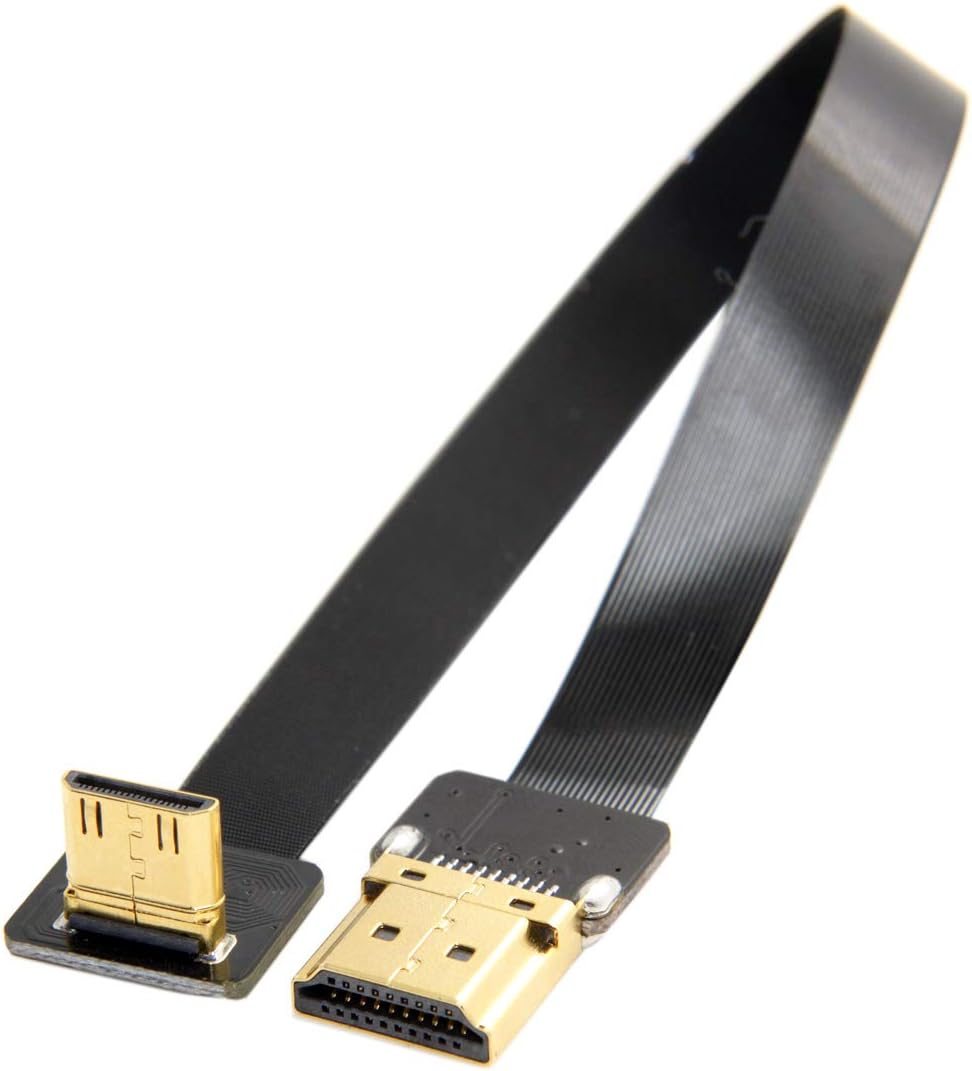
The JSER CYFPV 90 Degree Up Angled Mini HDMI Male to HDMI Male Flat Cable is a 20cm high-speed (10.8 GHz) cable engineered for FPV multicopter aerial photography. Its unique 90° up angled connector and ultra-flexible flat design make it perfect for tight gimbal setups and Micro HDMI port cameras, delivering reliable HD video transmission with minimal latency.


| ASIN | B073335YLW |
| Best Sellers Rank | #579 in HDMI Cables |
| Brand | JSER |
| Brand Name | JSER |
| Cable Type | HDMI |
| Color | Black Up Angled 20cm |
| Compatible Devices | Television |
| Compatible Phone Models | No Compatible Phone Models |
| Connectivity Technology | HDMI |
| Connector Gender | Male-to-Male |
| Connector Type | HDMI |
| Customer Reviews | 3.9 out of 5 stars 252 Reviews |
| Data Transfer Rate | 10.8 GHz |
| Gauge | 1 |
| Indoor Outdoor Usage | Indoor, Outdoor |
| Item Length | 20 centimeters |
| Item Shape | Flat |
| Item Weight | 9.07 g |
| Manufacturer | chenyang |
| Model | HD-190-UP-0.2M-XY |
| Model Name | JSER FPV 90° Up Angled Mini HDMI Cable |
| Number of Items | 1 |
| Number of Pins | 19 |
| Other Special Features of the Product | Up Angled |
| Part Number | HD-190-UP-0.2M-XY |
| Recommended Uses For Product | FPV HDTV Multicopter Aerial Photography |
| Special Feature | Up Angled |
| Specification Met | CE |
| UPC | 652065556604 |
| Unit Count | 1 Count |
S**.
I got sent the wrong product! (edited)
I already have numerous HDMI to HDMI mini cables and was specifically looking for a flat cable for a personal project because a normal cable won't fit. I'm sure this was just an accident but I needed that cable by tonight. This is highly unfortunate.. EDIT: I notified Amazon that I received the wrong product and they shipped me the correct cable. Looks/works exactly as described.
K**D
as advertised
as advertised
F**L
Barely works.
I needed a short and flexible mini hdmi cable to hdmi to go from my raspberry pi to a little 7" lcd. This looked a perfect solution to my project. But, so it doesn't work right. I have the ribbon cable connected properly with the contacts towards the circuit board on both sides. My screen has two hdmi ports, standard, and mini. But having the mini hdmi side in the screen with the hdmi to a mini hdmi adapter on the pi, nothing happens. Having it reversed with the standard in the screen, and the mini hdmi in the pi, the display comes on for about 10 seconds then does not want to come back on.
B**F
Blank screen for raspberry pi and 3rd party display
I get an initial display when I first boot up my pi with the loading console, but after it tries to log in i get a blank screen. I've tried increasing the HDMI boost in config.txt as well as a few other variables and nothing made it stay on. I've tried other cords and they all work correctly with no issues- even without adjusting any variables or parameters. It seems to be fairly well made. I even checked the solder joints with a multimeter to make sure there were no loose connections and everything seemed good. For whatever reason, though, this cord did not work for my application.
F**D
Neither original, nor replacement cable worked.
This cable HARDLY works, and when I does, the display will cut in and out. When it does "work", parts of the display is pixelated. I assume this is due to the cable connections being held on by clamp pressure instead of a soldered joint. I can't comment on whether or not audio works through this cable, as I could not get it work long enough to test it out. Don't waste your money.
L**N
Not as compact as it looks, no HDMI audio
Was looking for a really small HDMI wiring for a PI touchscreen project. I make no claims for how this cord performs on other systems at this time. Firstly, while this is one of the only mini-HDMI Up Angles out there and may still fit your needs, it doesn't sit flush. When plugged in it goes out a solid 4 millimeters before taking it's turn. Secondly, I was not able to pipe audio through this HDMI cable. Pi can be a bit tricky with that, so it's possible there's a way, but I didn't find it. I was able to get audio through HDMI with several other cord and mini/micro HDMI adapter combinations... but not this one. If you don't need audio through HDMI, and you have room for the extra 4mm this sticks out, this is still one of the more compact solutions for mini-HDMI to HDMI with Up Angle out there. It did seem to pipe 1080p video as expected. 2 stars.
S**E
It technically works, when you solder the components yourself...
It's a good think I'm not afraid of soldering SMDs, otherwise this would have been a wash. While attempting to troubleshoot the connection, I discovered all but one of the pins on the Mini-HDMI connector lacked enough solder on the pads to properly make a joint. I wasn't planning on buying a DIY kit.
I**E
Worked for a couple days
Worked for a few days. Some of the wires must not have been soldered correctly
M**L
Extreme quality loss on 1080p
Image quality was very bad, seems that there's quite a lot of data loss with this cable and the video cuts out. Double checked the ribbon connections, eventually just swopped to another cable.
T**G
Product is well made
H**B
The only cable of this kind that works, if you know how to make it work
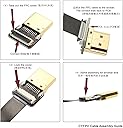
Can theoretically go upto 1080p or even 4K but, in reality this cable will only go upto 720p. The problem is not the cable, but how HDMI cables work. Most HDMI cables in the market have RF shielding - that is to avoid issues due to radio interference. This is why those cables are so thick and heavy. This ribbon cable has no shielding, so it will not work for higher fidelity signals like 1080p. But I was able to get 720p video working. I returned one cable thinking it didn't work before - but the new cable had the same result, I only got a black picture. No other display. While assembling the cable, make sure you keep the ribbon's metal contacts facing down towards the PCB on both ends. Check the illustration in the amazon product pictures on how to flip open the sockets and assemble the cable. If you still have issues - you can try wrapping the ribbon cable in a few layers of aluminum foil to help with RF shielding. If you are using with a raspberry PI and still get a black screen or no picture, increase the HDMI_Boost in your confix.txt to boost the HDMI signal. Hope this helps.
A**E
Gutes Kabel für Raspberry zero
Es ist ein Kabel mit zwei Steckern dran.... aber wirklich gut gemacht. Für meine Zwecke hätten die Stecker nicht "abnehmbar" sein müssen, aber vermutlich kann das ganz hilfreich sein, wenn man das Kabel irgendwo durchführen muss und das Loch nicht groß genug ist um die Stecker durchzupfrimeln. Der einzige Nachteil, den ich sehe, ist, das die Verbindung Stecker<>Platine, mechanisch wohl nicht besonders belastbar ist. Ich würde davon abraten, diese Stecker in Situationen zu verwenden, in denen die Verbindung häufig getrennt werden muss. Aber das ist wohl Konstruktionsbedingt, schließlich wurde hier auf ein Gehäuse um die Stecker verzichtet, was die "Verbindungsstelle" aber recht klein macht. Geliefert wurde das Ganze in einer runden Kunststoffdose. Das Kabel am Rand, die Stecker in der Mitte. Allein das ist das Geld schon wert. Wie gesagt, nur ein Stück Kabel mit zwei Steckern dran, und trotzdem eine echt clevere Idee. Ich habe damit einen Raspberry-Zero (mini-HDMI) mit einem 3.5" Touchdisplay (HDMI) verbunden. Das klappt elektrisch natürlich einwandfrei und ist mechanisch nicht so sperrig wie die normalen runden Kabel mit den großen, vergossenen Steckern dran.
お**さ
モバイルモニターで使ってます。
モバイルモニターのHDMIが画面横にあるので、ケーブルを後ろに回すためにつかっています。 コネクタ接続後はグルーガンと収縮チューブで養生して使ってます
Trustpilot
1 month ago
3 days ago